🚀 Elevate your workspace—connect, expand, and conquer with StarTechcom!
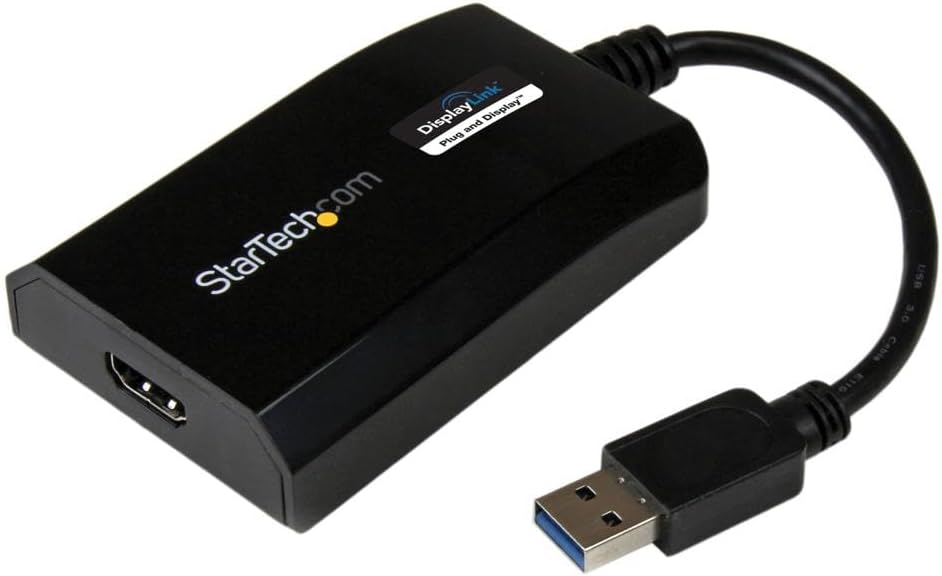
The StarTechcom USB 3.0 to HDMI Adapter is a DisplayLink certified, plug-and-play solution that converts a USB Type-A port into a high-definition HDMI output supporting 1080p resolution and 5.1 channel audio. Compact and bus-powered, it enables seamless multi-monitor setups on Windows and Mac devices without extra power adapters.


| ASIN | B00O6G5ZGI |
| Best Sellers Rank | #44 in USB-to-VGA Adapters |
| Brand | StarTech.com |
| Built-In Media | User manual, cable or connector. |
| Color | Black |
| Compatible Devices | Audio/Video Device, Computer, Laptop, Monitor, Projector, Ultrabook, Workstation |
| Connector Type | HDMI, USB Type A |
| Current Rating | 1 Amps |
| Customer Reviews | 4.3 out of 5 stars 904 Reviews |
| External Testing Certification | CE, FCC, DisplayLink |
| Finish | Matte |
| Global Trade Identification Number | 00065030857505 |
| Input Voltage | 5 Volts (DC) |
| Item Dimensions | 3.5 x 2.2 x 0.8 inches |
| Item Type Name | A/V Cable |
| Item Weight | 2.24 ounces |
| Item dimensions L x W x H | 3.5 x 2.2 x 0.8 inches |
| Manufacturer | StarTech.com |
| Model Number | USB32HDPRO |
| Number of Items | 1 |
| Number of Ports | 1 |
| Package Quantity | 1 |
| Power Plug Type | No Plug |
| Specific Uses For Product | Monitor,Projector |
| UPC | 065030857505 |
| Unit Count | 1.0 Count |
| Warranty Description | 2 Year |
| Warranty Type | Extended |
C**G
Works great on Chromebook Acer Spin 713, no driver/software needed, 1080p60fps video, no lag
You NEED the USB3 DisplayLink version for an external monitor display with no lags running at 1080p60fps. I had the older USB2 DisplayLink and it was so laggy, so with this upgrade, all that is gone. Don't wait, it's worth the money. My default setup was limited to 2 external monitors and the laptop screen. But I really wanted 3 external monitors and laptop display for a total of 4 displays and this new setup just works... on my Chromebook Acer Spin 713, no drivers/software to load, and no lag even with HD video. This is absolutely the best device ever. Also, since the DisplayLink functions as its own video card, you might be able to add even more monitors if you wish... but make sure you have a powerful laptop/computer to push out the graphics. I highly recommend this device for anyone wanting to add extra external monitors especially on Chromebooks.
J**.
Great solution for dual monitor set up in an office environment...
First, before you buy, make sure that your current computer does not already support dual monitors. If you have a display port (DP) it might support dual monitor connections and all you have to do is get an adapter. Also, if you have both a VGA port and a DP port, your computer definitely supports dual monitors and you do not need to purchase this device. The same goes if you have a graphics card that has something like a VGA port and a DVI port. So check your computer first to determine that there is no other way to connect a second monitor before you buy this. You should know that this is a graphics card that connects on a USB port and capabilities are limited even compared to on-board graphics cards found embedded in a computer's mainboard. Over the past couple of years I purchased a few of these for work because our employees keep asking for a dual monitor setup. It works well for things like spreadsheets and documents but if you are looking for a second monitor to play games on, this will not be for you. Finally, note that this will work with Windows 10 but previous versions of this device from Star Tech that I purchased for Windows 7 do not work with Windows 10 and Star Tech does not offer drivers for them. Hopefully, this being USB 3.0 will be supported by future versions of operating systems and Star Tech will produce drivers for them. This is not a plug and play device so before you connect it to your USB port, make sure you download the latest drivers for it from startech.com and install them. Then plug it in.
B**C
It worked with my MacBook Air 2015
I wanted to attach two extended displays to my MacBook Air 2015 (running Monterey) and had a terrible time finding a solution until I came across a YouTube video that directed me to this product. One display was already plugged in to the mini-DVI port. I bought this to plug my 2nd monitor (HDMI output) to my laptop's USB port. My monitor has a VGA output too but I decided on the HDMI because it was cheaper with faster shipping. I bought an HDMI cable too. It arrived fast and took me about 15 minutes to set up. I followed the directions and easily downloaded the appropriate driver from the StarTech website. It didn't work immediately even after I rebooted my laptop which made me worry it wasn't going to work at all. I then tried opening up the DisplayLink driver file directly from my applications folder. Once I did that, it prompted me to adjust a security setting giving permission for the adapter to access my computer's video (or something like that). Once I changed the security setting, it immediately worked. The adapter is expensive but I am so happy to finally have two displays!!
M**K
Excellent, and well worth it.
I'm using this with a 2016 MacBook Air 13" with 8Gig RAM. It's working really well. Gives me an extra external monitor when at my desk, and is awesome. Lag is so minimal I don't even see it. Still wouldn't try to watch an HD movie through it, but extremely fast none-the-less. Pros: - Inexpensive - Light-weight (easy to take with me) - Simple - just requires an open USB 2 or 3 port (USB 3 is going to perform much better). Cons: - You have to find an download a piece of software ( a driver in for the Pref Pane in MacOS) to make it work. I wasn't aware of that, nor expecting it, so for the first little bit I thought it was defective.
C**X
Does not work well with HDMI Converter (Display Ghosting)
I attempted to use this with a QGeeM Mini Display Port to HDMI converter and 27" Apple Cinema Displays and the image on the screen seem transpired and it had a ghost effect to it when any window was moved as if the monitor had the imaged burned into it temporarily. I've tried several adapters and 4 different Apple Cinema Displays with the same result. I returned this and immediately bought the Plugable dual display dock and it worked absolutely flawlessly both over display port and HDMI even with the QGeeM adapters. Link for the Plugable 4K DisplayPort and HDMI Dual Monitor Adapter for USB 3.0 and USB-C https://www.amazon.com/dp/B08F2SZQYX/ref=cm_sw_em_r_mt_dp_GMHRY3VQG3GTJFCD49JS?_encoding=UTF8&psc=1
M**W
Easy install
Works great
J**R
PERFECT! Plug and go!
I went through a few of these to try and extend a 3rd monitor from my HP laptop. None of the USB-C versions worked on it. Not even the expensive docking station for HP! So I tried this USB-A one and I just plugged it in and boom, screen on! Did not create any drag on my system nor any flickering which I have experienced with other laptops with screen extensions. Very satisfied!
J**T
Great
I just got this n today & will update this review IF something goes wrong. Opened the box & saw a installation cd & thought great, I don't haaaave a cd driver, but thought about going to the StarTech website to download the drivers. On the website, I looked up the model number & the drivers were right there. (They're r several to choose from but they're alllll labeled as to which one they're for. Windows 11 is the first one.) Downloaded the driver & then had to extract it. (It maaaaaay have just ran out but it recommended extracting them so I did.) After they extracted I clicked on it again & selected run. Hooked up the adapter AFTER all of that. (It MIGHT have worked just hooking it up but didn't want to take a chance. Installation is a pain n the butt IF u HAVE to do all this. It miiiiight b plug & play?, but I did it this way. U can try that if u want, i didn't want to try that.) The picture quality is BEAUTIFUL. Response time has NO lag, it's just like it is on the laptop screen. Overall I'm happy about it. Wish it was simpler plug & play. Wish it didn't cost soooo much but as much as I spent buying cheaper ones with 4.5 star reviews, (that crapped out AFTER Amazon's 30 day return window, (that's not right n my opinion, it should b 1 yr or at LEAST 3 to 6 months). Arrived faster then it originally said so I'm REAL happy about that. All I can say for now is I'm THRILLED about the product itself just not the PRICE.
Trustpilot
Hace 1 semana
Hace 2 semanas