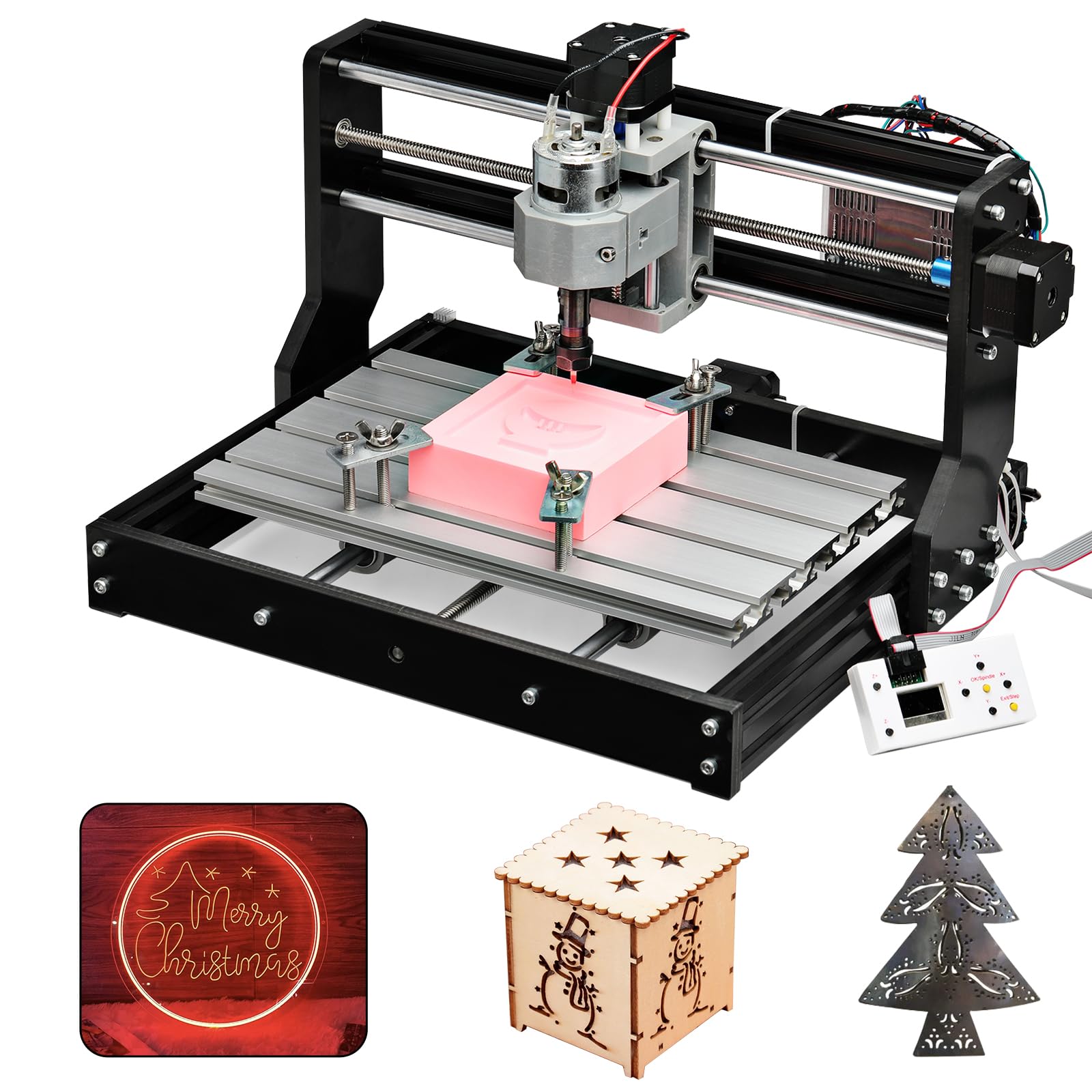


⚡ Unlock your maker potential with precision and power!
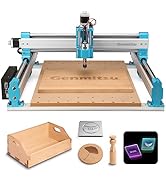
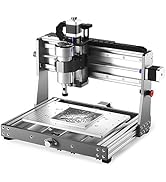
The Genmitsu CNC 3018-PRO is a professional-grade 3-axis router kit featuring a 300x180x45mm working area, upgraded for easy assembly and improved stability. It supports a wide range of materials including plastics, soft aluminum, wood, and PCBs, powered by a UL-approved adapter compatible with a 20,000 RPM spindle. Controlled via open-source GRBL software on Arduino, it offers dependable performance and community-backed support, with optional upgrades to expand your creative workspace.










| Brand | Genmitsu |
| Power Source | Corded Electric |
| Product Dimensions | 7.09"W x 11.81"H |
| Voltage | 24 Volts |
| Item Weight | 15.3 Pounds |
| Horsepower | 120 |
| Maximum Rotational Speed | 1000 RPM |
| Amperage | 1.3 Amps |
| Base Type | Fixed |
| Global Trade Identification Number | 00816550021620 |
| UPC | 816550021620 |
| Manufacturer | SainSmart |
| Part Number | B07P6K9BL3 |
| Item Weight | 15.3 pounds |
| Item model number | 3018-PRO |
| Style | 3018-PRO |
| Thickness | 0.1 Millimeters |
| Item Package Quantity | 1 |
| Included Components | Wood Carving Milling Engraving Machine |
| Batteries Included? | No |
| Batteries Required? | No |
C**D
Trust yourself and get this
I was just like you, reading reviews and contemplating if I should meander in to the world of CNC machines, a world that I know nothing about. If you're searching for these machines, you're already interested - so the only thing I can tell you is - get it. I have basic knowledge when it comes to electronics/hardware/software, if you're completely new to these things, the setup and usage may be slightly intimidating, but it IS easy enough that anyone can do it by following basic instructions. Like most mention - instruction manuals aren't the easiest to understand (for anything) but there are a ton of user videos all across the interwebs showing you how to set up/run the 3018. (seriously, if you need to learn anything, ever, about anything, ever, just YouTube or TikTok that ish) Out of box - I was a bit anxious. Any time you're opening a package that has hundreds of tiny parts it can seem like an uphill battle. If you dedicate a half hour or so of watching a set up video (all the way through), then setting it up while watching it again, it makes this set up a breeze. I had mine completed in about an hour, and after a minor issue was up and running. The V Bits that come with the machine are what I use most for cutting out designs. I also purchased some straight bits to use which, to me, are necessary if you're cutting out large pockets of material. As far as while this machine is running, people have mentioned noise quite often in reviews. I did not find the noise to be overwhelming. I have the 3018 set up in a room inside my house, and with the door shut, it doesn't disturb us at all. I use a Mac currently. I hate it, I was born and raised on a PC. So far I have found that Easel (it's a free application from inventables) is the easiest and most user friendly application to send G-Code, or your designs, to the machine. It's also incredibly user friendly for creating new designs for your 3018 if you're less than a novice and don't use any number of graphic suites (inkscape, illustrator, photoshop) along with Fusion 360 to create toolpaths for your designs. Windows users have a ton of more options to utilize your machine while connected to a computer, or you can upload your codes to the controller that comes with the machine to create your projects. I have used the 3018 quite often in the month I have had it. As always, there is trial and error involved. There is a learning curve when it comes to types materials to cut/carve at what speeds, and what types of bits to use. As you try a few projects here and there, you'll get much more comfortable about what to cut, and how to cut it. You can research and read about spindle speeds/materials/bits as much as you want, but you'll inevitably learn more from trial and error after having that basic knowledge from your prior research. So far I have mainly used MDF for my projects, though when attempting to use it on acrylic and copper, I can see the vast potential this machine has. CUSTOMER SERVICE for this product awesome. I had an minor issue during set up, and I was sent a replacement part incredibly quick. I was up and running the same week I received the machine. I have seen reviews complaining, but my experience reflects all of the glowing reviews about the help I received. This isn't a plug and play machine. You have to set it up. You have to learn it. At the price point, and with the capabilities this machine has - it is the PERFECT starter machine to get into the world of CNCs. All I can say is that you won't regret this if you try it. I'll upgrade the bed of the machine for larger projects, and eventually invest in the laser module to play with that as well. I would definitely recommend this machine and I would buy it again.
K**S
My first year learning and using CNC Router Machine
I’ve never used a CNC Machine before purchasing the Genmitsu 3020-PRO MAX, and to be honest I didn’t know if I could figure it out. I have to say that I sure had a lot to learn. Granted I did watch a whole lot of YouTube and seen the different types of machines. The one thing that hooked me was the wood cravings that could be created that as a wood craftsman I could never accomplish with the limited experience I have. I chose this machine over others was first the price, ease of assembly (it comes mostly assembled already) and simplicity of the operation. I purchased my unit in July of 2022 but since I was not ready to start I didn’t open the box till June. Getting the 3020 was pretty easy. Learning the difference softwares and programs was the default part. The box it came in had all the parts and manuals to put it together but was missing a USB stick with the software! At first I was a bit taken back by this and sent an email to the customer service department. This is when I first realized I had made the right choice. A service member (Hong or Mr. Hong) was right on spot with sending me a link to download software. I used a Laptop with Windows 10 and was able to setup the comport and install Candle. A software that uses files called gcode (*.nc file) to tell the machine what to do. Also one of the files was a test file that craved a small 2.5D image. I know this now but didn’t know then that a machine with three axles will only crave 2.5D as the other 0.5 is the flat surface on the bottom. From this one file I was able to figure out the files needed to take a object (2.5D) and turn it into a work of art. To my surprise it actually takes three steps to complete first. 1st was finding the object files. Too my delight in found 1000’s of free files in a *.stl format online. As I’m not going to use these files or creations to sell I downloaded and modified using a software already available in Windows called 3D Build. I then downloaded a trial version of MeshCam. As my CNC machine is located in a spare room, I used another Laptop to modify the files, open these files with MeshCam to create the tool paths and convert the files from an STL file into a NC file that the Genmitsu 3020-PRO MAX uses. I only was able to convert 15 files using MeshCam before the trial version ran out. I have tried other softwares but after using MeshCam I will pay for the license ($250.00 one time payment) as other programs where not as easy to learn and the results as positive. I would have purchased the software already but ran into issues with the stepper motors. I started getting what I first thought was banding with the X and Y axis that increased very quickly, projects halfway completed were being ruined. I emailed Hong and told him my troubles and he sent 2 new stepper motors to me free of charge. I installed the new motors and it’s back to creating beautiful works of art. While the machine was down I was able to give the machine a good cleaning. My only drawback with the machine is that the manufacturer does not at this time offer a explanation kit for this model. I’m hoping one will come out in the near future. Overall I give this one an 4 1/2 Stars. It’s built strong, service is excellent and it’s a very good investment for anyone looking to get into using a CNC Machine.
A**T
Not sure about these low ratings...
I put this together in about 2 hours, i loosely fitted all the parts and then kind of sequentially tightened everything to make sure it was uniformly snug, I wired it up after that and ensuring everything was mechanically ok with it, I was braced for massive flex and performance issues and all sorts of nightmares after reading these (I read after I had ordered it), but it works fine, I had to flip two of the axis in candle to get it working how I wanted, but it has no flex at all, when set up right with a carbide miller bit that I bought along side the machine, its got good resolution, the long cut times were not a thing, but I am on an 8 core server so I think maybe the lag times are due to the computers, because that demo dragon only took about 3 hours, not 6. There was some oil and aluminum shavings, but I just wiped and brushed as I went because I was aware of it before hand. I am using fusion 360 and exporting g code and doing the cutting with candle and while its not the absolute fastest work flow, its definitely not the most tedious I have dealt with. I think people are either rushing the assembly or trying to step too fast on harder materials or something, cause I got it basically just to tool wood and plastic for prototypes, and so far it has worked as well as any other machine I have used, like the axis problem was one line of code in candle if you read the manual, and with fusion 360 I have cad and cam and just port it out to the cutter, like manually set my x,y,z with the material and the machine, and it cuts the part, the only two problems I have had was one was fuzzy because I set my starting point too deep, and one I had to abort cause I didnt have the material clamped well enough and it slid, but both of those are user error, so the sum total of me having to rig it is one line of code in candle. If its your first machine maybe take a look at general building instructions about loose fitting and tightening and how to handle electronics, because theres a lot of nightmare stories on this and I experienced none of them at all. Just need to set it up with care and calibrate the software propperly FIRST, and then and only then try to do some cuts. I was doing a basic test of it with the manual controls, and it went right through a hardened paint stick with no problems, I mainly cut hdpe plastic, I am currently machining out a 4th axis lathe piece for the table, just a manual one to flip sides for a top and bottom. Would have given it 5 stars, but there was the one problem, and its not as easy as super expensive stuff and the materials were a little dirty and I still think it was a little pricey for what i got, not by much, but if it was a little cheaper I could have just bought a 4 axis or something, and priced out for the parts theres a bit of a mark up, but im an engineer so I factor all the design and stuff as things I could do and extra money added. Right now though, with it all propperly tightened and the machine set sturdy I havent actually experienced flex on it, which is a nice surprise and thats why I gave a 5 for accuracy, I know its description accuracy, but the actual accuracy is 5 stars. One tip, if you are doing your own files, when in doubt, just set it up like its cutting something harder than it is with more shallow cuts, itll add cut time, but all these people talking about stalling stepper motors are just pushing the machine too hard, the only thing that will do is add some time but save your machine. One thing I would really like to have seen is some kind of limit on the axis so it wont drive itself past the actual limit on the threads, I had that happen twice where it was trying to push against the housing and yeesh that was a moment, just some kind of kill switch or something would be nice for it, cause it makes me just completely unable to trust files that I didnt make with this machines limits in mind. I also put the value at 4 stars cause I was looking at the accessories and just insta noped at the prices for them. Like I know what I need this for and the money I will make back for it, and yeah, thatd just blow my budgets to peices, cause I was considering getting the laser attachment and looking into a rotary wheel if there was one, and possible rail upgrades, and pretty much all of them just priced me out, cept the rotary wheel which wasnt an option, hence me making one. Anyway, I tried to be as honest and unbiased as possible the whole way through this, hopefully it helps. Anyway, im about 2-3 days in on it.
A**R
A CNC Router that is Cheap in a Costly Way
There are so many reviews for this device or devices nearly identical to this one. Here is my personal experience so far with the 3018 Pro. This 3018 Pro CNC engraver machine kit works pretty well for projects that involve: ✓ Soft material sucn as balsa or plastic ✓ Slow and small, shallow cutting ✓ V bit carving of characters in soft material using F-engrave software - nice results cheap ✓ Limited cut depths in multiple passes at slow feed speeds Assembly was easy using a nice flat tabletop to square things up before tightening. Nothing missing and while minimal, instructions were adequate in the book. Parts had to be washed to remove excess tool oil and shavings on some pieces. The Controller is apparently compatible with LinuxCNC, which makes me wish I had ordered the MX3 version, so the Grbl (Candle) software contols the machine. The included bits in the kit are not so great for anything but soft material V carving and soft engraving. They are definitely not adequate to do thicker cutouts. Basic X, Y Positioning is suprisingly good, Z is okay too. This machine is probably better with the laser head that I did not get. The biggest downsides to this machine, even for a beginner are: ▪ Way too much slop in the X,Y acme screws, which leads to chatter, lack of accuracy on many cuts, and poor cut quality on some materials (even melamine board and soft plywood are problems). ▪ Spindle speed is too slow and spindle / motor assembly has too much vibration and slop (backlash) ▪ Good 3d software that can make good NC programs costs much more per year than this machine and takes time to learn - why waste time learning things that are not so good? ▪ Lack of limit switches and built-in Z zeroing probe The seller or maker should offer a kit that has dust control, limit switches and mountings brackets and a zero probe. Watch out for the sample files - some are are fast and agressive, not suitable for particle board as a test / waste piece. Best bet is to slow down the Z plunge rate and feed rates in your nice CAM software that doesn't come with this and then use that NC file if you are doing "3d Geometry" carving. I had nice results using files created with F-engrave. If all I had to do was make non-professional but pretty fair wood or plastic small signs, I could be happy with this rig. Guess what? This machine of course makes lots of fine dust, and of course has no dust management. The little included brush is not good - one should not be breathing fine dust particles or spreading them around into everything in the home or shop. You need a vacuum. Really. If you get this rig, take some time to cut some waste board to put under your rig, and consider making that board have pass-throughs to clamp things down to the board. A few minutes with your table saw or miter saw out in the shop makes this easy. But then, here we go, trying to make a toaster into a microwave. You'll be happy if you like a toaster as a toaster - but if you need a microwave, that's what you should get. I wish that I had simply splurged on a more expensive toy. After adding in some bits and some tax, this machine isn't free. I can't see the value in adding limit switches, upgrades, dust control and more to something that is so flawed at the bearing and acme / lead screw and carrier bearing part. I just tossed three hundred bucks, or just under HALF of a CNC router setup that would cut anything my regular routers cut but do it quickly and accurately. That smarts. Forget about cutting much metal thicker than a few thousandths. Maybe circuit boards, especially if you have software to generate a good NC program. Most cheap tools operate with too many RPM and so damage material and tools. In this case, the spindle speed is about one half of what would be reasonable as a maximum speed, perhaps a third. Between the spindle speed and excess lash, cut quality suffers for some kinds of jobs. For a child to safely use this little rig, I'd be worried at someone younger than a teen having it for safety concerns, yet I'd want a teen to have something much more substantial to play with. If you want to play with this stuff, like small projects in soft things, and have lots of time to spend rigging something, you can't beat the price. If you want a little more toward what you could do with your normal shop router but with a computer to control it - don't waste your money like I did. Want to engrave or carve your name onto a soft wood or platic plaque? Works! You can probalby engrave soap with this, but soap is pretty expensive these days. It might make a very interesting gift to engrave a bar of soap!! I purchased a CReality Ender 5 3d printer recently. The difference in function, capability, success rate and lack of kludge is huge. The value of that 3d printer is five star. With a little care to keep it clean and leveled, it just works. Initially the hope was to be able to cut 1/2" thick plywoods and stronger plastics with speed and acuracy to make stronger simple parts quicker than a 3d printer. This machine is just too slow and too fidgety to get dialed in for each job. A beginner needs something with limits, safety (dust protetion, better cable management) a little more capability (since ultimately one must use pretty fancy software to get results other than for character engraving and carving), and more predictabilty. The learning is pretty quick though - use it a while and learn to appreciate the value of one's time and materials. Three stars on this little router as supplied. Although there is temptation to go one or two stars due to the sting of a poor value, some people will find plenty of use for it and for the price there is just nothing like it. Sometimes the lowest price item is the most expensive.
S**N
Insane value for the money.
The 3018 router is neither a production machine nor a toy. It is a solid hobbyist tool that is capable of producing excellent results. Assembly is straight forward with an excellent pictorial guide. Expect to put it together in an hour to a few hours depending on your experience. The unit is well designed and constructed. Tolerances are tight and there is no flex in the frame. The travel along the x and y axes measured precisely to spec out of the box. The kit comes with everything you need to get started including some bits and a disk with software. A word on software: Some reviews criticize the machine based on "software". The fact is that the firmware (the code that lives inside the controller board) is a recent version of GRBL, an open source program that is behind the vast majority of desktop routers. Every CAM program you are likely to use supports GRBL, so you will have access to a plethora of design tools to create your projects. Keep in mind that CNC is a 3 step process: 1) design the piece in CAD and export to DXF 2D format; 2) use CAM software to prepare G code by providing information on the bit, depth and order of cuts, and travel and rotation speed of the bit; 3) send the G code to the router with G code sender software. Don't be confused by the fact that some applications can combine 2 or even 3 of these steps. Like with 3D printing, it is very gratifying to start with an idea and develop it into a physical object. If you have the maker mentality this machine will provide great enjoyment and utility. UPDATE: My controller board stopped working--a very common occurrence for desktop routers due to the heat the motor drivers generate. I sent an email to Sainsmart describing the problem and within a few days they had a new board in the mail to me. After I received the board, their representative even followed up with me to make sure everything was working. This is the kind of customer service you love to have, and so rarely get. Even if you pay a few dollars more to buy from Sainsmart, it's well worth it. They will stand by their products.
A**T
Don't do it
This will be a lengthy review .. 1. Assembly was easy. There is a very nice instructional booklet and plenty of videos on YouTube on how to do it. Took me about 40min to 1 hr. 2. The item came well packaged and gives a bit of a WOW moment when you open it. I mean you pay under $200 and everything is nicely placed inside and no parts missing :) 3. The frame is sturdy, everything pretty much self levels and squares as you put it together. Assemble slightly loose and tighten up all bolts fully at the end. Honestly, by the time I was done with assembly and played with the software, I was surprised that there were any negative reviews lol 4. The USB stick was a nice touch but you still need a service/program to convert data to gcode. There is a learning curve with getting this to work but YouTube is your best friend again. I am very tech-savvy and had no issues at all. Others might have a different experience but give yourself time and you will get it; it's easy, I promise :) 5. The problem/s- The connection created by the Coupling&Set screws!!! This is a nightmare! The issue is that they can't hold tight enough to handle the tension created by the spindle w/bits against the surface your are milling/carving. They simply come loose and the job goes to trash. 6. Also, once assembled, there is no good access to keep tightening both ends (motor and rod) on all 3 axes. For X and Y, you need to detach the motors and reattach again. For the Z axes, you need to work on the one end at an angle. When one of those coupling screws gives in, the machine can't follow the code and move in the failed direction so your project is ruined. One would say hit the Stop button, adjust/fix/tighten and continue.. hm, it doesn't work like that. By the time you hit Stop, you either get a scratch or a hole dug into the material by the bit, depending on which axes fails. 7. I only used mdf and plywood, both 1/4 inch thick. Out of maybe 20 jobs, I had only 3 successfully completed. Can't imagine if I had to do work on a walnut piece. 8. Each successful attempt came after I fully unscrewed, disassembled, reassembled and freshly tightened the coupling screws. And this to me, is totally unacceptable. At least give me 3 good cuts before I need to go through the nonsense lol 9. The machine is noisy when in operation but I didn't expect it to be quiet, its a power tool after all. it's pretty much on par with my Vacmaster. So, is this machine usable? - yes, if you are willing to tighten all coupling&ser screws and bolts between each use. This deserves 1 star only because if you are determined to make it work, you POSSIBLY can. When I was watching tips/tricks/troubleshooting on YouTube, I came across a guy who suggested that one should put a drop of superglue when tightening the screws. Perhaps that would work to a degree, it might've actually given me the 3 good cuts i want lol But let's face it, how long would the superglue metal to metal bond hold when the machine is in constant vibration during operation?!? Yep, 3 good cuts then back to point 8 above :) Save your money, time, frustration and materials, and buy something better. I can't afford the $2k price tag so decided to give Foxalien Masuter a shot next. I'm truly hoping my experience is better with it because I have so many ideas and want to open a hobby shop on etsy. I am forever grateful for Amazon and their return policy. I've disassembled the cnc and sending it back.
C**L
Great for small parts, very accurate, very well built, and reasonably priced
I have been looking for a desktop CNC router to make small parts for rc model aircraft and quadcopters. The materials which I use most often are 1/16" to 1/4" thick balsa, basswood, light-ply, aircraft grade plywood, spruce, cherry, maple, and occasionally, 3mm carbon fiber plate. I was skeptical that this machine could handle these materials, but after doing some reading on the internet, I decided to give it a try. What I like about it is this: (1) is is very well built, just use blue thread locker on the screws and grub screws holding the parts together because all machines like this are subject to vibration, not matter how well built or expensive they are. (2) Use the depth gauge on a vernier caliper to square the aluminum xy-table to the frame since this thing will, like all machines, be only as good as you put it together. Do this by measuring the distance between the xy-table and the frame on the diagonals from opposite corners of the xy-table. (3) The motor is relatively quite. Quieter than my Dremel 4000. (4) It includes an ER11 collet, and an off-line controller which is easy to use. (5) It has a variety of upgradable parts and spare parts are available. (6) It works particularly well with Easel and FreeCAD, and of course Candle. What I don't care for are the bakelite components, but they are more than strong enough for the machine and the makers had to economize somewhere. Some people complain that there is some flex in the rods supporting the motor carriage. I have not found this to be a noticable problem. In the bags of parts you will find an blue extra shaft coupling adapter. I finally realized that this is used to hold 1/8" bits to the motor's spindle if you don't use the ER11 collet. The ER11 collet is much easier to use.
K**L
Fun tool to learn CNC on
Background: I have a little bit of experience with manual machining in a machine shop during college, no formal CNC at all. I'm an electrical engineer by training and am decent at programming. TL;DR: Great machine to learn on, worth the money. Pros: - Easy to assemble. Instructions were very clear. The main frame members still had some sharp shavings on them, but no big deal. - Basic functionality right out of the box. What I mean by that is you get basic instructions to execute the sample g-code. - Compact - So far no damage to machine from simple mistakes (like driving a motor past its limits) - Very common machine. From everything I've seen this is kinda the 1993 Honda Civic of starter CNCs, everybody has them or knows someone who does. Cons: - Aside from assembly and running sample g-code, no instructions. I knew this would be the case as I was buying this for my own education but I can see where someone might have expected more. - No limit switches included. There are pin headers on the control board, and some purchase options (not sure if the vendor has them) which allow for easy expansion but they are not a part of this. - Only comes with engraving vee-bits. Most 3d work is better done with end mills. - The supplied bolt-and-plate parts for securing work to the table are a PITA. I haven't taken the time to work out a more convenient alternative yet... Other Thoughts: - There are hundreds of videos, blogs, forum posts, etc about how to get started. There's value in most of them, but don't expect a lot of consistency. It was my experience/impression that most of them are either so basic and vague that they were useless, or assumed a basic functioning knowledge of how CNCs work. I was able to piece things together, but be patient and don't expect masterpieces in the first month! - I personally recommend getting Fusion360 by AutoDesk as your CAM program to start with. It is free for hobbyists, you just have to poke at their website a bit to find that option. It has CAD functionality but I think it falls way short in that arena. It has logical tool and path definitions as well as toolpath simulation in the CAM environment which is super helpful for beginners to understand what all the various parameters do. Very much a graphical tool. - I use AutoCAD for my CAD environment. This program is NOT free for hobbyists however I have it on my work laptop and my employer doesn't care what I tinker with at home so long as I'm not making money from their license. There are open source AutoCAD copycats out there, I haven't worked with any of them. - While the handheld controller can send g-code, it doesn't behave 100% like Candle (the included software). I recommend using a PC as a g-code sender.
Trustpilot
Hace 1 mes
Hace 1 semana