

Desert Online General Trading LLC
Dubai, United Arab Emirates
Desert Online General Trading LLC
Dubai, United Arab Emirates





💡 Upgrade your space with smarter, faster, and farther-reaching control!
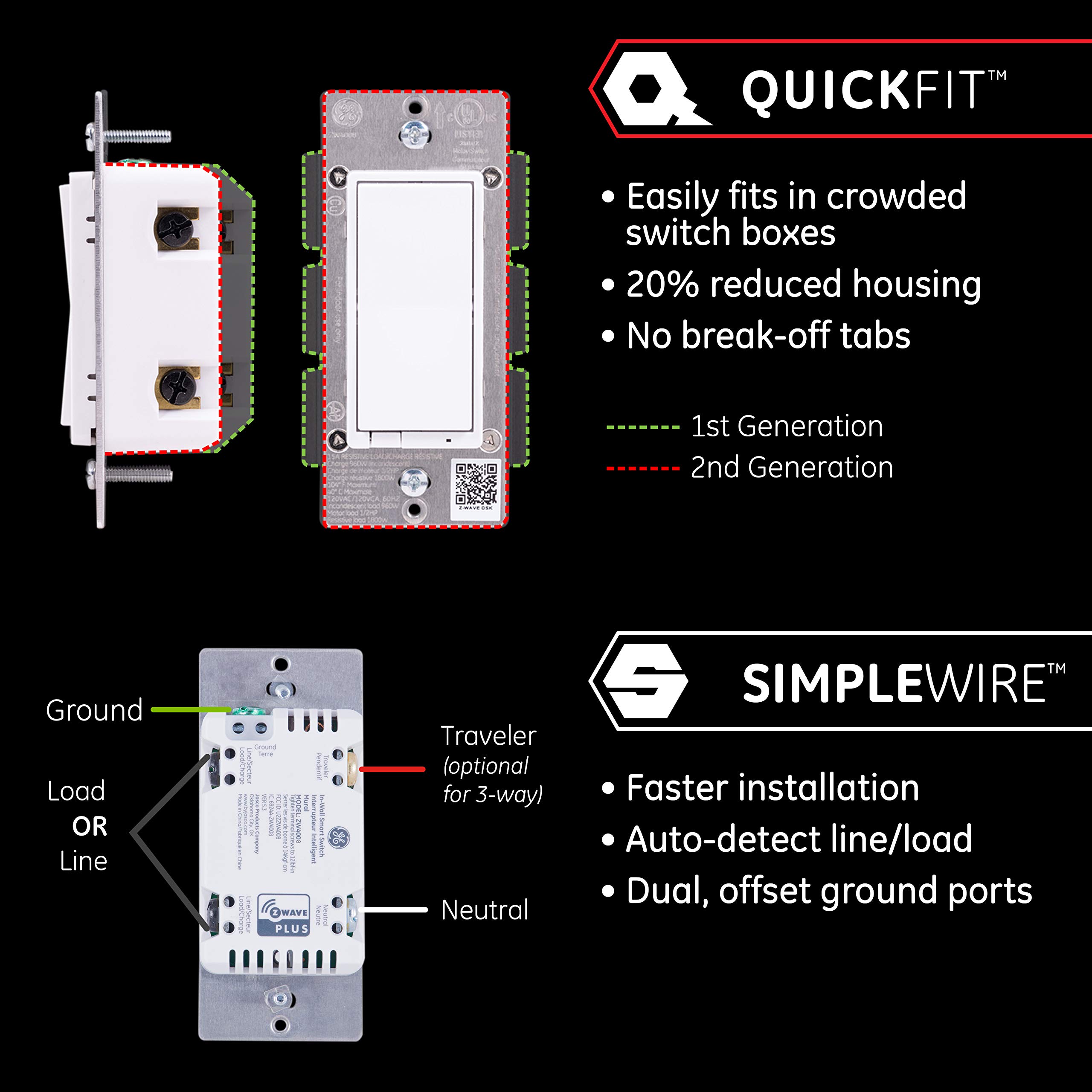
The Enbrighten Z-Wave Smart Rocker Light Switch combines cutting-edge QuickFit and SimpleWire technologies for ultra-easy installation and reliable performance. Rated for 15 amps and 120 volts, it supports 3-way configurations and voice control via Alexa and Google Assistant when paired with a Z-Wave hub. Its built-in repeater extends your smart home network by up to 150 feet, while interchangeable paddles ensure seamless style integration. Ideal for professionals seeking a sleek, future-proof upgrade to their home automation setup.


| Operation Mode | ON-OFF-ON |
| Current Rating | 15 Amps |
| Operating Voltage | 120 Volts |
| Contact Type | Normally Open |
| Connector Type | Clamp |
| Brand | Enbrighten |
| Terminal | Spdt |
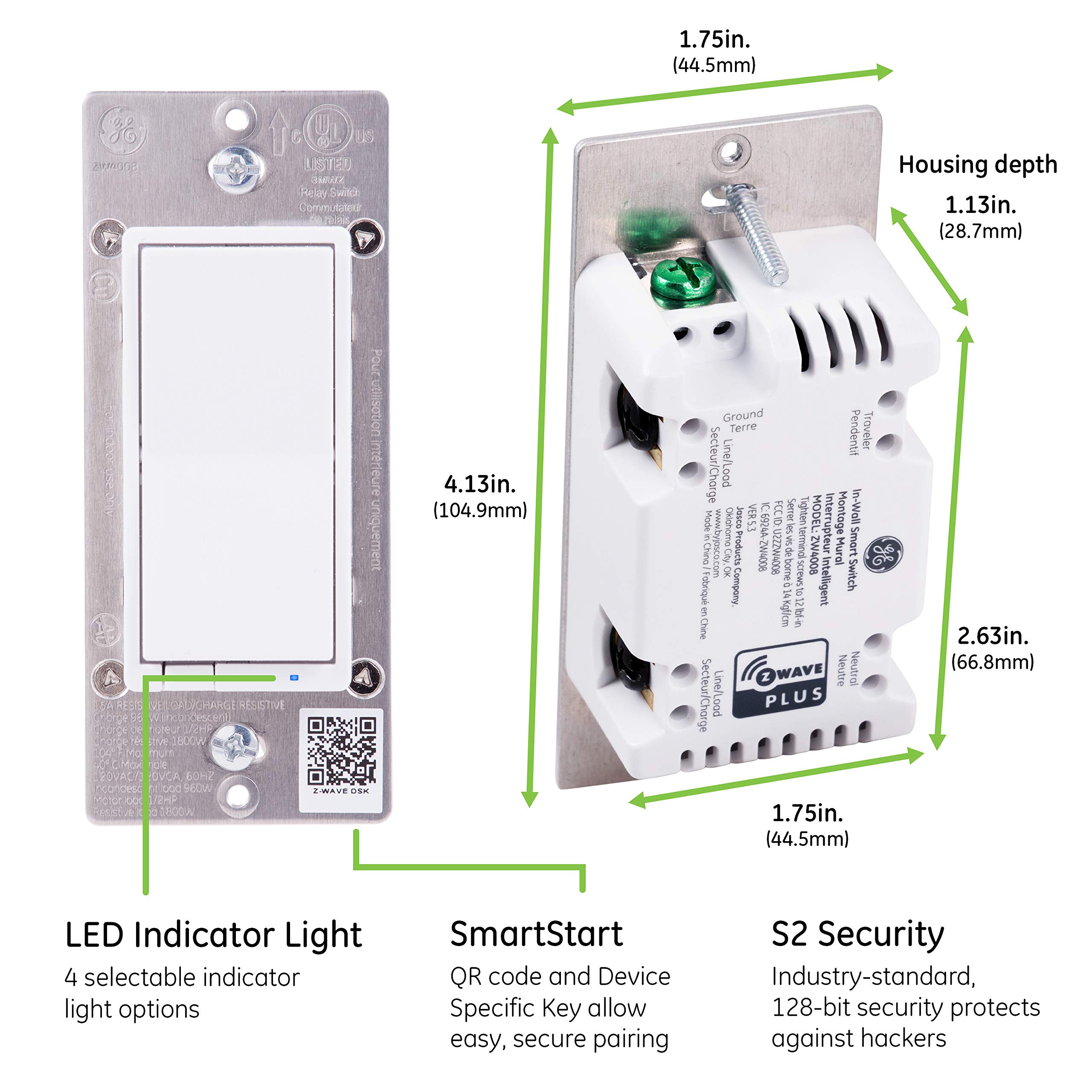
| Item dimensions L x W x H | 1.78 x 2.36 x 4.13 inches |
| Circuit Type | 3-way |
| Actuator Type | Rocker |
| Contact Material | Metal |
| International Protection Rating | IP20 |
| Number of Positions | 1 |
| Specification Met | Z Wave |
| Lower Temperature Rating | 32 Degrees Fahrenheit |
| Upper Temperature Rating | 104 Degrees Fahrenheit |
| Controller Type | Amazon Alexa, Google Assistant, nexia |
| Control Method | Voice |
| Connectivity Protocol | Wi-Fi, Z-Wave |
| Color | White Rocker Switch |
| Wattage | 960 watts |
| Unit Count | 1.0 Count |
| Number of Items | 1 |
| Global Trade Identification Number | 00030878462013 |
| Manufacturer | Jasco Products Company, LLC |
| UPC | 030878462013 |
| Part Number | 46201 |
| Item Weight | 5.9 ounces |
| Product Dimensions | 1.78 x 2.36 x 4.13 inches |
| Item model number | 46201 |
| Size | 1 Pack |
| Style | Paddle Switch |
| Pattern | Switch |
| Power Source | Hardwire |
| Voltage | 120 Volts |
| Item Package Quantity | 1 |
| Usage | Commercial/Residential |
| Included Components | Smart Switch |
| Batteries Included? | No |
| Batteries Required? | No |
| Warranty Description | 2-year limited warranty |
M**R
Way way! Better then Leviton or Similar Switches
Great product, I ended up buying about 100 of GE Enbrighton Series to switch out my Leviton switches which ended up in the trash bucket. Between the dimmers, switches, touch dimmers, add ons, and motion switches they all work very well. There are a few cons to each one in their design but, do operate within the parameters the manufacturer's description.Pro's: if you initiatively know how to wire electrical systems in 3&4&5 way installs the wiring is far simpler, Jasco uses only one (1) low voltage wire to control the remote switches using an existing travler, very intuitive, where my Levitons were completely backwards from a traditional install requiring master switch be on the load side vs. Standard line side, Jasco keeps with the traditional with an intuitive twist. Jason also uses quick connect slots in lieu of an outside flange like Leviton. The switches also don't go haywire turning on and off lights randomly, or deciding not to respond to controllers requiring a hard reset unlike Leviton which has all of these issues. The new v2 series are also a welcome change offering a much thinner switch allowing eaiser installs in shallow gang boxes. The construction of the Jasco switches is also far superior to most of the zwave switches I've encountered, my Levitons on the other hand all of the face plates fell off within the first year.Cons: Jasco should really offer a addon switch for the touch series dimmers, it's just not cost effective to install 3 to 5 touch dimmers for one light. Jasco could work a little harder to develop a better method of dimmer switch illumination, however I'll take a minor inconvenience over the Leviton dimmers which work less then half the time.Overall I would highly recommend the Jasco product lines for their build quality, ease of use, longevity, software, and hardware quality. I honestly cant believe I'm saying this about GE as their consumer reputation is a mouthful of awful, side of terrible, with a main entree' of vomit, Note GE's commercial line is 100% opposite of this. But, this consumer product beats the odds and all simular products. GE will likely screw this up like every other automation device they've ever made, so my advice to the consumer is this, if you plan on sticking with Zwave. Buy the GE buy Jasco switches while you can before GE destroys the product line by pure ignorance and shotty engineering. Anyone who has experience in integrated automation will probably remember GE's progressive destruction of Kalatel Systems, or the halfa** launch of GE's first home automation line, I think their website still currently shows upcoming products for existing customers 10 years later ongoing never to be seen. But there you have it one diamond in the rough now GE's track record speaks for its self. Buy now you wont regret it, wait and be disappointed by a product change. Best of luck on your automation project. Cheers.
K**O
Works well with Wink2 hub and Echo Dot
Installation was straightforward if you know how to do basic home wiring. The switch will fit snugly in a crowded outlet box. I installed several around the house in the 3-way configuration without much trouble. Take your time carefully moving each of the wires in the box to ensure the switch fits.The toggle action is fine in my opinion. Push the top or bottom of the switch to change the state of the lights. The switch panel returns to the resting state after each push, unlike traditional panel switches.I added these switches to my Wink2 hub and Echo dot. However each time I added the switch in the Wink app, it timed out and said the installation failed. However, I heard the dot saying it found a new device. After I closed the Wink app and reopened it, the switch was added to my dashboard. From there I could edit the details of the switch (name, icon, etc.). The echo dot picked up on all the changes very quickly, so I could give voice commands within a few seconds of making the changes in the Wink app.I like that I have manual control of the lights if for some reason my Wink2 network goes offline.Manually switching on the lights takes less than half a second for the lights to turn on. Turning them on via the Echo dot takes about a second. From the wink app it takes a few seconds (2-3). If the switch hasn’t been used in several hours it seems to take a few extra seconds to toggle the light. It could be due to my setup. (My IOT stuff is on a separate network than my phone, so commands go from one network, to the server, then back to the other network as if I am remotely controlling the switch from another location).Overall, I am happy with the switch and would recommend it to anyone with a Wink 2 hub.
T**C
Improvement over first generation (thinner and more customizable) but nothing extraordinary
In the attached image, this product (on the right) is shown next to a Lutron Caseta Smart Home Dimmer Switch; together, the two of them operate a ceiling fan (this switch) and its light kit (the Lutron dimmer). I have used a number of these GE Z-Wave Smart Switches in their first generation, and I can say that the "Enbrighten" version is a notable improvement for five reasons:*) It is significantly thinner*) It is narrower (does not require breaking off metal fins to fit into tight spaces)*) It can auto-detect line/load*) It has extra terminals to help avoid a tangled mess of wire nuts (although this may mean reducing your ability to remove one switch without also loosening the other)*) It has a more customizable status LEDThe first four reasons are well-known marketed features of the Enbrighten line, but the fifth feature was a happy surprise to me. By hitting the top of the paddle three times very quickly and then the bottom, you can toggle the status light across four different modes. By default, it will always be opposite the connected load (so as to act as a night light). However, it can be switched to match the connected load (so as to mimic the current state of power on the circuit). It can also be switched to be always on or off. In the previous version of this switch (before Enbrighten), it was only possible to have it oppose the load (night-light mode) or be totally off. In fact, until reading the manual for this switch, I did not even realize that the 3+1 maneuver was an option for the old switch. I assumed I could configure the status light via Z-Wave, but I never bothered issuing the commands. So it is this configurability that I have really appreciated with this switch.If you have other older GE Smart Z-Wave Switches, this switch looks and feels identical to them from a user perspective. It just looks very different within the box.So the GE Enbrighten Z-Wave Plus Smart Light Switch is an improvement over the older versions of this product, but it is really nothing special when it comes to Z-Wave switches. It is a solid switch with a firm feel to its use. I am happy with it, but I am much more excited about the Lutron and Leviton dimmers that I use in other parts of my home.
Trustpilot
Hace 2 semanas
Hace 1 mes