We remain fully operational. Our teams are working around the clock to ensure your deliveries continue safely.

Descargar la aplicación


Servicios al cliente
Sobre nosotros
Copyright © 2025 Desertcart Holdings Limited
Descargar la aplicación


Buy anything from 5,000+ international stores. One checkout price. No surprise fees. Join 2M+ shoppers on Desertcart.
Desertcart purchases this item on your behalf and handles shipping, customs, and support to Bolivia.
🎮 Elevate your game with precision and style — don’t just play, dominate!
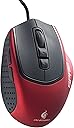
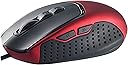
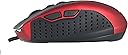
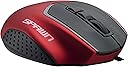
The CM Storm Spawn is a high-performance gaming mouse engineered for professional FPS players who prefer a claw grip. Featuring a 3500 DPI optical sensor with quick DPI presets, 7 fully programmable buttons, and ultra-durable Omron micro-switches rated for 5 million clicks, it delivers precision and longevity. Its ergonomic design and lightweight build ensure comfort during extended play, while the gold-plated USB connector guarantees reliable connectivity. Finished in a striking crimson red, the Spawn is both a functional and stylish addition to any serious gamer’s setup.
| ASIN | B004RJJMBI |
| Additional Features | Ergonomic Design |
| Antenna Location | Gaming |
| Are Batteries Included | No |
| Are Batteries Required | No |
| Brand | Cooler Master |
| Button Quantity | 7 |
| Color | Red/black |
| Compatible Devices | Personal Computer |
| Connectivity Technology | USB |
| Customer Reviews | 3.4 out of 5 stars 660 Reviews |
| Enclosure Material | Plastic |
| Finish | Glossy |
| Global Trade Identification Number | 00884102010439 |
| Hand Orientation | Right |
| Hardware Platform | PC |
| Item Weight | 4.96 ounces |
| Manufacturer | Cooler Master |
| Model Number | SGM-2000-MLON1 |
| Mouse Maximum Sensitivity | 3500 Dots per Inch |
| Movement Detection | Optical |
| Movement Detection Technology | Optical |
| Number of Buttons | 7 |
| Operating System | Windows |
| Power Source | Corded Electric |
| Range | 5.0 meters |
| Special Feature | Ergonomic Design |
| Style Name | Optical |
| UPC | 884102010439 |
| Warranty Description | 12 months |
H**E
Best Mouse I've Had So Far
My cat chewed through two Logitech G400's and I finally decided I needed to start going a little cheaper with my mice. This was about the cheapest one I could find with the features I wanted, so I was extremely surprised when I ended up liking it more than the G400. I've been using the claw grip since I was a wee lad playing Counter-Strike 1.6, and this mouse is much more fitting for my grip than any other I've had. Your normal 5 button mouse has the side buttons fairly far up, great for palm grip, awkward for claw. They're a little further back on the Xornet. If you're using the claw grip, it's great, but I've found that if I palm it, it's actually easy to hit the back button with the knuckle, instead of the top of my thumb, so actually with either grip the button placing is much better. I didn't find it to be restrictive of my ring figer at all, rather, the Xornet has almost a little sloping shelf. If I'm palming, it's just a nice place to have my finger hang out, and it feels perfectly natural, and for claw, the tip of my ring finger rests on it while my pinky hangs out on the side. It feels perfectly natural and comfortable. One of the features this mouse lacks over others is the ability to custom set the DPIs. You're stuck with what they give you, but I haven't found that a problem as I just keep it ramped up to 2000 and adjust the sensitivty in whatever I'm using. It's not a feature that I miss when I use the Xornet. The Xornet doesn't have any little feet on the bottom, but the forward and back parts on the bottom of the mouse have long raised parts, which makes it glide very smoothly along my mousepad. The lightness of the mouse contributes to this as well. It's not so light that I find myself making mistakes, but I definitely have no problem making long sweeping motions very quickly. Overall, I've tried a lot of other, more expensive gaming mice, and this is the best one I've found so far.
N**V
Solid Claw Grip Mouse. Maybe a little light?
I've switched from a Logitech G5 to a G9 to a G9x previously while searching for a mouse that felt right. The G5 had a nice planted feel, but it's definitely a palm grip mouse. The G9 to G9x transition wasn't much of a difference and presented a problem: I realized I was actually using a "claw grip" but neither grip arrangement (wide or the other one) felt quite right. Thin was better, but maybe too thin? The adjustable weights and grips were mostly overkill; once you figure out what works, it's not like you're going to be using those features later. Once the G9x wore out, I tried a Corsair M60. It's very similar to this mouse, minus the resting place for your ring/pinky finger on the right side. It wasn't a bad mouse for a claw grip by any means, but I've got small hands and the "hump" in the back of the mouse was too tall, meaning I'd be psuedo-palming the mouse every time I tried to push it forwards with my fingers. I also couldn't reach the "sniper mode" button without palming the mouse briefly. After giving it a month, I decided to switch again. So, that brings us to the CM Storm Spawn. For a small handed claw grip user, this is definitely a good fit. It's small enough to be easily handled. It's also feels very light, but I think that may just be a product of having a good grip on the mouse (it's probably 50%-100% heavier than a $5 cheap-o 800 DPI mouse).The cord isn't made of braided cloth or whatever the Logitech uses, but there's little to no practical difference. There's no adjustable weights, but the mouse is balanced as-is. The right side of the mouse is a little odd at first. You can rest your ringer finger and "squeeze" the side of the mouse with your pinky, or you can rest your pinky and have three fingers on top. I haven't figure out which is optimal, but after a few days of using the mouse it becomes comfortable. The only reason I'd down rate the mouse are petty: the hardwired DPI settings make perfect since (lowest, middle, highest), but the middle is 1800DPI and I'm used to 2000DPI from years of customizable Logitech use. The mouse also feels just a little too light sometimes. It's definitely user error, but if there's any "curling" in your finger when you left click, the angle of the front of the mouse and its lightness will cause the mouse to move slightly. Stated differently, you can move the entire mouse without trouble with one finger on top, so you either have to grip hard on the sides or push down a bit to hold it steady. Overall, it's a great mouse that's reasonably priced.
G**Y
gamers post rave reviews for this claw-grip, so ...
. ( ... this review is for the rest of us ... ) Considering the $10 rebate & free-shipping, Amazon's $13.xx net-cost for this item was irresistible. The Windows (Win7x64) generic mouse drivers installed w/o incident upon USB plug-in; although providing limited control of mouse functions & setup preferences. The mouse slides effortlessly on my surfaces (desks or pads). Mouse-buttons and scroll-wheel operate quietly, gently & with minimal effort. This light-weight product appears to be well made ( hope it is reliable? ). I have not experienced any "false double-clicks" as reported by some (I did upgrade to f/w v.75). I was tempted by the product images which appear to show that the mouse has an "apparent" ergonomic grip ( for my average hand ... not so much ). If your hand is accustomed to a regular and/or full-size mouse and that feels comfortable, you should expect the Xornet to seem foreign and perhaps uncomfortable in your hand ... till you re-adapt. If you're comfortable with a small'ish or travel-size mouse, then the difference may not be so noticable. ( click amazon's "share related images" to see uloaded pix for mouse-size comparison ) The Xornet mouse length is ~1" shorter and height is ~1/2" lower than a full-size, standard mouse. So, my index & middle fingers are in a new & uncomfortable position, while the dual "thumb-buttons" seem awkwardly placed. The Up/Down DPI buttons are cumbersome to use ... but not nearly as cumbersome as switching USB polling-speeds with a three-button combo exercise. note: Outside of gaming use, I doubt most users would feel a need to adjust these settings from defaults. The CM Xornet grip-design is unique (to me), featuring a short, squat & low-profile that is designed to be held (clawed?) with a small rest for your ring-finger. I find this mouse-holding position to be quickly fatiguing. Since I daily use this mouse and also a standard-sized mouse on a 2nd PC, this mini-mouse will always feel different if not awkward. added : I recently discovered another "undesireable feature" for this "claw" mouse. ... which will result in unintended "clicks" ( L or R ). With just the lightest pressure, the L & R buttons respond/click at ANY spot over the entire button surface, not just near the finger-tip ends. If your knuckles lie on the mouse, accididental "clicks" are probable. The manufacturer does NOT provide device-specific drivers nor any software for this mouse. Custom mouse-key assignments will require 3rd-party mouse software (ex. X-Mouse). The Up/Dowm DPI button functions do not appear to be re-assignable. The über-nice retail box contains NONE of the following: ... installation CD, instructions, FAQs, drivers, software, firmware. (refer to cmstorm support website for some of those) my wish list : - - a subdued LED power-indicater ( a blue-lighted wheel would be nice ) - - offered in a standard or full-sized version. - - better support for thumb - - s/w to reassign thumb-button functions. ... {I guess, I just miss my IBM 19K2002 Optical Navigator}
A**.
Nice mouse, but not for everyone
I've used this mouse for a few days, after my Logitech mx518 finally started dying on me. It looks really nice, and performs well, but over the past few days, I just couldn't get my hand to adjust to the radically different shape this mouse sports (compared to the mx518). The groove on the right side where your ring finger should rest takes some time to get used to, but even then it still felt weird for me to have it there. Normally, I have both it and my pinky finger together off to the side where they hold onto the mouse and help me lift it off the surface. Here, it just rests and the pinky does all the work. The rubberized coating is very nice, and it covers almost the entire surface of the mouse, except for the thin part that separates the buttons from the body of the mouse. The sensor is very responsive, and it comes with three preset sensitivities that you can choose through with the two buttons behind the scroll wheel (800, 1800, and 3500 dpi). These are not adjustable however. I personally found that the middle setting was just a bit too fast for what I was used to, and that I couldn't fine tune it from there was really a shame. Also, this mouse doesn't have a braided cable, but for the price i sort of half expected it. It still would have been nice though. I would say to try and get a feel for the mouse yourself before buying it outright. What works for some may not work for others, especially for a gaming mouse. Everyone's got their little preferences so make sure to do a bit of research beforehand. Pros: Inexpensive Precise sensor Solid buttons Nice rubber coating Cons: Shape (unless you find this style comfortable) Nonadjustable dpi presets (800, 1800, 3500) No braided cable
B**R
I was skeptical, but now I love this thing.
To start off, I will say that I have large hands. Probably somewhere around large-xl glove size to give you a rough estimate. I use a sort of relaxed claw grip(Maybe even fingertip?) which is what this mouse is aimed at. Likes: The grip is superb and very comfortable. -A nice amount of width to it, other mouses feel terribly tiny in my giant hands now. -DPI switch on top; I find it's best left at the max, although in certain games(Orcs must die!) it can be helpful for the MASSIVE amount of sensitivity that game has. -Style- This mouse is surprisingly stylish, the trim around the buttons is a nice gloss, the sides are a black rubber material, and the top has a nice matte(?) finish to it and looks classy. -Glides very smooth across my cheap freebie mouse-pad. -Price; for a budget minded gamer who doesn't care about fancy LEDs or massive buttons on the side, this is a good mouse. -Two buttons on the side; Sure, I don't care or need buttons on the side, but these are a nice addition at this price point. The main use it to go back and forth between web-pages. However, in some games it can be used to map things to them. -Rubberised sides; These provide a nice grip and it seems to not be as prone to wear down compared to other mice I've had; I'll try to update this in the future to give better feedback on it(I've only owned for about 3 weeks now). Dislikes: -Scroll wheel; I only have a minor dislike with this, the scroll wheel functions nearly perfect. It scrolls up and down with a little click, giving some feedback. My minor complaint is that the 'up scroll' click is noticeably louder. -The mouse buttons seem to get fingerprint wear down, this is only noticeable in certain light though. Other thoughts: The ring finger rest is a pro or con. I personally like it with the claw grip. I don't lay my ring finger flat across it, because that is uncomfortable; instead, I use a 'claw' for the ring finger too. On my old mouse Microsoft Wireless mouse 3000), my pinky would be left to drag across the mousepad, with this though, I can grip the side with the pinky and let the ring finger rest. -No LEDs; pro or con depending on what you like, I think LEDs are distracting so +1 for me. -If you're interested in dimensions (Comes from manufacturer website): (L) 107 X (W) 75 X (H) 35 mm / (L) 4.2 X (W) 4 X (H) 1.3 inch -I got this over the Razer Abyssus due to two reasons; One, the Abyssus had a glossy coat on the side(AKA Fingerprint and scratch magnets) and two, this one has no bright LED. Plus, the Abyssus has recently spiked in price(At the time of this writing) compared to this mouse. If you're deciding between these mice, my vote goes for Storm Xornet(Even with the lower DPI rate).
M**K
Overrated
Overrated is the one word I would use to describe this mouse. If it were wireless I would say "you got what you paid for" but since its wired I will say you didn't get what you paid for . 1. the mouse itself has a physically short width. Less grip and control. And this is someone who has a smaller than average reach and hand 2. It cannot focus on smaller things. If you use this for gaming, clicking on gold during Diablo 3 runs could be difficult and the mouse actually pains your hand during these times. On forums/pages where you have a small 1 2 3 4 for pages at the bottom of a page, you will have trouble easily clicking on the smaller numbers Definitely not for gaming. Learned the hard way that there are things you can't simply buy online. Build quality is okay. The buttons on the left side for going 'back' or forward are automatically enabled and are 'accidentally' clicked so often that it is more an annoyance than a convenience.
N**Y
Excellent mouse for the price, but!!!
This mouse works very well for me and I only have reservations about two things: 1) There is no way to save profiles of button assignments. I am an old guy on disability with limited ambulatory ability and difficulty reading. I hate TV so instead of knitting or something (grin) I have taken up playing video games as a way to pass the days. When switching games, I find this mildly annoying because of the limitations that some games have in key assignments and its hard to remember the few differences caused by the compromises. 2) The selection range of DPI is not optimum, particularly since I NEVER run it anywhere near the highest range. I have the res set at a compromise 1800 dpi in the software for all three settings-- this works well as a one resolution/speed mouse AND frees up the two DPI keys for reassignment as QuickSave (F5) and some other non-action game function that is handy on the mouse. Someone before me had small issues with the cord NOT being braided but I find it to be excellent the way it is. My previous mouse, a Logitech G9x had one of those annoying stiff cords and it was part of my decision for buying this. I have used and liked many Logitech products over the years but that cord (which they advertise as, "soft and flexible", was absolutely neither. I have had it over two years and used it hours daily and it STILL has the bends from when I uncoiled it after removing it from the box. This mouse cord IS soft and flexible and does not require additional effort to push around and never kinks. All in all, this is a good mouse for the buck. Comfortable, tracks well and seems to be well made. My real rating would be around 4 1/2 stars.
S**Y
Great for a budget gamer
As a PC builder, I have come to know and like the Cooler Master name due to their reliable and affordable power supplies and computer cases. However, I was surprised to see that they were now making gaming mice and keyboards as well, and purchased a CM Storm Spawn to see if their new products were as good as their old ones. I have been very pleased with my purchase and must say that I even impressed with the value that this mouse has to offer. It has subtle but attractive styling, with a red metallic body and matte black accents, I have been complemented on it during many LAN parties, but it lacks flashy LED lights and bright in-your-face colors so buyers looking for a gaming mouse that screams "look at me!" won't be quite as impressed. Moving past the appearance, it's a comfortable mouse for people who enjoy using a claw grip and it has two extra buttons on its left side that are easy to press with your thumb due to the way this mouse sits in your hand. The top two buttons behind the scroll wheel cannot be mapped, but instead allow you to quickly adjust cursor movement speed on the fly. The scroll wheel moves smoothly, and clicks when scrolled, allowing you both speed and precision, which can mark the difference between life and death in certain games. Overall, I have been using this mouse for close to six months and have had no problems with it. I personally really like the soft, slightly grippy texture on both the left and right mouse buttons, but some people may not. My one and only complaint is that the product pictured shows a braided cable, but my Spawn mouse does not have a braided cable. This did not affect my satisfaction with the Spawn, but it is worth knowing, The added onboard storage is a nice bonus, and Cooler Master has a program you can use to install custom mapping, however, I have not needed to use either of those features, but it's still nice knowing they're there. If you're looking for a good value in a gaming mouse that looks good and doesn't sacrifice performance for style, then the CM Storm Spawn might be a good mouse for you.
Trustpilot
Hace 2 semanas
Hace 5 días