
Descargar la aplicación


Servicios al cliente
Sobre nosotros
Copyright © 2025 Desertcart Holdings Limited
Descargar la aplicación
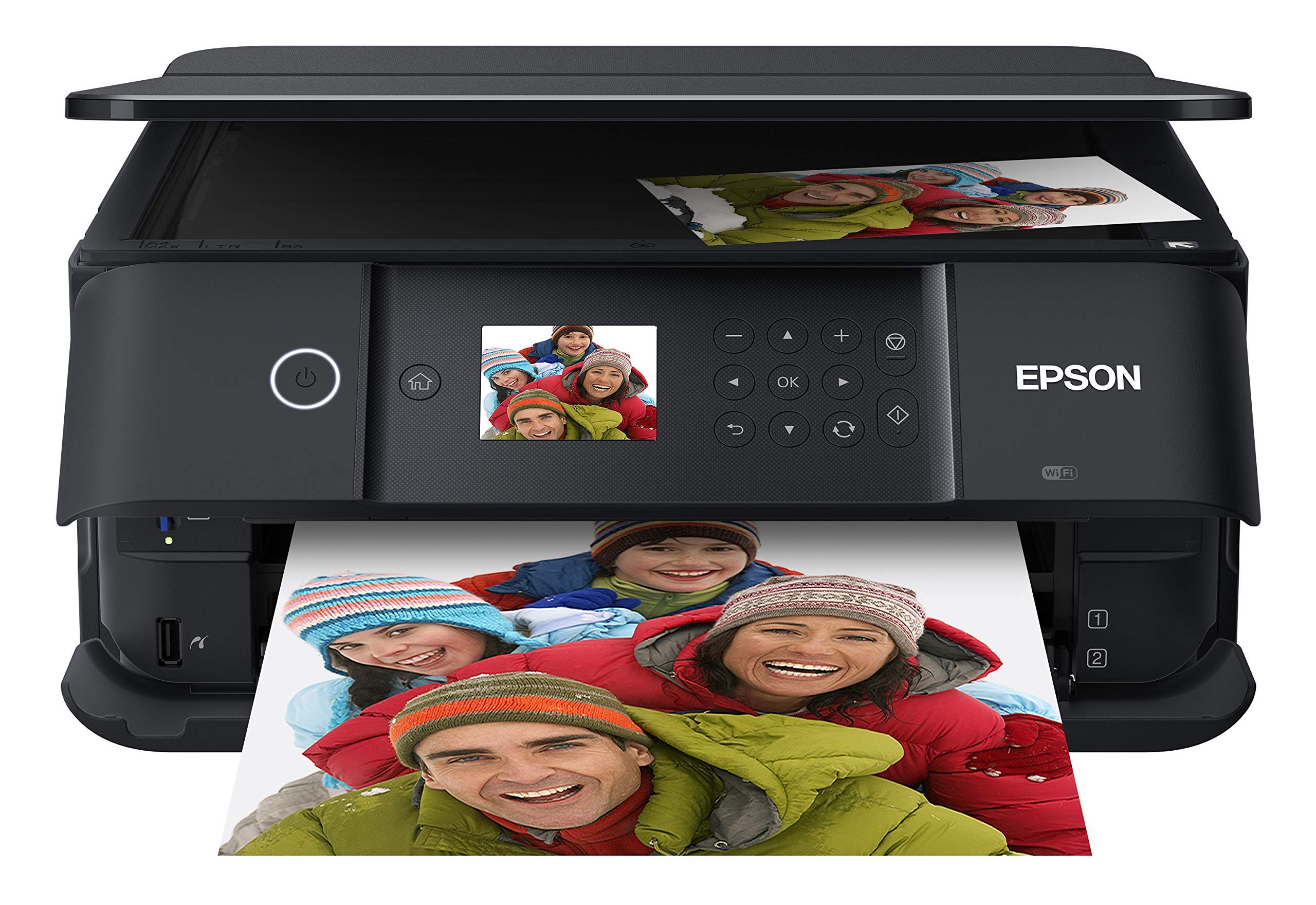


🖨️ Print Like a Pro, Share Like a Boss
The Epson Expression Premium XP-6100 is a sleek, wireless all-in-one printer designed for millennials who demand professional photo quality and fast, convenient printing. Featuring a 5-color ink system, ultra-fast 15-second 4x6 photo prints, voice-activated commands, and dual media trays, it delivers crisp documents and vibrant photos up to 8" x 10". Its compact design and seamless smartphone compatibility make it the ultimate desktop companion for creative professionals and busy managers alike.


| ASIN | B07PDNS5CZ |
| Additional Printer functions | Copy, Scan |
| Best Sellers Rank | #7,736 in Office Products ( See Top 100 in Office Products ) #4 in Desktop Photo Printers |
| Color Depth | 24 bpp |
| Compatible Devices | Camera, PC, Smartphones, Tablets |
| Control Method | Voice |
| Controller Type | Amazon Alexa, Vera |
| Customer Reviews | 4.0 4.0 out of 5 stars (5,357) |
| Date First Available | May 29, 2019 |
| Dual-sided printing | Yes |
| Duplex | Automatic |
| Global Trade Identification Number | 00010343944169 |
| Hardware Interface | USB |
| Included Components | Expression Premium XP-6100 color inkjet printer, setup and instruction manuals, CD-ROM containing software and drivers (Windows and Mac (7)), power cord, 5 Claria Premium Ink cartridges: 1 302 Black ink cartridge; 3 302 color ink cartridges: Cyan, Magenta and Yellow; 1 302 Photo Black ink cartridge |
| Ink Color | Black |
| Is Discontinued By Manufacturer | No |
| Item Weight | 14.6 pounds |
| Item model number | XP-6100 |
| Manufacturer | EPSON PRINT |
| Max Copy Speed (Black & White) | 15.8 ppm |
| Max Input Sheet Capacity | 100 |
| Max copy resolution black-white | 5760 dpi |
| Max copy resolution color | 5760 x 1440 dpi |
| Maximum Black and White Print Resolution | 5760 x 1440 dpi |
| Maximum Color Print Resolution | 5760 x 1440 dpi |
| Maximum Media Size | 8.5 x 11 inch |
| Memory Storage Capacity | 64 MB |
| Model Series | Expression Premium |
| Number of Trays | 2 |
| Output sheet capacity | 100 |
| Power Consumption | 13 Watts |
| Print media | Paper (plain) |
| Printer Ink Type | Claria Premium Ink |
| Product Dimensions | 5.39"D x 7.8"W x 2.2"H |
| Scanner Type | Photo |
| Series Number | 6100 |
| Sheet Size | 3.5" x 5", 4" x 6", 5" x 7", 8" x 10", 8.5" x 11", A4, B5, A5, A6, half letter, executive |
| Smart Home Compatibility | Smart Home Compatible |
| Specific Uses For Product | High-quality photo printing, Professional-looking CDs/DVDs |
| Supported Media Sizes | 4 x 6 inches, 5 x 7 inches, A4 |
| Total USB Ports | 1 |
| UPC | 010343944169 010343924536 |
| Warranty Type | Limited |
| Wattage | 13 watts |
N**M
Great product
Found this very easy to set up. I set up as wireless in about 15 minutes. Printer is working well and I like that it doesn't take up a lot of space. I had purchased this to replace an Epson that was about 15 years old and purchased it on sale so am well pleased with the price. I have yet to print photos but expect it to print well.
A**R
🙂 Great printer with an even better price.
I just happened to stumble across the Epson XP-7100 while looking for a small photo printer capable of using Letter size paper. The store did not have print samples and I knew nothing about it so I put off the purchase to do some more research. I came across a PC Magazine article titled The Best Photo Printers for 2019. The XP-7100 was listed a one of seven listed as an Editors' Choice, but the 7100 was the only Legal size printer with 2 others not fitting the bill and the remaining 4 being large formats costing 2-10 times as much. With a price of $129, I decided to take a chance. The XP-7100 arrived well packaged and heavier than expected (usually a good sign). It is a elegant contemporary design which takes up very little space and looks good anywhere. No ADF or trays sticking out. Setup was easy and straight forward with the quick setup sheet. The 4.3 inch control screen is a delight with its intuitive interface and bright touch screen. Once the ink cartridges are installed, just push the power button (the only button) and the control panels automatically tilts outward for a better viewing angle. After printing a few test sheets for printer head alignment, it was time to set up WiFi (unless you go with USB). WiFi setup was easy. Just select your network and enter its password (if secured). Last step is to install the software and driver on the computer. The CD did not auto run as it was supposed to so I manually opened the CD in File Explorer. At the root level are two app files. EPWizard.exe and Setup.exe. I ran the EPWizard.exe and everything installed fine. WiFi tried to locate the printer and it failed. This was resolved with a simple Restart of the computer. My first few prints were to test different papers and quality setting. The printer has 2 trays supporting cards, photos, envelops and basically anything A4 or Letter size and smaller. It even includes a CD tray to print on CDs. A motorized output tray retracts back into the printer (along with the control panel) when you power off. As far as construction, the port for the power cable is a little wobbly. I do not know what that is about. Some reviewers wrote the printer is flimsy. The trays do not have rollers or bearing, so yes they are a little flimsy to reduce friction, but tighten into place once fully extended. This is common among printers and helps keep cost down. As for the body, it does have thin panels (available in different colors) which are simply not acceptable for a laptop. Oh wait, this is a non-portable printer meant to, at most, be moved from place to place a few times. Remove from box and place on desk. I purchased the printer mainly for its photographic printing abilities. My first real print was a Student of the Month article (about my daughter) from the website of the local newspaper. The photo and text would be a great test of the printers capabilities so I imported the article at 300 dpi with vector text. I printed it with high quality settings and used Epson Ultra-Premium Glossy Photo Paper. The results were phenomenal. The color photo was vibrant and the blending of the 4 photo colors was seamless. Text (some of it 5pt in size) was very crisp and could rival laser printers. The printer is fast for an inkjet on high settings. I estimate around 35 seconds for the 8.5 x 11 print. I’ll add a follow up on the scanner, ADF, and media ports but for now the 7100 is a very impressive photo printer which can be had as low as $99. Of course they will make up for the losses, and then some, with ink and paper sales.
B**8
Poor quality and awkward design
I have been very disappointed with this printer. The printer heads stopped working after less than 3 years. Ruining maintenance on them only made it worse. I was unable to print at all. When I called Eason they said there was nothing that could be done and it was not covered under warranty. I had just bought new ink which was wasted when the printer broke. Also the feed trays and paper try’s are very awkward. The photo try is hard to get aligned. You have to close the feeder tray to put paper in and then pull it out to print. The front cover is useless because you have to have it open and have the paper tray pulled out to print. Also if you have 5 G WIFI it is not compatible. It is compact but the overall design is poor and the quality of the product is poor. The ink is expensive and a pain to install. The print quality of photos is decent but there are enough other disadvantages that I would make a different choice.
J**N
Compact and multi-capable with good print quality
I have to say that, at least so far, I'm pretty pleased with this new printer. I'm probably not the best judge because I made my last printer last for a LOOOOOONG time - like, at least 15 years. Seriously. So, there's a lot about this new printer that is probably blasé to most people, but it's a lot of fun for me. First off, the size really is great. My last printer was a wide-format printer that could print up to 11x17, and this one obviously can't do that, but I became like most people - almost all the printing I do now is Letter or 4x6. And this little guy does a great job. It's also much faster than my old printer, and I'm stunned how easy setting it up is and getting it to work with Apple products. The print quality is good, to my eye, though I did have one occasion where there was some streaking and I had to do a print head test and cleaning. It seemed early on in my ownership of this printer to have needed that, but it's behaved well since. Now, I have NOT owned it long enough to evaluate ink capacity, but for what little work I've given it, it seems to be doing pretty well.
B**B
Very professional style printer
Very professional printer. Does a variety of things but no instructions to show you how to take advantage of them. I got basic setup instructions for me to use it and it does a really nice job printing what I need.
M**S
La meilleure imprimante. Très facile et ne tombe jamais en panne. Je l utilise plusieurs fois par jour et elle marche sans soucis. Bravo Epson!
J**I
No me gustó que los cartuchos no son fáciles de encontrar, además de que no tuvieron mucha duración los que traía
J**H
I bought an Epson XP6100 printer on-line from NES Online through Amazon. The item arrived promptly on the first day of the expected delivery window. It was brand new in its manufacturers packaging and has worked like a dream. It seems quieter than previous Epson printers I have owned, and the scanning function operates quicker and at better resolution than previous scanners, probably due to improved software.
A**N
Got a great deal on this printer. The setup process was so easy, light years ahead of the HP, Lexmark and Brother printers I've had over the past few years. Print quality is excellent, and it's fast. My HP printer over-inked the pages at high quality and made the page warp, this has no problem at high quality settings, even small text looks great. Has an ADF and auto duplexing which is rare at this price point. A bit confusing with the remote printing options and setup. Overlapping functionality that wasn't very clearly explained, and it installed 2 versions of the printer intiially, a Network version and the regular one, that both functioned exactly the same from what I could tell. So I just deleted the extra Network one and I can print remotely and directly just fine to the other one. Overall an amazing purchase and I'm now sold on Epson printers going forward.
B**N
cette imprimante fonctionne tres bien et pour le prix cet exelent
Trustpilot
Hace 1 semana
Hace 2 semanas