We remain fully operational. Our teams are working around the clock to ensure your deliveries continue safely.

Descargar la aplicación


Servicios al cliente
Sobre nosotros
Copyright © 2025 Desertcart Holdings Limited
Descargar la aplicación
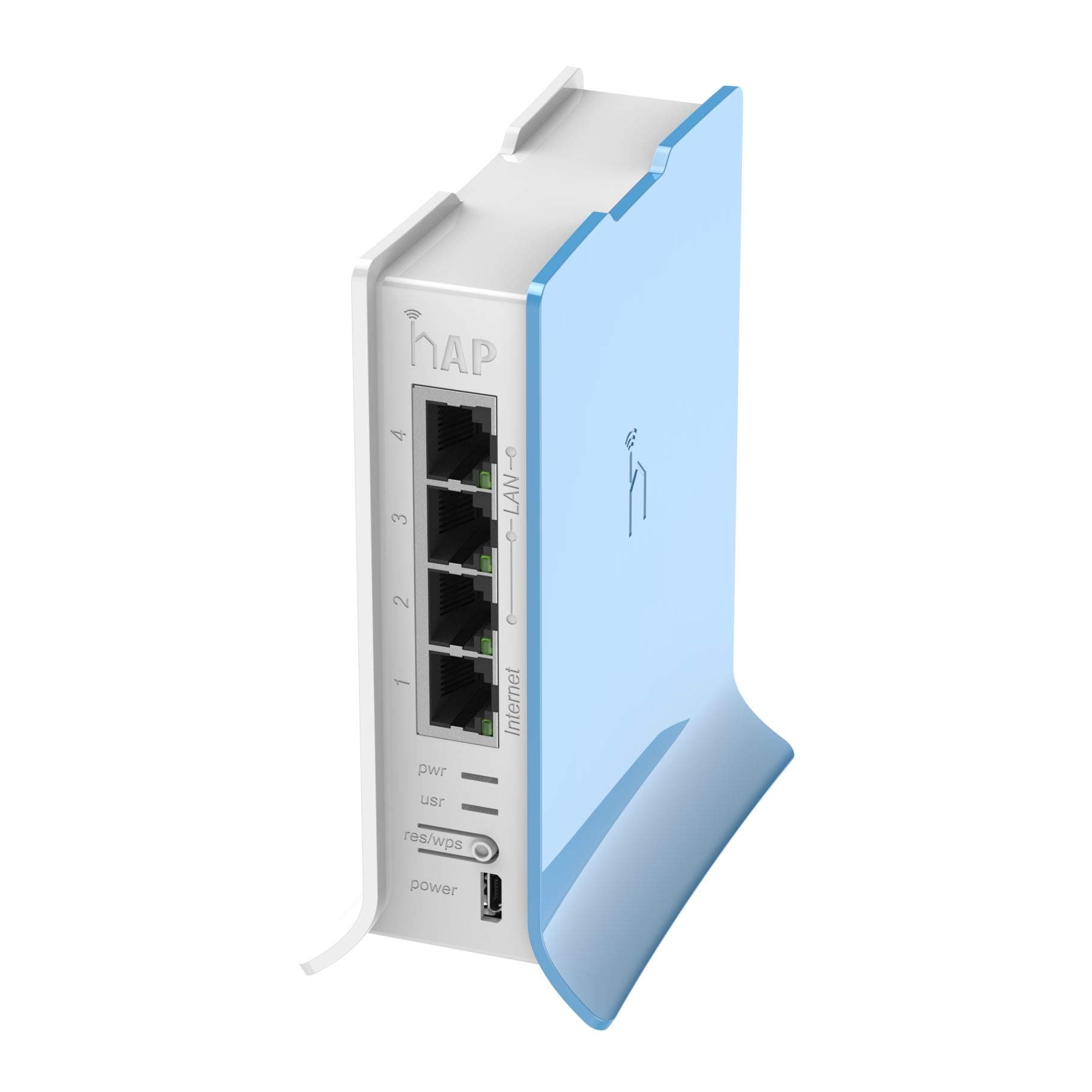
🚀 Elevate your network game with Mikrotik hAP Lite — power, control, and speed in a compact package!
The Mikrotik RB941-2nD-TC hAP Lite is a compact, high-performance wireless access point featuring a 650MHz CPU, 32MB RAM, and dual-chain 2.4GHz 802.11b/g/n WiFi. Equipped with four Fast Ethernet ports and running RouterOS with an L4 license, it offers advanced network management including bandwidth shaping and firewall controls. Ideal for apartments, homes, or small offices, it supports easy WPS setup and delivers reliable, flexible connectivity with professional-grade features at an unbeatable price.
| ASIN | B016E93MX2 |
| Best Sellers Rank | #372 in Computer Networking Wireless Access Points |
| Brand | MikroTik |
| Color | Multicolor |
| Customer Reviews | 4.6 4.6 out of 5 stars (660) |
| Date First Available | October 9, 2015 |
| Is Discontinued By Manufacturer | No |
| Item Dimensions LxWxH | 5.51 x 7.09 x 2.36 inches |
| Item Weight | 5.7 ounces |
| Item model number | RB941-2ND-TC |
| Manufacturer | Mikrotik |
| Number of USB 2.0 Ports | 1 |
| Operating System | RouterOS |
| Product Dimensions | 5.51 x 7.09 x 2.36 inches |
| Series | hAP lite TC |
| Wireless Type | 802.11b, 802.11g, 802.11n |
B**Y
My setup is quite unusual so ordinary routers either fall short or I need to flash alternative firmwares to make the best out of them
This is a fabulous product at this price point. It comes with the RouterOS 4.0 level license. Yes, it has a steeper learning curve than the other home routers in the markets. But, it does try to offset that with the Web UI and Wizard setup. My setup is quite unusual so ordinary routers either fall short or I need to flash alternative firmwares to make the best out of them. This little router gives me the flexibility and reliability of the RouterOS. I use my office connection at home through a Radio setup beaming signal from my office building to my bedroom window (yeah, lucky me I live close to my office pro- eliminates commute time - cons been I am the first to call in an emergency).Our office closes at 4.30pm and after that, all the bandwidth just sits there. So I have distributed the bandwidth with a license exempt band to my home and our office guest house. Coming back to the router, I have setup it up in such a way that I can control the bandwidth during the day at my home for a minimum of 256kbps for an emergency while in the evening hours it bumps up 80% of the bandwidth for me and 20% for the guest house. I know, I could have done this from the office end as well as we are using Mikrotik there as well. However, I just like the control at the receiving end and this gives me the flexibility to configure a hotspot both on wifi- and wired network. I have setup priority for VOIP and Gaming devices. The wireless signal as most will enjoy has a decent coverage and I haven't had the need to restart the router for any fluctuations in power as I do experience that with other routers at my location. Note: User manager will not work on this as the hAP lite does not support it, I guess its hardware limitation. But overall, it is a bang for the buck device and overall a little flexible powerhouse. To get the best of the device, do understand/learn the Mikrotik RouterOS configuration through WinBox. All the best. Hope this helps.
C**.
Outstanding price, Great hardware, great software. Still working 4 years after it was purchased.
I've been using this device on and off for 4 years now. What can I say as an access point? It is after configuration? Downright bulletproof. I've even used it with some weird configurations. Power over electrical then connected to this to make an access point in a random place? Oh yes. This thing has more power than most people will ever use other than they want more speed out of it. What can I say?? For the wireless specification of the chipset and the CPU power, it's great. Just make sure to use the phone app for configuration. Oh yeah, make sure to let it firmware update whenever it wants. It just gets better as it goes along.
F**0
Awesome AP and great little stand alone device
For a sub $30 router this is pretty much a solid buy. Set up can be confusing, but quick settings are provided. If your really new and just need something going quick give those a try. I also recommend that you change your admin user login and its password to something else, Winbox makes this pretty much a snap. Also be sure to download both the new firmware and the updates to RouterOS when you get it, Firmware updates are available in System > Routerboard, and System > Packages for the OS updates. IPV6 is disabled by default, but you can enable the package there if you want it. You can customize the quick settings in Winbox as a download from their site, or from the web interface which it has a basic setup for from the default gateway address. The quick settings have a really good firewall setup and the rest of the stuff to get you started and there is a ton of customization you can do. I bought one to test it out as an access point using CAPSman, a wireless centralized AP manager. Overall this is great. Its a little 2.4G model, but they also have a dual band for not much more. It would work well stand along as a router, or along side other products and I think you'd be happy either way. The price is awesome for this little box, and the Level 4 license is plenty. I'll be picking a couple more up and giving them out for some better routers than your at home fair.
R**S
Great router, very configurable, though takes some fiddling to configure the first time.
Bought this little router to function as a WiFi bridge to replace a D-Link router flashed with DD-WRT that failed after a couple years. Extremely configurable - you can do just about anything with this little box, from providing basic WiFi access point functionality for your home, to advanced routing, VPNs and more. The only downside is that you can do just about anything with it - there are so many options that I would not necessarily recommend it for a non-techie type person. I only ran into one problem when trying to set it up as a WiFi bridge to connect a few hard-wired devices to my wireless network - I had to put the wifi interface into station-pseudobridge-clone mode to get it to work like DD-WRT as I was having it connect to a non-RouterOS access point. This was not obvious and took some reading to figure out. But I liked the hAP Lite so much overall that I ended up replacing my access point with a RB951G-2HnD which allowed me to put the hAP Lite wifi interface into station-bridge mode which gets things working as expected. BTW, the hAP Lite is very low power. You can power it with almost any 5V micro-USB power source. It only draws about 3 watts when powered up.
L**O
Durable and reliable
Very powerful to manage my home network, as the years went on and I outgrew this hardware, I can say it helped me learn and improve my skills while using it.
R**H
This is an amazing device. It runs RouterOS which gives you all the features of a high end router in terms of options, settings and configurations. Of course you don't get gigabit routing speeds like an enterprise class router. But I don't need that. I just need some clever router and VPN functions to go with a 40/10 FTTC broadband line. There is a Quick Setup that makes it work like most home routers - ethernet upstream internet connection, NAT and WiFi and a local subnet on the other ethernet ports. But you can reconfigure everything. You can assign different ethernet ports to different subnets, add firewall rules, configure a VPN server and also a VPN client. The WiFi supports virtual APs and I have 3 different virtual APs running, So right now I have Ethernet Port 1 connected to my upstream internet connection. Virtual AP1 also connects to my upstream internet connection. Ethernet Ports 2 and 3 are a local subnet which is NATed onto the internet connection. It has a Virtual Access Point too. The DHCP server for this subnet has customisations with its own 'dhcp options' for some SIP devices. Ethernet Port 4 is isolated from everything else and tied to a VPN connection to a far away VPN server. It also has a Virtual Access Point that is just linked (bridged) to this remote VPN server. Perfect for my quirky config at approx £25. RouterOS takes some getting used to. If you have configured networking on Linux or high end managed switches you'll quickly pick it up and there are loads of resources on the internet and YouTube. They make models with much higher throughput but for my task this is all I need
A**X
Un excellent router lorsque l'on sait le programmer et qu'on connait la base sur les réseaux mis il ma permis de faire un bridge wifi avec un autre bâtiments a coter
L**A
Come altre recensioni riportano, non e' per principianti (anche se basta informarsi e anche un non esperto puo riuscire a fare quello che vuole). Inutile tentare di elencare le funzionalita, sarebbe impossibile: e' un router VERO, con cui puoi riuscire a fare in scioltezza cio che i router "classici" nemmeno concepiscono, ha delle potenzialita' enormi, appunto un router e non un ibrido modem router che ha migliaia di limitazioni (ad esempio: numero di regole di forward, porte e servizi controllabili, non esistono praticamente limiti). Stabilissimo nonostante la mia rete abbia un traffico notovole in entrata e in uscita, occupazione del processore che, stando attenti a come vengono generate e gestite le regole, resta davvero basso, dimostrando di avere una potenza di processazione piu' che decente. Dopo un paio di ore spese a sistemare le regole di routing, e' in funzione da quando l'ho acquistato e fa il suo lavoro in modo egregio, consuma 1/5 rispetto al precedente netgear, occupa uno spazio infinitesimale e mi permette finalmente di avere un controllo completo della mia rete (la funzione TORCH e' spettacolare!!!!!) Per chiudere ha anche ampio supporto al protocollo SNMP. Un oggetto davvero superlativo ed un prezzo ridicolo. Ripeto, per poterlo usare si deve avere una minima idea di cosa sia il TCP-IP, poi la rete ci permettera di capire come fare per ottenere cio che ci si era prefissati. Soddisfattissimo, uno degli acquisti migliori fatti in vita mia.
F**L
Je ne suis pas un as dans les réseaux. La configuration est particulièrement difficile. L'absence d'un manuel papier n'est comblée par les informations en lignes, qui sont des plus confuses pour un non initiés. Habitué à celle des NETGEAR, je suis trés déçu par les MIKROTIKS d'une façon générale.
J**Z
Mikrotik es una marca que mantiene unos estandares de calidad impresionantes y es imposible conseguir por este precio en otra marca todo lo que hace este aparato. El sistema operativo RouterOS simplemente es impresionante, se pueden hacer cosas que otros dispositivos ni siquiera soñarian. La versatibilidad de acceso esta muy bien, se puede usar la pagina web o usar el programa propietario de Mikrotik llamado Winbox desde los cuales podemos configurar el router a nuestra conveniencia. Con este router de 26 euros podria configurarlo para balancear la carga de varios provedores de servicios, utilizarlo de Bridge inalambrico y decenas de roles de utilidad. Este o cualquier routerboard de Mikrotik son muy buenos, pero en verdad lo poderoso de la marca es que todos usan el mismo sistema operativo que es el rey: ROUTEROS. Uno no se puede equivocar comprando esta marca, 100% recomendado para cualquier usuario que tenga conocimientos avanzados en redes.
Trustpilot
Hace 2 semanas
Hace 1 semana