We remain fully operational. Our teams are working around the clock to ensure your deliveries continue safely.

Descargar la aplicación


Servicios al cliente
Sobre nosotros
Copyright © 2025 Desertcart Holdings Limited
Descargar la aplicación
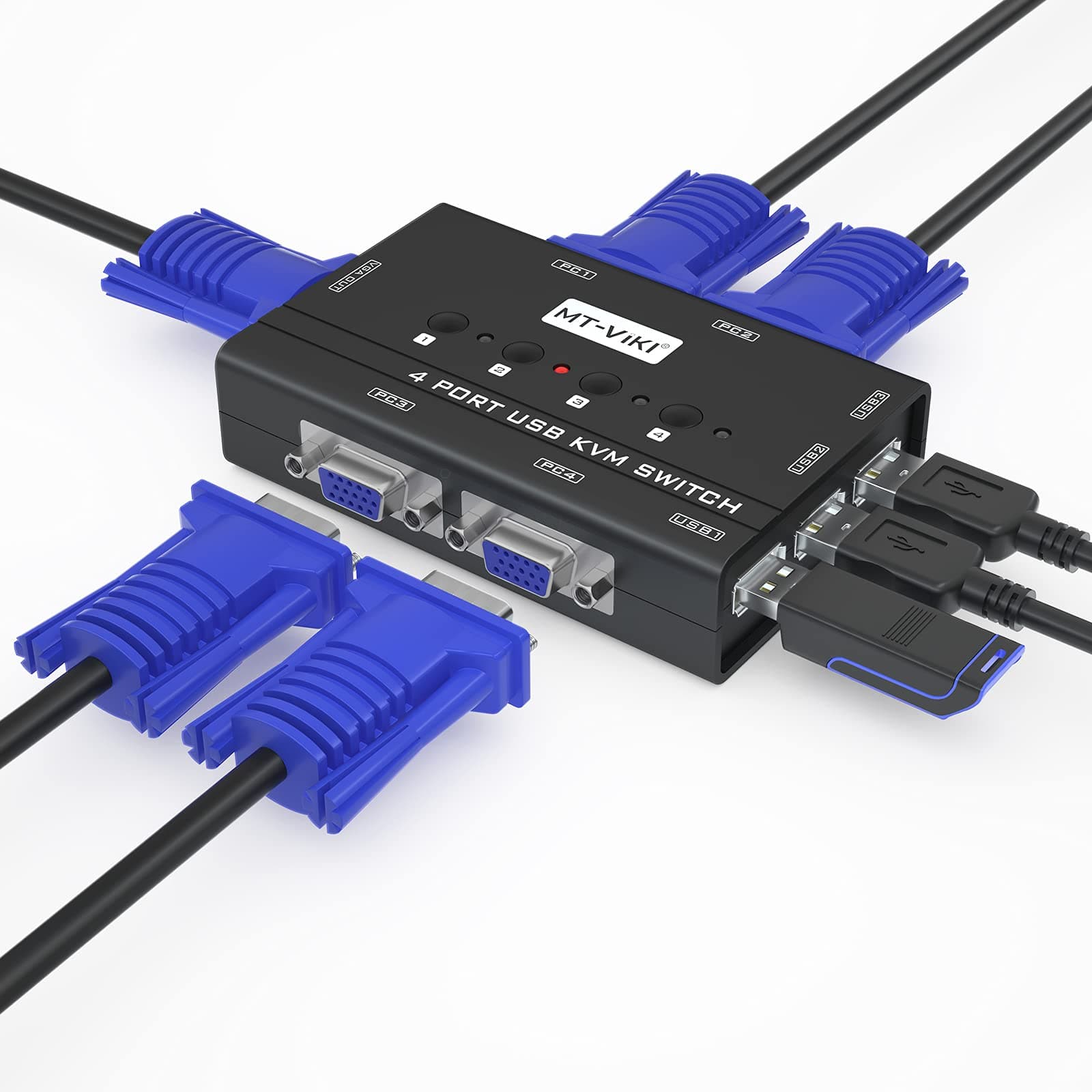
🔄 Master your multi-computer setup with one sleek switch—because juggling should be for pros, not your desk.
The MT-VIKI 4-Port VGA KVM Switch lets professionals share one monitor, keyboard, mouse, and printer across four computers seamlessly. Supporting HD resolutions up to 1920x1440 and featuring a 3-port USB 2.0 hub, it ensures smooth peripheral sharing and crisp visuals. Compatible with all major operating systems, this compact, push-button switch includes all necessary VGA/USB cables with power supplied via USB connectors, making setup straightforward for multitasking managers and tech-savvy millennials alike.





| ASIN | B07TXSCBKH |
| Actuator Type | Push Button |
| Best Sellers Rank | #276 in KVM Switches |
| Brand Name | MT-VIKI |
| Circuit Type | 4-way |
| Color | Black |
| Connectivity Protocol | Vga |
| Connector Type | Female Vga |
| Contact Material | Metal |
| Contact Type | Normally Open |
| Control Method | Touch |
| Controller Type | Push Button |
| Current Rating | 1 Amps |
| Customer Reviews | 4.3 4.3 out of 5 stars (325) |
| International Protection Rating | IP56 |
| Item Dimensions | 3.35 x 5.59 x 8.31 inches |
| Item Weight | 1 Pounds |
| Manufacturer | MT-ViKI |
| Material Type | Plastic |
| Model | MT-460KL-A |
| Mounting Type | Panel Mount |
| Number of Items | 1 |
| Number of Positions | 4 |
| Operating Voltage | 5 Volts |
| Operation Mode | ON-ON |
| Specification Met | CE |
| Switch Type | Push Button |
| Terminal | Physical |
| UPC | 749185499796 |
| Unit Count | 1 Count |
L**L
GREAT UNIT WORKS WELL BUT READ MY WRITE-UP FOR IMPORTANT INFO
I had problems setting this up. I wanted to use it for 3 computers. It would not fire up the LED's were not lighting up. I will tell you the instructions SUCK!!! Even though this s/b a no-brainer setting up, the one thing the instructions failed to tell you that is MOST IMPORTANT! Each cable has both a standard computer multi-pin cable which also has a USB PLUG infused into the workings. This USB plug supplies the power to your selector unit --- and what they fail to tell you is this... YOU MUST PLUG THAT USB CABLE INTO POSITION #1 of all the USB INPUTS on the back of your computer. If you plug it into #2, 3, 4 etc. THE UNIT DOES NOT FIRE UP!! They only informed me of this when I requested to return it and refund. The manual was written by someone foreign *(no discrimination intended!!) who should never be doing TECHNICAL WRITING to instruct people in ENGLISH speaking countries how to set this up. I mean no disrespect but they almost lost the sale due to this person's lack of ability to communicate. OVERALL I REALLY LOVE THE UNIT NOW THAT IT'S WORKING! I use several computers - one for surfing, one for recording, and one to install software on my synthesizers that need updates from time to time.
D**D
It Works.
Replaced a Belkin KVM that was several years old and quit working and is not made anymore. This KVM works well, a little less convenient in that it requires a physical button on the kvm itself to be pushed instead of some keyboard combination, but not that big of a deal. I have a mix of linux and windows boxes, switches perfectly, no issues.
H**!
Works great
Edit: Eventually got the switch to work at full resolution with Ubuntu from startup. Getting a lot of use switching between personal/work laptop and desktop. For some reason Ubuntu wouldn't recognize the display through the kvm switch, but I was able to set a custom mode in xrandr, and it helps switching my second display after logging in for some reason. 100% compatible with USB C hubs, so it's painless even swapping around a bit as needed. Really nice to have one set of keyboard/mouse to work with 4 computers.
R**O
Works OK; cheap and good; not fast; not smart; finicky.
Works OK but it is not smart and it is finicky. Had to turn on each computer one by one before switching to the next one If I turn them on all at the same time then only the number one will display; and the others will return "no display". Also you have to first turn on the next computer, wait a few seconds, then switch to the number, and proceed like so. If you press the next key and turn on it will return "no display". Using 3 HP Prodesk 400 with VGA running Linux Debian 12, text based only. Tested the keyboard and video. Did not test mouse. Still a good product for the price, and it does it's thing.
S**R
Huge time saver
I’m running 2 servers 1pc and a protectli vault in my network rack and this thing has saved me so much time not having to swap cables between them to check on the status or just use them. It was an extremely easy setup, and the included wires were the perfect length to make it everywhere I needed one.
D**G
I Can Live With It, But Far From Perfect
It works, I'll keep it, but there are couple of annoyances: 1) image degradation, 2) occasionally hangs, 3) no response from support. I have two identical monitors and I used my phone camera to take a picture of the same application on the direct output from the computer, and the output through the KVM switch. Through the switch is a little bit blurry. The photo actually makes it look worse than it looks to my eyes at regular viewing distance, but it's certainly not as clear. I have three Windows computers connected. Usually I can switch between them without issue, but occasionally I've had the device quit responding. But sometimes Windows tells me the USB device has malfunctioned. The only way I can get it working again is to unplug all of the VGA connectors (remove power, I suppose). This only happened twice in a week, so I can live with it, I suppose. An email to the support people went unanswered (4 business days). I was asking if there was a better way to reset the device than to unplug all of the VGA plugs. Maybe they didn't have a good answer, and I found the best approach.
A**R
great
just what i needed worked great
C**R
Wavy lines horrible quality
Works well enough for really low resolutions but as soon as you add more than one 1080p computer it adds distracting artifacts and scan lines. Needs restated way too often to not get crazy horizontal line artifacts. Avoid this kvm.
C**A
good and quality product
J**H
Does exactly what you'd expect straight out of the box. Excellent product and very simple to set up and use.
R**Z
Tengo 4 PC y una pantalla full HD, manda muy bien la imagen y es muy útil
V**D
Near and good to use
A**N
I replaced a ten year old KVM Switch that was on the blink. Replacing it was seamless. Just simply swapped it over. Worked perfectly on my three computers.
Trustpilot
Hace 2 semanas
Hace 3 días