🔑 Lock down your digital life with the T110 — security that’s always a touch away.
The TrustKey T110 is a cutting-edge FIDO2 and U2F certified security key designed to safeguard your online accounts from phishing and unauthorized access. Compatible with Windows, Mac OS, Linux, and all major browsers, it supports seamless one-touch login via USB-A. Trusted by top platforms like Google, Microsoft, and Bank of America, the T110 offers professional-grade protection in a compact, lightweight form factor.

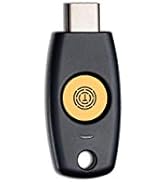


| ASIN | B086QTS5YM |
| Best Sellers Rank | #271 in USB Flash Drives |
| Customer Reviews | 4.2 4.2 out of 5 stars (679) |
| Date First Available | April 3, 2020 |
| Flash Memory Type | USB |
| Hardware Connectivity Technology | USB Type A |
| Item Dimensions LxWxH | 1.64 x 0.7 x 0.15 inches |
| Item Weight | 0.109 ounces |
| Item model number | 10000110 |
| Manufacturer | Trustkey |
| Model Name | TrustKey T110 |
| Product Dimensions | 0.47"D x 2.99"W x 4.76"H |
D**E
It Works!!!
Very Good
J**N
Sin duda alguna para quienes necesitamos mantener nuestras cuentas seguras esto es indispensable, la 1ra barrera de defensa siempre somos nostros como usuarios que debemos tener cuidado con los correos sospechosos, pero este tipo de llaves FIDO2 nos dan una tranquilidad extra de que no perderemos nuestras cuentas y en mi caso mi canal de youtube estara mas seguro al tenerla, OJO es importante tener 2 de ellas en caso de que se extravié o dañe la principal, el respaldo te ayudara a seguir entrando en tu cuenta mientras consigues una nueva
M**R
DOES NOT WORK WITH MY COMPUTER. UPDATE; 12/11/2021 - A COMPUTER SPECIALIST GOT IT WORKING.
UPDATE; 12/11/2021 - I HAD TO HIRE A COMPUTER SPECIALIST TO GET IT WORKING. THIS PRODUCT DOES NOT WORK WITH MY COMPUTER, OR THE SPECIFIC APP IT WAS PURCHASED FOR. TECH SUPPORT WAS RENDERED BY A SALESMAN, NOT A TECH SUPPORT SPECIALIST. ALTHOUGH THE SALESMAN " TRIED ", HE DID NOT SOLVE THE PROBLEM.
M**R
Jr
Great fit easy to setup
A**M
Security in a budget
This is a low price alternative to the most famous security key (passkey), but with all the needed bells and whistles. Simple, does the job as required. Inexpensive, so you have no excuses to deploy real 2FA for your small business or family devices.
C**N
Compatible with most FIDO2/Webauthn implementations!
DO NOT USE THIS DEVICE IF YOU NEED HOTP OR TOTP, IT HAS A FATAL SECURITY FLAW!! So, first, the good. -The unit works fine for FIDO2. -It is made in Korea, not a non TAA country. -Windows 10 and 11 can set the pin and factory reset the unit with no additional software. -It works out of the box on Debian 11.6.0, and probably any linux with a proper version of OpenSSH -It supports 'Resident Keys' or 'Discoverable Credentials' -Chrome based browsers on Linux manage the token's basics fine. You can see all 'Resident Keys' or 'Discoverable Credentials' as well as change or set a PIN and reset the token. The bad: -The unit only supports edcsa, it does NOT support ed25519/ed25519-sk. This is not recommended or acceptable for certain, ultra high security scenarios and for some applications MIGHT be considered unacceptable Though scenarios where this is a concern will probably buy a US or European made token at 10x the price... -TOTP is TECHNICALLY supported... if you use their app. On windows only. Not unexpected, since the unit has no battery or RTC. Having to use their App is an absolute deal breaker, as will be indicated below. -HOTP is TECHNICALLY supported... but must be setup with their app first, then you can short press the unit to trigger a HOTP slot as a keyboard/HID device. Having to use their App is an absolute deal breaker, as will be indicated below. -Their App does NOT support 'Resident Keys' or 'Discoverable Credentials.' It has no idea they are on there at all! This is a critical feature. Having to use their App is an absolute deal breaker, as will be indicated below. The absolute dealbreaker: Their app is NOT signed. This is incredibly inexcusable for a company even remotely pretending to be a security device provider. It is mind-bogglingly STUPID at best, and a catastrophic security flaw if you need to use their app. There is no way of knowing if their application has been modified or not, or if it is even a genuine version distributed by the maker. It will pop up a warning on windows every time, as it should, and will not let it run unless you change settings. You should not let the app run until the OEM posts the sha1/sha256/md5 checksum and signs the executable with an approved certificate. Getting a code signing certificate is TRIVIAL and CHEAP. 850 dollars for 10 years. Inexcusable... Update: It's actual incompetence at this point. They've signed the INSTALLER, but have not signed their app.
J**Z
Hoy dia es totalmente necesario esto, la gente deberia comprar al menos 1 para evitar problemas en internet, es muy facil de usar, solo conectar y ya
D**T
Working ok
It’s working ok, but I got to use for logging in with finger, and it’s not doing that it’s work for 2 Step verification, but doesn’t seem to be using the finger print, from my understanding. Any finger can be used but need the device to be plug in, like the code via SMS or app, w/o using and enter code, tho!
T**A
Finalmente sono riuscita a registrare la chiave x le funzioni di sicurezza della banca
し**客
タイトルの通りです。FIDOを安価で導入したい人向けです。(米国だとYubicoが本家本元だけに安くて在庫が豊富なのですが・・・) Amazon、Google、X、Apple、Microsoftのそれぞれのアカウントで使用できることを確認しました。NFC非対応です。 良く知っている人は、上述の動作確認以外は読む価値はありませんので、これ以降はスルーしてください。 --- 最初に、このセキュリティキーを使うにあたって、PINの設定の必要があります。 が、PINの設定をしていない状態でサイトに登録しようとすると、PINの設定を自動的に求められますので、あまり意識しなくても良いでしょう。 このPINはこのセキュリティキーに対してのPINなので、一定の回数、PINの入力を間違えると、このキーがロックされます。 キーがロックされたらリセットしてキーを工場出荷状態に戻さなければ使えず、また、マッサラになってしまうので、再度各サイトに登録し直さなければなりません。 このセキュリティキーは、説明にもある通り、パスワードレスでのサインインやパスワード認証の後に追加で認証する「二段階認証」のために使います。例えば、Amazonでこれを使った場合はパスワードレスでのサインインができるようになります。パスワードレスなのか、二段階認証用なのかは、それぞれのサイトで異なります。 パスワードの代わりにこのキーのPINが求められるようになります。 「パスワードレス?それって便利じゃん。」と、普段からログアウトをする習慣のある人なら思うでしょう。 が、しかし。これを使うことによってパスワードが「忘却の彼方」になってしまうこともあります。 そうならないようにパスワードを記載した手帳を作ったり、WordやExcelのファイルにパスワードを記載したものを作り複数のUSBメモリに保存して厳格に管理しておくなどをする必要が出てきます。 普段からパスワードを使わないので、パスワードを入力するところを他人に見られる恐れがなくなるので、安全性は高くなるでしょう。 このキーのPINは見られるかもしれませんが、キーそのものをネックストラップなどを使って首から下げておくなどして、他人が入手できないようにしておけば、そもそも問題は小さいですしね。 なお、PINは変更できますので、定期的に変更するのも手でしょう。 但し、このキーでPINを変更したいのなら、リセット後にPINの設定をした上で、各サイトに登録し直す操作が必要です。 Windows11なら、製造元のアプリを導入することにより、PINのみの変更が可能です。MAC OS版のアプリもありますが、使ってないのでコメントできません。それ以外の環境なら、上記の通り、全部リセットしてPIN設定の上、各サイトに再登録となります。(2025/07/20追記) NFCには対応していませんのでNFC対応のスマホや非接触カードリーダーにかざして使うことはできません。 USB-A以外のコネクタを持つPCやスマホで使うには適切なアダプターを使わなければ、このキーを使うことができません。面倒であれば、NFCに対応した別製品を検討した方が良いでしょう。 なお、豆として次の情報を記しておきます。 このキーは製造元のアプリがあるので、基本的にそれを使えば良いですが、それがなかったりダウンロードできる環境にない時に、Windowsを使ってPINの設定やファクトリーリセットをする手がないのか、という部分の豆で。他のセキュリティキーにも使えるかもしれません。(このキーを使ってこのリセット機能が使えるかどうかは、当方では未確認です。機能の紹介の意味で記述するだけです。) --- FIDOのセキュリティキーのリセット方法は、Windows11を使っているのなら、以下の通りです。 最初に 「スタート」→「設定」 などで設定のウィンドウを立ち上げる 設定ウィンドウ内で: 左側の「アカウント」 右側の「サインイン オプション」→「セキュリティキー」→「管理」 あとは画面の指示に従えば、「リセット」できます。PINの変更も見ての通りできます。 但し、PINの変更は、それに対応しているキーのみでしょう。対応しているキーは見たことがありません。 2025/08/31追記: このセキュリティキーを使うにあたって、Googleへの登録はWindows環境下ならMozilla Firefoxにて、Linux環境下ならGoogle Chromeにて行ってください。 「パスキーを登録」の中の「デバイス」の項目に、このセキュリティキーが登録されている場合、新規環境にてこのセキュリティキーを使ってログインをしようとすると、「不明なセキュリティキー」となり、ログイン完了しません。 「セキュリティ キー」の項目の中に並ばないと、新規環境にてログインできなくなります。 このキーを登録したPC&ブラウザなら、どのように登録されていても、問題なくログインできますが。 もしかしたら、AmazonやMicrosoftに登録するときも、同様にFirefoxにて登録しないと、上述の現象が出るかもしれません。 また、より安価に登録するという意味では、以下のURLの製品がセキュリティキーの最安値を更新したので、お知らせします。(ただし、Amazon Primeに登録していない人が単品で購入するのには、この製品がちょうど3500円で送料無料となるので、気分的には良いかもしれません。) https://www.amazon.co.jp/dp/B08BVYJ67J/ 最後にまとめるとセキュリティキーの特徴は次の通りです。 ・認証情報がセキュリティキーの中にあり、これは外から読み出すことができない ・認証情報が必要な処理はセキュリティキー内で行う ・セキュリティキーを抜き差しする、あるいはタッチするなどのアクションがあるまで機能しない ・必要のないときにはPCやスマホから抜いた状態にしておける ・ネックストラップを使うなどで肌身離さずなど、物理的にわかりやすくセキュリティ確保が容易 ・万が一、誰かが拾ったとしても設定してあるPINを8~10回間違えるとロックされる ・ロックされたらリセット以外は一切受け付けなくなる ・リセットされたら工場出荷時の状態に戻るため認証情報はマッサラになる つまり、認証に必要なものをセキュリティキー内に持たせてしまい、しかも物理的に保護しやすくしている、という特徴があるのです。
D**S
Und so weiter.....Der Stick wird von Tool 1 erkannt, aber Tool 2 für die Passwörter sagt DA IST KEIN STICK.
G**Z
Recibido en tiempo, pero no lo he podido configurar.
I**T
This needs to be more highly recommended. It supports both Google and Microsoft accounts at a very good price. A PIN needs to be set (something you know) and the token (something you have) can be registered to a service. Very easy to use. I used TrustKey Key Manager to perform a factory reset and set a PIN. Then I ordered a second one :).
Trustpilot
Hace 2 días
Hace 5 días