We remain fully operational. Our teams are working around the clock to ensure your deliveries continue safely.

Descargar la aplicación


Servicios al cliente
Sobre nosotros
Copyright © 2025 Desertcart Holdings Limited
Descargar la aplicación
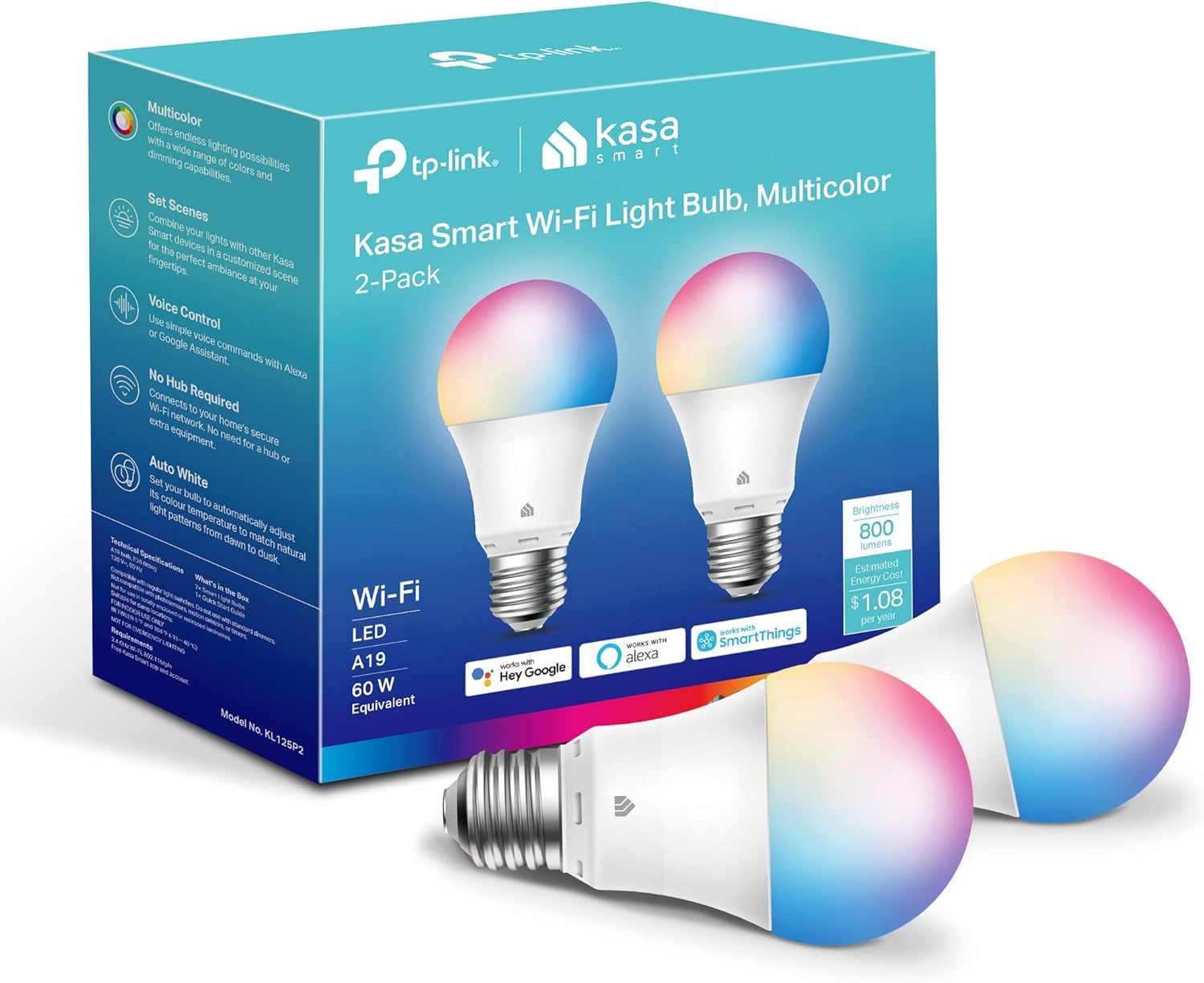
💡 Light up your life, your way — smart, stylish, and always connected!
The Kasa Smart Light Bulbs (2-pack) offer 16 million colors plus tunable warm-to-cool whites with 800 lumens brightness at just 9 watts. Compatible with Alexa and Google Home, these A19 bulbs require no hub and connect via 2.4GHz Wi-Fi. Control your lighting remotely through the Kasa app, set schedules, and monitor energy usage effortlessly. Trusted by over 6 million users, these UL-certified bulbs combine vibrant customization with energy efficiency for a modern smart home experience.





| ASIN | B08TB6VXFL |
| Accepted voltage frequency | 100 to 120 Volts and 60 Hertz |
| Batteries Included? | No |
| Batteries Required? | No |
| Best Sellers Rank | #537 in Industrial & Scientific ( See Top 100 in Industrial & Scientific ) #38 in LED Bulbs |
| Brand | Kasa Smart |
| Brightness | 800 Lumen |
| Bulb Base | E26 |
| Bulb Diameter | 2.36 Inches |
| Bulb Shape Size | A19 |
| Color | Multicolor |
| Color Rendering Index | 90 |
| Color Temperature | 6500 Kelvin |
| Control Method | Voice |
| Customer Reviews | 4.5 4.5 out of 5 stars (24,690) |
| Date First Available | January 20, 2021 |
| Efficiency | 800 lumens / 9 Watts = 88.89 lumens/Watt |
| Incandescent Equivalent Wattage | 60 Watts |
| Included Components | 2x Kasa Smart Light Bulb Multicolor, 1x Quick Installation Guide |
| Indoor/Outdoor Usage | Indoor |
| Item Package Quantity | 1 |
| Item Weight | 5 ounces |
| Item model number | KL125P2 |
| Light Color | RGB |
| Light Output Maximum | 800 Lumens |
| Light Source Type | LED |
| Light Source Wattage | 9 Watts |
| Light Type | LED |
| Manufacturer | TP-Link |
| Material | Plastic |
| Model Name | KL125P2 |
| Number of Items | 1 |
| Part Number | KL125P2 |
| Power Consumption | 60 Watts |
| Power Source | Corded Electric |
| Product Dimensions | 2.36"W x 4.52"H |
| Shape | a19 |
| Size | 800 Lumens, 2-Pack |
| Smart Home Compatibility | Smart Home Compatible |
| Special Feature | Auto White, Dimmable, Energy Monitoring, Tunable |
| Special Features | Auto White, Dimmable, Energy Monitoring, Tunable |
| Specific Uses For Product | Lighting |
| Specification Met | ul_listed |
| Style | Kasa Smart Bulb |
| UPC | 840030702389 |
| Unit Count | 2.0 Count |
| Voltage | 120 Volts |
| Warranty Description | 2-year warranty. |
| Wattage | 9 watts |
| White Brightness | 800 Lumens |
M**5
Lights, Camera, Action!
Easy to set up! There are multiple colors available in the app to choose from. I just got mine a couple of days ago so I'll update if needed after I've used it for a little bit. My main reason for buying it was so that I can have a small light at night when I'm out. I have a cat and I'd perfer she not be in the dark when I go out at night (don't judge me🤭). The price was nice and it works as described. Love the fact that I can set a schedule and it works with Alexa!
E**T
Easy & Inexpensive Smart Bulb
I wanted to try a sunrise alarm clock to help me get out of bed in the morning, and realized I could do so cheaply using this smart bulb in my bedside lamp. It works great right out of the box and is super easy to use and set up. It works with Google Home, but I found the Kasa app to have even more use and functionality. I love that I can set it to gradually turn on in the morning, and it usually wakes me up before my regular alarm. The Circadian function is beautiful; it automatically adjusts the brightness based on the time of day and sunrise/sunset so it's not glaringly bright first thing in the morning or at night. I love that you can adjust the warmth of the light as well because I prefer a warmer, yellowish light in the bedroom. I haven't messed around much with other colors but it's cool that that's an option. The only downside is that you have to use the app or a widget on your phone to turn it on and off and the lamp has to be turned on at all times, so it's not as easy if other people want to use it.
R**R
Easy enough and works, but one small wish
So far so good. Though it’s only just been installed today it works and does have the color picker which is great. My only wish would be if it had hex color support. If it does I can’t find it. Was trying for a certain hue and it’s so close almost perfect, almost. Still so many to choose from and easy to adjust. Anyway it was easy to install, screw it in, sign up, connect. The connecting part was slightly confusing as you had to connect to their wifi I guess like a temp network also and switch back but only took about 10 minutes for everything to set up and now I’ve got great mood lighting. Hoping it lasts for a while.
G**.
great product
Super fun for the holidays and also you can use it as a regular amber/white bulb. They are bright but not SUPER bright. Perfect brightness for a front door porch or a patio
S**N
Great - Just Works - But Basic
I initially was a Hue bulb user but I had multiple quirks so I completely dumped them and switched over to the Kasa Bulbs. Reason I picked the Kasa Bulbs over others was because I already had some Kasa Switches and Kasa Plugs so I didn't want another App and another eco system to worry about. Also, my existing Kasa stuff works perfectly. With that said, here's my review Pros App is simple and straight forward (see negative) They work with Google, Alexa, IFTTT, and Smart Things (no Apple Homekit) so I'm not tied to a single smart system Brightness is great. Brighter than my Hues (1000 lumen bulb) No Hub needed Fast response. When I turn on or off the lights, or even change brightness/color, it's pretty much immediate - my friend has Feint Electric bulbs, and there is like a 3-5 second delay I can control lights remotely - when I'm away from home I can see status of the lights Price - 2 pack of Hue is $100 (not including hub). 2 pack of Kasa, about $30 Setup is super easy (see negative) Negatives The app being simple is a negative. Coming from the Hue app, Kasa app is super basic. While you can get it to do pretty much everything you could do in the Hue app, it's a lot of manual setup. Example: Hue has a ton of pre-setup scenes like night 'Misty Morning', etc. Whereas Kasa has 3 basic scenes to start. You can definitely 'recreate' any Hue scene in the app, but it's a lot of work. (small gripe) Continuing with, app, the home screen should be quick access to things (more grouping of icons). Example: Hue has all the scenes at the top and lights below that. So once you go in to the app, it's one click to change scenes or to turn off/on a light. In Kasa, it's extra click or additional scrolling to accomplish the same thing And then there are no add-ons like Hue to make the lights more fun and dynamic. Like on New Year, I could set Hue lights to 'Firework' and that was cool. There is zero dynamic modes with Kasa To go along with the 'fun' topic. You can link your Hue up media device and have it changes colors while it plays (music, tv). There is nothing in the Kasa ecosystem right now that does that. Setup can be annoying because the app can be confusing during setup. (see below for easy headache free setup) No Apple Homekit support IFTTT - does not support triggers, only actions. While I'm going to miss some things about the Hue lights, I'm not going to miss the headaches. Hue lights are more 'fun' (just don't expect no issues), but if you want lights that just work, have great brightness, color selection and are a fraction of the price of Hue, I highly suggest the Kasa bulbs Pre-setup notes If you are connected to a vpn on your phone or using AdGuard, disable it before you start Require 2.4Ghz WiFi. Will not connect to 5Ghz. On your phone connect to your 2.4Ghz WiFi before you start If you have more than 1 bulb to install, do 1 at a time. Don't install any of the other bulbs until you finish the previous. Setup works best when you wait about 20-30 seconds after you plug in the bulb before trying to it up. Setting up bulb 1 - in the Kasa app, press the + in the top right corner 2 - select Device 3 - select smart lights 4 - select Smart Bulb KL100 series 5 - click next on install screen 6 - click next on power screen 7 - app will try to connect to bulb, if it connects to bulb, skip to step 11 8 - if it fails to connect, wait like 5-10 seconds and hit 'try again' 9 - if it still fails to connect, open your WiFi settings on your phone and manually connect to the Bulb (bulb should be TP_Link....) 10- now go back to the app and hit 'try again' 11- pick the WiFi and enter your WiFi password 12- when you get to the 'Connect to your WiFi' screen, if the app switches you back your initial WiFi (takes about 20 seconds), click 'already connected'. If it doesn't auto switch you back, manually switch back to your initial WiFi and then click 'already connected' 13- Now name your Bulb 13- you're done. - repeat for each bulb you need to setup Now you can add a group (+ in top right corner of app) if you want group multiple bulbs together or create a scene, etc. NOTE: A group in Kasa won't show in Alexa. If you want a group in Alexa, in Alexa app go to Devices, scroll down to Groups and create a Group
J**N
Solid smart-bulb for everyday use
I installed this Kasa bulb in a lamp and it worked almost instantly — setup was easy, no hub needed, and it connected fine to my 2.4 GHz WiFi. The color-changing + dimmable features are great: I can pick from a wide range of hues or set cozy warm-white light, and brightness control is smooth. It plays nicely with voice assistants (Alexa / Google), which makes it convenient if you prefer hands-free control. The light output is bright enough for a medium-sized room (roughly equivalent to a 60W bulb), but when on colored modes it feels more ambient than ideal for focused tasks.
R**P
MUST HAVE!!
LOVE LOVE these bulbs. I have about 8 of these throughout my house. They work with Alexa so well. I love how I can adjust the brightness but also diferent colors. The price is perfect for what it does! If you have Alexa buy these!!!!
G**O
The smart bulb works great and is easy to set up. Brightness is excellent, and the color options are vibrant and accurate, making it perfect for both everyday lighting and mood settings. The build quality feels solid, and it has been reliable so far with no connection issues. Overall, it’s a great value for the price and a convenient upgrade from a regular bulb.
I**.
Deceptive ad, does not mention the voltage is not suitable for 220v (the standard voltage in the UAE and is still available on UAE amazon). After purchase I received an email informing me of this this and recommending I use a voltage converter. By this time it was too late to cancel. Proceed with caution.
P**E
These Kasa Smart Light Bulbs are amazing! The brightness is impressive—1000 lumens easily lights up an entire room—and the color range is incredible. I can switch from warm cozy lighting to vibrant colors in seconds right from my phone. Setup was a breeze with the Kasa app, and I love that they work perfectly with Alexa and Google Assistant. The dimming feature is smooth, and the customizable scenes make it easy to set the perfect mood for any occasion. Reliable connection, beautiful colors, and excellent brightness—these bulbs have completely upgraded my space. Highly recommend!
C**O
Los productos TP Link son grandiosos; tengo un router archer AX 6000, 6 interruptores inteligentes, 1 dimmer inteligente, 1 x 4 pack de smart plugs mini, dos regletas inteligentes con tres entradas, entre otros dispositivos de esta marca y no saben fallar, tienen un funcionamiento eficiente, además de que la aplicación Tp Link Kasa es bastante útil. En general puedo decir que este foco a pesar de ser económico tiene buen flujo luminoso (medido en lumen) bastante bueno, acercándose en calidad a la de su competencia "los focos phillips Hue" (los cuales tengo 1 x 2 pack), alumbra bastante bien mí escritorio, tiene una amplia gama de colores y temperatura de color (medida en Kelvin), lo empleo para uso rudo, varias horas al día, sin embargo llega a calentarse un poco, recomiendo no situarlos en sockets embebidos para que tengan una ventilación óptima. Para quienes comentan que su dispositivo pierde constantemente la conexión, sugiero que compren un enrutador TP Link de gama media (quizás un enrutador "TP-Link WiFi 6 AX3000 Smart WiFi Router" para arriba) para que tengan una mejor gestión de los dispositivos conectados a su red wi-fi, ya que inicialmente a mí me pasaba lo mismo, hasta que adquirí un buen enrutador, el router TP Link AX6000 (procuren también actualizar el firmware de su enrutador de manera periódica para no sufrir pérdida de velocidad en la transferencia de datos). Anteriormente tenía el módem típico que TELMEX provee, el cual sólo me brindaba 17 mb/s de los 200 mb/s contratados al momento de hacer el "speed test", desde que adquirí el enrutador TP Link antes mencionado el manejo de mis dispositivos es excelente, ya que gestiona de manera óptima todos los dispositivos y de manera simultánea, habiendo más de 20 dispositivos conectados a la vez (echo studio, echo dot, 4 pantallas, 2 laptops, 3 smart phones, y varias luces inteligentes Philips Hue y Tp Link), he hecho muchas mediciones de Speed test conectado a este enrutador TP Link Archer 6000 y en la banda de 5G, y puedo decir que la velocidad de transferencia de datos es de 200 mb/s en promedio, pero aún más importante, la gestión de los dispositivos es excelente. P.D. A mí me costó este smart bulb $309.49 mxn, precio imbatible para un foco inteligente de colores.
D**L
buenos focos para utilizarlos con un asistente virtual. Fácil de configurar y utilizar, en las noches ya no necesito pararme antes de dormir para apagar los focos, Alexa lo hace por mí.
Trustpilot
Hace 2 semanas
Hace 1 mes