We remain fully operational. Our teams are working around the clock to ensure your deliveries continue safely.

Descargar la aplicación


Servicios al cliente
Sobre nosotros
Copyright © 2025 Desertcart Holdings Limited
Descargar la aplicación
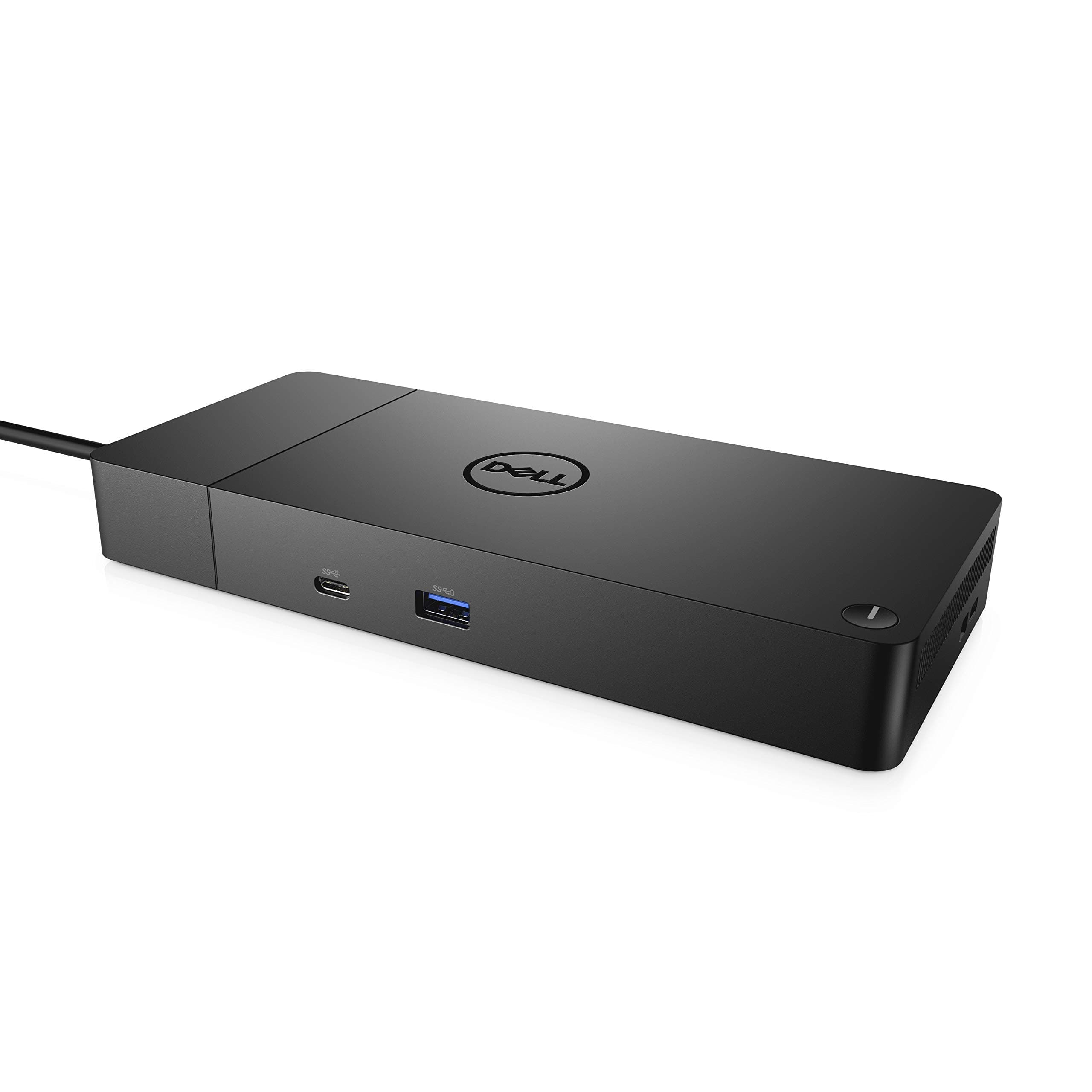
🚀 Elevate your workspace — dock, power, and connect like a boss!
The Dell WD19S Dock is a professional-grade USB-C docking station featuring 6 USB ports, HDMI and DisplayPort outputs supporting up to 4 monitors, and 180W power delivery with ExpressCharge. Designed for seamless multi-device connectivity and future-proof modular upgrades, it transforms your laptop into a powerhouse desktop setup with gigabit Ethernet and easy plug-and-play functionality.


| ASIN | B08XNJDRFB |
| Best Sellers Rank | 899 in Computers & Accessories ( See Top 100 in Computers & Accessories ) 9 in Docking Stations |
| Box Contents | 1 product |
| Brand Name | Dell |
| Colour | Black |
| Compatible Devices | Likely compatible with USB-C enabled devices, particularly Dell brand laptops and devices |
| Customer Reviews | 4.0 4.0 out of 5 stars (12,319) |
| EU Spare Part Availability Duration | 3 Years |
| Global Trade Identification Number | 00884116398349, 05397184513989 |
| Hardware Interface | USB Type C |
| Input Voltage | 120 Volts |
| Item Dimensions L x W x H | 20.5L x 9W x 2.9H centimetres |
| Item Type Name | Docking Station |
| Item Weight | 1.28 Pounds |
| Manufacturer | Dell |
| Number of Ports | 2 |
| Total HDMI Port | 1 |
| Total USB Ports | 6 |
| UPC | 884116398349 |
| Unit Count | 1.0 Count |
| Wattage | 90 watts |
K**D
A new experience with Windows, a device that works flawlessly first time!
This box does amazing things! With my Surface Laptop using Windows 10 it converts it into a desktop with 4 monitors all running at fairly high resolutions. See picture of the finished set up, though the Dell docking station is the little white LED light rather tucked behind the laptop, out of sight and soon out of mind. Monitor 0 is the one on the laptop, Monitors 1 to 3 are driven by the Dell effortlessly, the mouse moves smoothly from screen to screen. I've not tried gaming. It is light and you'll need to clamp the unit down if the wires are not to take over control - see pictures of installed unit. Setup of the Docking station, if you follow the instructions EXACTLY, is a breeze. It seems that this is in fact mostly due to the excellent hardware and driver software provided by Displaylink but Dell get credit for clear instructions and a neat package. Maybe it is time to return to Dell after 10 years or more away from them; they used to be the best once. It could be improved if the USB 3 cable supplied, which is a very strange one that goes to a keyhole shaped port on the back of the unit, has a very stiff cable which is a problem with a light laptop. A flexible, perhaps flat cable would be much better and, even better, one that has the USB at 90deg to the cable so that it does not need much side room would be good. That said, the USB plugs in firmly and well and the real miracle is that it works - so much data is transmitted seamlessly. I have now, within an hour of starting work got 4 monitors each showing different information and gigabit ethernet: 0. 2736x1824 1. 1050x1680 2. 1920x1200 3 1080x1920 Gigabit ethernet connection. Better still, on one of the monitors I have got a separate 3 way switch (not part of the Dell) so that I can connect a different PC to that monitor. When I press the button this switch disconnects a monitor from the Dell. The Dell/Windows 10 detects the change and I have a 3 monitor system. Click it again and it goes back to being a 4 monitor system. This is not quite flawless. Every now and then, one of the monitors will not be correctly synched. Turning the Dell on and Off once (pull out the power cable so keep it in reach) fixes this, so it is not very bad as it happens infrequently (one to work on though Dell/Displaylink/Microsoft ! ). What's not to like? Well the Dell User Guide says that the Displaylink software will be loaded with the Drivers and will provide you with some extra functionality that resizes the image on each monitor. Well it doesn't, at least on my Windows 10 system. No software is evident anywhere and I really do need to resize one of my displays. At full monitor resolution all the borders of the display are lost...moving windows then becomes very difficult. I have connected a USB mouse to the unit but it is not recognised. I've tried various ports to no avail. No mouse. Not all of the USB ports on the USB hub are powered. This is strange because the transformer is a 65watt one and the unit runs only a little bit warmer than room temperature so it is not using much power. So, it is rather annoying that you can't connect and get power on all 5 USB ports if you should need to. It is also likely to lead to confusion about which one is good for power and some discharged devices from time to time so it is not very user friendly. Given my expectations of what Windows would do for me, this gets a 5. Someone meaner might have made it a 4 because of the flaws above but, heck, this is an enormous improvement on past Windows kit.
S**D
Very happy
Brilliant dock. The port capacity is fantastic.
K**K
Once tried you never go back
Much more useful than first thought. I use my laptop mainly as a desktop for college work, and the ability to detach from keyboard, mouse, and screen by one cable is very handy, I have routed the cables much more nicely than having them trail all over the laptop and desk. I have also had to work from home at times and attaching the docking station to my works laptop (also Dell) saves a lot of time and rerouting of all peripheral cables. I did as the instructions said (and on the advice of other reviewers) and made sure the drivers were updated before installing, and have had no issues with the docking station. It would be nice to switch the laptop on without opening the lid, and it is a little pricey, but other than that I think it is worth the time saved on taking out multiple cables constantly. EDIT 02/06/2020 - I wrote the above review back on Nov 2017. The docking station is still going strong, and has proven invaluable now I work and study at home constantly during the COVD-19 pandemic. Switching between the work and home laptops is simple with just switching over the USB cable from one to the other.
M**A
Amazing. Turned out better than I expected.
First off - unfortunately it is poorly advertised (and marketed on the box) as a 'dock', which isn't true. In the traditional sense that you don't 'dock' the laptop into it and it therefore doesn't provide power to your laptop. I knew this from the off so it didn't come as a surprise. It is purely a gadget into which you plug your devices and displays allowing you to connect to everything via a single USB cable into your laptop. That said, it works great. I was apprehensive at some of the reviews but honestly, it's flawless so far. Before I continue, my laptop: It's a Dell Ultrabook with 8GB RAM with a Corei5 CPU. I read somewhere (I'm sure it was on the Dell site) that it recommends a Core i7. That seemed a little odd to me and thankfully that isn't the case. Setup: Download the Windows 10 drivers from the DisplayLink website. The ones Dell provide on their site didn't allow connected monitors to work in Windows 10. If you do install them by mistake however, Windows 10 should show a pop-up that you need to update the drivers. Once I'd run the DisplayLink driver installer and rebooted, everything came to life. I have 2 23" 1080p monitors connected. You need to go into display settings and use the box that lets you drag the monitor positions around. Once you have that set up, you're away. I also have a stereo amplifier plugged into the device and my audio is now much better as my laptop output jack was playing up previously. People mentioned display lag: For me there is none at all. I'm pleasantly surprised at how flawless it all is. I use a Lenovo X1 Carbon at work (expensive ultrabook) with a Lenovo device which does a similar job to this D3100 and I get lots of display lag on that. Tip: Turn off the Windows 10 screen 'snap' system. It's buried in settings under System > Multi-tasking > Snap (or search snap in the start menu). Otherwise every time you drag a window onto one of your external monitors, the window will try to snap into place at the bottom of the external screen. FY: I haven't tried the displayport connection or 4k and I'm not using the wired ethernet port so I can't comment on the performance of those. I have 2 1080p monitors connected via HDMI, a stereo amp via 3.5mm jack, a mouse and an external hard drive and all work perfectly. No screen lack or dodgy connections. I'm over the moon that I went ahead. I used to have a gaming PC connected up and sadly it's now so old and my laptop is much faster. This device has at least made my laptop a good device to use at my desk.
B**D
Utilisée avec une "Precision 7730" + 2 écrans 24 pouces depuis 10 mois, sans aucun problème. Alimentation externe recommandée par Dell, mais pas indispensable, en plus de la station d'accueil Mises à jour automatiques par Dell.
M**A
Ich benutze das Dock für 3 verschiedene Laptops, einen älteren precision, einen älteren latitude und einen aktuellen precision. Das Dock funktioniert prima. Das Kabel ist etwas kurz aber sonst ist alles prima. Dell halt. Es ist sogar ein gutes Netzteil dabei. Das steam Deck funktioniert auch prima an dem Dock und auch iPad wird erkannt.
S**N
Works really well with my two monitors and was very easy to setup.
Y**Y
Very fast delivery. Work good.
S**N
Worked perfectly.
Trustpilot
Hace 2 meses
Hace 1 mes