We remain fully operational. Our teams are working around the clock to ensure your deliveries continue safely.

Descargar la aplicación


Servicios al cliente
Sobre nosotros
Copyright © 2025 Desertcart Holdings Limited
Descargar la aplicación
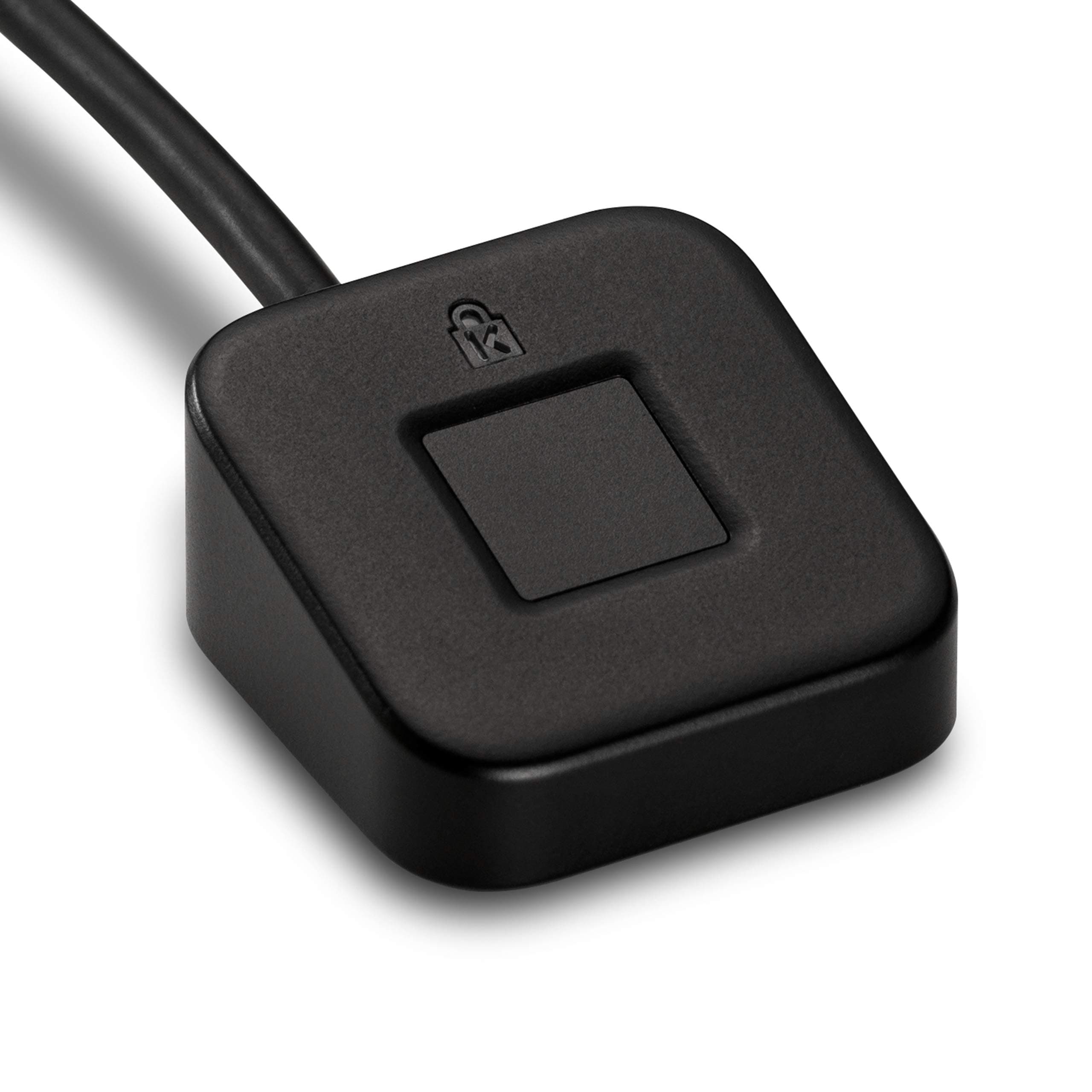
🔐 Unlock your digital world with a touch — security that’s as smart as you are.
The Kensington VeriMark Desktop Fingerprint Reader is a compact, USB 3.0 biometric security key designed for professionals seeking fast, reliable, and multi-factor authentication. Featuring 360-degree fingerprint readability and FIDO2/WebAuthn certification, it integrates seamlessly with Windows Hello and supports up to 10 fingerprints. Engineered for high accuracy with a false acceptance rate of 0.001% and false rejection rate of 2%, it ensures enterprise-grade security while complying with GDPR and other privacy regulations.


| ASIN | B08WPHWN83 |
| Are Batteries Included | No |
| Batteries | A batteries required. |
| Best Sellers Rank | 4,314 in Computers & Accessories ( See Top 100 in Computers & Accessories ) 448 in Laptop Accessories |
| Brand | Kensington |
| Colour | black |
| Computer Memory Type | DIMM |
| Customer Reviews | 3.9 3.9 out of 5 stars (4,772) |
| Date First Available | 16 Feb. 2021 |
| Guaranteed software updates until | unknown |
| Item Weight | 57 g |
| Item model number | K62330WW |
| Lithium Battery Packaging | Batteries contained in equipment |
| Manufacturer | Kensington |
| Power Source | Wired |
| Product Dimensions | 13.21 x 11.68 x 4.57 cm; 57 g |
| Series | VeriMark |
X**6
Plug and play desktop fingerprint login
This is absolutely excellent. I have it connected to my USB hub and when I switch laptops I can still login to anything with the same fingerprint reader, which I have in its ideal position on my desk. Plug and play, so no setup - Windows detected it immediately and I can use it for Windows Hello fingerprint login once registering my fingerprints on each laptop. The device itself seems high quality. It's very small in size but the fingerprint pad itself is relatively big, and it easily identifies my fingers. Very pleased with it.
C**.
The most reliable 3rd party fingerprint sensor I have found.
This sensor was significantly more expensive than others, but it is the most reliable I have used. My laptop has a built-in sensor which works well, but at home I use large external monitors, and keyboard, and my laptop remains closed - so I wanted a sensor that I could connect to a USB extension cable. I had a semi-generic Chinese make that worked well for a few years, but recently has been failing to recognise my fingerprint on around 50% of the attempts. I could not buy a direct replacement from Amazon, I tried a similar alternative, and it was worse. Finally I splashed out on this Kensington item. It works excellently, and even shows a small light when reading a fingerprint -red or white.
B**T
Low accuracy, not really worth its cost in time
It’s cool to have a fingerprint sensor. And often, they work super well. My hands could be sopping wet when I get to my MacBook and while I wouldn’t handle my MacBook in that state, I’m highly confident it would pick up my fingerprint still anyway. For £30, the verimark falls short of that by far. It was easy to set up and worked well with my desktop (I put it in the USB port my keyboard has), and it looks cool on the keyboard. It’s plenty small enough and seemingly works with a lot more than just Microsoft’s surface devices. However, it just doesn’t pick up my fingerprint very well at all after initial scanning regardless of how clean my hands are. I’ve tried redoing it twice since and it still just refuses probably over half the time to recognise me. It also REALLY doesn’t help that unlike macOS, you either have to click or swipe up into the login screen and then either fail scanning your fingerprint something like 5-7 times or press some fiddly buttons to have the right to enter your pin in Windows 11 if you start to realise the sensor won’t work. All in all, I just tragically can’t recommend it for £30.
T**D
Not the easiest to set up
Worked effortlessly on my laptop, just plug and play. Would not work on my two desktops - one being a specialist made pc only a couple of months old. Downloaded drivers and tried several suggestions from other users but could not get it to work.
M**K
An extra layer of security to your PC and Online accounts
Say Goodbye to «Forgot password? / Reset your account» and other hassles faced of remembering the password. The Kensington VeriMark IT Fingerprint Key is a USB dongle that adds an additional secure login layer to your computer and to some websites and services. With the help of this fingerprint scanner from Kensington - you can easily log on to your PC and also to your favourite websites through the touch of your finger. · There is no need to remember the password, just place your finger over the scanner whenever the screen prompts you to enter username or password. · The scanner is compatible with Windows 7, 8/8.1 and 10. Moreover, it is also compatible with Windows Hello, Windows Azure, Office 365, OneDrive, Skype and other Microsoft services which opens up the possibility for the IT administrators to easily manage the employee’s authentication methods. In addition to Windows Hello compatibility, the reader also comes with FIDO2/WebAuthn compatible which means that you also get the option to use the fingerprint scanner as part of the Two-Factor Authentication to log into various websites, apps or services directly from a web browser (all the popular ones are supported: Google Chrome, Mozilla Firefox, Microsoft Edge etc.) · Encryption is also used to protect all the fingerprint data held on the reader. · On one side of the dongle, there is a padlock-shaped LED. When accessing a website with it, it lights WHITE when you use the correct fingerprint and RED when you use the wrong fingerprint. ⓘ KEEP IN MIND: The Web Authentication is supported on Windows 10 only! ✔ Pros: + You can easily sign-in to the Windows with your fingerprint (without remembering usernames and passwords) + The sensor is fast and accurate + Can be used with multiple computers + Easy to install and to use + Compact size ✖ Cons: - No complaints (I will update this post if any quality issues arise) 👉 Features I would like to Add, Change or Remove: · Add Mac / Linux support · Add a cover or other design solution - to be able to attach the dongle to a keychain or something else for safekeeping This is definitely something I would recommend to anyone who takes their device with them anywhere to help keep those important files and information locked and secured / to keep undesired users away when using the login process.
M**B
Nothing has ever been so painless, this is truly plug-and-play: you plug it in a USB-A port and Windows instantly takes care of everything. 10 seconds later it's ready to work. At this point you'll just have to go to Windows Hello in your settings to register up to 10 fingers. In my experience, this sensor is about as fast and as reliable as the second Touch ID sensor from Apple (which is considered as a leading standard in fingerprint authentication). I haven't yet fully tested U2F. Look for it in a subsequent edit. EDIT >> I have now had the time to test U2F and there are a couple of things to know: * This doesn't work like a Yubikey for example. U2F in this, the same as for Windows Hello, is directly tied to the computer where the fingerprints and the 2-factor auth had been set up (in fact, as far as I understand this, it's Windows Hello itself that manages the U2F bit in conjunction with the reader). It is therefore not portable, no data whatsoever is stored on the actual sensor. You can't just take this dongle and plug it in an another computer to authenticate; it won't work. You can however set this up with multiple computers you own. For each one of these, you must run through the entire set up process and register a "new key" with your websites. If you were hoping to trike two birds with one stone using this (fingerprint scanning and portable U2F), you are out of luck. This severely cuts the usefulness of U2F support as, generally, your own computers will be considered trusted devices for 2FA and will never be asked to use codes or keys. * U2F support just came to Edge in the 1809 Windows 10 update and it's still flaky. It's outright unsupported on Firefox (unless if you dig in the config page and manually enable it, and even then it's not reliable). If you use Chrome, you're good to go. END OF EDIT <<
A**B
Słabo działa, szczególnie za te pieniądze, często i tak muszę wpisywać pin, ocena 3 jest i tak szczodra.
B**M
Denna fingeravtrycksläsare monterade jag på en stationär dator. Fingerskannern igenkänndes omedelbart av Windows 11 och den fungerar alldeles utmärkt. Rekommenderas absolut med högsta betyg.
M**L
The Kensington VeriMark IT Fingerprint Key is a high-quality security key with a premium metal build—feels durable and well-made right out of the box. Setup was smooth with Windows Hello, and the driver installed automatically via Windows Update, no manual steps needed. It works flawlessly with my password manager and is compatible across multiple PCs, making it a reliable choice for both personal and work setups. Only downside? You need to touch it lightly—pressing too hard and it won’t register your fingerprint. Once you get the feel for it, it reads fast and accurately. Bottom line: Sturdy, easy to set up, and does its job well. Just be gentle with the touch.
K**.
Trustworthy brand, needs no introduction. Bought it for ₹3830, substantially more expensive than my previous USB fingerprint reader from Secureye (more than 2x), but it died recently after 3 years of usage, so had to buy this. Just in case you're wondering, it costs $19 on amazon.com (US), which is roughly about ₹1600. Since it gets imported here, it becomes so expensive. Works great on my Asus VivoBook 17 running Windows 11 Home, though after plugging it in for the first time, had to restart my computer so that Windows recognizes it properly. Proper Plug and Play experience. Much better compared to the previous one, as in that case I had to go to company's website, download the drivers, install them and what not. Build quality seems pretty good. Hope it lasts much longer than the one I had before. Works well with U2F on websites. I've used it with Google. Prompt comes automatically through Windows Hello when signing in. It's Made in Taiwan. If you can, wait for some kind of sale, it can go below ₹3K.
Trustpilot
Hace 1 semana
Hace 2 semanas