We remain fully operational. Our teams are working around the clock to ensure your deliveries continue safely.

Descargar la aplicación


Servicios al cliente
Sobre nosotros
Copyright © 2025 Desertcart Holdings Limited
Descargar la aplicación

🚀 Elevate your office game with speed, smarts, and seamless mobile power!
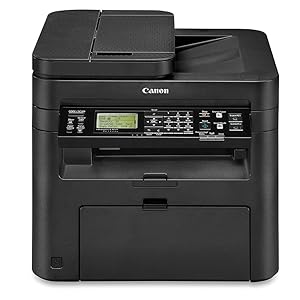
The Canon imageCLASS MF244dw is a robust monochrome laser multifunction printer designed for small to home offices. Delivering professional-quality prints at up to 28 pages per minute with automatic duplexing, it features wireless connectivity including Wi-Fi Direct and mobile printing support via AirPrint, Mopria, and Google Cloud Print. Its 250-sheet capacity and single combined toner/drum cartridge system ensure high-volume efficiency and easy maintenance. With a responsive tiltable LCD and energy-saving modes, this reliable all-in-one device balances performance, convenience, and cost-effectiveness for busy professionals.




| ASIN | B01K9L6TS6 |
| Additional Printer functions | All In One |
| Best Sellers Rank | #648,156 in Office Products ( See Top 100 in Office Products ) #943 in Laser Computer Printers |
| Compatible Devices | Smartphones |
| Control Method | App |
| Controller Type | Android |
| Customer Reviews | 4.1 4.1 out of 5 stars (454) |
| Date First Available | August 12, 2016 |
| Dual-sided printing | Yes |
| Duplex | Automatic |
| Global Trade Identification Number | 00013803275100 |
| Hardware Interface | Ethernet |
| Included Components | ISO/IEC standard), MF244dw Product, Power Cord, Starter Cartridge 137 (Starter Yield: 1,700 pages, Starter Guide, User Software DVD‐ROM, Warranty Card |
| Ink Color | black |
| Is Discontinued By Manufacturer | No |
| Item Weight | 26.7 pounds |
| Item model number | Canon imageCLASS MF244dw |
| Manufacturer | Canon USA (Lasers) |
| Max Copy Speed (Black & White) | 28 ppm |
| Max Input Sheet Capacity | 250 |
| Max copy resolution black-white | 1200 x 1200 dpi |
| Maximum Black and White Print Resolution | 1200 x 1200 dpi |
| Maximum Media Size | 8.5 x 14 inch |
| Maximum copies per run | 28 |
| Memory Storage Capacity | 512 MB |
| Model Series | MF244dw |
| Number of Trays | 1 |
| Number of USB 2 Ports | 1 |
| Print media | Paper (plain) |
| Processor Count | 1 |
| Product Dimensions | 14.7 x 15.4 x 14.2 inches |
| Scanner Type | Automatic Document Feeder (ADF) |
| Series Number | 244 |
| Sheet Size | 8.5 inches |
| Specific Uses For Product | Home, Office, home office |
| Total Ethernet Ports | 1 |
| Total USB Ports | 1 |
| UPC | 013803275100 |
| Warranty Type | Full Warranty |
| Wattage | 2 watts |
I**S
Canon ImageCLASS MF244dw: A Rock-Solid Workhorse That's Still Going Strong After 8+ Years
I bought my Canon ImageCLASS MF244dw back in October 2017 for my home office, and it's been an absolute beast ever since. This monochrome laser all-in-one (print, scan, copy) has handled heavy daily use without a single major issue—no jams, no breakdowns, no service calls. It's truly flawless in reliability, which is why I've since purchased **two more identical units** for backup and other workspaces. All three are the same model, and they all perform with the same bulletproof consistency. What stands out most is how **efficient it is with toner**. The genuine Canon 137 cartridge is rated for about 2,400 pages, but in real-world use (mostly text documents, reports, and invoices at standard 5% coverage), I get even more out of each one. I print a lot—easily 1,000-2,000 pages a month for work—and cartridges last me months without running dry unexpectedly. Compared to inkjets I've owned before, this laser doesn't waste toner on cleaning cycles or dry out if left idle. The single-cartridge system (toner + drum combined) makes replacements quick and mess-free. Print quality is sharp and professional every time—crisp black text, decent graphics for business needs, and fast speeds (up to 28 ppm) with duplex printing built-in. Wireless setup was straightforward, and it connects reliably to my phones, laptops, and network for AirPrint or scanning. The scanner/copier is solid too, with an auto document feeder that handles multi-page jobs effortlessly. Eight years later (as of 2026), my original MF244dw is still humming along like day one. No faded prints, no error codes, just pure dependability. If you're looking for a no-nonsense, high-volume monochrome laser that won't nickel-and-dime you on supplies, this is it. Canon nailed it with this model—highly recommended for anyone with real work to do!
L**M
ALL printer setups should be as painless as this
Allow me to preface this by saying that setting up printers never goes well for me, even as an IT professional (with experience in everything from end-user support development and even some database administration). I originally purchased the Brother HL-L2340DW, arguably the most-purchased, most-reviewed, and highest-rated printer on Amazon. Although network setup went smoothly, nothing else did- it never registered or was recognized by Google Cloud Print or even its own drivers/network configuration software. I was skeptical of this printer, more so than others because of the relatively small number of reviews, a number of which said the installation instructions were unclear or that they had difficulty setting it up. From my perspective, the setup couldn't have been easier. Wireless (WLAN) setup: -I plugged the printer in and used manual WLAN setup to punch in my network details and configure a static address for the printer (a slight oddity here- enabling and assigning a static address does not disable DHCP IP retrieval, but it was inconsequential to the setup as it only took 2 seconds to turn off). From plug-in to successfully pinging the access point (the printer includes a built-in utility for pinging) was less than 5 minutes. Google Cloud Print setup: -As soon as the printer was on the network, every Cloud Print capable device was able to see the printer, and I was able to register it under my account and connect all other devices in less than 10 minutes. Samsung Print Service setup: -Surprisingly, the Samsung print service that comes pre-installed on many Samsung devices did not need any additional configuration to work with this printer. Windows Driver setup: -MAJOR, MAJOR KUDOS TO CANON - the Windows "full driver package" dated February 10 2017 (2/10/2017) on Canon's website included NO BLOAT WHATSOEVER. I struggle to find a printer these days which doesn't try to install 8 different pieces of software for ink ads (that you have to install anyway because the "driver only" packages magically don't work...). -Canon's proprietary UFR II driver does provide lightning-fast print jobs, but you'd be almost equally well serviced by the PCL print driver if you need something with a bit more compatibility. -I have had success with installing the UFR II drivers on the following machines: Windows 7 Professional x64, Windows 10 Home x64, and Windows 10 Enterprise x64. Other thoughts: -For my model, the print and scan quality is fine. It's at least as good as the Brother before it, and easily better than the HP inkjet it replaced. -The LCD interface has good visibility and contrast, and it snappy and responsive. I've heard this is not true of the upgraded touch-screen model, but I can't personally confirm this. -The plastic housing does feel a bit flimsy in some areas, but I don't intend to be hitting the thing with a hammer (well... so long as it works), so I imagine it will be fine. -This printer seems to have no trouble waking from sleep to print. I've had numerous HP and Brother printers struggle with this, but the Canon has been extremely reliable. TL;DR: -Easy WLAN setup for devices of numerous make/model/driver/service -No driver bloat -Fast, quality printing and scanning -NO driver bloat! -Reliable wake from sleep -NO DRIVER BLOAT! NONE! This printer has been a dream to work with. Canon was the underdog between HP and Brother in the printer market, and so I didn't honestly expect much, but this printer has blown me away in initial impressions. If it lasts and Canon doesn't stray too far from what they've done here, they'll have made a lifelong printer customer out of me.
A**R
I have two restaurants and purchased two .The quality is outstanding the first Cannon product I purchased ten yrs old and still running at home
V**O
Love the fact that I can now print wirelessly from any laptop within range! I also love the 2-sided feature.
D**E
This a real nice looking printer. It arrived in it's own carton but travelled pretty well, no dings or scratches. It takes a bit of messing around in the settings to get it going the way you want it to but from there it's all good. The first thing you should do is hit the MENU button and spend some time familiarising yourself with the various options ... and there are lots of them. Driver installation took only a couple of minutes and provides all the needed features. You will need to go into the printer's preferences in Control Panel->Devices and Printers and manually set it to Collate if you don't want to have to sort the pages after printing multiple copies. This preference is a default, so you only have to do this once. (I learned this the hard way by printing 10 copies of a 12 page document) Printing is just like with any other printer. CTRL-P and away you go. Scanning is a bit tricky, if you're not careful the scans can come out crooked on the page. Use the document feeder with the side rails set tight to the paper to prevent this. Pros: Double sided printing! Fast Easy to use Relatively quiet Cons: Single sided scanning ... They put a single sided scanner on a double sided printer. Big ... this isn't the biggest all-in-one laser printer I've used but it's still a pretty hefty size. The instruction manual is practically useless... but it's not hard to figure out from the display. I like it and I've always had good luck with Canon copiers and printers.
Trustpilot
Hace 2 semanas
Hace 2 semanas