We remain fully operational. Our teams are working around the clock to ensure your deliveries continue safely.

Descargar la aplicación


Servicios al cliente
Sobre nosotros
Copyright © 2025 Desertcart Holdings Limited
Descargar la aplicación
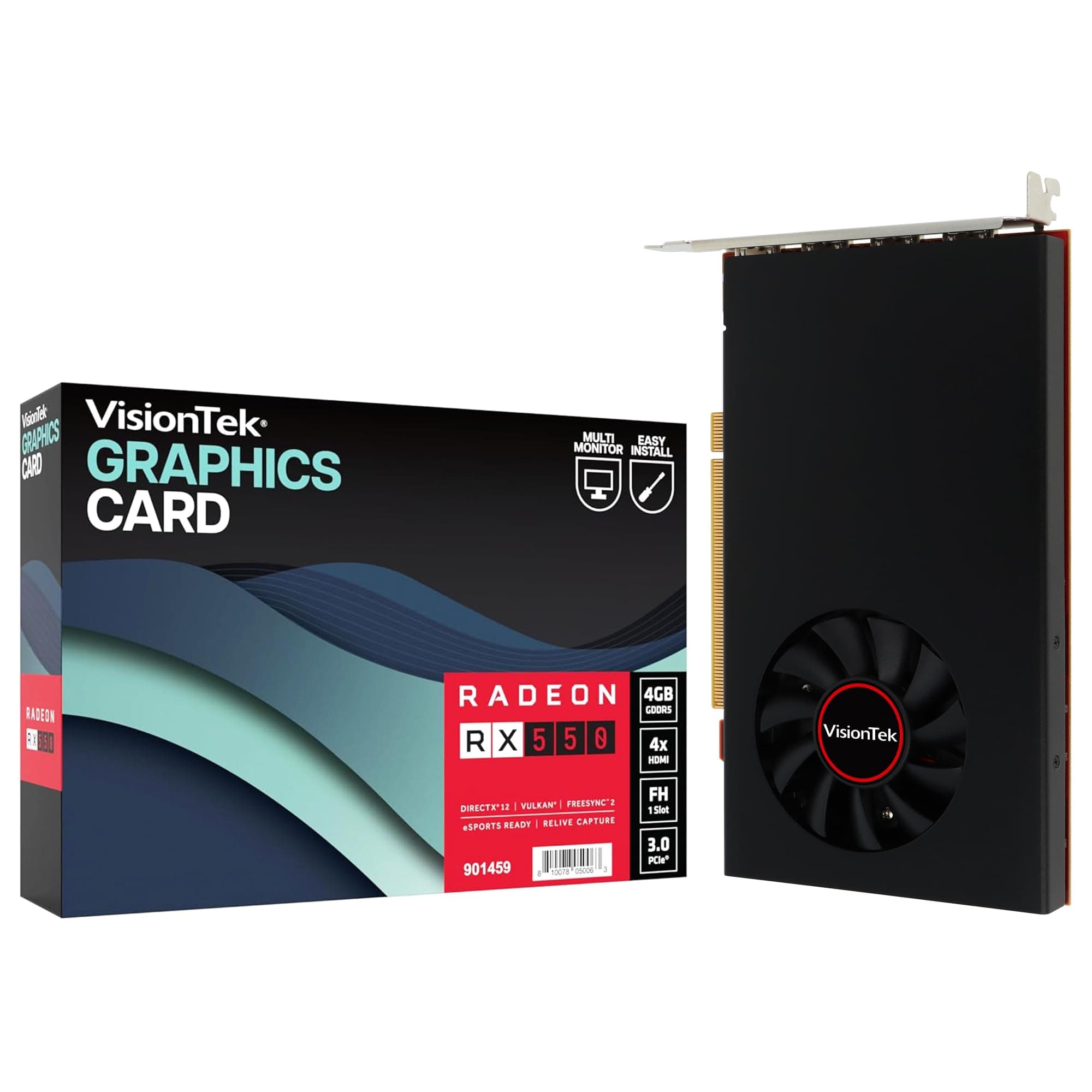
🚀 Elevate your visuals, dominate your workspace.
The VisionTek Radeon RX 550 4GB GDDR5 graphics card delivers stunning 4K resolution across four HDMI outputs, powered efficiently via PCI Express 3.0 without extra cables. Featuring Radeon FreeSync 2 for tear-free gaming and HDR support, it combines 4GB of high-speed GDDR5 memory with a 1500MHz clock for smooth gaming and professional-grade video editing. Backed by a 3-year warranty, it’s a reliable upgrade for gamers and creatives seeking crisp visuals and hassle-free installation.


| ASIN | B09B83MV78 |
| Best Sellers Rank | #124 in Computer Graphics Cards |
| Brand | VisionTek |
| Built-In Media | Graphic Card |
| Compatible Devices | Monitors |
| Customer Reviews | 4.1 4.1 out of 5 stars (66) |
| Display Resolution Maximum | 4096x2160 Pixels |
| Global Trade Identification Number | 00810078050063 |
| Graphics Card Interface | PCI Express, PCI-Express x8 |
| Graphics Card Ram | 4 GB |
| Graphics Coprocessor | Radeon™ RX 550 |
| Graphics Description | VisionTek Radeon RX 550 4GB GDDR5 |
| Graphics Ram Type | GDDR5 |
| Item Dimensions L x W | 6.9"L x 9.4"W |
| Item Type Name | Graphic Card |
| Item Weight | 13.4 Ounces |
| Manufacturer | VisionTek Products, LLC |
| Memory Clock Speed | 1500 MHz |
| Model Name | RADEON RX 550 4GB Graphics Card |
| UPC | 810078050063 |
| Unit Count | 1.0 Count |
| Video Output Interface | HDMI |
| Video Processor | AMD |
| Warranty Description | 1 Year |
D**R
Radeon Upgrade
Bought this to replace an older Radeon card that did not play well with WIndows 11. Kept locking up the system. No new drivers. New one has been running for over a week with no errors. Plug and play. Quick and dirty. I'm happy.
P**S
Works For Video Editing
Unlike most users, I am not a gamer. I needed to upgrade the graphics card on my Dell XPS 8910 tower for the purposes of video editing using Davinci Resolve 17. The card that came with the unit did not support OpenCL and had only 2 GB of memory so the program would always fail when I tried to render even the simplest videos. So I was more interested in the ability of the GPU to support video and photo editing. From that perspective I am very happy. I was able to edit a half hour worth of 4K video without having to use proxy files and the video played smoothly while editing. And when it came to rendering, it worked flawlessly. Installation was very easy and the driver auto installed after a few minutes. Gamers may have other opinions, but as a video editor on a fairly simple set up, it has been well worth the money.
O**D
Works *great* with Linux
I've struggled trying to get multi-head stuff working for years with Nvidia products. Recently (thank you chat gpt) I came to understand that one can just count on AMD video cards working well with Linux so I got one of these. I will not touch NV for video ever again - this is an awesome card! I'm using it with Mint (so Ubuntu (so Debian)). I didn't have to do anything - it just worked.
T**N
NOT RECOMMENDED! Does not drive 4 ports reliably even at less then 4K resolution
Requires DisplayPort cabling? The VisionTek website says that this card only supports 4 4K displays using "Four displays are at your fingertips with VisionTek’s multi-monitor graphics cards, offering 4K resolutions with direct DisplayPort connections. Using the appropriate active adapters, you have access to the best possible resolutions spread to enough monitors to make a command center out of your standard desktop." What the heck? It has 4 HDMI ports NO DisplayPort ports! And it cautions about using converters as being bad... Ok, I installed this to replace a 3 port card. Right from the start, the 4th monitor didn't work. Windows detected that monitor but it stayed blank. Tried all sorts of things - New cables, swapping cables and ports, etc. It would not drive 4 ports with 3 at 4K and 1 port at 1920x1280. Sometimes it would work for a while...then one of the displays would just blank out forever. Ok, something is very wrong here! From the other comments it appears that it works SOMETIMES as I've found out. So, no, this card doesn't really support 4 monitors at all! I am returning this card. NOT RECOMMENDED!
A**E
Great product
Very satisfied! Was exactly what we needed to expand our video capabilities during church services.
A**N
does what it says it does
Within less than 1/2 a yr, one of the ports just stopped detecting a monitor device at the other end of the cable and shut the port off. Moved it to another port, and it came back. Annoying, to say the least but survivable because I was not using all ports.
M**T
Runs five different tvs for our church
Installed this in a new computer for express purpose of running multiple tvs in our church. Works fantastic for that purpose. Our video output is graphic intensive, but for slides (basically) which do not require a fast refresh rate. My install allowed me to keep the factory HDMI output for running the computer’s monitor and use all 4 outputs here for the tvs, eliminating the need for a signal splitter. Very happy with the performance for my use.
A**M
Decent replacement for Nvidia NVS 510
Noticed using Nvidia NVS 510 in Windows 11 Pro for basic, non-gaming usage had 100% GPU utilization only using two displays. Swapped it out with this card, and utilization went down to 30%. Given Nvidia is not providing driver updates for the NVS 510, this is a decent replacement for it.
P**E
super
Trustpilot
Hace 3 semanas
Hace 2 meses