We remain fully operational. Our teams are working around the clock to ensure your deliveries continue safely.

Descargar la aplicación


Servicios al cliente
Sobre nosotros
Copyright © 2025 Desertcart Holdings Limited
Descargar la aplicación
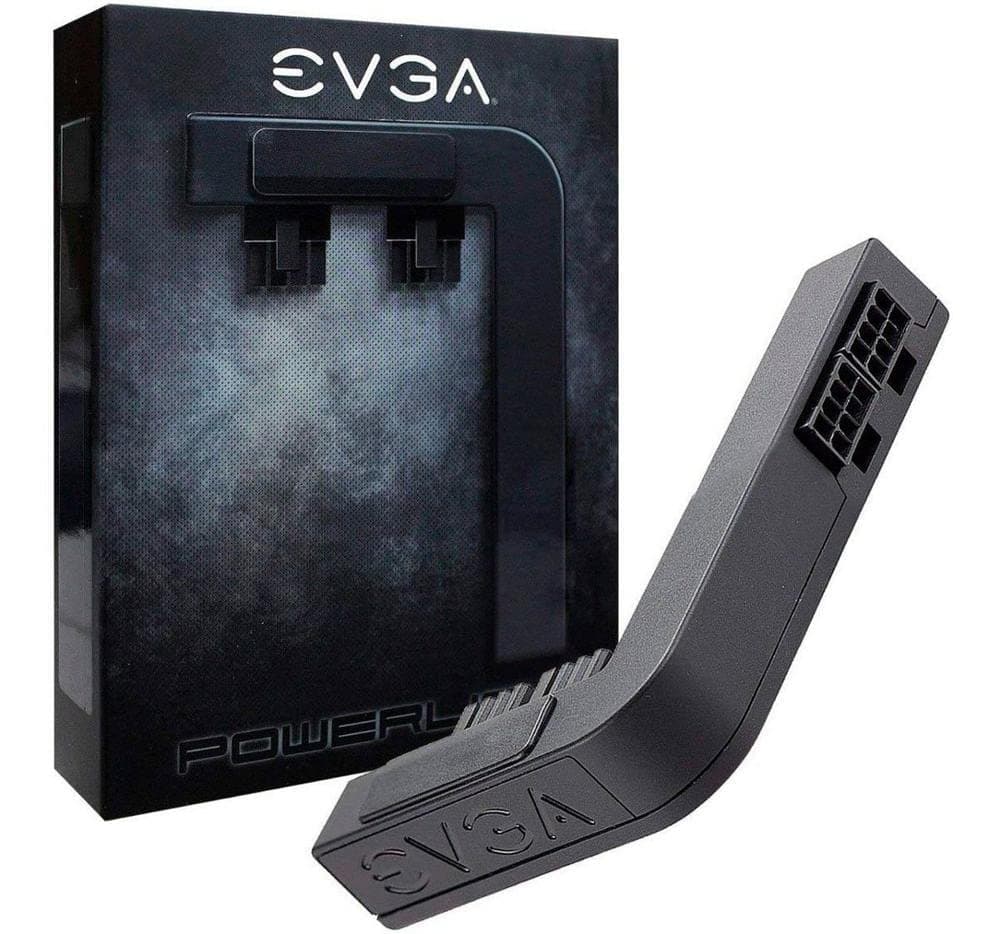
⚡ Power up your rig with flawless flow and flawless looks!
The EVGA PowerLink is a premium PCI-E power adapter designed to optimize power distribution and cable management for NVIDIA Founders Edition and EVGA GeForce RTX 20/16/10 series GPUs. Featuring integrated solid-state capacitors, it reduces power ripple and noise, ensuring stable performance even under overclocking. Its adjustable design enables cleaner wiring and improved airflow, enhancing both aesthetics and cooling. Ideal for professionals and gamers seeking a sleek, reliable upgrade to their GPU power setup.


| ASIN | B01MQ1YEYH |
| Antenna Location | Gaming |
| Best Sellers Rank | #412 in Computer Graphics Cards #1,883 in Computer Cable Adapters #2,871 in Audio & Video Connectors & Adapters |
| Brand | EVGA |
| Built-In Media | 6-Pin Connector, 8-Pin Connector(2), Allen Wrench, EVGA PowerLink, Installation Guide |
| Compatible Devices | Compatibility of the EVGA PowerLink, Support ALL NVIDIA Founders Edition & ALL EVGA GeForce RTX 2080 Ti/2080/2070*/2060*/SUPER*/GTX 1660 Ti*/1660*/1650/1080 Ti/1080/1070 Ti/1070/1060 (600-PL-2816-LR) |
| Customer Reviews | 4.4 4.4 out of 5 stars (2,447) |
| Display Resolution Maximum | 7680x4320 |
| Global Trade Identification Number | 00843368044091 |
| Graphics Card Interface | PCI Express |
| Graphics Card Ram | 11 GB |
| Graphics Coprocessor | NVIDIA GeForce GTX 1060, NVIDIA GeForce GTX 1070, NVIDIA GeForce GTX 1080, NVIDIA GeForce GTX 1080 Ti, NVIDIA GeForce GTX 1650, NVIDIA GeForce GTX 1660, NVIDIA GeForce GTX 1660 Ti, NVIDIA GeForce GTX1660 SUPER, NVIDIA GeForce RTX 2060, NVIDIA GeForce RTX 2070, NVIDIA GeForce RTX 2080, NVIDIA GeForce RTX 3060 Ti |
| Graphics Description | High-performance NVIDIA GeForce RTX 3060 Ti graphics card |
| Graphics Ram Type | Unknown |
| Item Type Name | EVGA 600-PL-2816-LR Powerlink, Revolutionized Cable Management! |
| Item Weight | 0.15 Pounds |
| Manufacturer | EVGA |
| Memory Clock Speed | 1600 MHz |
| Model Name | Powerlink |
| UPC | 843368044091 |
| Unit Count | 1.0 Count |
| Video Output Interface | [At Least One of] [HDMI, DisplayPort, DVI] |
| Video Processor | NVIDIA |
| Warranty Description | 2 Year Warranty |
S**0
Great product, but watch those tiny screws!
I received this after deciding to purchase to help clean up my graphics card cabling which was sort of inhibiting my really clean look. I received it a couple of days later and immediately set to installing it in my case. After removing the power cord from my case (always do this!) and taking off the cover I measured (visually) where my connectors should be and then went about the task of using the tiny screwdriver device to loosen the tiny screws on the device. Much to my surprise they not only loosened but one came out! ACK! This thing is so tiny it's near microscopic and for a second I panicked as I looked frantically for it. I really wish they'd have made these not come all the way out but rather just loosen. That's my only criticism here. However, they do include two extra in case you do lose one so... After a little bit of work I got the alignment right and installed it. I reconnected everything and turned on my PC and didn't get video. After taking a deep breath disconnected the power and reseated the cabling at the base of this device, connected things back up and restarted the PC and voila, I got video and everything now is working great and looks great. I'd highly recommend this product, just keep a close eye on those screws! I'd recommend when you're adjusting the screws you do it over a clean desk with something, perhaps material, that is white to visually aid in case one drops.
C**S
Perfect for Mac Pro to balance power draw over both PCIe auxiliary power connections
Nice, simple, does exactly what it is supposed to do. It takes any combination of 6 pin and 8 pin inputs, connects all of the 12V lines in parallel, and then feeds it out. This results in power being pulled fairly evenly over both of the inputs rather than lopsided. For outputs it is set up for 8 + 8 by default, and there is one 6 pin output you can use instead of an 8 pin. The pamphlet in the package says that it is possible to request a second 6 pin output if you have a 6 + 6 card. I have a Mac Pro 5,1 with an Nvidia GeForce GTX 980Ti with a 6 pin and 8 pin auxiliary power input. Watching the amperage via iStat Menus I could see one drawing 7.5 - 8 amps and the other drawing 5 - 5.5 amps. With this connected it's now pulling about 6 - 6.5 amps from both. The Mac Pro will shut off if the power draw on one of the PCIe auxiliary power connections is too high in order to protect itself, something I ran into that a few times shortly after I got the card and was testing it out. To prevent that from happening while I was playing games under Windows I wound up using MSI Afterburner to limit the card's power draw to 90% of maximum. Once I had that configured I no longer ran into any abnormal shutdowns, but it also meant that there was some performance capacity still available that I couldn't use. After installing the PowerLink and seeing how it balanced the power draw over both auxiliary connections, I updated the Afterburner configuration so the card could pull 100% power again and run at full performance. After many, many hours of gaming I have yet to experience an unexpected shutdown. Update: Took some screen shots showing the power distribution with and without the PowerLink installed. Going through that process I found one minor little annoyance: it's difficult to remove the PowerLink from the video card when it is installed. The clip that holds it into the card can't be depressed to remove it. Instead, you need to take something tiny, like a plastic spudger, and slightly tilt the clip to release it. Not difficult, but it took me a few minutes before I realized I needed to do that. I also opened up the PowerLink and took some pictures of the inside in case anyone is curious. It does do a little bit more than just connect all of the 12v pins in parallel, but not much. The main thing to notice in the pictures is how lopsided the power draw was without the PowerLink installed. It was pulling 8 amps from the A feed but only 4.5-5 amps on the B feed. Skimming through the forums I ran across the theory that the sensor won't report higher than 8 amps while the protection mechanism kicks in (shuts off the machine) at 10+ amps. If that's true then the 8 amps that is shown on the boost A connection may actually be a bit higher than that. Also, while going through this I noticed that the PowerLink was pulling slightly more power from the lower plug than the upper. I think the maximum difference I noted between the two was about .5 amps briefly, but it was usually around .2 amps or less. Basically there was just enough of a difference to be noticed, but that's all. It's still far, far better then the 4-5 amp difference seen without the PowerLink. Anyway, I am still extremely pleased with the PowerLink. If you have one of the older Mac Pros (5,1 or earlier), and want to run one of the newer video cards, get this. While I can't guarantee it will prevent abnormal machine shutdowns due to pulling excess power from one of the PCIe aux power connections, it will absolutely reduce the likelihood.
J**N
Adds a very clean look to your cables and performs just as well!
If you have a compatible EVGA card (check item details), this adapter is fantastic! It takes about 5 minutes to install and if you need to reconfigure the 6 or 8 pin plug arrangement, that takes about one minute as well. Everything is super simple to adjust and install. If your PC case has a side window, this adapter makes things look very nice and clean. It also will help get your power cables out of the way and help with airflow (Depending on your particular setup). Given that the price of this thing is currently $9.99 (As of 9/20/2018) this is a no-brainer. Everything runs perfectly through this adapter! This thing is terrific! Highly recommended!
J**R
Does the job
It does the job, period, it's been working as it should since day one. Pros: - No aparent electric hazard or problems so far. - Depending on your setup, it can really improve the looks of the system and cable management. - If you're into RGB and like your system looking like a red light district, I'm sorry for you, this thing doesn't have any RGB on it. My faith in humanity is partially restored thanks to this product. Cons: - Only works with EVGA cards, the design isn't flexible enough to allow it's use with other brands. - It's a bit thick and on small cards it can look like a tumor, on bigger cards the looks are more appealing. Still, I wonder if EVGA will ever release an slimmer version of this device. - Installation can be painful, the little screws you use to accomodate the 6/8 pin connectors can be lost easily.
S**A
Looks great nice product for gpu power cable management and it has capacitors inside it that means it filters power before delivering to gpu
M**L
It might look better with it or without it, just try it on like clothing. It might take the space needed to fit a finger through to reach the push disconnects of the ATX plugs. My card has big aftermarket cooling fins right there, so it would be difficult to disconnect the plugs and may decrease airflow on them. The adapter may correct the size ratio of a small video card in a big computer case and definately puts the cables a bit out of visual focus.
I**F
Decent QoL product for those with OcD like myself, it re-routs GPU power connector cables to the side of the card making it look neat and tidy. Works with Nvidia Founders GPU's and 'vast' majority of EVGA's including my EVGA RTX 3060 XC. The only CON that I can think off is lack of logo RBG but that can be modded.
J**L
Perfect
M**T
reference 6950xt has a lip hanging over the power connectors preventing complete contact with the powerlink but after modification with a alphacool waterblock was able to fit. REMEMBER TO BRACE THIS DEVICE. as others state, IT WILL RIP OUT THE POWER CONNECTORS if not properly braced. i used a old gpu stand to at least level it and take the pressure from the cables. the modified gpu is a quarter of its original weight so it didint needed to be braced.
Trustpilot
Hace 4 días
Hace 1 mes