We remain fully operational. Our teams are working around the clock to ensure your deliveries continue safely.

Descargar la aplicación


Servicios al cliente
Sobre nosotros
Copyright © 2025 Desertcart Holdings Limited
Descargar la aplicación

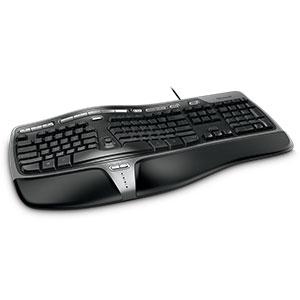
⌨️ Elevate your workspace comfort — type smarter, not harder!
The Microsoft Natural Ergonomic Keyboard 4000 is a wired, split-design keyboard engineered to promote natural hand, wrist, and forearm positioning. Featuring a cushioned palm rest and dedicated media keys, it enhances comfort and productivity for professional users. Its improved number pad and taskbar hotkeys streamline workflow, making it a top choice for office environments seeking ergonomic excellence.




| ASIN | B004SUIM4E |
| Additional Features | Ergonomic |
| Antenna Location | Office |
| Best Sellers Rank | #714 in Computer Keyboards |
| Brand | Microsoft |
| Built-In Media | Limited 3-Year Warranty, Microsoft Natural Ergonomic Keyboard 4000 |
| Button Quantity | 104 |
| Color | Black |
| Compatible Devices | PC |
| Connectivity Technology | Wired |
| Customer Reviews | 4.4 out of 5 stars 4,536 Reviews |
| Enclosure Material | Plastic |
| External Testing Certification | FCC, CE, VCCI, WEEE, CB |
| Global Trade Identification Number | 00803982728500, 05436639802565 |
| Hand Orientation | Ambidextrous |
| Is Electric | No |
| Item Dimensions L x W x H | 19.8"L x 10.3"W x 3.26"H |
| Item Weight | 22.44 Pounds |
| Keyboard Backlighting Color Support | Single Color |
| Keyboard Description | qwerty |
| Keyboard Layout | QWERTY |
| Language | English |
| Manufacturer | Microsoft Input |
| Model Name | 5QH-00001 |
| Model Number | 5QH-00001 |
| Number of Keys | 104 |
| Power Source | AC |
| Recommended Uses For Product | Office |
| Series Number | 500001 |
| Special Feature | Ergonomic |
| Style Name | Business |
| Theme | ergonomic |
| UPC | 887598377352 085783540783 763615766883 807030502319 706017847569 809185821314 731631156759 803982728500 885370247848 809186277929 168141472497 163121148133 031112688206 012951723389 971471818671 021111721967 172302696264 731631156803 132017926292 012303341674 999994677247 031112089799 809385672822 078667271224 014444848456 731631157503 |
| Unit Count | 1.0 Count |
| Warranty Description | Comes with Manufacturer Warranty. |
K**C
Great Ergonomics
I had bought this keyboard back in 2012 when I had tendonitis and needed to make my entire work set-up more ergonomic. This keyboard helped immensely! This keyboard comes with the extra bottom attachment to lift the keyboard, but I always found it more comfortable to use the keyboard without it (maybe just add a wrist-rest if needed). I type pretty often and very quickly, and it was easy to adjust to the split layout (only took a couple hours to remember which keys to hit with which hand...). The quality of this keyboard is pretty decent - I would still be using this keyboard to this day, but it had one-too-many liquid spills back in 2020 to the point that certain keys would not function, so that was that. I have used this keyboard for windows, linux, and mac (primarily mac) and can say that all the regular keyboard functions worked. All of the extras (i.e. 'media' buttons along the top and center) were inconsistent about working and depends on what system you are using. I didn't take too much time to force it into working, since I didn't really need those functions. I also travelled for work with this keyboard - although it's bulky, it does fit in the check-in bags, and the wired function is convenient since it doesn't require batteries. Although I loved this keyboard dearly, when it met it's untimely death, I looked for a replacement and I was surprised at the price this keyboard is currently at. It's definitely not something I would be able to afford back when I was working barely above minimum wage... I can't promise if it'll be worth the cost as there are other alternatives that could work just as well at a lower price. However, my experience of this keyboard was definitely excellent and met my ergonomic needs.
D**A
Works for what I need it for
I've been using this type of keyboard for years. I remember back in the late 1990/early 2000s, I was working as a medical transcriptionist and my supervisor at the time was using a "curved" white Microsoft Natural Elite keyboard. I was still using the typical, out-of-the-box, straight keyboard. She gave me hers to try out for a while. At first, I HATED it. My typing speed was terrible, I was pressing every wrong key, etc. But after I got used to it, I realized there was no way I could ever go back to a straight keyboard. Now, all of these years later I'm still working as a medical transcriptionist and have graduated up to the Microsoft 4000. I still have problems using a straight keyboard - in fact, when I'm using my laptop for work I cannot use the laptop keyboard and have to hook up my own keyboard in order to transcribe. Compared to all of the other "ergo" keyboards out there that I have tried (and I have tried quite a few), this is the best I've found. Now, I have never tried the Kinesis which I hear once you try and actually get used to you will never go back to anything else ever again and that it's the "best of the best." I have thought about trying one of those out, but I just cannot justify the cost. Perhaps if I was suffering from more carpal tunnel symptoms, more wrist pain, etc., I would give it a try, but as of now the Microsoft 4000 works for what I need it for. I am pairing it with an Anker wireless mouse, which took me a while to get used to but now I couldn't function without it! My sister was visiting me a few months ago and she was having a terrible time using my keyboard and mouse just to function on the internet and I then realized how somebody who isn't used to it feels. As I mentioned above, I've been using one of these "curved" split keyboards for nearly 20 years now, so I'm definitely used to it. With this keyboard, my hands feel like they are at a more natural position compared to a regular standard keyboard where they feel to be unnaturally squished close together. When I worked in-house at a local clinic (I currently work from home), we had occupational therapists come over to evaluate our work stations, etc. I was told I have hyperreflexia and that the best position for this keyboard was to keep the lower bottom "riser" attached and to keep the top legs folded up so that my hands are sloping down from my wrist placement. That is the best position for me, but others may be different. As I mentioned before, I have used this brand of keyboard for years, though I need replacements every six months or so as I am definitely NOT easy on my keyboards!! I always keep a spare one around which is good as the other day my Diet Coke spilled all over the one I was using. I thought I caught it early enough and got it all drained out, but nope, it was (and still remains) dead. So the spare I keep around does come in handy!! All in all, this is a great keyboard for those of us who type on a regular basis. My only complaint (and this is not with EVERY Microsoft 4000 I've purchased, only a few) is that there are times when the space bar is a bit sticky. I pound the keys so hard while I'm typing that I generally don't notice this, but I have had a few that I have noticed it on. Otherwise, all keys seem to depress well. The letters on the "common" keys do wear off around four or five months, but that is something I could care less about as I don't ever look at my keyboard when I'm transcribing (though those that attempt to use my keyboard have commented on it)!!
I**Y
Wonderful keyboard, VERYuseful programmable buttons aplenty. Only problem: Intermittent connectivity problem with wireless unit.
I really love this keyboard, having used "ergonomic" keyboards for a great many years now, and using nothing else. The design is really nice, with the split keyboard being an increasingly rare thing to find these days. Almost no models made by anyone offer such a design, but even if there was more competition of this type, I still think this keyboard is great. The programmable buttons (MANY of them) are a huge plus. You can program most of them to do all kinds of things, including opening often-used documents or websites for you, or running macros you write. The buttons that are intended for specific purposes, though, are so well thought-out that I leave most of the button assignments as they are. For example, the buttons dedicated for increasing, decreasing, or muting the speaker/headphone volume are VERY useful very often. And the calculator button also gets a lot of use. Others are the same: very well-thought-out standard assignments doing things I do often (and that presumably most people do often), and once you get used to the fact that now you have a button that does what you want (at first, you'll do it the slower way requiring many more button presses &/or mouse pointer clicks), this keyboards full functionality really shines through for you, and you can't imagine how you could use anything else! The removable palm rest is another great feature, by the way. Since I use this on my lap, and the bottom of that thing isn't comfortable at all that way, I'm very happy it comes off. And it goes on and off very quickly and easily, in case you want to move it back and forth between a non-organic surface and your lap. The only problem I have with this keyboard in its wireless version (I have both cabled and wireless ones) is that with many positions I get in, even when the keyboard is VERY close to the receiver plugged into the USB jack on the front of my computer, it won't work at all many times. But when the keyboard is in other positions that have NO line of sight to the receiver, it works fine. It's very particular that way, with some orientations that seem like they'd make for very easy connectivity being impossible to use, while other orientations/distances that seem like they wouldn't work work just fine. Go figure. But once you learn its oddities, you can work around that by moving the keyboard and/or the receiver plugged into the computer so that it works. I do still find it annoying that it seems like the most comfortable positions I want to be in often seem impossible to make work, even with very close proximity. Using the wired version, of course, removes this problem entirely. But I think that the connectivity of the wireless version should not be so touchy and idiosyncratic, and would describe it as a "design flaw." I would have to say that, overall, this isn't enough to warrant deducting a star, though. Overall, though, I'd say it's a great keyboard, and highly recommend it.
K**E
I was glad I bought it until four or five months later...
I am now about a week and a half into using this keyboard. It is the first time I have used an ergonomic split keyboard. I am a medical transcriptionist and type for a living. At first I found it awkward, I kept reaching too far for some keys, and it seemed that I was always missing the right-sided home row by one key. Now I find that I'm not thinking about the keyboard at all, which means it is working well for me. I find the key "touch" to be a little on the firm side, which means that I occasionally miss a letter because I didn't push hard enough, but I think over time I will adjust to that, too. This keyboard does not "click" when you type, which means it is generally quiet. Personally, I prefer the clicking, but for work, I wear a headset and don't hear the keyboard at all, so this is not an issue. Of course, with the need to press the keys harder, there is more thumping than I think I would normally hear when I type. As far as the alignment, it seems excellent. I have rheumatoid arthritis, which is well controlled, but I still have some stiffness and loss of range of motion in my fingers and wrists, and the angles of the keyboard seem to be perfect for me, and I don't feel as much strain as I used to in my wrists after working all day. There is one thing I wish was included, and that is a lighted keyboard. I have never had one, but I have worn the letters off the keys of several keyboards, plus it would just be helpful to be able to see the keys more easily for those times when you don't have bright light or so your eyes don't have to adjust to dim lighting after staring at your bright monitor screen for a long period of time. After less than two weeks, I can already see shiny spots on the space bar and some of the most-used keys, so I know the letters will start wearing off soon. Not a big deal, but a lighted keyboard would be a really nice feature, perhaps an option that could be offered in the future. If you are considering this type of keyboard, I think it is worth the minor aggravation of needing some time to get used to it. My impression is that my hands and wrists will be thankful I made this purchase. UPDATE JULY 22, 2015: The keyboard started acting strangely yesterday morning, some keys not working at all, some keys creating the wrong letter or digit, and the period key seemed to be stuck. I tried to file a claim using the extended warranty, but because it was still under the manufacturer's warranty, they told me to contact Microsoft, and they gave me the wrong phone number for Microsoft. Microsoft wanted the keyboard to be shipped back to them in California, and they would send a replacement AFTER they received this one. I use the keyboard for work, and I don't have a week or more to wait for a replacement. I asked for my money back, which they agreed to do, BUT they then sent me on a wild goose chase trying to make that happen. It seemed that no one with Microsoft had any idea of how to help me and they didn't seem interested at all in helping me, although one person I spoke to at one of the wrong numbers I was given was very kind and helpful in spite of my anger and frustration (thanks, Sachin!), but he couldn't help me either, and he said I needed to contact Amazon. This was definitely NOT Amazon's problem, but you know what? They made it right. No arguments, no questions, no lengthy explanations, no making me feel like I was trying to take advantage of them. I asked for their help, and they apologized for the troubles I had experienced and sent a new keyboard. I have heard people complain about Amazon, but as far as I'm concerned, they are AWESOME. Microsoft and Square Trade Warranties not so much. This keyboard should have lasted longer than a few months, and Microsoft's customer service was horrible when I needed help, so when I have to purchase another keyboard, I probably won't buy another Microsoft product. That said, I have been very happy with the layout of the keyboard and I wish it hadn't malfunctioned so quickly.
A**R
Good all around design with plenty of functionality; best design especially for this price. Very comfortable ergonomics.
The ergonomics of this keyboard are very helpful. I've purchased this same keyboard many times over the years (they wear out). It takes some getting used to, but I love it. It's a more natural position. I'd like it better if there was more space between the two sections of keys, but I would assume they were trying to keep the footprint similar to a regular keyboard for space reasons. This made a big difference in my neck and shoulder pain and I don't experience any wrist pain like I do when using other keyboards. I don't know if they still make the wireless version, but I can't recommend that as it wears out even faster than the wired keyboard. And that leads me to the one real drawback - they wear out too quickly. Usually the letters on the keys wear off first, which usually isn't a big issue since I don't look at the keyboard much, but when I do, it's a pain that the keys no longer show the some of the letters. The keys themselves begin to wear out. It seems to me it happens faster than it did years ago. They used to last a few years before they keys stopped responding well (nothing happens when you hit the key and then suddenly you get a jumbled mess), but in recent years, it seems like I need a new keyboard every two years. I suppose that's one way to make sure your product continues to sell. Also, initially the keys are fairly quiet, but it doesn't take long before they're quite noisy. In comparison to other ergonomic keyboards, this one has the best design in the lower price range. Others with better designs run into the hundreds. I highly recommend this keyboard.
M**L
Good keyboard but it takes time to adjust.
I had a prior version of this keyboard (the Microsoft Natural Ergonomic Keyboard 3000) for my office PC. It did admirably, but after a year or so, my wrists were starting to hurt IN SPITE OF the ergonomics helping. This one is better rated. So far, it has helped, but it took at least a week of use just for my hands to BEGIN to get used to the differences. I'd do a pro/con list, but I'm not sure there are any "cons" as compared to "issues to expect" if you buy this keyboard. 1. Expect a steep learning curve to get used to the layout. The "bend" in this keyboard is significant, and it will take time for your fingers to get used to hitting the right keys on a consistent basis. Give it one or two weeks of regular use before deciding if you like it or not. You can't know in a couple of days if it's helping you because you do need to re-learn your hand placement and fingering to some degree. 2. There is a physical break in the left and right hand keys. This "no man's land" means you need to unlearn using the wrong hand for the wrong keys because you will either miskey or just hit nothing when you go to use your right hand to it the G key (or a similar situation). Likewise, some of the keys have an odd shape that takes getting used to. I had considerable issue getting used to hitting V and B correctly. Again, this is all about relearning how to keyboard properly. My best tip is to avoid looking at the keyboard while typing. For me, looking at the keyboard made it harder compared to just backspacing and repeating until I got it right. Passwords are about the only thing where I still watch what keys I strike. 3. This keyboard is wider and "taller" than most. If you use a keyboard tray, clearing it might pose and issue (see next point below). You will likely have less room for your mouse as well, but I found it something I could live with. 4. The keyboard has three (maybe four) resting positions. There's a removable front skirt that elevates the front. There are the standard rear folding supports to elevate the rear. So, that's resting flat (none), rear elevated, front elevated, and both elevated. Lying flat, the keyboard works fine with my keyboard tray. Set the way I find it's most comfortable for me, I can only push the tray in halfway before the keyboard hits the desk. This isn't a deal breaker for me, so I'll live with it. You keyboard tray may need to allow at least 3 inches of vertical clearance to not have an issue with this keyboard. I was divided on four or five stars, but since I need this more extreme curve to deal with wrist pain, it's not the product's fault, so I won't hold the awkwardness of it against the designers. It does what it's designed to do for a good reason. That comes with a trade off.
M**A
1 Year Later....Still going Great
Ok, I have had this keyboard since June 28, 2015 and today is July 4th, 2016. Having thought about this keyboard over the last year and then swapping it out for a standard Dell (non ergonomic) keyboard for the last two weeks has made me realize a few and not so few obvious things: 1) Footprint of ergonomic keyboard on desk is larger than most that I can recall. Not a con but keep that in mind if your computer desk is on the smaller side 2) Build Quality. You buy a top tier (Microsoft, Dell, Lenovo, HP, etc) business OR retail keyboard for a decent price, one EXPECTS minimal issues. There are two issues that have cropped up over the course of the last year: a couple of the tabs holding the snap on palm rest have broken off. The palm rest/riser plastic piece is still firmly attached. My guess is that these plastic clips were put in high stress areas. No loss in functionality. The CAPS LOCK LED light that is in the middle doesn't really work anymore. If I hit the caps lock with my left pinkie finger, the light doesn't come on. If I smash the same caps lock with my thumb or index finger, the light comes on and then goes out. Windows 10 always tells me via the popup message if my caps lock is on. No loss in functionality. 3) Key labels have not worn off. The letters are a bit faded but are still clear. The number row above the keys are virtually pristine (and by extension are used for the comparison of the letter keys). 4) This is a very good ergonomic keyboard. Within a couple of days of the swap, my wrist and left finger were starting to have that familiar hurt. I could go on and on about the specifics that some have posted in other reviews, but I feel that this is relevant to my use after a full year
T**S
Worst keyboard ever made. Looks wonderful, would be nice if it actually worked.
I purchased one of these Microsoft 4000 keyboards, I love the ergomic keyboards, and my old logitech wireless ergonomic was beginning to fail after many years. I decided to go for a wired ergonomic, as the wireless became a pain in order to keep recharging batteries every week to keep it going (yeah, when Logitech says a battery will last years, don't believe a word of it). The 1st one I plugged in as soon as it arrived, started off happy as a clam. It's comfy, it's very professional looking, and it has the type of additional feature keys (Home, Search, volume, calculator, etc) that I use daily, and several programmable keys for macros you create yourself. Sounds great, right? Yeah, it was. For two days. Then the space bar started acting up. Turns out, this is a *constant* complaint with this keyboard, for many customers, for many years. They haven't bothered to fix it. It could be a very easy fix, instead of trying to have one space bar that straddles the two halves of the ergonomic keyboard, and fails to do the job for either the left or right thumb, they could have designed the same keyboard with two space bars, one for each side, one for each thumb. Easy-peasy design fix, right? Again, you'd think so....but this is Microsoft we're talking about, after all. So after the space bar failing completely within 2 to 3 days, I went online to search for a fix. People were trying all sorts of things, taking the keyboard apart, gluing in rubber band pieces, bending the support bar, only to conclude that nope, nothing works to fix this space bar (then why they chose to put multiple pictures detailing every step of their "fix," only to surprise you at the very end that it didn't work--I can only conclude they are tech sadists, or complete idiots). So, my attempts to fix what still seemed a viable keyboard with many attractive features failed utterly. Return it to Amazon we did! Intending to just get a refund, I was tempted and ultimately persuaded to try a replacement option instead. That was an even BIGGER mistake. The replacement came promptly, looking every bit as spiffy and promising as the first one. Guess what? Even bigger fail than the first. At least with the first keyboard I tried, only the spacebar failed to function. This one? EVERY key fails to function. EVERY single key instead of just typing like every other keyboard I've ever used, opens a new HELP tab in my browser, asking me, "How can we help you?" Unbelievable. So...long story short, save yourself some time, lots of frustration, because even if you get your money back, it won't be worth it. Microsoft should PAY you to try this unmitigated piece of crap, and pay you exorbitantly. If it were possible to give this POS a negative 100 stars, instead of just a minimal 1star review, I would do so. Since I can't, you've been warned: **Caveat emptor. Buyer beware. MINUS 100 stars for this keyboard, or should I say, minus 4000, for the model number. **
Trustpilot
Hace 2 semanas
Hace 3 días