We remain fully operational. Our teams are working around the clock to ensure your deliveries continue safely.

Descargar la aplicación


Servicios al cliente
Sobre nosotros
Copyright © 2025 Desertcart Holdings Limited
Descargar la aplicación
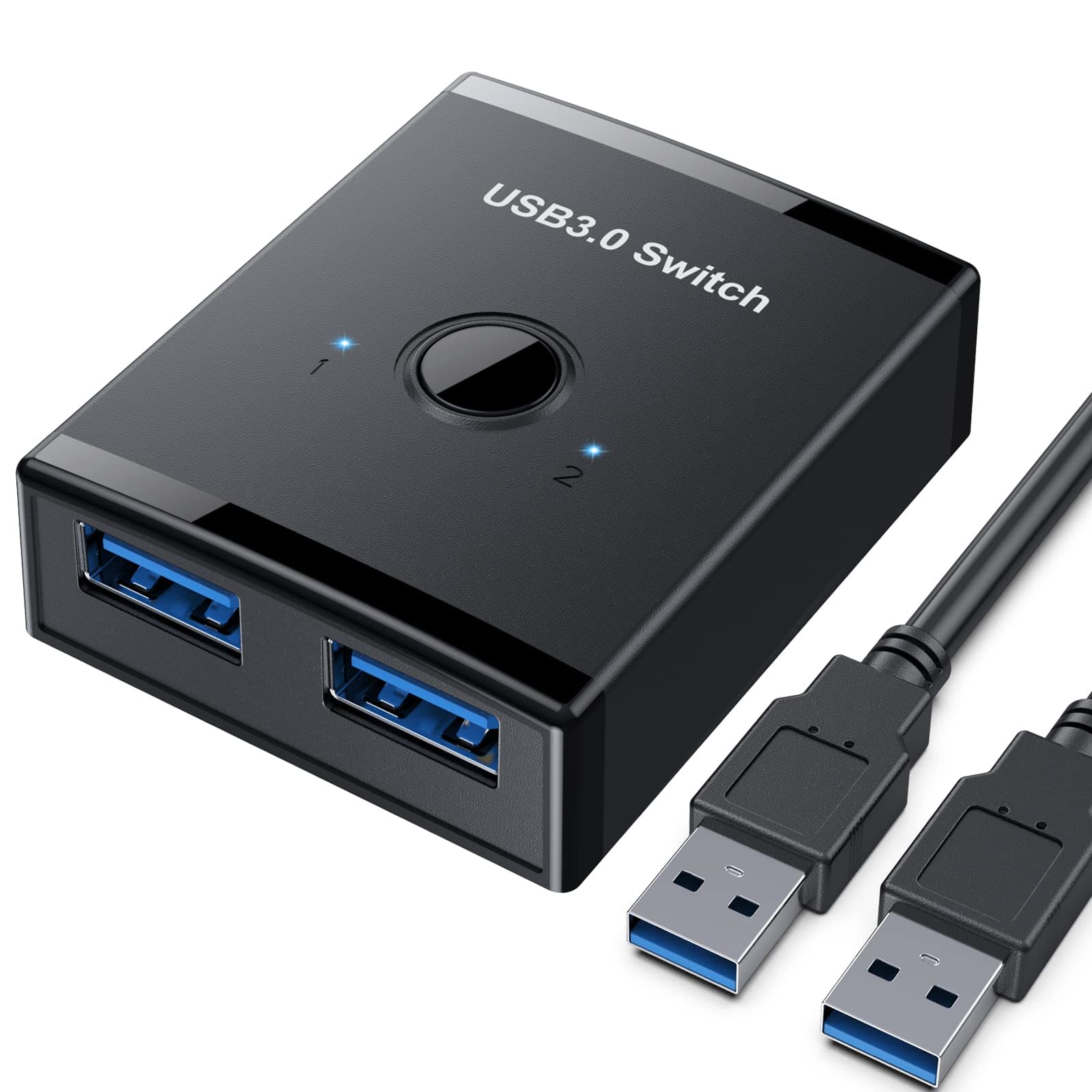
🔄 Switch Smarter, Work Faster — Stay Connected Without Missing a Beat!
The YINNCEEN USB 3.0 Bi-Directional Switch is a compact, durable KVM switch that enables seamless sharing of USB devices between two computers or vice versa. Supporting ultra-fast 5Gb/s USB 3.0 speeds and featuring a one-button toggle with LED indicators, it offers plug-and-play compatibility across Mac, Windows, Linux, and Chrome OS. Ideal for professionals managing multiple devices, it streamlines workflows by eliminating cable swapping and boosting productivity.


| ASIN | B09W219SRZ |
| Actuator Type | Push Button |
| Best Sellers Rank | #157 in KVM Switches |
| Brand Name | YINNCEEN |
| Circuit Type | 2-way |
| Color | Black |
| Connectivity Protocol | Usb |
| Connector Type | Plug In |
| Contact Material | Abs |
| Contact Type | On Or Off |
| Control Method | Touch |
| Controller Type | Push Button |
| Current Rating | 800 Milliamps |
| Customer Reviews | 4.3 4.3 out of 5 stars (492) |
| International Protection Rating | IP54 |
| Item Dimensions | 2.36 x 1.93 x 0.71 inches |
| Item Weight | 0.1 Kilograms |
| Manufacturer | Yinuocheng Tech |
| Material Type | Acrylonitrile Butadiene Styrene |
| Model | T26 |
| Mounting Type | Surface Mount |
| Number of Items | 1 |
| Number of Positions | 2 |
| Operating Voltage | 5 Volts |
| Operation Mode | ON-OFF |
| Specification Met | Partial |
| Switch Type | Push Button |
| Terminal | Solder |
| Unit Count | 1.0 Count |
O**N
Used it for Apple car play in my Toyota Tacoma
I recently purchased the USB 3.0 Switch, Bi-Directional USB Switch 2 in 1 Out, and I am pleased to share the reasons behind my enthusiastic five-star rating. This compact yet powerful device has proven to be an essential component of my tech setup for several compelling reasons: Effortless Bi-Directional Switching: The USB 3.0 Switch offers seamless and bi-directional switching between two devices, eliminating the need for constant unplugging and re-plugging. This functionality streamlines my workflow and adds a level of convenience that has significantly improved my overall user experience. High-Speed USB 3.0 Connectivity: The switch supports USB 3.0, ensuring fast data transfer speeds between connected devices. This is crucial for tasks that involve large file transfers or high-bandwidth peripherals, providing efficient and responsive connectivity. Sturdy and Compact Design: The build quality of the USB 3.0 Switch is impressive. Its sturdy construction instills confidence in its durability, while the compact design ensures it doesn't take up unnecessary space on my desk. The combination of durability and space efficiency is highly appreciated. LED Indicator for Easy Monitoring: The inclusion of LED indicators for active ports adds a thoughtful touch to the design. It allows me to quickly identify the active device, reducing any potential confusion during operation. The simplicity of the LED indicators enhances the overall user-friendliness of the switch. Versatility in Device Compatibility: The USB 3.0 Switch is compatible with a wide range of devices, including computers, laptops, and other USB-enabled peripherals. Its versatility makes it a versatile and valuable addition to any tech setup. In conclusion, the USB 3.0 Switch, Bi-Directional USB Switch 2 in 1 Out, has proven to be a reliable and efficient solution for managing multiple USB devices. Its user-friendly design, high-speed connectivity, and compact form factor make it an excellent choice. I confidently give it a five-star rating and would recommend it to anyone seeking a hassle-free and effective USB switch solution.
R**R
Perfect for running a big Mac and a MacBook simultaneously with a single keyboard.
I ordered this keyboard switch and it arrived on my doorstep a few hours later; thank you AMZN! I have an app that requires my MacBook instead of my older iMac, but I love the Mac's big 24" screens and its full-size keyboard with a number pad and the little laptop's keyboard massively slows down my input. I plugged in this USB 3.0 switch and it immediately solved these issues. I also run an Apple mouse on the laptop and a second one on the iMac, as well as feeding the MacBook to one of the IMac's large displays. The whole setup is literally just as good as if the app in question (TurboTax) was able to run on Big Sur on the Mac. I seamlessly flip back-and-forth all day long between the 2 computers and this keyboard USB switch makes it all possible.
T**N
Slim and Works as Needed
Nice USB switch. I needed to replace a working but old and bulking KVM switch. This switch is small and easy to setup and use. I use a wireless KB and mouse with two computers. I plugged the KB/Mouse dongle into the single USB port and the USB cables (included) from one of the 2 USB ports to 1 of my 2 computers. Just press the button switch on the top of the unit to toggle the KB/Mouse to either of the 2 computers.
K**M
Exactly as advertised
This works quite well. Allows be to switch between components/computers/etc. with ease.
J**N
Doesn't work.
There is absolutely no reason for this product not to work. I'm connecting between my laptop and my desktop so they can share a mouse. Only worked for one device plugged in. Terrible instructions, no troubleshooting or website listed.
R**N
Works well, just not for my intended purpose.
Does what it's supposed to, but unfortunately didn't work for my application. So others don't make the same mistake, I'll describe the setup I had in mind that this, unfortunately, didn't work for and how I'll be using it in the future. How I planned to use it: My initial thought was to use this to switch between my two Android auto devices in my 2018 Volvo XC60. I have an Atoto AI box and a Motorola MA1 Android Auto device. I wanted to be able to switch between them rather than using the extra Android Auto connection available in the Atoto AI box since it's slower to connect and seems to occasionally drop the Android Auto connection, but it does full Android REALLY well and has its own SIM card so I can use it for hotspot, calling and messaging as well as music and any other Android app I want to install from the Playstore. The MA1 does actual Android Auto REALLY well and has been very reliable other than one or two odd one-time quirks that haven't happened in months. Unfortunately, even with the Atoto wiring that combines the power from both of the XC60s USB ports, it wasn't enough to power the Atoto, the MA1 and the switch at the same time, and the switch does send power to both devices regardless of which is active, a feature I wish you could turn off. The MA1 seemed to function fine, but the Atoto AI box wasn't getting enough power and kept rebooting. If you were using two MA1s so you and your significant other could each use your personal phones wirelessly with the same car, it might work OK (MA1 only pairs to one device). How I will use it: I have a home computer and a work computer at home. I have a very nice multi-function laser printer/scanner that is on the network, but it doesn't work with my work computer while on VPN. The alternative is to use it via USB. This switch will allow me to connect both the home computer and work computer to the printer and use it with both by simply pushing the button to switch the input.
C**U
Works perfectly!!!!!!!!!!!!
Works perfectly! I have two computers ( a Surface Pro and a Dell PC) and wanted to use the same mouse/keyboard wireless combo. I got this and inserted the toggle and it allows me to switch back and forth effortlessly!!!!
M**A
Facil de usar, mucho mas compacto de lo que parece en la foto, el cambio entre canales de salida o entrada es casi instantaneo.
S**N
Received a functional but obviously previously used product. Happy with the product. Not happy for paying that much for a used product. It should be illegal to not mention it.
Trustpilot
Hace 2 semanas
Hace 1 semana