We remain fully operational. Our teams are working around the clock to ensure your deliveries continue safely.

Descargar la aplicación


Servicios al cliente
Sobre nosotros
Copyright © 2025 Desertcart Holdings Limited
Descargar la aplicación
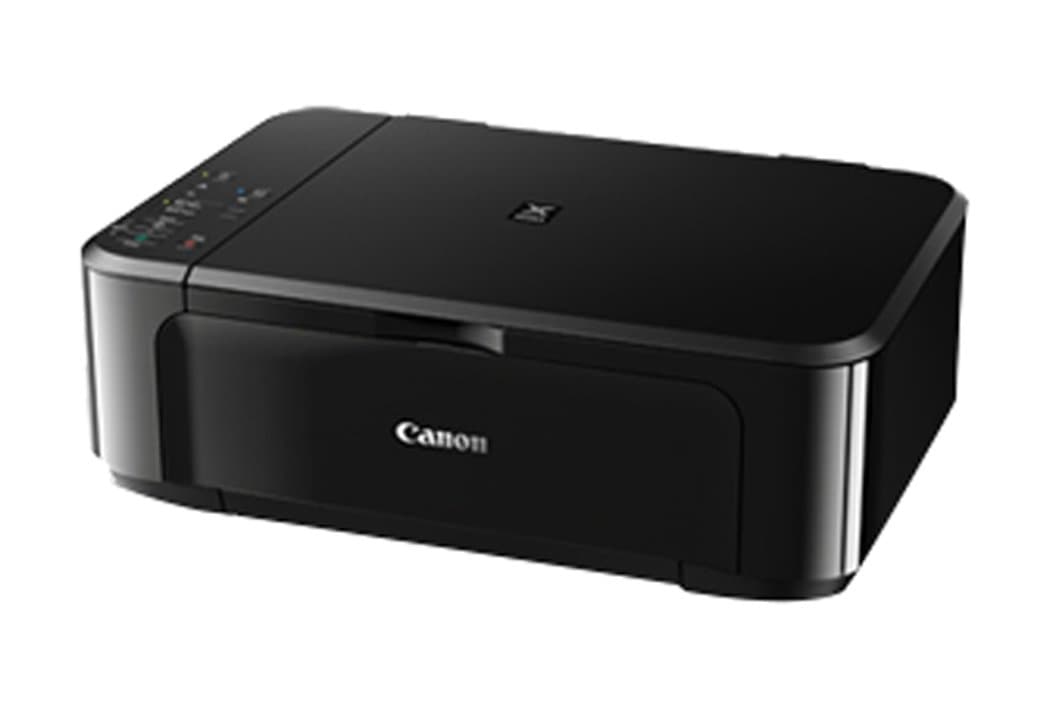
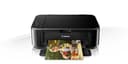
🖨️ Elevate your workspace with crisp, fast, and wireless printing—because your ideas deserve the best!
The Canon PIXMA MG3650 is a compact, multifunction inkjet printer delivering high-resolution prints up to 4800 x 1200 DPI with fast monochrome speeds of 9.9 ipm. Featuring wireless LAN and USB connectivity, automatic duplex printing, and a flatbed scanner with 1200 x 2400 DPI resolution, it’s designed for efficient, versatile use in home or office environments. Compatible with multiple devices and controlled via app, it balances quality, speed, and convenience in a sleek black design.


| ASIN | B015DS7RKO |
| Additional Printer Functions | All In One |
| B&W Pages per Minute | 9.9 |
| Best Sellers Rank | 40,828 in Computers & Accessories ( See Top 100 in Computers & Accessories ) 91 in All-In-One Printers |
| Box Contents | All-In-One printer –PIXMA MG3650 FINE Cartridges Power cord Setup CD-ROM Manuals and other documents |
| Brand Name | Canon |
| Color Depth | 1 bpp |
| Colour | Black |
| Compatible Devices | Laptops, PC, Smartphones, Tablets |
| Control Method | App |
| Controller Type | Android |
| Customer Reviews | 4.0 4.0 out of 5 stars (632) |
| Dual-sided printing | Yes |
| Duplex | Automatic |
| Global Trade Identification Number | 04549292036909 |
| Hardware Interface | USB |
| Initial Page Print Time | [EO: 6-10 seconds] |
| Ink Colour | Multicoloured |
| Item Dimensions D x W x H | 12D x 17.7W x 6H centimetres |
| Item Type Name | Ink-Jet Colour Printer |
| Item Weight | 5400 Grams |
| Manufacturer | Canon |
| Maximum Copy Resolution Black and White | 1200 dpi |
| Maximum Copy Resolution Color | 1200 x 2400 dpi |
| Maximum Print Resolution Black and White | 4800 x 1200 DPI |
| Maximum Sheet Capacity | 100 |
| Maximum Supported Paper Size | Legal;A4 |
| Maximum print Resolution Color | 5760000 Pixels |
| Model Name | 0515C008 |
| Model Number | 0515C008 |
| Model Series | PIXMA |
| Network Connectivity Technology | USB 2.0, Wireless LAN |
| Number of Trays | 1 |
| Other Special Features of the Product | ISO standard size:B5 |
| Output sheet capacity | 100 |
| Paper Size | A4 |
| Print media | Paper (plain) |
| Printer Output Type | Colour;Monochrome |
| Printer Resolution Vertical in Black and White | 472 Centimeters |
| Printer Type | Inkjet |
| Product Warranty | 1 year |
| Resolution | 4800 x 1200 |
| Scanner Type | Flatbed |
| Specific Uses For Product | General use |
| Total USB 2.0 Ports | 1 |
| Total USB Ports | 1 |
| Warranty Type | limited warranty |
J**S
Canon quality and foibles
I bought this MG3650 printer to replace my MG4250 because the waste ink reservoir was full and it stopped working and was not viable to fix, this is planned obsallesence at the highest level. I only bought another Canon printer because it was compatible with the 4 cartridges I had in stock worth circa £80.00. The MG3650 is very similar to the scrapper and was relatively straight forward to set up, this unit doesn't have it's own screen so everything is on the computer screen but it works well enough with practice and the print speed and quality are both excellent at this price point i.e. circa £65.00.
L**N
Good value printer but expensive inks
I ordered the Canon PIXMA MG3650 to replace the same model which had done me good service for about 5 years before I inadvertently damaged it beyond repair. I was sent the upgraded 'S' version (at no additional cost) which is proving as good as the original and as a result was very easy to install because it uses the same configuration and programmes etc as the original. Colour prints on normal paper are of good quality, as are b&w text prints. I print a lot of Word documents with implanted photographs and text and am very satisfied with the results. The machine is good value for money, with the only drawback being the cost of the inks (two of the XL packs including both colour and black cartridges cost more than the printer).
J**S
1 star review for a 5 star printer
First things first, this is an excellent printer for what I use a printer for. Easy to install, fast and quiet. Perfect, right? Yep...until the time came to change the ink cartridges. I got them changed easy enough, but it said that one (don't know which one) was installed incorrectly. So I took them both out and put them back in - three times - but got the same message again. Now, I am unable to remove them at all (and I've just paid £25 for them). I have now spent in excess of two hours trying to remove the cartridges, but the lock won't budge. Added to this, I can't even access the ink cartridges without the use of a pen knife or something similar to open the compartment. Terrific printer, but SO impractical.
J**S
Basic scanner and printer for peanuts!
Only just got this printer so these are initial thoughts only! The printer came well packaged and was easy to get out of the box... a diagram on the box showed to do it on its side. There was a plethora of different language set up instructions... I found the English version. The instructions are very simple to follow with visual info in diagram form and usually a simple sentence. Unpacking took minutes. A British 3 pin plug is provided ( also a 2 pin) so once all the Orange stickers and plastic transit holders are taken off; turn it on. Now to wifi set up: again simple straight forward instructions. Download the Canon Selphy app and follow the step by step instructions ( there is a tutorial video as well). You will need your wifi password and know which wifi is yours. Register the printer and should everything have gone to plan a test print option will be offered. So my Kindle Fire tablet can now print. On to the mobile. Download the app and connect it to the wifi... this time a message came up about NFC, which I ignored. It found my Wi-Fi and I clicked on the printer name (with proxy address xxx.xxx.xxx.xxx type). This time an error message came up. I noticed my Wi-Fi signal was weak so I attempted to 'require' which didn't work. So I remembered Richard Ayaoede's advice on the IT Crowd and turned my printer off and then back on. This time the printer connected and I registered it on my mobile. I have only printer one thing and this looks fine. 4 stars for build quality...but only paid £30, so what can you expect! Ink is expensive, look around for deals!
R**S
Excellent
Easy to set up
K**L
What a pain to install!
I bought this as a replacement for a previous, excellent Canon Pixma model which lasted over 10 years. This is a more basic version than the previous one and time will tell if the print quality is good enough. However, the connection to WiFi was not straightforward, the supplied instructions not consistent with the app or even the sequence of buttons to press and when. I consider myself very tech literate and found this a 30 minute challenge to set up. Fingers crossed it doesn't ever need reconnecting because it may just lie in my office unused for a few years. Very disappointed compared to my experience with the previous model.
C**S
I love this printer
Okay, I should say from the jump: we don't use the wifi printing because it's slow, but it can do it, so if you have the time to wait, it's great. But, we do *heavy duty* printing, lots of which is on glossy photo paper, and it's brilliant! If you set it to best quality print, and choose the appropriate paper type from the options in Properties, the black is true black, and colours are rich and deep. It prints fairly quickly - it's slower on the higher quality print, which makes sense - but it can print a plain A4 page full of text in about 20 seconds. Its scanning function is great, too - quick, reliable and scans copies perfectly. We needed to buy a new printer recently and wouldn't think of ordering anything else. It's such a workhorse; it's reliable, and we've never had a problem with it. Just a quick tip, though: the ink isn't cheap, so we've sampled off-brand alternatives (we've tried several through the Vine programme, too) and not one has been any good. This printer really does need official Canon ink to do what it can do. So while, aye, the ink is a little spendier, if you need a halfway decent print, it's worth the extra pennies.
P**E
Achetée pour remplacer ma canon MG 3250 qui a duré 10 ans ,en l'utilisant beaucoup. Celle ci est aussi bien ,facile à installer, maintenant c'est le prix des cartouches de marque Canon qui sont trop chères
K**E
Druck mal und dann wieder nicht, oder eine Stunde später.
D**U
Dieser Multifunktionsdrucker ist u.a. für Windows 10 geeignet.Er druckt sehr gut,ist allerdings im Betrieb sehr laut.Die Druckerpatronen sind leider sehr teuer.
N**D
Un must dans le monde de l imprimante en terme de qualité et de prix
C**N
Je suis très satisfaite de ce produit
Trustpilot
Hace 1 día
Hace 2 semanas