We remain fully operational. Our teams are working around the clock to ensure your deliveries continue safely.

Descargar la aplicación


Servicios al cliente
Sobre nosotros
Copyright © 2025 Desertcart Holdings Limited
Descargar la aplicación
![StarTech.com M.2 SATA SSD to 2.5 inch SATA Adapter [NOT NVMe], Open-Frame Bracket, 7mm High, M2 Hard Drive Adapter - TAA](/_next/image?url=https%3A%2F%2Fm.media-amazon.com%2Fimages%2FI%2F81LqrwoUgaL.jpg&w=3840&q=75)
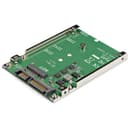
🚀 Transform your storage game with sleek speed and cool confidence!
The StarTech.com M.2 SATA SSD to 2.5 inch SATA Adapter enables professional users to repurpose M.2 SATA SSDs in any 2.5-inch SATA bay, delivering up to 6Gbps transfer speeds. Its open-frame design enhances heat dissipation, supporting multiple M.2 SATA sizes (2230-2280) with secure mounting options. Ideal for system upgrades, this TAA-compliant adapter ensures reliable, high-performance storage expansion backed by a 2-year warranty.


| ASIN | B00ITJ7U20 |
| Best Sellers Rank | 46,046 in Computers & Accessories ( See Top 100 in Computers & Accessories ) 303 in SATA Cables |
| Brand Name | StarTech |
| Colour | Green |
| Compatible Devices | Laptop, PC |
| Connector Type | SATA |
| Customer Reviews | 4.2 4.2 out of 5 stars (1,492) |
| EU Spare Part Availability Duration | 2 Years |
| External Testing Certification | CE, FCC |
| Global Trade Identification Number | 00065030855600 |
| Input Voltage | 5 Volts |
| Item Dimensions | 9.9 x 7.1 x 0.8 centimetres |
| Item Type Name | Drive Bay Adapter |
| Item Weight | 0.04 Kilograms |
| Manufacturer | Startech |
| Model Number | SAT32M225 |
| Number of Items | 1 |
| Number of Ports | 1 |
| Package Quantity | 1 |
| Power Plug Type | No Plug |
| Product Finish Type | Matte |
| Product Warranty | 24 months |
| Specific Uses For Product | computer system upgrades and performance improvements |
| UPC | 065030855600 |
| Unit Count | 1.0 count |
| Warranty Type | Limited |
M**E
Everything worked surprisingly easily and of course the laptop is now wonderfully fast
About the only M.2 adapter I've seen that gives you the screw holes used to mount a 2.5" drive. I used this to put the M.2 SATA SSD from a broken laptop into a new one. Everything worked surprisingly easily and of course the laptop is now wonderfully fast. Moving the post that secures the end of the M.2 card can be tricky as it has screws in both sides, but the screws are different diameters so you can't mix them up. Just screw the post into the adapter where you need it first, then screw down the M.2 card and the screw lengths work out correctly. The hole for the post for 80mm long cards is right on the edge of the PCB and not closed, but it won't see large loads and with a tight screw I'm confident it will be fine.
H**N
Great piece of kit!
Works great! I was a bit worried I wouldn't be able to boot from this but it worked fine, had no problems at all with it so far and getting some great speeds with it. Below is a link to the M2 I put in it and as stated above it works fine, I will update this review if I have any problems with it further down the line. https://www.amazon.co.uk/Samsung-500GB-Solid-State-Drive/dp/B00TGIW1XG/ref=sr_1_6?ie=UTF8&qid=1507561747&sr=8-6&keywords=m2+evo+ssd
B**D
Mistakenly bought for NVMe drive
The only way I find out about new PC technologies is when I accidentally buy the wrong thing. This is what happened when I tried to connect a spare NVMe drive from a broken computer into this adapter. Although the slots appear similar, the M.2 NVMe PCIe is completely incompatible with SATA and requires something like the UGREEN NVVMe to USB-C converter instead. It's a shame, but lesson learnt. The hardware seems well made and Startech probably have good support to help you through. It's a shame the buying guide wasn't as obvious as it could be.
A**C
Simple but effective
Bought this item to fit an M.2 SATA SSD in the place of a 2.5inch SATA HDD. Came with all mounting screws needed. Fitted the available slot comfortably, cables connect easily with no interference on the board, booted straight up. For the price the performance is impressive, read and write speeds match what is quoted by the disk manufacturer. Would recommend for anyone upgrading an older PC that doesnt have a built in M.2 slot.
A**N
Absolutely Brilliant
This item worked flawlessly while getting the data from a m.2 NGFF 128GB Toshiba SSD which was exposed inside a water damaged laptop, saving my Bachelors dissertation and other coursework. Cannot recommend it enough due to its functionality and versatility
G**H
wrong and improperly listed
stupid thing is an B key and not an M key, does not say this anywhere on Amazon, instructions are all wrong and show wrong product. Worse thing I have ever got from Startech which I have been using for years. Did not understand why the thing was going in the wrong way. Probably damaged my now SSDs after getting completely confused.
V**R
I believe this item will work adequately, but i haven't installed it yet.
Product includes the screws needed to secure the drive but I haven't used the caddy yet.
R**G
Three Stars
Just what it said.
A**ー
古い機器を動かすのに古いノートパソコンを使用する事になり余っていたSATAのSSDを使用するために購入。 作りもしっかりしていて問題なく使用できています。
C**N
Utilisé pour mettre un nvme m2 Sata dans un acer V3-771G-32326G1TMaii. Fonctionne correctement et sans problème. Je précise pour ceux qui auraient des doutes : vous devez mettre un m2 sata, (par exemple : VERBATIM Vi560 S3 M.2 Sata) et non pas un m2 pcie(par exemple : WD_BLACK SN850X SSD).
A**Z
ES MUY FUNCIONAL, BUENA CALIDAD Y FUNCIONA SIN PROBLEMAS
R**.
Das recht schnell angekommen gute Qualität leicht zu montieren, konnte es allerdings nicht benutzen, da Festplatte nicht kompatibel war. mein Fehler 🫢☺️👍
N**S
As described in specifications
Trustpilot
Hace 5 días
Hace 1 mes