We remain fully operational. Our teams are working around the clock to ensure your deliveries continue safely.

Descargar la aplicación


Servicios al cliente
Sobre nosotros
Copyright © 2025 Desertcart Holdings Limited
Descargar la aplicación
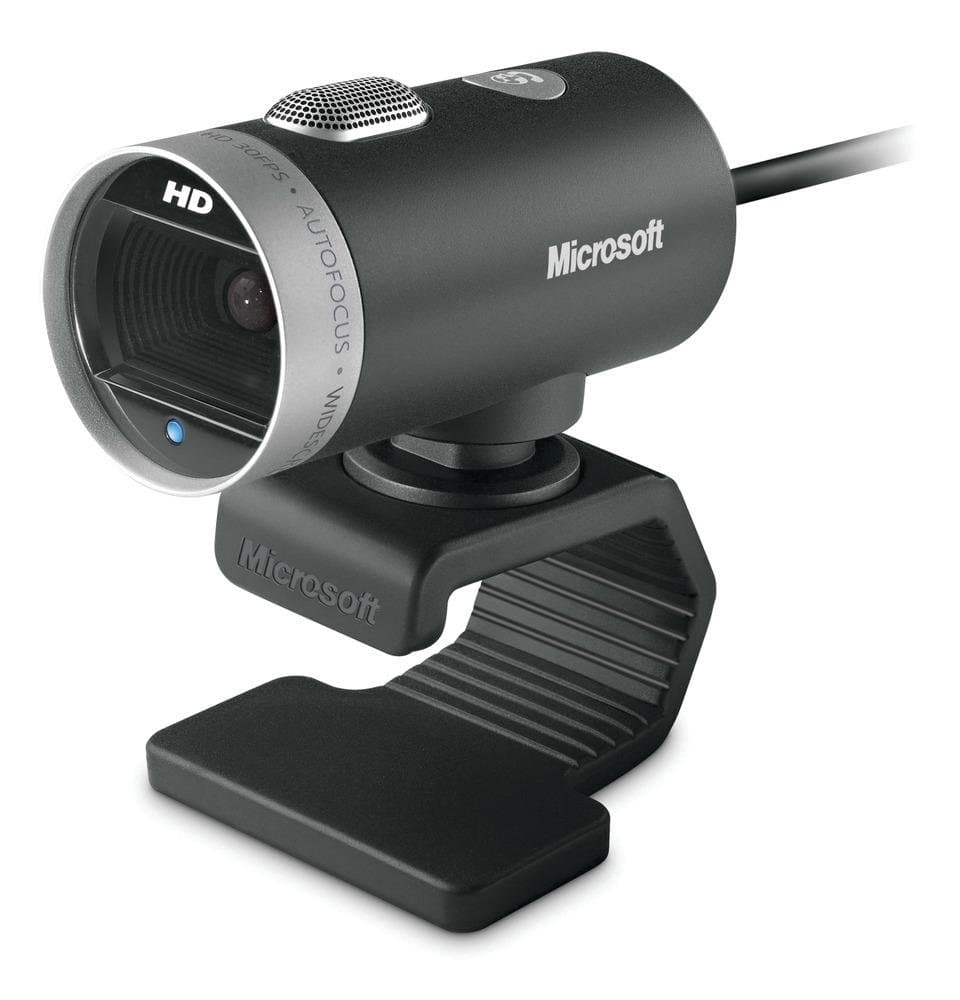

🎥 Elevate your video presence—because your image deserves the spotlight
The Microsoft LifeCam Cinema Webcam delivers crisp 720p HD video with a high-precision glass lens and TrueColour technology featuring face tracking for vivid, bright video calls. Its 360-degree rotation and built-in sound recording make it a versatile, professional-grade webcam optimized for Skype and Microsoft Lync, perfect for dynamic remote meetings and streaming.


| ASIN | B009BT67A8 |
| Antenna Location | video conferencing, chatting |
| Are Batteries Included? | No |
| Best Sellers Rank | 39,621 in Computers & Accessories ( See Top 100 in Computers & Accessories ) 286 in Webcams |
| Box Contents | Keyboard |
| Brand | Microsoft |
| Brand Name | Microsoft |
| Camcorder Type | Webcam |
| Colour | Black, Silver |
| Compatible Devices | Personal Computer |
| Customer Reviews | 4.1 out of 5 stars 622 Reviews |
| Digital Zoom | 4 x |
| Effective Still Resolution | 1 MP |
| Effective Video Resolution | 921600 Pixels |
| Exposure Control Type | Automatic |
| File Format | [Some of] ["AVI", "MP4", "WMV"] |
| Flash Memory Bus Interface Type | SD Bus |
| Flash Memory Installed | 8 GB |
| Flash Memory Type | SDHC, SDXC |
| Flash memory type | SDHC , SDXC |
| Focus Type | Auto Focus |
| Form Factor | webcam with stand |
| Global Trade Identification Number | 00885370428537, 08853704285370 |
| Has Image Stabilization | No |
| Image Aspect Ratio | 16:9 |
| Image Stabilization Type | false |
| Item Dimensions D x W x H | 10.2D x 11.7W x 14.2H centimetres |
| Item Type Name | LifeCam Cinema Webcam |
| Item Weight | 0.18 Kilograms |
| Lens Type | Zoom |
| Log Gamma Curve | Log Gamma Curve |
| Manufacturer | Microsoft |
| Maximum Aperture | 2.8 Millimetres |
| Maximum Display Resolution | HD |
| Maximum Focal Length | 10 Millimeters |
| Maximum aperture | 2.8 Millimetres |
| Maximum focal length | 10 Millimeters |
| Minimum Aperture | 10 Millimetres |
| Minimum Focal Length | 20 Millimeters |
| Model Name | Cinema |
| Model Number | H5D-00014 |
| Network Connectivity Technology | USB |
| Number of Batteries | 1 A batteries required. |
| Operating System | Windows |
| Optical Sensor Size | 1-inch |
| Photo sensor technology | CMOS |
| Product Features | Built-in flash^Built-in microphone^Mounting Type:Clip/Stand^Operating temperature range:0 - 40 °C^Optical drive required^Photo feature^Sill image capture resolution:2880x1620^USB powered |
| Screen Size | 75 |
| Sensor Type | CMOS |
| Shooting Modes | Night Portrait |
| Style Name | Standard |
| Supported Audio Format | AAC, MP3 |
| Supported Image Format | JPEG |
| UPC | 885370428537 |
| Unit Count | 1.0 count |
| Upper Temperature Rating | 40 Degrees Celsius |
| Video Capture Format | AVI, MP4, WMV |
| Video Capture Resolution | 720p |
| Video capture resolution | 720p |
| Viewing Angle | 75 Degrees |
| Water Resistance Level | Not Water Resistant |
| White Balance Settings | Auto |
| Zoom | Digital |
W**.
5 stars doesn't do it justice.
Next day delivery which was superb as it came one day early. Well done Amazon. The camera; Very well made in aluminium with a glass lens. I plugged it into USB 3 ( it is backwards compatible so it will work with USB 2) and it was recognised immediately and found the drivers from Microsoft and loaded them. I am running this on a win 7 64 bit, 3.4 Gig CPU and 8 Gig ram. It works flawlessly at HD 720 providing your graphics card and monitor are compatible. If you can't get HD 720 then it's likely your graphics don't support it. It doesn't have an on off switch so to speak, however I have it set to let software take control of it. This means when I'm not using it, I close skype and the camera shuts off. I also use a language program online and sometimes I have to speak the word, when the program asks the word the camera comes on (mic only), I speak the word and it goes off again when I've finished speaking. I don't have to touch it and it is a bonus as it isn't on all the time. I am in awe at the quality of this camera, the pic quality and the overall build of it. The mic is superb, but remember to set it up with your computer sound mic settings to get the best from it. The mount is a rubbery compound and you just bend it round to fit your monitor, and it stays put (normal use, maybe not frantic gaming but a bit of blue-tac will solve that lol). They are a steal at this price, normally going for nearly twice the price, even on the notorious bidding site we all know and love/hate. I highly recommend this and if problems arise, short of it being faulty, check your computer spec's and set it up accordingly.
C**N
DO NOT BUY FOR WINDOWS 10 OR 11!!!!
I'm the IT manager at a med-sized org, so I promise I'm not just missing a trick here! Long story short: This is a good device for Windows 7 or earlier, and would likely work perfectly for a PC that was upgraded from Windows 7 to Windows 10. If you've got a computer that was bought new in Windows 10 or 11, don't buy this device! (I also couldn't get it to work on 2 different Mac devices; I gave up after 10 minutes so it may work with a bit more fiddling, but not straight away.) Full story: My manager had this model and it looked good, which is why I purchased it for a project I was heading up. When tested on an old Windows 10 laptop, it worked fine - the quality was above average, easy plug-and-play. I was very happy! So we purchased the new PC it was going to be attached to, but found a serious problem - and after a LOT of troubleshooting (including complete OS reinstalls) we found the issue: The new more-generic drivers that are in-built with Windows 10 (and 11) don't support this device correctly. The quality is dramatically lowered, and the auto-focus can't settle, meaning it refocuses every 5-10 seconds without fail. Worse still, the specific drivers for this device have stopped being updated - me nor 3 others could get the Windows 7 drivers to function properly (unsurprisingly), and as the others are in-built we couldn't overwrite them easily. It also used to come with a small piece of control software, but same story here. The old laptop, however, was upgraded from Windows 7 to Windows 10 - we discovered it still had the appropriate drivers running, which is why it worked so perfectly! Really unfortunate coincidence for how much time it took. The solution for our new device was to run OBS and use its Virtual Camera feature to control the webcam, so we could access and control the camera settings to turn off the auto-focus, so it stopped doing the nauseating phasing. 4 stars because it does work this way, and does good-enough a job. But it's a really unnecessary additional step to train users up in. Hope this helped someone!!
A**C
Great reduction in cost, quality web camera that works with Windows 10
* Physical The device is a circular tube of the dimensions of a bigger cotton reel. It feels to the touch well-made. When it is used the webcam can become warm to the touch. * Installation If you require guidence, for setting this up, i suggest YouTube. Eventually, you will find a useful video to look into. This is done by downloading and installing the webcam driver software first and then plug - and -play the camera into a convenient USB 2.0 and above the port. * How it performs When the device is set up properly and working with services such as SKYPE or ZOOM, the picture I am told by others who view my connection, proves to be very detailed, bright, and attractively clear with fluid motion and no trace of blocking. The microphone, I am told by others I have a video called, is very clear and free from distortion. This is helped by a BB connection of 68 Meg / Second. * Changing camera settings There are two ways to access the settings to control this camera. The first is to enter the search bar on the bottom left of the desktop screen with 'Microsoft camera', and press return to get the panel with basic settings. Select 'pro options' to get most of the setting control. The second method is when online and running the Zoom application. Select your small camera video image with your mouse, left-click to select it, and then right-click to access the options it holds. There are more options here available than in the previous way. I had issues with the Zoom image temperature being red-shifted. I selected a change in the video setting and left Zoom and then reentered Zoom to apply these changes. It worked. A Zoom member had difficulties with his online resources, I am able to reduce the data settings of my camera to help the user to see my connection. If these two methods cannot fix your problem, such as extreme red-shifted colour balance, may I suggest the free utility OBS Studio? The videos to use this is on Youtube and it's a free application. Choose the Windows version. Look at the YouTube videos as to how to use it. It helped me. Just a tip. Some bulbs using folded tubular construction can take time to reach their designed operating light output. If you give the lights illuminating your computer 20 minutes or so, the issue can clear itself and the colour balance can be restored. This view of its fine performance is in part due to my ISP download speed of 58 Meg / Sec, including a NordVPN. * Summary Overall, I rate this webcam device. This device works with a desktop of Windows 10 Pro, 64-bit. And is well worth the money. In closing the device works very well and I am pleased I bought this webcam from Amazon.co.uk. If you're concerned with remote viewing through your webcam, might I suggest you rotate the camera and turn it away from viewing you when it's not using it? It's likely your antivirus utility - such as AVG - will let you know if the camera is being used for video or sound by those you've not initiated the connection. This will protect your video and sound connection if it's being hacked by scammers. * As of 09 March 2024 This is just a quick update that this device seems to be still working well. I join a Zoom group for around 90 minutes most Mondays. Its video and audio are still working as designed. The colour balance can still be off, but trying again at a later date is acceptable. The colour temperature of these tubular lights can take 20 minutes to return to their designed brightness and related colour temperature. * As of 11 June 2024 My LifeCam Cinema HD device has received and benefitted from a recent driver update. The image is sharper. The contrast is better too. This driver update, just installed, is from 2016! So why has it been hidden away all this time to date, I do not know why. * As of 30 May 2025 Zoom issues new applications to handle its traffic every few weeks. Sorry if it's obvious. But I didn't know this until a few months ago. To do this, make yourself an account with Zoom. Then log in. Find the correct Zoom for your equipment. Mine is 64-bit for Windows 10. Download it. Go to your Downloads folder and do a scan with your antivirus of this file. Then click on it. It will initiate. It waits a few minutes until your camera shows up in a panel on your monitor. It's good to test that both your camera vision and sound are working, then log in to your Zoom meeting and your chat. The latest Zoom update -17 March 2026- has made the connection much faster.
A**R
Average camera, not really worth the money
The camera works ok but the picture quality is quite poor and it regularly goes out of focus. The biggest issue is that it does not cope with anything but perfect lighting conditions, so if like me your home office doesn't have fluorescent lighting, it's not going to be great.
S**D
Very Nice, watch the price
Bought this for Skype to replace a Logicam webcam bought in October 2011. This one is miles better for both picture and sound and is well worth the tenner extra. It gives a picture that is clearer and brighter than the Logicam. It easily shows a nice bright picture of a whole room with just normal room lighting in the evenings. It has autofocus, rather than fixed focus which is useful if you want to occasionally show things close up to the camera as well as having a normal view of a whole room. The bendy clip on the stand is very good, we have it on top of our telly and it seems to be adjustable to fit almost any screen or surface. There is no separate sound lead (unlike the Logicam), it is just a single USB. Our old PC running Windows 7 recognised it immediately and loaded up the driver, it took about 3 minutes in total. The only thing it does not have compared to the Logicam is a built-in light, but in view of the much better picture, it doesn't need it. The price seems a bit variable - we paid £37.50. Of course, getting a better camera gives the person you Skype-call a better picture, not you!
V**I
Great 720p Webcam
Microsoft's LifeCam Cinema has been on the market since 2010, so how does it hold up 11 years later? Autofocus is a very nice inclusion as fixed focus webcams can make a lovely mess of your image when you're not at that specific spot. Face tracking will work on Windows, but not on other platforms as far as I know. There seems to be no way to activate Microsoft's TrueColour feature, even in Windows 10 - so that's a selling point of this webcam that is completely broken in 2021 now. Thanks Microsoft. Other than that, it deals with low light situations quite well, and manages to hit 30 FPS at 720p most of the time. It really is a shame stuff like face tracking will only work on Windows, and that TrueColour is just... gone now, aside from their now out of date marketing. There are 1080p alternatives to this, like the LifeCam Studio, which is just £10 more, or Creative's Live! Cam V2, which is the same price as the LifeCam Cinema but captures in 1080p instead of 720p. Think on that. Overall, it's a decent webcam, but for £45 it needs to have the kinks that have appeared over the years ironed out to work properly again.
P**P
LifeCam - Get the Picture?
Worked straight out of the box on my Win7Pro installation. Plugged in, it searched for the drivers at the Windows update site and installed them with very little interaction required other than a couple of clicks. Video and sound quality are both excellent and the accompanying software is a simple but nonetheless effective service. Image focus is good (in auto) and no problems with light levels. A great buy - if in doubt, hesitate no longer, a great HD camera you can safely buy. What are you waiting for?
T**S
Nice elegant design but....
Nice and elegant design and discreet but auto focus not working properly and you cannot stop it. Very disappointed as I was very much looking out for it. Returned.
Trustpilot
Hace 3 semanas
Hace 1 semana