We remain fully operational. Our teams are working around the clock to ensure your deliveries continue safely.

Descargar la aplicación


Servicios al cliente
Sobre nosotros
Copyright © 2025 Desertcart Holdings Limited
Descargar la aplicación
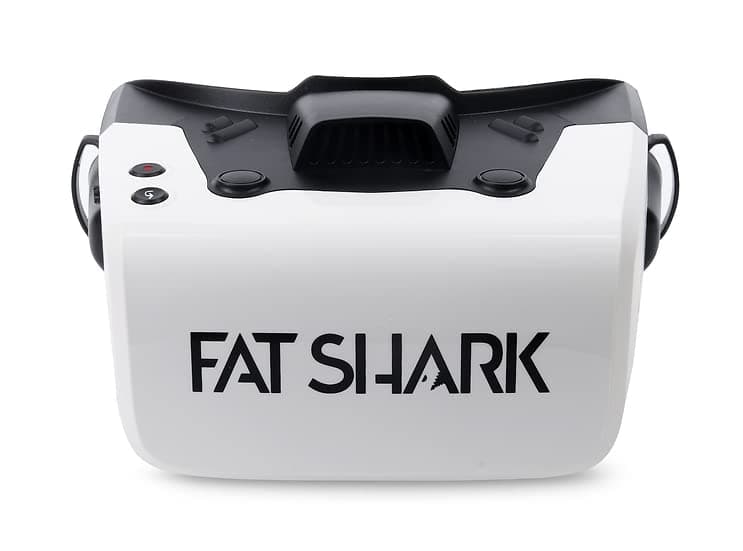
👓 Elevate Your FPV Game!
The Fat Shark Recon HD FPV Goggles (FSV1127) are designed for both beginners and seasoned pilots, featuring a high-definition 1920x1080 TFT display, wide beam width directional antennas, and an ergonomic design for maximum comfort. With a 44° diagonal field of view and compatibility with Walksnail Avatar VTXs, these goggles provide an immersive flying experience while remaining lightweight and easy to wear.
| ASIN | B0BQ1GJ2LN |
| Age Range Description | Adult |
| Best Sellers Rank | #256,874 in Sports & Outdoors ( See Top 100 in Sports & Outdoors ) #261 in Snow Sports Goggles |
| Brand | Fat Shark |
| Color | black |
| Compatible Devices | WalkSnail Transmitters |
| Connectivity Technology | USB-C |
| Connector Type | USB Type C |
| Controller Type | Button Control |
| Customer Reviews | 4.1 4.1 out of 5 stars (9) |
| Display Maximum Resolution | 1920x1080 |
| Display Refresh Rate in Hertz | 60 |
| Display Resolution Maximum | 1920x1080 |
| Display Type | TFT |
| Field Of View | 44 Degrees |
| Is Mixed Reality Compatible | No |
| Item Dimensions | 3.94 x 3.94 x 0.39 inches |
| Item Package Weight | 0.56 Kilograms |
| Lens Technology | Folded Optical Engine |
| List Price | 145.00 |
| Manufacturer | Fat Shark |
| Mfr Part Number | FSV1127 |
| Model Number | FSV1127 |
| Operating System | Oculus |
| Package Quantity | 1 |
| Platform | Meta |
| Refresh Rate | 60 hertz |
| Resolution | 1920 × 1080 |
| Screen Size | 3.5 Inches |
| Sensor Technology | gyroscope accelerometer |
| Size | 4 Inch TFT (1920 X 1080) |
| Specific Uses For Product | Gaming |
| Target Gender | Unisex |
| Title | Fat Shark Recon HD FPV Goggles (FSV1127) |
| UPC | 840630111277 |
| Unit Count | 1.0 Count |
C**.
works great
excellent product, i have no complaints. works exactly as advertised and looks great. if you are having trouble binding with walksnail VTX then you'll need to update firmware on both goggles and VTX. Here's the instructions i followed and it worked perfectly. first visit fat sharks site and download the latest firmware. then... ---How To Update Goggles--- Download latest Ground Firmware File Remove the SD card from your goggles and insert it into your computer. Put the correct firmware file onto the SD card. Eject the SD card from your computer and insert it back into the goggles. Power up the goggles. Wait until you see the Standby screen. Using a tool, push and hold the red Link button for 8 seconds. The headset screens will go black indicating the start of the update process. The update will take approximately 10 minutes. During the update, the goggles will beep. This is normal. DO NOT turn off the headset until the update is finished. When the update is complete, the beeping will stop and the goggles return to the Standby screen Enter goggle settings menu and select RESET ---How To Update Avatar Video Transmitter--- Download latest Sky Firmware File Connect your transmitter to your computer using the USB cable that was included with the transmitter. Supply power to the video transmitter. The transmitter storage should appear on your computer. Put the correct firmware file onto the transmitter's storage. Disconnect the transmitter from your computer. The LED on the transmitter should be blinking green. Push and hold the Link button on the left of the transmitter for 8 seconds. The LED on the transmitter will turn off indicating the start of the update process. During the update the LED on the transmitter will blink red. When the update is complete, the LED will blink green.
T**E
A great alternative to the Walksnail goggles
They work great. I was able to update them to the newest Walksnail firmware without incident, just follow the directions on the Walksnail website. The screen might be as big as the actual Walksnail goggles but I chose this one because it can output a video signal to an external display. Madstech did a teardown awhile back and it has four patch antennas up front with two dipole omnis on the top...I've never had any reception problems.
A**!
Don't buy it!!!
I tried 3 different times to purchase and update the firmware from Caddyx and each time, NOTHING! From what I've seem online Caddyx has made a lot of promises about upgrades to firmware compatibility, upgradeable hardware and new products joining their fpv hd line up but seriously, they don't have any right putting out more products, when the ones they have out now are still having so many problems.
L**.
Missing the carrying case
So far the product works as advertised but I received it without a carrying case.
Q**N
Haven't had any issues, way better than analog
I got the open box one. They work incredible, never fogged up on me, and are entirely reliable.
S**L
Comfortable, good range, good resolution
Very happy with these goggles. The set up is easy, they are quite comfortable to wear and easy viewing. I do not wear glasses, but the recessed screen should make the image look good for ones that do.
Trustpilot
Hace 2 semanas
Hace 1 semana