We remain fully operational. Our teams are working around the clock to ensure your deliveries continue safely.

Descargar la aplicación


Servicios al cliente
Sobre nosotros
Copyright © 2025 Desertcart Holdings Limited
Descargar la aplicación
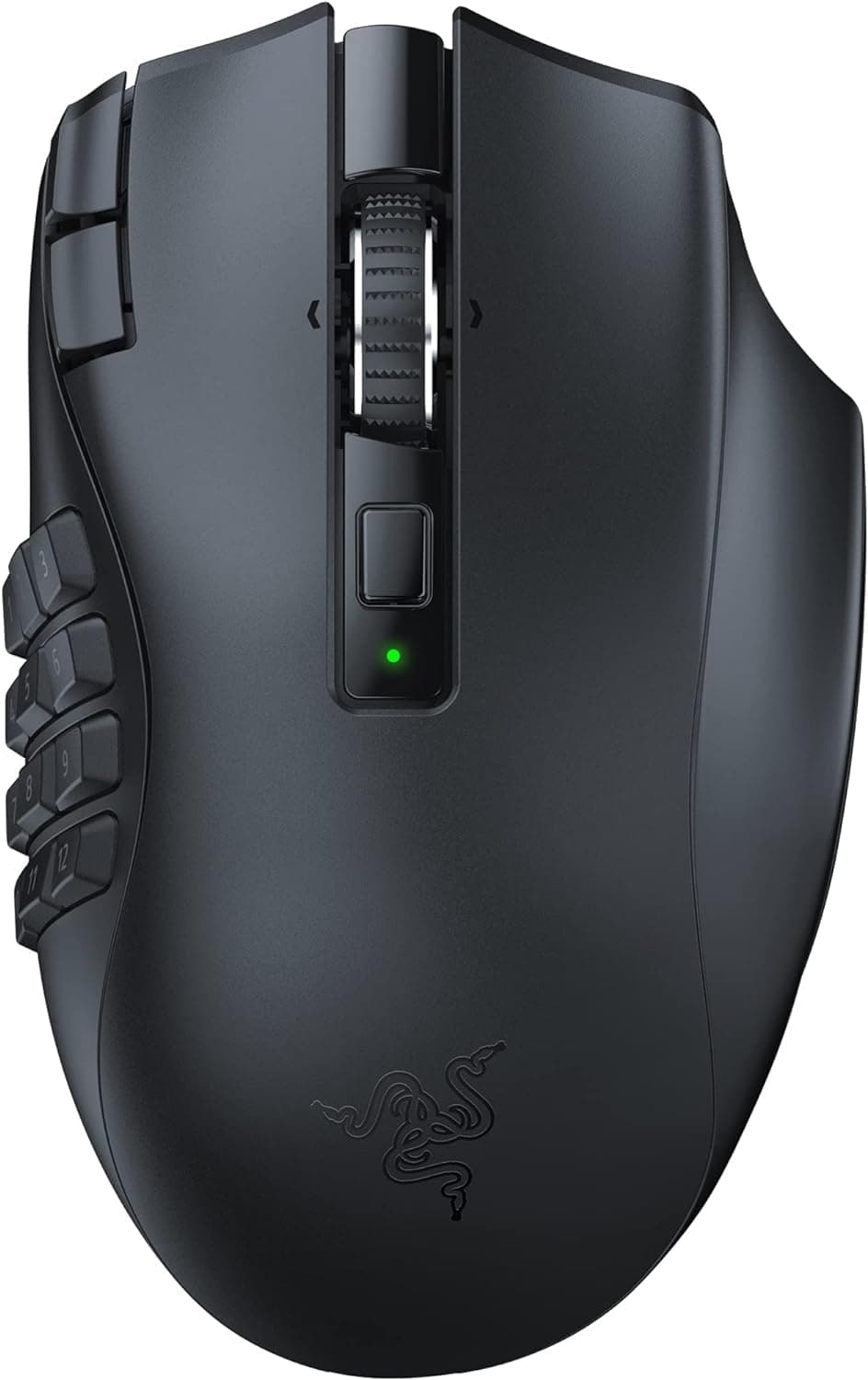
🔥 Dominate Every Click with Razer Precision 🎯
The Razer Naga V2 HyperSpeed Wireless MMO Gaming Mouse is a powerhouse designed for professional gamers and multitaskers alike. Featuring 19 programmable buttons, ultra-low latency HyperSpeed Wireless technology, and the cutting-edge Focus Pro 30K optical sensor, it delivers unmatched precision and speed. Its HyperScroll technology offers versatile scrolling modes, while an industry-leading battery life of up to 400 hours ensures you stay ahead in marathon gaming sessions. Ergonomically crafted for comfort and control, this mouse is the ultimate tool for those who demand performance and reliability.


| ASIN | B0BD5L1ZJQ |
| Additional Features | Wireless |
| Antenna Location | Gaming |
| Are Batteries Included | Yes |
| Are Batteries Required | Yes |
| Battery Average Life | 250 Hours |
| Best Sellers Rank | #1,992 in Computers ( See Top 100 in Computers ) #88 in Computer Mice |
| Brand | Razer |
| Built-In Media | Razer Naga V2 HyperSpeed |
| Button Quantity | 19 |
| Color | Black |
| Compatible Devices | Laptop, Personal Computer |
| Connectivity Technology | Bluetooth |
| Customer Reviews | 4.2 4.2 out of 5 stars (2,567) |
| Embellishment Feature | No Embellishment Feature |
| Enclosure Material | Plastic |
| Global Trade Identification Number | 08886419334002 |
| Hand Orientation | Right |
| Hardware Platform | PC |
| Item Dimensions L x W | 69L x 24W centimeters |
| Item Weight | 118 Grams |
| Manufacturer | Razer |
| Model Name | Naga V2 HyperSpeed |
| Model Number | RZ01-03600100-R3G1 |
| Mouse Maximum Sensitivity | 30000 Dots per Inch |
| Movement Detection | Optical |
| Number of Batteries | 1 A batteries required. (included) |
| Operating System | Windows 7, Windows 8 |
| Power Source | Battery Powered |
| Range | 10 |
| Style Name | Classic |
| Theme | Video Game |
| Unit Count | 1 Count |
| Warranty Description | 2 year manufacturer |
M**E
product works great
it's nice that the mouse arrived with a battery, works as intended. this is a personal thing but the top of the mouse is coarse and i hate it
B**Y
Perfect size, awesome 6 key option
For people with small hands and looking for a bit of comfort through multi key function has to buy this mouse I tried many high end gaming mouse, logitec and steel series mostly but the high end products are mostly pretty big, resulting in discomfort in using mouse key 5 My hand snug as a bug on this mouse, 6 key function allows me to do pretty much all I need to do and to my surprise, there are no clicking errors 6 keys seem like there could be some misclicks or overlapping clicks but It takes very short time to get adjusted and using all 6 keys is much easier then one might think. If your hands are smaller then 22 centimeter(tip of your middle finger to the end of your palm) buy this
A**R
Productive Mouse!
I picked this up from Amazon warehouse for a cheaper price than brand new and I can't complain. The quality is as new but box was a little damaged (expected). Although it is only day one, I am happy with it. I will be using this as my daily driver for work. I have configured buttons and assigned it to my profile on the mouse. The configuration has to be done via Synapse on Windows as OSX is not supported (this is the reason for the 4 stars). However once you have configured your mouse how you want it, you can either connect it via USB dongle or Bluetooth. The profile still works even via Bluetooth! I have been able to create new functions and assign it to the mouse to make it work with my OSX Macbook laptop. Please note macros and some multimedia keys do not work as you need Synapse on the system. I looked for alternatives such as Logitech MX Master 3s, Rapoo MT760M, but wasn't really impressed. Logitech doesn't have on board memory which requires you to install the logitech application which is poor for its price point. The Rapoo a cheaper clone of the MX Master 3s it was awful and there was no copy/paste option to assign to a mouse button. Its early days but based on the battery life of this thing as described I think it will be a great asset to make things easier and more streamlined.
A**R
Side panel buttons have issues
Generally a really good mouse, but the side panel buttons have stopped working properly since three months ago. Mind you I purchased this in December 2024, so for 8 months everything was fine, and now half the buttons do not work unless I plug the mouse out and back in, or remove the side panel and leave it off for a while. Unsure what the issue that caused it is, but buyer be wary.
M**D
Highly recommend
This review is written after almost a whole year of purchase and usage. The product is excellent, it’s definitely in the pricey range but this is a Razer product after all. Battery is still in excellent condition and the clicks are not even 1% worn out Poll rate is excellent and the Synapse software just doesn’t miss, it has everything with almost infinite possibilities of customizations. Highly recommend this for serious gamers
G**N
Super
I was pleased, what I expected, a wonderful thing I definitely recommend
R**G
good
good
M**S
Excelente mouse, de fato a ergonomia que ele trás durante a jogatina é surreal. Muito confortável e preciso !
A**S
Donanım çok iyi daha önemlisi yazılımı daha da iyi Diğer gamer markaların da ürünleri var bende ilk defa bu kadar kullanışlı yazılım gördüm Razer tavsiye ederim.
R**S
I love this mouse. Custom scrolls for faster/more accurate scrolling depending on situation. All the extra shortcut buttons are amazing. Finally feel like my right hand is as usefull as my left.
M**K
Love the mouse. light for mmo mouse, A left rocker on the mouse wheel would make it perfect. Well built, I use it in fps games. I would recommend if you want the extra thumb buttons.
L**A
El Razer Naga es Ergonómico y super funcional. Tenía un Razer Naga de hace 10 años, pero dejó de funcionar correctamente el boton derecho. No me extraña porque le he dado muchísimo uso en todo este tiempo, así que decidí, después de mirar que otras opciones había, volver a comprar el mismo modelo. Una vez montado me di cuenta que la forma del que se fabrica ahora ha cambiado algo en la parte exterior, y hace que el pulgar se aleje unos mm de la zona de botones. Yo que soy un ser de costumbres lo noté al instante, y tuve que modificar la forma de coger el ratón para compensarlo. Pero tras unas horas de uso te acostumbras y de hecho, me da la sensación de que va mejor y es más cómodo. Además esta nueva versión es mucho más ligera, lo que en usos prolongados hace que se te canse menos la muñeca. También puedes modificar la sensibilidad sobre la marcha, creo que la versión antigua tenías que descargarte un software a parte para hacerlo.
Trustpilot
Hace 1 mes
Hace 5 días