We remain fully operational. Our teams are working around the clock to ensure your deliveries continue safely.

Descargar la aplicación


Servicios al cliente
Sobre nosotros
Copyright © 2025 Desertcart Holdings Limited
Descargar la aplicación
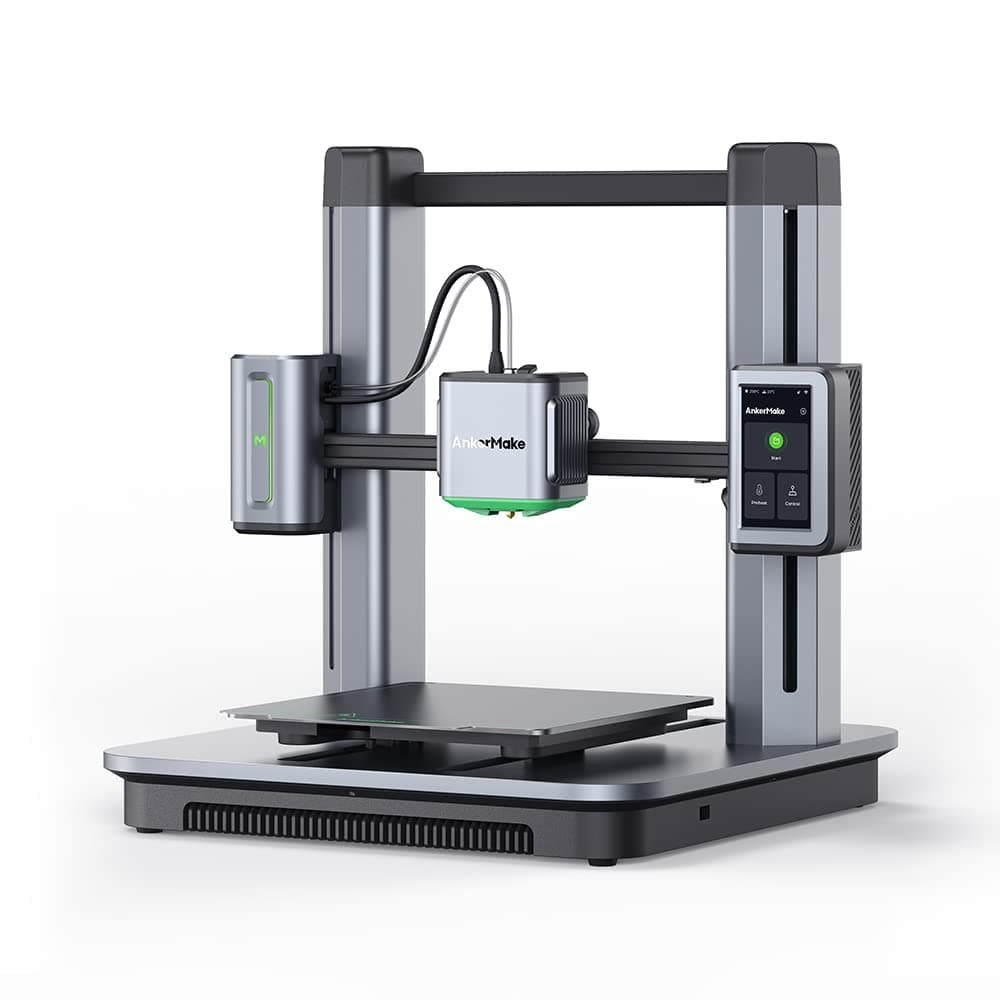
⚡ Print Fast, Print Smart, Print Like a Pro!
The AnkerMake M5 3D Printer redefines desktop 3D printing with its upgraded PowerBoost 3.0 firmware enabling blazing speeds up to 500 mm/s without sacrificing quality. Featuring ultra-precise 0.1 mm detail, AI-powered error detection with a built-in camera, and a 7x7 auto-leveling system, it ensures flawless prints every time. Its robust die-cast aluminum alloy frame guarantees stability, while a large 235x235x250mm build volume accommodates ambitious projects. Easy to assemble and remotely controllable via the AnkerMake app, the M5 is designed for professionals who demand speed, precision, and smart automation in one sleek package.


| Best Sellers Rank | #312,309 in Industrial & Scientific ( See Top 100 in Industrial & Scientific ) #265 in 3D Printers |
| Brand | Anker |
| Color | Black, Silver |
| Compatible Devices | Laptop, Personal Computer, Smartphone |
| Customer Reviews | 4.0 out of 5 stars 504 Reviews |
| Item Weight | 31.8 Pounds |
| Material | PLA/ABS/PETG/TPU/PA-CF/PLA-CF |
| Product Dimensions | 19.7"D x 17.2"W x 18.5"H |
J**E
The AnkerMake M5 3D Printer: A Game Changer in the World of 3D Printing
From the moment the AnkerMake M5 3D printer arrived at my doorstep, I knew I was in for a treat. The difference between my previous Ender 3v2 and the AnkerMake M5 was immediately apparent and impressively significant. One aspect that struck me instantly was the ease of assembly. AnkerMake has streamlined the process to a point where it is virtually effortless, a feature that, on its own, earns high praise. The assembly of the AnkerMake M5 was not just easy, it was refreshingly simple - a stark contrast to many other 3D printers in the market. However, where the AnkerMake M5 truly shines is in its in-built features. The automatic bed leveling function is a dream, eliminating the time-consuming and often frustrating process of manual bed leveling. The remote control functionality through a user-friendly app is another highlight, offering an unparalleled convenience factor. The timelapse feature allows you to witness your creation come to life in accelerated time, and the AI auto detection system ensures smooth operation and reduces errors, ensuring top-quality prints every time. Despite these standout features, the standout aspect has to be the printer's high-speed printing capability. The AnkerMake M5 is fast, significantly reducing print time without compromising on the quality of the final product. However, I would recommend using the AnkerMake filament to fully take advantage of this high-speed feature, as it is designed specifically to support this unique characteristic. In summary, the AnkerMake M5 3D printer has proven to be an absolute powerhouse, outperforming many of its competitors. Its exceptional features and performance make it well worth the investment. I am thrilled with this printer and can't wait to see what else it can accomplish in the realm of 3D printing.
L**0
My First 3D printer - Amazing!
This is my first 3D printer and I've been following AnkerMake since it was on Kickstarter. I could kick myself for not investing when it was on Kickstarter. This unit is pretty awesome to say the least. However, I can't really give comparison with any other brand since this is my first printer. However, I will give my pros and cons for the unit and software itself. Upon arrival, box and pieces within were excellent. Packing quality is solid. I was afraid it would have been damage since I saw boot prints on the outside as if it was used for a stepping stool. Pros: - Unit comes almost fully assembled and took about 10 mins or less to build. - Set up through the app was quick and it found the printer instantly - Low Power consumption (not sure if this is the same for all 3D printers?) - Loading filament was super easy and straight forward - Does a timelapse automatically of your project (yes it has a 1080p camera with a light and night vision) - Speed (it prints wicked fast, but I found great quality and speed at about 150mm/s) - Can watch your project live with the camera away from home - Has some pre installed samples to test - Have not have 1 error with a print yet, which is saying something for a first time user. lol - Great size printing plate - Strong magnet Cons: - It is very loud (the fans that is). - I found that mine if printing on fast, when the unit moves up and down it makes a terrible noise. Probably needs some grease in the gear column - The app doesn't let you choose F and is stuck on C. - AnkerMake Slicer is awful. Its okay to just print and set your settings. You'll see as you use it. I use PrusaSlicer as its much better in terms of options and smooth operation. - Camera is 1080p and can be grainy at times Now I just need to remember how to use CAD and I can get some new products out for my business. Overall, this is a great unit and I would recommend it. I will update my review as I always do, as time goes on within the warranty timeframe. I'm not sure how long a 3D printer lasts, but I hope it lasts me some time. Update #1: 1.5 weeks later the filament clogged, but I found out that was my error for not retracting the filament correctly. However, upon following the "Stuck?" prompt on the machine, I found out all but 1 screw were stripped or not grabbing well. It took longer to fix because I had to find a way to get these screws out! Luckily my Torx screw driver for my Mac was able to get all of the screws out. So, keep a Torx driver around just in case. I believe it was a T9 that was used. On a separate note, Ankermake personally reached out regarding some low ratings I had given because the slicer software is quite buggy. Good to know they are responsive and willing to make a solid product! Thats a plus for me. Update #2: I purchased a second unit which arrived damaged. Ankermake got back to me within a few hours with tracking information for the replacement part. USPS delivered a damaged package to me so another replacement had to be sent. The 2nd replacement worked and a step by step video was sent to show how to fix it. Great CS.
S**R
Great Prints... Until Catastrophic Print Failure Rendered it a Pricey Boat Anchor
TL;DR: I was excited about the AnkerMake M5's speed and AI features, but it failed before even finishing a full roll of filament. I ended up with a massive filament blob because the AI didn’t catch the error — or any of the other print failures. Most prints turned out great when it worked, but the reliability and AI Error Detection claims haven't held up. I wouldn’t recommend it. Customer support was friendly and apologetic but only offered a 15% off coupon valid only on their website for their overpriced (and out-of-stock) parts. At this point, I’m cutting my losses and getting a Bambu Lab A1 Mini Combo — for less than I paid for this boat anchor. Full Review: I jumped on the AnkerMake M5 3D printer bandwagon, hoping for really fast prints and AI-assisted failure detection. The idea of printing at 500 mm/s with an AI camera monitoring everything sounded great! Plus, the die-cast aluminum alloy frame felt solid, which I appreciated. But things went downhill after only a few dozen hours of printing. Out of nowhere, the printer froze mid-print (around 10% done). The extruder however, kept printing, dumping what felt like an entire mountain of AnkerMake PLA+ filament onto the print bed — completely burying the print head. Seriously, it was like a 100g-150g blob of PLA. And this happened despite the printer supposedly having an AI Error Detection engine to prevent exactly these kinds of failures. I thought I was buying peace of mind, but that couldn’t have been further from the truth. Cleaning up the mess was a nightmare. I had to preheat the hot end for ages just to soften the PLA enough to pry it off. The silicone cover on the hot end tore, and filament seeped into every possible crevice — including into the cooling fans, and engulfing wires & lower connectors. Now, I have to replace the entire print head to get it to print again. After sending photos, videos, and print logs to AnkerMake Customer Support, they determined that the extruder needed to be replaced. But instead of offering a replacement or repair, they offered me a 15% off coupon — only valid on their website, where prices are usually higher than on Amazon. To make matters worse, the extruder has been out of stock on their site for at least a month (maybe longer), which makes the coupon basically useless. Not to mention, AnkerMake appears to be exiting the 3D printing space altogether, so any repair parts would likely need to be DIY sourced. To top it off, this all happened right after the warranty expired. That’s on me — I took advantage of a sale before I was ready for it resulting in it sitting in my office unopened in the box from Mar. to Nov. before setting it up — but I didn’t expect a printer this expensive to fail so quickly. I even bought a bunch of accessories: five 10-packs of all the nozzle sizes (including a 10-pack of the hardened nozzles), an all-metal hotend upgrade, a 5-pack of silicone covers, and several rolls of AnkerMake PLA+ filament. Now most of it’s just sitting there, reminding me of the investment I regret. I always checked for firmware updates and used the latest version of AnkerMake Studio before each of the times I used it. Since I was using PLA+ filament, I also stuck with their recommended settings. So it’s not like I was doing anything out of the ordinary. That said, when the M5 did work, the prints were excellent — even at 50-100mm/s speeds (never got to witness any 500mm/s printing). I liked the ability to print directly from AnkerMake Studio over Wi-Fi, and setup was genuinely quick and easy. The camera is a nice touch, but it failed completely at its primary job: catching print failures. In the end, it was just a webcam watching a disaster unfold. At this point, I’ve decided to cut my losses. I’m switching to the Bambu Lab A1 Mini Combo, which cost me less than what I originally paid for this boat anchor. Right now, I can’t recommend this printer — especially if you’re counting on reliability and/or the AI error detection features. AnkerMake still has work to do before those features are truly reliable. At this point, it’s a gamble. You might get amazing prints, or you might end up with a very expensive, filament-covered paperweight. You’ll have to decide if that risk is worth it. --- Product: AnkerMake M5 3D Printer, High-Speed, Speed Upgraded to 500 mm/s, Fast Mode, Smooth Detail, Intuitive Control, Error Detection with AI Camera, Auto-Leveling, Integrated Die-Cast Aluminum Alloy ASIN: B0B79NB686
V**T
Many issues with the extruder, loading the filament is very difficult. But printing is great
I ordered this printer 4 times already, returned it back 3 times, hopefully the forth time will work so I can keep it. I really want to keep this printer, but it gives me so many issues. First one I got thru preorder, printed a few and starts noticing issue with bed heating unevenly causing the model to get knock off the printing bed. I thought it might be issue with filament, so I tried to change to a new one, then I found out that I can even get the filament thru the extruder, no matter what I tried, nothing works, then I switched to another filament, then it works, then changed to another one and then it failed to extrude again, something must have misaligned in the extruder. I got so frustrated every time when I tried to load the filament. I struggled so much with it, so I returned it. But I didn't want to give up on this printer yet, so I buy again from Amazon, but this time I can load and change filaments with very minimal issue, but then the fan on the base started to make loud noise just like a gasoline engine sound when I start up the printer. I thought it's probably just one time, so I turned off and turned it back on and the issue went away that time, but it came back again. Then I start noticing other printing issue after I upgraded the printer with latest firmware, print starts to fail at the last few layers of the print and it continues do that on every print, so I returned it back to Amazon. Again, I purchased for the third time. This time it's even worse, I can't even get the filament to load at all, not matter what kind of filament. I tried many ways, failed all. I can't even get a test print. So, I returned it back to Amazon, but not give up yet so I ask for a replacement, hopefully this time it will work and I can keep it. There is definitely a design flaw in the extruder internal. I hope AnkerMake reexamine this design and make it better. They need to look at the extruder internal between the extruder clamp and the nozzle, somehow it's very difficult to get the filament to reach the right place so that it can be extruded. There is something misaligned which causes the filament unable to passthru. This has nothing to do with leftover from previous element. This happens to a brand new printer which never even printed once. This machine is great but has so many flaws. I hope AnkerMake can fix these flaws. I give 1 star because I bought it 4 times and it's frustrated me so much Update: with my forth purchase attempt, this time it works great. Still has little bit of issue with loading the filament near the nozzle, but it's not a showstopper. The extruder definitely needs some design changes to make it easy to load filament. Other than that, with latest firmware, the printer performs fantastic, fast, and highly accurate. I'll change my star rating 4 stars because of the quality of the print, easy to use, and easy to assemble, and most important of all is great customer service.
K**R
LAST UPDATE!
UPDATE 4/34: I now have four M5 printers. I wrote a grant and was able to purchase two more M5's for my classroom (I actually got to take the original ones I bought out of pocket home). They run every day. I honestly think these are the best printers out there for the money. I started with zero knowledge or experience, but have had nothing but great prints on each of the four M5's I've bought. Not a single one was a lemon.... four out of four amazing machines. As I said, two were purchased for my classroom and have seen some brutal treatment... but still run like champs. I have no idea how anybody is giving these any negative reviews, but I am aware that there are people out there who could literally screw up trying to use a pencil. Great printer... period. This is a second update after the first purchase (mentioned below). I went ahead and purchased a second M5 dedicated for my classroom. I can't say enough about these printers. My original one has already gone through dozens of 1kg rolls-mainly PLA+, but also PETG and TPU. The only thing I've done is replace the original nozzle as proactive maintenance. After my experience with the Ender, I am SO GLAD I didn't settle for it. I love the fact that when I'm at school, I can check prints going on at home, and the same when I'm home, I can check my students' prints at school. My students love designing in Tinkercad and are usually able to take the items off the printer before the end of the school day. I bought an enclosure for my home printer, but haven't needed it as I haven't tried ABS yet. It prints TPU and PETG flawlessly without the enclosure. It's about six months since my first M5 purchase and I'm still in love. Owning two of the same printer I can tell you they are both a dream to use. Original Review: Story starts with an Ender 3s1pro: After much research, I ordered the Ender 3s1 pro, even though it had a smaller bed than I was looking for. Out of the box, I leveled it and successfully printed the test model. Great! The next day, I leveled the bed again but noticed that the z offset was way too high during the print. Three hours later, I discovered that I could level the bed, but the offset would absolutely not stay put. I boxed it up and sent it back. My M5: I ordered the AnkerMake M5 hoping that it wouldn't be such a pain to level. No manual leveling or fiddling with screws. It did it's auto level, and let her rip. I was dumbfounded at how great this thing was out of the box. I haven't had any issues with loading filament, or the AI (two things that people have posted about). Oh, and talk about fast.... the test print came out in about an hour (compared to the 5 hour wait on the Ender test print). I'll post an update if anything goes south, but I love it. **UPDATE** Had this for 5 months now. This printer runs EVERY DAY, for hours and hours at a time. I've printed in TPU, PET-G, PLA, PLA+, and silk PLA. The only maintenance I've done is replace the nozzle. I am buying a second one for my classroom. No regrets!
T**N
Easiest to use by far
This was my FIRST 3D printer. After studying the myriad options and reviews, this seemed like the best option for getting into 3D printing with minimal hassle. My choice was spot on! I seriously doubt any other printer on the market can be set up as easily as this one. My first test prints "out of the box" were superb using the factory settings. I was using the Anker brand PLA filliament just to eliminate that variable but since then have use others with excellent results. The Anker Slicer software is very good and easy to use with the presets for the Anker filiaments already in the supplied library of materials. You can add your own customized material with whatever parameters you want. I really like the "easy" mode for simplicity but with all the power of the "expert mode" there for those that like to fiddle with every imaginable parameter you can tune. For newbies like me, it is MUCH easier to start with a known working setup and then experiment from there. At first I printed things I found on line but since then I've been using Shapr3D to do my own custom designs. I was amazed at the dimensional accuracy of the finished "prints" corresponding to what I'd specified in the model. Visually, using a mm ruler, it's as close as I can see with my old eyes. So it's within a millimeter "out of the box." The auto leveling feature is superb. What is REALLY surprising is the quality of the iOS app for printer control/monitoring. It is very nice to be able to get real time video of the print going on in another room from anywhere I happen to be working. My son spent half as much doing one of those "bootstrap" DIY printer projects and he had to do WAY more fiddling to get things working. If you just want a good experience "out of the box", this printer can't be beat. Oh, one more thing. The manual that comes with it is mostly about the out of the box assembly. Once that's done, the online info is far more detailed including videos. Finally, the "hidden gem" in all of that turned out to be right in the device itself. Don't overlook the excellent "help" available right from the printer touch screen. The first time I had an issue with something not working, I was impressed that the display showed a QR Code that when scanned with my phone took me right to the online troubleshooting for that particular issue. Outstanding attention to end user assistance.
D**N
Hands down, best I've had so far...
I was skeptical when purchasing as this is the first printer made from Anker. However, I was really, really impressed by the simplicity of the setup, print quality, and lack of skills needed. In the past, I've owned 3 separate printers, so I went into this with some knowledge of the slicers and whatnot. The fact that this has its own slicer makes things easier... somewhat. It would be nice to see a Cura/Prusa profile for this machine. Since this is relatively new, I won't deduct a star for that. Let's break it down : Pros : Exceedingly easy assembly Wifi Built in accessible through an LTE connection Time-lapse capabilities if enabled Amazing print quality with a .4 nozzle at .2 quality Fast (subject to prior printers owned) 49 point (auto) leveling & 5 point before print Cons : No SD card slot, only Type C-USB No COM Port (for klipper as an example) Limited in printable expansion (such as on a Creality setup) I honestly think that for the price point, you're getting a wifi enabled, mostly aluminum built, direct drive 3D printer, that's worth every penny. If you're new, you'll love it. Experienced? Try a CR-5
D**L
Not as good as advertised
I bought this printer almost a year ago as an upgrade from my ender 3 pro. My initial impression of the M5 was that it was a great printer. Through the past year I have learned a few things that have made the experience less amazing. First off, the printer is always LOUD. Even when it is on and not printing, the fans are going and it is annoying to be in the same room as it. This could be from user error, but the v roller wheels wore out very quickly on my printer. After a few months of good prints I started to notice some imperfections. After digging into it, I found that several of the v roller wheels had gone bad. After replacing them, print quality returned. My only comparison is to my ender 3 pro that I had for about 3 years. In that time, I only had to replace a couple of the wheels once. Again, this could be user error on my end. Finally, the part I have found most frustrating, upgrades to the printer. When I was researching which printer to buy, I found AnkerMake was developing a multi-filament attachment for the M5. This was ultimately what drove me to purchase the M5. However, the release date would come only for AnkerMake to push it back by several months. Just recently they announced they are cancelling the project. That was a huge disappointment for me. I am also having an issue with their new all metal hotend upgrade for the printer. Since upgrading, I’ve had about 90% of prints fail due to nozzle clogging. The 10% of prints that complete have had lower quality than with the old hotend. In summary, this printer is good and easy to use out of the box, but I would hope for better at this price. If you decide to buy it, I would personally avoid doing any upgrades and instead leave it completely stock. Just make sure you have somewhere you can keep it so the noise doesn’t bother you.
Trustpilot
Hace 5 días
Hace 2 semanas