We remain fully operational. Our teams are working around the clock to ensure your deliveries continue safely.

Descargar la aplicación


Servicios al cliente
Sobre nosotros
Copyright © 2025 Desertcart Holdings Limited
Descargar la aplicación

Buy anything from 5,000+ international stores. One checkout price. No surprise fees. Join 2M+ shoppers on Desertcart.
Desertcart purchases this item on your behalf and handles shipping, customs, and support to Bolivia.
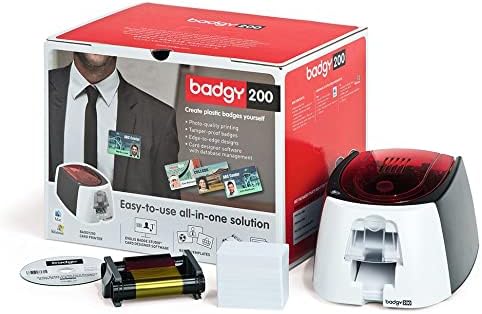
Badgy Card Printing Solution : desertcart.co.uk: Computers & Accessories Review: Plastic card printing on a budget - but it has limitations - The Badgy is probably ideal for low-volume ID cards (maybe in a small office or school etc) but not suited to high volume or particularly 'professional' cards due to some unfortunate limitations. I can't comment on the software provided as I didn't use it but rather just downloaded the OS X Drivers from Evolis' website and treated it as a standard printer (Interesting that it works this way - many older card printers use proprietary interfaces and don't work without the supplied manufacturer's own software, so this is a big plus point for the 'plug in and print' nature of this device - also if you're worried about not being able to design your own badges, with the included software don't be - you can use any software you like - and, in some cases, would be better to) The Badgy has a lot going for it - it appears as a standard printer (as above), it's very affordable (under £600 at time of purchase, most competing machines cost well over £1,000), it's reasonably high resolution (300dpi) and it's not the fastest but at around 40s per card it's not particularly slow either. Also, despite the poor quality 20mil cards included it will happily print the more normal 30mil cards - All in all it's a well rounded offering. However, there's a few negatives too - the biggest one for me is that it doesn't print to the edge of the card, but leaves a considerable (3-4mm) border - this is made worse but the fact that the promotional photography for the unit clearly shows an edge-to-edge printed card as do some, but not all, of the examples on the badgy.com website. This is the reason why, ultimately, my Badgy was returned. There's also a few issues with print quality, the ribbons don't seem great and occasionally there will be odd coloured marks within solid blocks of colour - usually they only happen once so you can just reprint them but with only 100 impressions per ribbon this could get expensive quickly if you need to reprint cards regularly. In summary if you need 70-80 cards in a run, buy two ribbons as you will end up reprinting several. I noticed one of the other reviewers had issues with barcodes. I had no issue with Code 39, QR Codes, Aztec or EAN128 barcodes printed by this machine being read by either a conventional laser scanner or optical CCD. I wonder if, by default, the included software prints barcodes in 'black' composed from all four colours - if possible they should be printed using the Black (K) ribbon only to minimise any fuzzy edges introduced by the multiple colours overlaid, some software may provide this option. If I was free to redesign our ID to cope with the white border the Badgy would have been fine - unfortunately the style of card is one we've had for years and are reluctant to change it to one which, ultimately, looks less professional due to the border so we returned the Badgy (a big advantage of buying from desertcart directly - this is never any hassle at all) Word of advice if returning or selling a used Badgy (or any card printer) - REMOVE THE RIBBON - it contains an image of every card you printed, so if you'd printed typical ID cards would contain the subject's photograph, your organisation, their full name, potentially a date of birth, barcode used for conditional access etc etc. I purchased a Badgy Consumables Kit along with the Badgy (seemed a good way of getting a second ribbon and some 30mil cards) and was glad I did, as was able to return the original consumables unopened. Review: Three Stars - Great printer, software rubbish
| ASIN | B001KBZ16G |
| Additional Printer Functions | All In One |
| B&W Pages per Minute | 45 |
| Brand Name | Evolis |
| Color Pages per Minute | 1.5 ppm |
| Colour | white |
| Customer Reviews | 3.1 3.1 out of 5 stars (16) |
| Dual-sided printing | Yes |
| Duplex | Automatic |
| Global Trade Identification Number | 00807027545770 |
| Hardware Interface | USB |
| Ink Colour | cyan, magenta, yellow, black |
| Item Weight | 2400 Grams |
| Manufacturer | Durable |
| Maximum Copy Resolution Color | 300 x 300 |
| Maximum Supported Paper Size | 4x6 inches |
| Maximum print Resolution Color | 300 x 300 |
| Model Name | Badgy 200 |
| Model Number | BDG101FRU |
| Model Series | Badgy |
| Network Connectivity Technology | USB |
| Print media | Glossy photo paper |
| Printer Output Type | Colour |
| Printer Type | Dye Sublimation |
| Resolution | 300 x 300 |
| Scanner Type | Photo |
| Specific Uses For Product | Printing customized badges and plastic cards |
| UPC | 807027545770 021111223652 080000449023 661572000005 012951576886 872182673170 814018010001 151903545348 071030041646 |
R**S
Plastic card printing on a budget - but it has limitations
The Badgy is probably ideal for low-volume ID cards (maybe in a small office or school etc) but not suited to high volume or particularly 'professional' cards due to some unfortunate limitations. I can't comment on the software provided as I didn't use it but rather just downloaded the OS X Drivers from Evolis' website and treated it as a standard printer (Interesting that it works this way - many older card printers use proprietary interfaces and don't work without the supplied manufacturer's own software, so this is a big plus point for the 'plug in and print' nature of this device - also if you're worried about not being able to design your own badges, with the included software don't be - you can use any software you like - and, in some cases, would be better to) The Badgy has a lot going for it - it appears as a standard printer (as above), it's very affordable (under £600 at time of purchase, most competing machines cost well over £1,000), it's reasonably high resolution (300dpi) and it's not the fastest but at around 40s per card it's not particularly slow either. Also, despite the poor quality 20mil cards included it will happily print the more normal 30mil cards - All in all it's a well rounded offering. However, there's a few negatives too - the biggest one for me is that it doesn't print to the edge of the card, but leaves a considerable (3-4mm) border - this is made worse but the fact that the promotional photography for the unit clearly shows an edge-to-edge printed card as do some, but not all, of the examples on the badgy.com website. This is the reason why, ultimately, my Badgy was returned. There's also a few issues with print quality, the ribbons don't seem great and occasionally there will be odd coloured marks within solid blocks of colour - usually they only happen once so you can just reprint them but with only 100 impressions per ribbon this could get expensive quickly if you need to reprint cards regularly. In summary if you need 70-80 cards in a run, buy two ribbons as you will end up reprinting several. I noticed one of the other reviewers had issues with barcodes. I had no issue with Code 39, QR Codes, Aztec or EAN128 barcodes printed by this machine being read by either a conventional laser scanner or optical CCD. I wonder if, by default, the included software prints barcodes in 'black' composed from all four colours - if possible they should be printed using the Black (K) ribbon only to minimise any fuzzy edges introduced by the multiple colours overlaid, some software may provide this option. If I was free to redesign our ID to cope with the white border the Badgy would have been fine - unfortunately the style of card is one we've had for years and are reluctant to change it to one which, ultimately, looks less professional due to the border so we returned the Badgy (a big advantage of buying from Amazon directly - this is never any hassle at all) Word of advice if returning or selling a used Badgy (or any card printer) - REMOVE THE RIBBON - it contains an image of every card you printed, so if you'd printed typical ID cards would contain the subject's photograph, your organisation, their full name, potentially a date of birth, barcode used for conditional access etc etc. I purchased a Badgy Consumables Kit along with the Badgy (seemed a good way of getting a second ribbon and some 30mil cards) and was glad I did, as was able to return the original consumables unopened.
P**X
Three Stars
Great printer, software rubbish
S**N
Two Stars
Software is very tempremental, not great
G**Z
Five Stars
Love it saving a fortune making my work force I.D badges
J**T
the results are fine and it does the job
You need to have existing software to use it, there's nothing included that allows you to 'print and go". You can't just get it home and start printing cards. Took me ages to sort some software out. Once you get it printing, the results are fine and it does the job.
C**N
Great, High Quality Colour ID Card Printer
I have ordered this Plastic ID cards Colour Badge Printer 6 months ago. After having had it i'd say its spectacular, cost effective, robust, and very well constructed printer.Its very easy to load cards and ribbons into the printer, it prints very quickly (less than even 45 seconds). The best thing that I really liked about this printer is its high quality printing. It comes with Excel spreadsheet software which is very simple and easy to use, with builtin templates. There are card templates available you can personalize them in few minutes and print your cards and badges with Badgy printer. It comes with 1 printer , consumables, 100 blank cards and 1 ribbon , 1 personalization software Office-Cards. In summary I'd say "The Badgy printer is very easy to set up and use. It is affordable, cost effective compared to other printers and produces good quality results. The templates allow for making more professional ID cards and badges." I'd recommend everyone to use this printer. "I just love this printer!" 5 stars out of 5.
G**.
Get the evolus Badgy 200 instead. Works better. We bought this one. It was ok but didn't print centered on the ID. 200 worked great.
B**H
The machine is pretty easy to use, but I had to work with tech support (which, by the way, were actually great and helpful) to finally get it running right. The Excel template system was hard to work with and crashed a lot, but the Word template was pretty simple to work with (if you are familiar with using Word) and that is what I use. The printing looks pretty dang good, but not perfect, but hey, I am not trying to forge I.D.'s so what does that matter?
E**G
I print the ID badges for my Interpreters with this (2 or 3 a month). After reading about the problems with the software, I didn't even bother installing it. I just made my own template and set up a custom size page (the size of the card) in MS Word leaving a field for the picture and the name, and it works beautifully. I couldn't ask for more in this price range!
C**N
I purchased this item with the idea it would help my company. It worked the first few times I used it then it just stopped. Seems the drivers get all screwed up when you choose to print anything with your regular printer. It likes to dominate your printer drivers and BE the default printer. Don't get me wrong, it prints nice, but it took over 4 hours to figure out the software to create a badge from scratch. I didn't like ANY of the templates they offered. Hope you have better luck than I.
A**O
This printer works great. It was super easy to use, once I set it up. The directions are super confusing, especially with a mac. I ended up making a template in photoshop and printing from there. Once it is set up, it prints the badges so fast and they look great.
Trustpilot
Hace 1 semana
Hace 2 semanas