We remain fully operational. Our teams are working around the clock to ensure your deliveries continue safely.

Descargar la aplicación


Servicios al cliente
Sobre nosotros
Copyright © 2025 Desertcart Holdings Limited
Descargar la aplicación
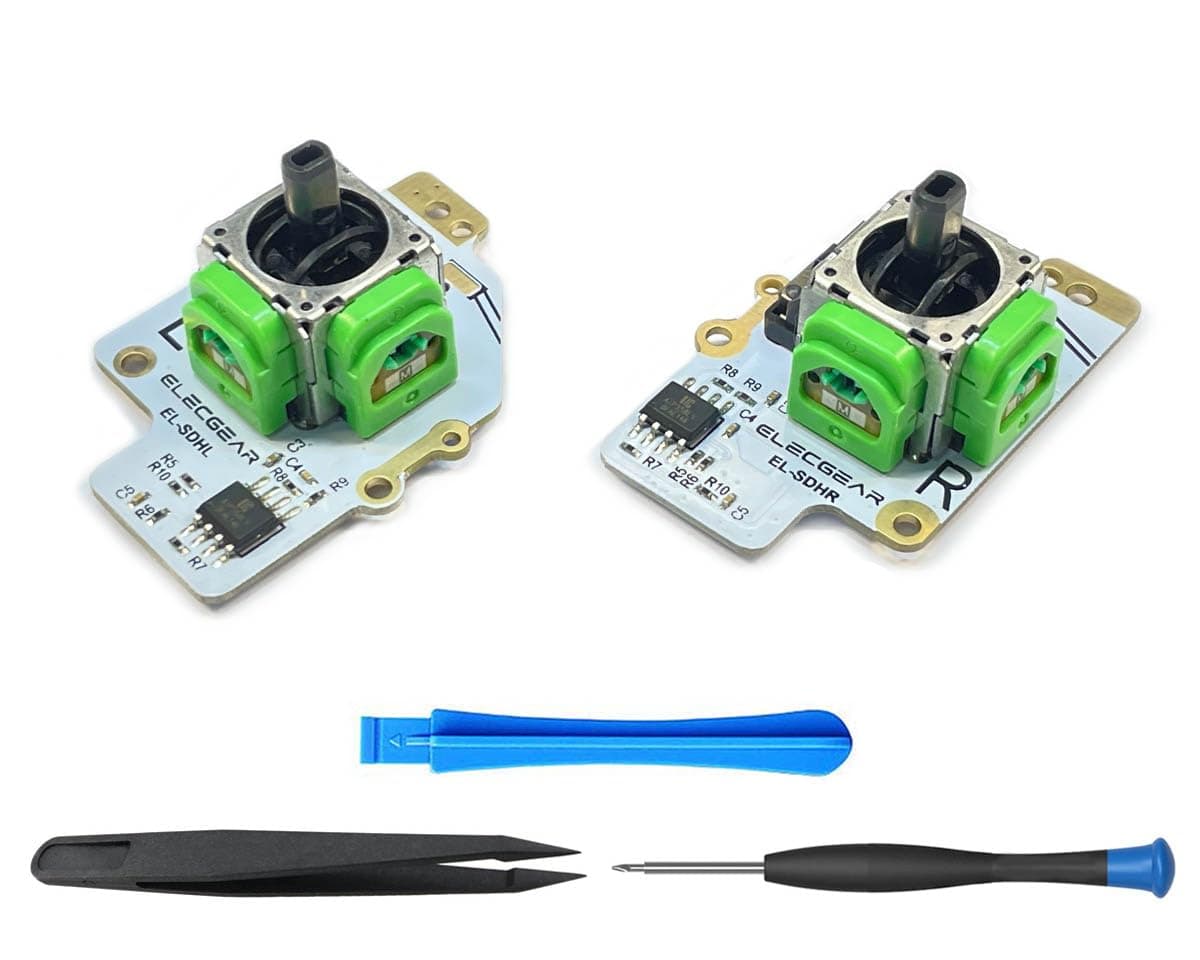
🎮 Upgrade your Steam Deck with precision that gamers crave!
The ElecGear TMR Joystick Replacement is a high-precision, drift-free analog thumbstick module designed specifically for Steam Deck LCDs. Featuring the latest TMR Hall sensor technology, it supports both MEDA and MHDA controller IDs and includes a DIY repair toolkit for easy installation. Enhanced with an ESD diode for static protection and a latency-free analog circuit, this module offers gamers a reliable, responsive upgrade to restore or enhance their Steam Deck’s control experience.
| ASIN | B0BVKT1JV7 |
| Additional Features | Ergonomic |
| Best Sellers Rank | #20,152 in Video Games ( See Top 100 in Video Games ) #166 in PC Game Joysticks |
| Brand Name | ElecGear |
| Button Quantity | 2 |
| Color | Blue |
| Compatible Devices | Windows |
| Connectivity Technology | USB |
| Controller Type | Joystick |
| Customer Reviews | 3.6 3.6 out of 5 stars (55) |
| Hardware Platform | pc |
| Item Weight | 0.05 Kilograms |
| Manufacturer | ElecGear |
| Model Name | RM |
| Package Quantity | 1 |
| Power Source | Battery Powered |
| Warranty Description | 30 days of FBA service |
A**.
03/28/2026 - Modern revision works great! Easy install.
The revision 2 model of the ElecGear TMR Joysticks are holding up great! I installed them a few days ago, and I've been playing Katamari Damacy to really put the joysticks to the fullest stress test possible, as the game requires full 360° rotation for the joysticks and also utilizes joystick button clicks (from the reviews, a known issue from early revisions of the model). These joysticks have no stick drift, have a lot of precision to them allowing the Steam Deck to lower the threshold all the way to 2000/2000 for both joysticks. It seems like technically speaking these could even be reduced down to 1800/1800, possibly even 1600/1600 without having drift. However Steam software doesn't allow for that, nor is it really necessary, more just a testament to the accuracy and sensitivity potential of these. The installation instructions were adequate, and there was a relatively good video provided as well. I did record a video of my own as I did not see many recordings, it includes the installation of these TMR Joysticks from ElecGear, as well as a replacement backplate from elsewhere. The video turned out to be a bit over an hour, the install was maybe an hour-40 -- mostly due to pausing to make sure, taking adequate time to check instructions, plus some recording aspects added a little bit of time. I think quite honestly, this is easily a sub-40 minute installation. Take out the SD card, take the backplate off, unlatch and remove the cable and 3 screws on each joystick, then 1 solder contact pad that is relatively easily removed (some glue slowed down the heating of the solder). Then, remove the joystick cap, add it to these TMR ones, and resolder the wire to the contact point. Very very easy soldering practice. For anyone looking to give a small, easy upgrade to their Steam Deck, Revision 2 of the ElecGear TMR Joysticks are a good way to go. Full, circular radius. The installation is seriously easy. Thanks for offering such a great upgrade as such a reasonable price, less than $20 feels like a steal.
P**O
Update: Quality control is bad, the replacement has the same issue.
The video above demonstrates that the button is stuck. UPDATE: The replacement I received has the same issue as the first. Clicking the left analog requires a ridiculous amount of pressure to actuate. I've tried to break it in but the issue doesn't improve. Perhaps they have a bad batch, but I've resorted to using a Gulikit left stick and the elecgear right stick. Gulikits are great but suffer from square deadzones, so I switched to these elecgears for their circular deadzones like the oem sticks, with the added stick drift benefits.
M**L
Issue with reported values while 'click'ed.
Sticks track excellently, until you click them at extreme vertical deflection. Doing this seems to present new maximum values in the output, causing the sticks to fail to reach maximum value unless they are also clicked during deflection. See video. Happens with both of my sticks. Horizontal axis seems unaffected. I haven't been about to calibrate this issue out, SteamOS seems to instantly begin using the new maximum value, and this makes gameplay difficult in some games. Rebooting the console fixes this, until a stick is clicked again at maximum vertical deflection.
M**E
The Perfect Joysticks
We purchased these under recommendation from a user in a Discord server. The joysticks arrived quickly and were super easy to install. They worked perfectly out of the box, and once they were calibrated they blew us away. They're far more precise than the OEM joysticks and much higher quality than the GuliKit ones (which had too loose tolerances and didn't even have full range of motion!) Would definitely recommend buying these to replace your drifting OEM sticks, or just to upgrade your input system!
A**N
Absolutely amazing, easy install, and better than stock!
- very basic soldering needed (easy) - calibration needed (easy) - barely need to take apart the deck (easy) You'll obviously need to take apart your steam deck (remove your microsd card first!) so please watch a YouTube video or two before doing it and make sure you're using the correct screwdriver bit so you don't strip your screws!! Use a PH1 size!! Yes there is minor soldering involved so be aware/prepared for that. I have janky soldering skills and still managed to do this so don't be intimidated by that! Instructions can get you by, but do some research too on how to set these up/calibrate them, its super easy. Once they're set up, they are so much smoother than stock! These use a circle gate rather than square like the other brands which is better. Highly recommend!!
C**E
Work amazing!
These work perfectly, installation was easy and they work like stock (but smaller dead zones due to the hall sensors). Definitely recommend these over the GulliKit ones as these have the proper deflection zone (circular vs square) and are super accurate. Seller is very knowledgeable and helpful should any questions arise!
O**A
These are better than the Gullikit Sticks in nearly every way. They are more accurate, smoother, have a circular deadzone, more responsive and less jittery, feel more premium and overall provide a better experience. These address and fix every issue that all the other Hall effect replacement sticks have, and then these go beyond and function better than the original sticks too. Theres literally no negatives I could find despite trying very hard. You will need to solder your own sticks, but other than that they’re easy to install, they come with everything you need to open your device and there are included instructions going over how to calibrate them afterwards very clearly. Overall, these went beyond my expectations and I will never use Gullikit stuff again.
D**N
Éstos sticks no tienen el problema de la zona muerta exterior. La zona es completamente redonda lo que hace qué los sticks respondan perfectamente. También son compatibles con los 2 tipos de sticks (meda y mhda) con los que vienen los steamdeck con solo mover 1 switch. Se necesita desoldar el cable del cap con el sensor touch del stick original (sin cortarlo) y soldarlo a los nuevos, y aunque no es muy difícil, puede qué sea un pequeño inconveniente para quienes no tienen las herramientas y jamás han soldado algo.
ガ**あ
問題なく取り付け出来ました。だからと言って変わらないよねー。高いものでも無いし買える時に買って交換しておこうって感じ。
G**N
Works perfectly... until you press the stick and the Steam Deck self-calibrates their stick range, giving you an oval dead-zone. Would otherwise be excellent
K**.
As others have mentioned, clicking the stick while at maximum vertical deflection will recalibrate your deadzones and make some games unplayable. Rebooting or putting the Deck to sleep will reset it. This affects the right stick much more than the left stick, the reason for this is still unkown.
Trustpilot
Hace 3 semanas
Hace 2 meses