
Descargar la aplicación


Servicios al cliente
Sobre nosotros
Copyright © 2025 Desertcart Holdings Limited
Descargar la aplicación

🚀 Own your cloud, ditch the subscriptions, and sync like a pro!
The BeeStation 4TB Personal Cloud Storage Device by Synology offers a robust, user-friendly solution for personal and shared file storage. With 4TB of built-in storage, it supports seamless syncing across laptops, smartphones, and tablets, consolidating backups from major cloud services into one secure, subscription-free hub. Its plug-and-play setup via QR code makes it perfect for busy professionals seeking reliable, private cloud access without IT hassle.


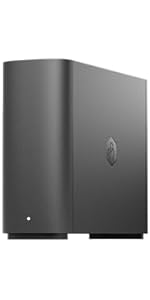


| ASIN | B0CSSR38F1 |
| Best Sellers Rank | #5 in Network Attached Storage (NAS) Enclosures |
| Brand | Synology |
| Color | Black |
| Compatible Devices | Laptop, Smartphone, Tablet |
| Customer Reviews | 3.8 out of 5 stars 238 Reviews |
| Enclosure Material | Metal |
| Is Assembly Required | No |
| Item Dimensions D x W x H | 4.53"D x 10.16"W x 9.92"H |
| Manufacturer | Synology |
| Material | Metal |
| Mounting Type | Tabletop |
| Product Dimensions | 4.53"D x 10.16"W x 9.92"H |
| Size | 4.53x10.16x9.92 inches |
| UPC | 846504005314 |
| Warranty Description | 3 years |
A**R
Great Cloud Storage Device
This is a great backup device for simplicity. The instructions are extremely clear into how to set everything up with scanning a QR code. Everyone complaining that they can't get the device to work is likely just impatient from the slightly long initial startup time. This additionally works with Mas OS Sequoia. Everything was seamless during the update. If someone says it doesn't work with an OS update, they likely did something else to cause their issue. The BeePhotos and BeeFiles app are great. BeeFiles is similar to google drive, where it can sync to a folder on your device. BeePhotos is basically a toned down version of google photos. There is unfortunately no dark mode on these apps. It is extremely easy to share files and albums between users. My one complaint is the link will open up the album in the web, versus in the beephotos or beestation app. Hopefully this will get addressed, but it is not a huge issue. Time Machine works great, which is the primary reason I got this machine. While this doesn't work with a Plex Server, you can view the files locally on a device and a tool, such as VLC and such. This is useful for viewing home videos and photos. The one downside to this device is that it only runs off 1 drive, where many NAS drives will have 2-bays. I recently purchased an external drive to act as a backup device so I don't solely rely on the beestation and the one drive. I will try and update my review after I report how my solution works.
S**.
Love this thing!
I was looking for a simple, reliable, affordable personal cloud storage option. This thing checks all the boxes. Plug and play, you don't have to be an IT geek to get it up and going. To be fair my only hiccup was during the initial setup it kept failing to complete the install, after over an hour of frustration I finally found a page on the Synology website that informed me that the site was temporarily down for maintenance and updating. Tried it again the next morning an voila, easy peasy! Wish they would have made it a little easier to know that little detail. Even with that, it deserves 5 stars, this thing is just what I was looking for. Love it!
J**S
Connection setup to my computer network is terrible
To first preface this I should say I am not a certified IT professional. However, I am highly technical in nature and have had a lot of experience with day-to-day dealings with computers and their interface due to the line of our work. Specifically as it relates here I have used WDCloud devices over the years and their setup was easily done. Their problem is that they have been phasing out their NAS product line. I needed something this time to host family photos and videos. I needed something that was just a 2TB to 4TB setup to be used locally here in the home to access family media through the local home network. Synology lists their product as easily setup. I beg to differ what they define as "setup". Upon opening the box you see a tiny setup card which simply guides you on how to physically setup the device with two methods to "Start Using BeeStation". One was Scan QR code and the other through their online portal. I used the online portal. The device easily and quickly connected to their network and all they did at that time is to declare that the device was "ready to use". Went all downhill from there. I could see from the online portal the drive and could transfer files via the Internet. However, I wanted a drive that was mapped to my computer for more of a direct connection rather than relying on the cloud. No mention was made anywhere from this process that other utilities should be used to effect this connection such as "Synology Assistant" and "BeeStation for Desktop". I had to find these via AI searches troubleshooting mapping the drive to my computer network. I get what they are trying to do as an end result but getting to that point is terrible and I was willing to work to see this through and work within their parameters. However getting this to connect to my network proved to be totally unsuccessful. No matter what I did I could not make a connection. I could see the drive in my system but could not see let alone access any of the folders to transfer files. The drive had been setup with credentials for online access and other credentials for local access. No matter what I did I could not gain local access despite 6+ hours of troubleshooting and using the two previously identified utilities from Synology. I rarely have returns to Amazon but this one is being returned today. I total waste of my time this weekend. I cannot imaging what a nontechnical person goes through in this setup unless all they do is rely on access via the cloud. I need local access as the first option. Terrible. P.S. I would give it a 0 star rating if I could but I had to select at least 1 star to submit.
J**M
Your search ends here!!!
Synology BeeStation One-Month Usage Review After using the Synology BeeStation for approximately one month, I would like to share my evaluation. I primarily use the Synology BeeStation to back up photos and videos taken with my mobile phone. 1. Reasons for Choosing Synology BeeStation and Its Advantages 1) Convenient Automatic Backup The automatic backup feature from my mobile phone to Bee Photos within the Synology BeeStation is extremely convenient. 2) Cost Savings Previously, I used Google Drive and Dropbox, but the monthly subscription fees were burdensome. The Synology BeeStation has freed me from these recurring costs. 3) Affordable and Reliable Compared to other products, it is reasonably priced and provides stable data storage, which I find excellent. 2. Areas for Improvement and Enhancement 1) Performance Optimization While the performance is generally acceptable, photo uploads, downloads, and deletions take a noticeable amount of time. It would be great if RAM expansion capabilities could be added to improve performance. 2) App Improvements Needed The Synology BeeStation/Bee Photos app requires several enhancements: Improved accuracy of facial recognition Addition of private/secure folder functionality Integration of advanced features available in Synology NAS systems Thank you
C**D
Use advance settings for local access and toggle on SMB Service for Time Machine backups.
It's easy to set up to replace our Time Capsule. Getting the BeeSation tuned on and updated takes a bit, I used my iPhone. Just wait a while, and the flashing white light will turn orange. Afterwards, the update takes a while, but you will see the progress on the app on your phone. I had to do a couple of searches to find out why the settings for Time Machine settings could not find the BeeStation. Here is the guide to set it up. After you create your BeeStation Portal log in. (I used the Apple Account choice) On your Mac log into your account in the browser. Hover over your BeeStation, click the icon at the upper-right corner, and select System Settings. Advanced Settings > Local Access. Enable Local Account. After you have set up a local account, toggle to enable SMB Service located below the Local Account section. Restart your Mac, and afterward, in the Time Machine settings, you can locate your BeeStation for backup. It backs up much faster on the BeeStation than on the Time Capsule. Attaching an external USB drive to the BeeStation is just plugging the drive into the USB port. Storage is great for two MacBook Airs. Set up is easy once you know how to have your Mac see the BeeStation. The App and the web browser settings are pretty simple. The BeeStation is much smaller than the Time Capsule with a lot more storage.
A**R
Great Buy but…
Should come with GOOD media managing software for video/photo organization (no duplicates) and home sharing with smart TV’s and wireless devices. Atleast an option of one that works well with the device.
D**Z
The windows 11 app requires reloading but then I only have file access, no photo access.
Slow and clunky Windows 11 PC app. I select the Windows app, and get a "Beestation is running" window. The app doesn't come up. I had to reload the app, and it only opens my files, no photo access unless I select wifi, which takes me to the website which takes a minute to have the file and photo icons pop up. They also push the C2 backup paid storage options, which is why I bought the Beestation in the first place, so I don't have to pay for cloud storage. However, the cellphone app works fine. I would not recommend this to a friend.
V**A
As advertised
It works exactly as advertised.
Trustpilot
Hace 2 semanas
Hace 5 días