We remain fully operational. Our teams are working around the clock to ensure your deliveries continue safely.

Descargar la aplicación


Servicios al cliente
Sobre nosotros
Copyright © 2025 Desertcart Holdings Limited
Descargar la aplicación
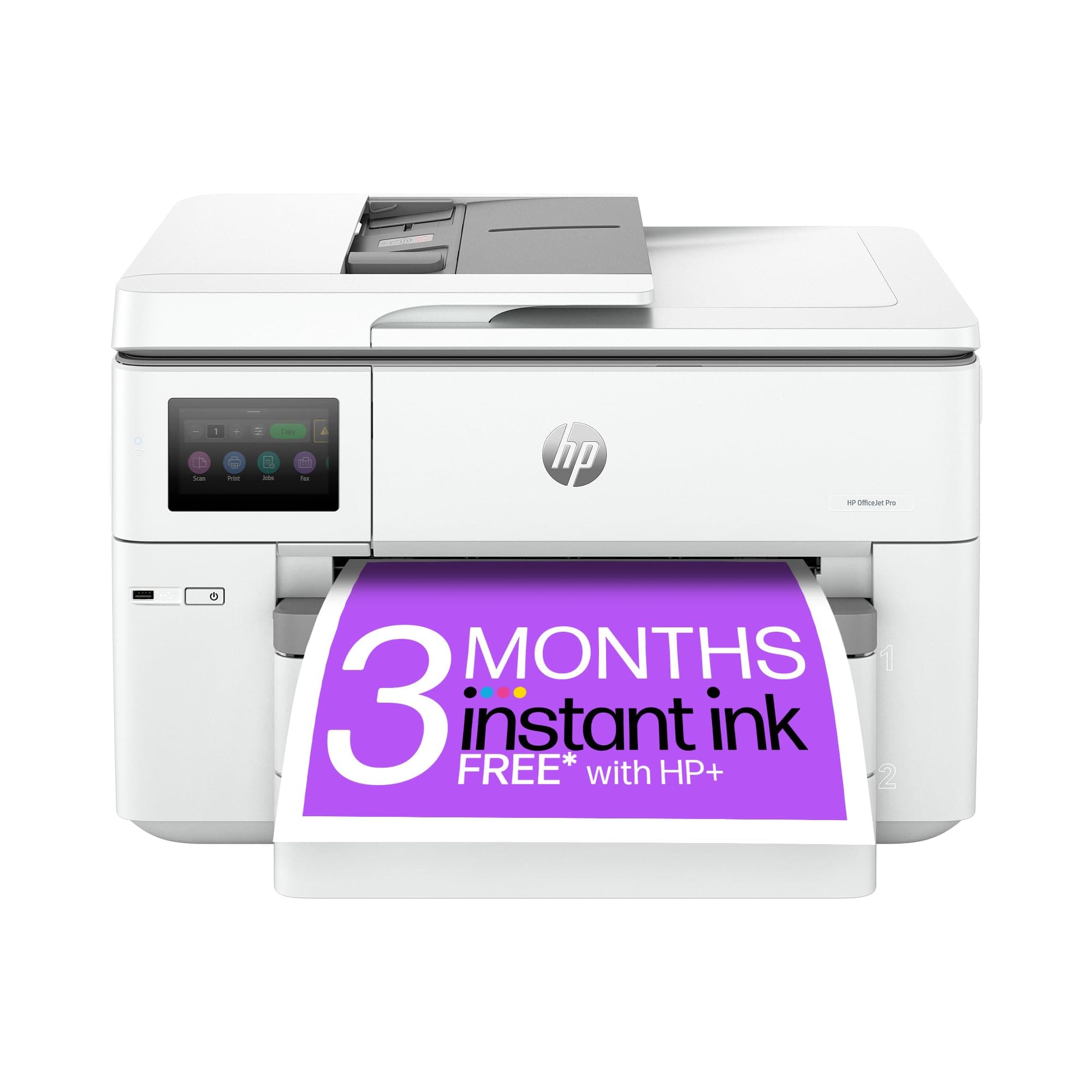
🖨️ Elevate your office game with HP’s powerhouse all-in-one—because your ideas deserve the best print stage.
The HP OfficeJet Pro 9730e is a versatile all-in-one inkjet printer designed for small to medium offices, offering fast print speeds (22 ppm B&W, 18 ppm color), wide-format A3 capability, and automatic duplex printing. It features dual-band self-healing Wi-Fi for reliable wireless connectivity, a 35-sheet automatic document feeder for efficient scanning and copying, and two 250-sheet input trays. With vibrant, screen-accurate color output using P3 color gamut technology and seamless cloud integration via the HP Smart app, it supports modern workflows. The printer includes 3 months of free Instant Ink for cost-effective ink management and is built with 30% recycled plastic, reflecting HP’s commitment to sustainability.


| ASIN | B0CJY237QY |
| Additional Printer Functions | All In One |
| B&W Pages per Minute | 22 ppm |
| Best Sellers Rank | 3,634 in Computers & Accessories ( See Top 100 in Computers & Accessories ) 21 in All-In-One Printers |
| Box Contents | 9730e |
| Brand Name | HP |
| Color Depth | 24 bits_per_pixel |
| Color Pages per Minute | 18 ppm |
| Colour | Black/White |
| Compatible Devices | Tablets |
| Control Method | Touch |
| Controller Type | Android, iOS |
| Country of Origin | China |
| Customer Reviews | 3.7 3.7 out of 5 stars (93) |
| Display Type | LCD or LED |
| Dual-sided printing | Yes |
| Duplex | Automatic |
| EU Spare Part Availability Duration | 3 Months |
| Hardware Interface | Ethernet, USB, USB 2.0 |
| Ink Colour | cyan, magenta, yellow, black |
| Item Dimensions D x W x H | 4.67D x 5.81W x 3.86H metres |
| Item Type Name | Multifunction Printer |
| Item Weight | 19500 Grams |
| Manufacturer | HP |
| Maximum Copy Resolution Black and White | 600 dpi |
| Maximum Copy Resolution Color | 600 dpi |
| Maximum Copy Speed Black and White | 22 ppm |
| Maximum Print Resolution Black and White | 600 dpi |
| Maximum Sheet Capacity | 250 |
| Maximum Supported Paper Size | A3 |
| Maximum print Resolution Color | 600 dpi |
| Model Name | 537P6B#687 |
| Model Number | 537P6B#687 |
| Model Series | Officejet Pro |
| Network Connectivity Technology | Ethernet, USB |
| Number of Ethernet Ports | 1 |
| Number of Trays | 1 |
| Other Special Features of the Product | Auto-Duplex |
| Output sheet capacity | 250 |
| Paper Size | 297 millimeters |
| Print media | Glossy photo paper |
| Printer Output Type | Colour |
| Printer Type | Inkjet |
| Processor Count | 1 |
| Product Warranty | One-year limited hardware warranty with option to extend to 2 years with HP+ Offer. For more info please visit us at http://support.hp.com . [9] |
| Resolution | 600 x 600 |
| Scanner Type | Flatbed |
| Specific Uses For Product | Office |
| Total USB Ports | 1 |
| UPC | 196337487963 196337487956 |
| Unit Count | 1.0 Count |
| Warranty Type | limited warranty |
P**R
Good stuff as a home office printer
I received the big box this morning, and my first impression was that it's quite huge and heavy (around 20KG) --- understandable given its ability to scan and print A3 documents double-sided! The setup was straightforward: after removing all the protective films, I simply plugged it in and followed the instructions via the LCD touchscreen. It supports 5GHz Wi-Fi, so an Ethernet connection is not mandatory. HP kindly includes a nice bonus: several free months of ink and packs of premium papers, provided you sign up for the instant ink plan using the promo code gbdzc4. Last time I got 6 packs of 80 gsm A4 papers, 500 sheets per pack, hopefully they could give me the same this time. xD. You're free to cancel after the trial period and switch to more affordable third-party cartridges, it is totally up to you. As for user experience, it is solid, but there are a few points to note: 1. The official manuals are quite vague, especially for advanced features. For example, if you want to scan directly to cloud services like OneDrive or Dropbox, you will need to use the HP Smart app. You will create cloud scan configuration profiles (so-called Shortcuts in HP's dictionary) within the app, which then sync to the printer. The sync to network folder (Samba/SMB/CIFS) is an amazing feature, you can simply scan documents and save to your network share (NAS like Synology or QNAP or whatever you have) in one click. 2. For scan to email, you must configure an email account as the sender- that's quite intuitive for people with such a tech background, but not for normal people. 3. When it comes to the paper trays, only Tray 1 supports various media types (like envelops and glossy photo paper). Tray 2 is limited to plain paper only. Unfortunately, HP doesn't clearly mention this in their product description, which I found frustrating---and apparently, so have other users, that's why this machine got so many low ratings online. 4. The ADF (Automatic Document Feeder) works well, but there is a slight skew (about 1 degree) shown in the scanning outputs. It's not a dealbreaker, but I was hoping for perfect alignment. For scanning based on ADF, it only supports up to 300 DPI, however, it could be 1200 DPI using the scanner glass (flatbed). The Scan to Network Folder/USB feature can only do up to 600 DPI. 5. The print quality is good as usual, 1200 DPI under "Colour - Best Quality" profile looks fabulous as long as you use good papers (>= 80 gsm). I used HP Premium A4 (90 gsm). Don't buy those cheap 70g stuff from Tesco---they are affordable but lead to a poor print quality. So overall, this is a powerful all-in-one printer with great functionality, especially for those who do need A3 capabilities. I couldn't judge HP more as they offered free ink, tons of papers and £50 cash rewards (limited event if you purchase it from Amazon). Just be prepared for a bit learning curve with the more advanced features and limitations in paper handling of the trays.
H**S
Not a good printer.
I had hoped that this printer would be able to handle light A3 card and photo paper but unlike what it says it can, it is very hit and miss or whether it will grab the paper / card from the tray and print. I have used all the correct settings etc but have wasted a lot of material as it has had issues etc. Had some errors in that the tray sensors didn't work correctly and wouldn't load the paper, I spent over 4 hours "chatting" to HP themselves to get a solution and this was only done after I asked to escalate my issue. A replacement one was sent, and was hoping that it would be an improvement, but is the same as the original one. For PAPER, it is ok but anything else, it's a lottery as to whether it works or not!
G**O
stampante ideal for small office
This is a high-quality printer that delivers excellent performance. It connects easily via Wi-Fi and is very quick and intuitive to use once the password is entered. The printing speed is impressive, and the overall setup is straightforward. Another great feature is the two paper trays, one for A3 and one for A4, which makes it ideal for printing larger formats without having to constantly switch paper. Overall, it’s a reliable, efficient, and user-friendly printer, perfect for both everyday tasks and professional use.
S**S
good match for a small business.
due to setting up additional premises we needed another printer. we decided on this one as we have always had HP printers and it does everything we needed. SO far so good, took it out of the box and set up was easy, it prints quickly with good colour quality. scanning can be achieved once you download the HP App, we have used the item both wirelessly and connected directly to our network. well priced and suitable for a small business.
R**R
Extra 2 Months Ink Offer Expired!
Printer is OK, setup easy. The extra 2 months ink offer is not honoured, as HP says the offer has expired!
G**N
Software not yet ready for UK market
Purchased for small office with 3 desktop computers and 2 laptops, all connected by ethernet apart from 1 laptop that doesn't have a port. Be aware that this printer can only be ethernet or wireless, not both at the same time. Direct printing works from a phone but not that laptop. The main issue is that the pre - installed software is American and defaults to letter paper size. Changing the defaults in printer properties does not save. I have spent many hours on the phone to HP support with Ron from the Phillipines who has been incredibly helpful over many hours. We have had to delete the printer and reinstall it direct using its IP address on each computer. We then manually altered the settings again for all trays and manual feed. As we had loaded the driver manually, the changes were saved. HOWEVER - the next morning the laptop, on Windows 11 pro, could still print normally but the desktops had reverted to letter setting for Word. PDF and Excel could be printed. Ron tried to help again, but his only solution was to ask me to ring Microsoft. In short we bought this printer to save money on ink by going on instant Ink as our ever reliable Epson was obsolete and we could not move onto their Ink plan. It has cost me over a week's productivity in trying to solve the problems it has created. We are on the verge of sending it back but it was the only one at its price point that offered simple A3 printing and we need this. We intend to persevere and make a decision just before the 30 days are up.
T**S
Good Printer, But AirPrint Issues and Poor Support
The HP OfficeJet Pro 9730e is a solid printer that performs well for Windows printing, and the build quality is impressive. However, I've had an ongoing issue with AirPrint, which has been a constant frustration. Despite spending days discussing the issue with HP support via WhatsApp, there's still no resolution. The lack of proper support has been extremely disappointing, and it leaves me unsure whether I should return the printer. If you rely on AirPrint, be aware that my experience suggests you might encounter significant issues.
Trustpilot
Hace 3 semanas
Hace 1 mes