We remain fully operational. Our teams are working around the clock to ensure your deliveries continue safely.

Descargar la aplicación


Servicios al cliente
Sobre nosotros
Copyright © 2025 Desertcart Holdings Limited
Descargar la aplicación
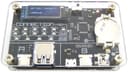
![Bit Trade One USB Cable Checker2 [Assembled] Supported USB MiniB/microB/TypeC Cables/USB Digital Tester/USB c Cable Tester/USB Cable Tester Tool / H0.5xW3.5xD2.1 inch ADUSBCIM](/_next/image?url=https%3A%2F%2Fm.media-amazon.com%2Fimages%2FI%2F81MTfycxcnL.jpg&w=3840&q=75)
🔍 Don’t get left behind—know your cables, know your speed!
The Bit Trade One USB Cable Checker2 is a compact, battery-powered digital tester designed for MiniB, microB, and TypeC USB cables. It precisely measures cable resistance and verifies data line integrity, displaying clear English status on an LCD. Ideal for IT professionals and tech enthusiasts, it helps identify power-only cables and ensures your USB connections deliver optimal charging and data speeds.


| ASIN | B07Y8BPVV4 |
| Best Sellers Rank | #213,860 in Industrial & Scientific ( See Top 100 in Industrial & Scientific ) #428 in Network & Cable Testers |
| Customer Reviews | 4.5 4.5 out of 5 stars (404) |
| Date First Available | December 8, 2022 |
| Item Weight | 1.59 ounces |
| Item model number | ADUSBCIM |
| Manufacturer | BitTradeOne |
| Package Dimensions | 6.38 x 4.33 x 0.83 inches |
A**.
❤️ Very accurate, informative and precious cable tester
I am providing an overall comment for three USB testers, all of which deserve to be purchased as they complement each other perfectly and are consistent in their results. I would like to dedicate the majority of this review to the Bit Trade One model, which has recently arrived on Amazon. It deserves a shoutout because the tool is exceptional and inexpensive for what it offers. The ADUSBCIM is a USB cable tester that truly complements traditional USB cable testers. Only the cable to be tested needs to be plugged into the A and B ports, and the tool does the rest. The reference value for calculating the cable's resistance is taken using a CR2032 battery, and I note that the calculation is very precise and stable. You can find on Bit Trade One's ADUSBCIM GitHub page, in the Pull Request section, a manual in English in PDF format. This is my small contribution to the project, as the current official English manual is more of a word-by-word description that is difficult to understand. Thanks to this tester, I discovered, for example, that Anker cables, the 765 series, were actually poor high-resistance cables, and that I had much better options for charging. I ended up wasting money on cables that turned out to be slower than cables that were given to me for free with computer accessories. The FNIRSI FNB58 is a very comprehensive USB-A and USB-C port tester. It notably offers numerous rapid charging protocol tests, can test the quality and resistance of a cable, and obtain oscilloscope-like graphical representations. Now that we are on PD3.0 and with PD3.1 approaching quickly, owning one of these tools is now essential to validate the proper functioning of an installation. I've read a lot of advice on Reddit, and if you're looking to equip yourself with the best products offering the most testing possibilities, here are the tester references to get: - Bit Trade One ADUSBCIM (very thorough cable tester testing all the lines of a cable) - FNIRSI FNB58 (the most comprehensive, many ports, many scenarios, USBA/C Micro) - ChargerLab KM003C (the most modern, TB4, 250W) If you have these three or at least a combination of the cable and usb tester, it will take you no more than a few days to become a USB expert. 👌
M**C
Far more useful than I expected
This is the only "smart" USB cable tester that I found (all the others were passive, simply using LEDs to show continuity between ends). Aside from the basic good/bad test, here are two features that are most useful to me: 1. Identifies power-only cables (no data lines) 2. Identifies whether a USB-C cable supports all of the data lines for SuperSpeed or SuperSpeed+ -- just because it has C-type plugs doesn't mean it's high speed! There are passive testers that can satisfy the points above (if they have more than four LEDs, of course), but here's what you get with this smart tester: 1. Line resistance -- high resistance on power lines (VBUS and GND) makes for a poor charge cable 2. CC line checking: a) USB-C cables may have a pull-up resistor inside the plug that's used to signal to the power supply the maximum current that should be allowed b) or for high-power cables, there could be an E-marker chip on this line for more advanced power capability identification c) some cables have a different pull-up/pull-down resistor on the other end of the CC line, which is a non-standard implementation and could indicate that the connector is sensitive to orientation So, who needs this tool? 1. It might not be a justifiable expense for the average user. if you have a pile of USB cables and just want to know which ones are good and which one to throw out, or which ones are power-only, a simpler LED-based tester would be enough. 2. IT professionals and tech-nerds will benefit from the ability to confirm whether a USB-C cable is really just a USB 2.0 cable in disguise, or if it actually support full-speed data transfer. Maybe that external SSD is slow because you're using the wrong cable? 3. Microcontroller software/electronics developers implementing USB power for their high-power prototypes, or high speed data transfer capabilities, will want to make sure they're using a proper cable for testing. Flaws: 1. The device seems to be sensitive to connectivity on the shells of the USB jacks. Slight movement of a cable plugged into these will cause the LCD to clear and redraw (so there's a noticeable flicker) as it re-determines whether the shell is bonded to GND. Not sure if it's a flaw with the electrical connectivity between the shells and the microcontroller, or suboptimal firmware -- probably some combination of both. 2. Given the physical nature of this tool (a raw PCB sandwiched between acrylic plates) and the fact that it uses an easily-programmable Atmel ATmega88PA MCU, I'm a little surprised that the firmware (and maybe the schematics) isn't open source. I can see some fellow nerds wanting to tweak the firmware for the benefit of all users, or even customize the firmware for their own use. But given the subjectively high price tag, I'm betting there's a rather wide margin that they aren't willing to cut into, so I get it. Given the flaws, it's still a very useful tool.
A**.
An invaluable tool for assessing USB-C cables
This is a clever, self-contained device that provides detailed information on an USB-C cable's features. Documentation is readily available on the web. It makes it easy to figure out if a USB-C cable is just for charging (which usually means that it transfers data at USB 2.0 speeds) or if it can provide various levels of charging power and/or high-speed data transfer. Almost no USB-C cables are labeled with this information, making this an invaluable device.
矢**文
これのお陰で本当のUSBケーブルが解りました。ただそれだけです。
J**N
USB-Cがコネクターの主流になった現在、同型で性能が全く違うものが混在してますが外見では殆ど判断が出来ません。 結果いろいろなUSB-Cケーブルが増えてどれがどれやら分からなくなってしまっていたのですが、この製品のお陰で一発解決でした。それぞれ仕分けして整理できました。中には表記があるコードで違った性能のもあったので実用性が非常に高いと思います。C国製は偽表記が多かった。 性能は文句なく満足できるレベルですが外装はアクリル板に回路基板を挟んだこれ以上無いシンプルなものを考えると価格が少々お高い感じは否めませんが同じ性能でも抵抗値表記があって判断基準が一気に上がりました。 電子機器の性能が上がって個々の性能に適したケーブルを使わないと使えなかったりボトルネックになって性能が出ないので表記に関わらす電気的に計測できるので非常に良い製品だと思います 注:付属のボタン電池は動作確認用みたいですぐにダメになりました(わたしのがハズレだったのかもしれませんが)
そ**3
USB-A/CのケーブルをMini/Micro/Cの端子につなぎこんでケーブル規格が何か、どの信号が通るかを 判定するガジェットで、そのUSBケーブルがどの用途に使えるかを判定するために利用します ディスプレイにはケーブルを流れる信号の抵抗値・回線種別・向き等が表示され 下のLEDで種別、回線向き等の情報が取れるためUSBケーブルのある程度の回線知識が必要になります ただ、ぱっと見でそのケーブルがデータ用なのか、充電用なのか、データ用ならUSBの規格は何かというのが 分かるようになっているので、最近多く出ているUSB-A/Cが一緒になっているケーブルが充電用途しか使えないか それともスマートフォンとPCを接続する為に使えるのかを簡単に判定するにはうってつけなので それらのケーブルを多く所持している方が整理の為この機器を持つことは大いに有りかと思います。
D**P
amazing speed - it came to Sweden within a week .. I am stunned!
太**郎
少々お高いですが、家中のケーブルすべてを確認できて良かった。抵抗値がかなり異なるのことがわかりました。性能確認はLEDの点灯で判断できますが、なかなか記憶できないので解説サイトの説明を印刷して見ながらテストしました。 安価な類似製品もありましたが、素人には実績ある本製品がやはり安心です。
Trustpilot
Hace 1 mes
Hace 3 semanas