We remain fully operational. Our teams are working around the clock to ensure your deliveries continue safely.

Descargar la aplicación


Servicios al cliente
Sobre nosotros
Copyright © 2025 Desertcart Holdings Limited
Descargar la aplicación
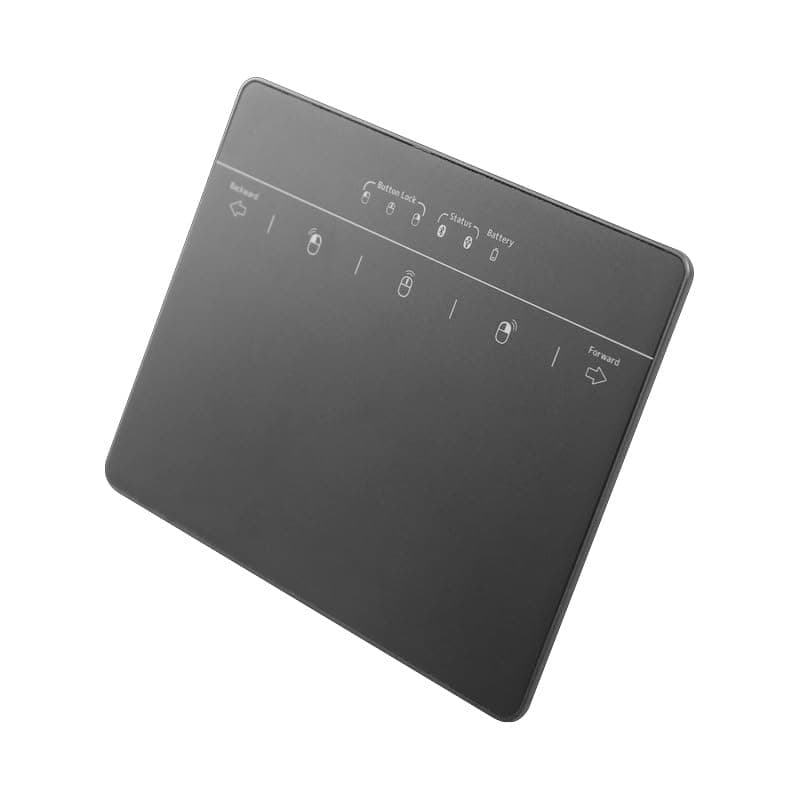
🖱️ Elevate your workspace—travel light, click silent, work smart.
This sleek, rechargeable metal trackpad combines wired and wireless Bluetooth connectivity for Windows 7/10/11 devices. Ultra-portable at 108g, it features a large 5.1x3 inch surface supporting advanced multi-touch gestures, a whisper-quiet buttonless design, and a long-lasting 30-hour battery life—ideal for professionals who demand seamless control on the move.


| ASIN | B0D9LF6VTH |
| Additional Features | Portable, Rechargeable, Soundless |
| Antenna Location | General Computing |
| Are Batteries Included | No |
| Are Batteries Required | Yes |
| Battery Average Life | 30 Hours |
| Best Sellers Rank | #42 in Computer Touch Pads |
| Brand | MICROPACK Digitally Yours |
| Button Quantity | 2 |
| Color | Black |
| Compatible Devices | Devices running Windows 7 with USB or Bluetooth connectivity |
| Connectivity Technology | Bluetooth, USB |
| Customer Reviews | 3.5 out of 5 stars 24 Reviews |
| Enclosure Material | Metal |
| Hand Orientation | Ambidextrous |
| Item Weight | 108 Grams |
| Manufacturer | MICROPACK Digitally Yours |
| Model Name | MICROPACK Digitally Yours |
| Movement Detection | Capacitive |
| Movement Detection Technology | Capacitive |
| Number of Batteries | 1 Lithium Polymer batteries required. |
| Number of Buttons | 2 |
| Operating System | Windows 7 |
| Power Source | Battery Powered |
| Range | 10 meters |
| Special Feature | Portable, Rechargeable, Soundless |
| Style Name | Modern |
| Theme | Computer Accessories |
| Unit Count | 1.0 Count |
| Warranty Description | 1 |
S**I
PORTABLE
Mouse pad works great! I love that it is portable and uses a charging cable instead of wasteful batteries. 10/10 would buy again!
E**I
not great usability
not great but usable... the outsides of the trackpad are unresponsive, including the m1-3 button hold sections, which are in confusing places (I don't know how they expect anyone to locate them by touch?). but gesture controls work great. unfortunately that it uses micro USB but it is an older product.
C**N
Usb connection
Was not easy to set up and did not want to connect usb. Only wanted to do bluetooth
J**O
Helpful
Super helpful!
L**Y
Disappointed, cannot figure out how to click and drag
The manual is minimalistic, and I am unable to to find anything to tell me how to click and drag. When I use typical touchpad options, they do not work. Tried Product Support and although they have more detail, they have no way to reach out to anyone. Click and drag is a core function for me, I cannot do without it, the fact that either I can't find it or it's no available is unfortunate. I like most of the other features of the toucpad.
P**.
Works as described
I've gotten so used to using my laptop mouse that even though I have a desktop now I want to use a touchpad. I ordered one previously and didn't like it. This one seems okay except for clicking on any of the buttons is a little clunky. Of course with the regular mouse you can click and hold with one hand, you can't do it with this you have to click and lock the left, right or center mouse button, you either need two hands or you need to do it slower. Although it's metal it's still very lightweight and I don't like the feeling of the touch bad it feels scratchy, and hollow. But I can live with it. I keep my regular mouse nearby so if I have any intricate work that's going to have a lot of right or left mouse clicking I just used that. I think in a perfect world, I'd rather have the button set up like a laptop. But I still use this 90% of the time.
A**R
Good product
Worked awesome
C**M
Worked well but not new
Love the feel, responsiveness accuracy and size but it was not a new item, it had corrosion around the top edge. I hope the replacement works as well.
Trustpilot
Hace 1 día
Hace 2 semanas