We remain fully operational. Our teams are working around the clock to ensure your deliveries continue safely.

Descargar la aplicación


Servicios al cliente
Sobre nosotros
Copyright © 2025 Desertcart Holdings Limited
Descargar la aplicación
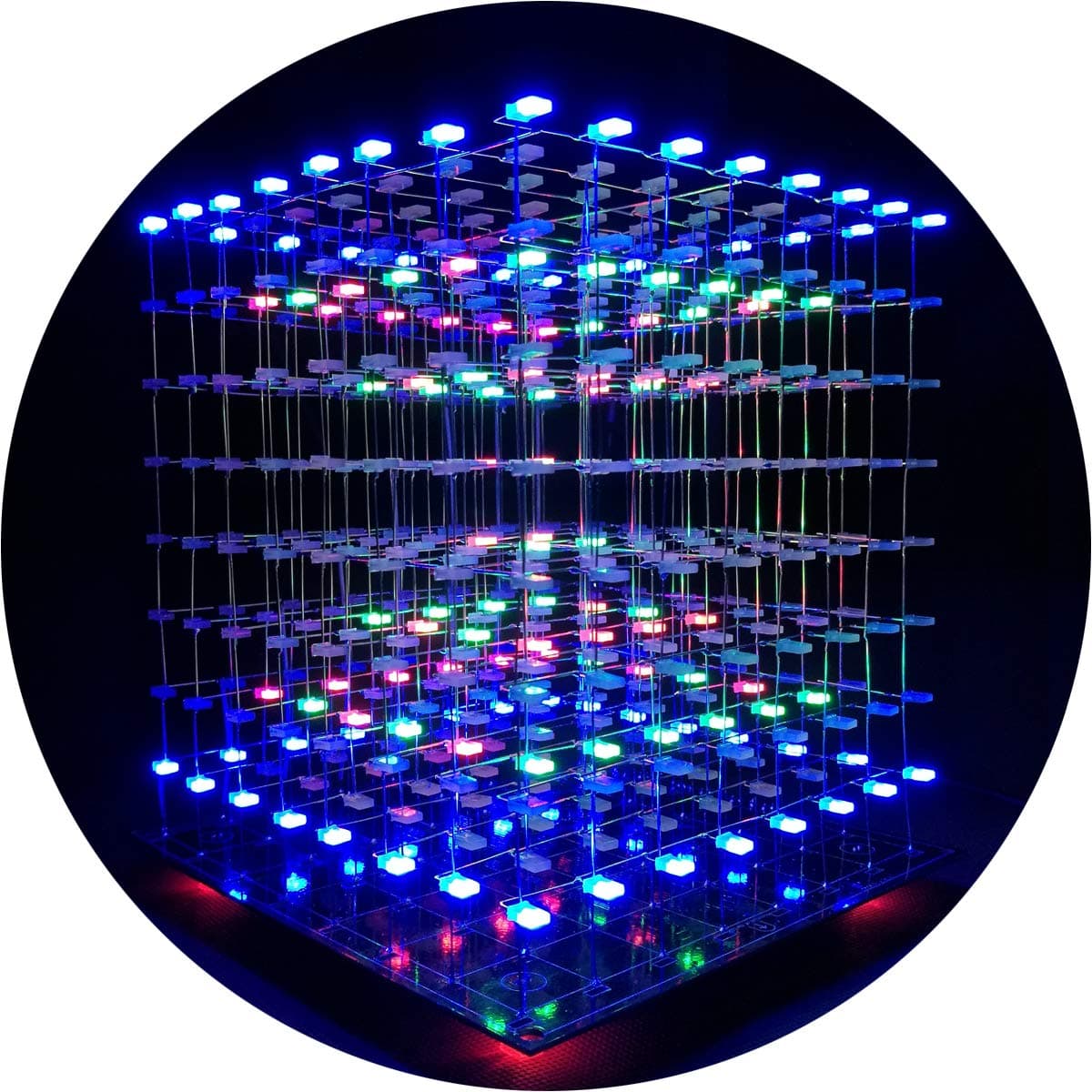
💡 Light up your creativity with the ultimate 3D LED cube experience!
The iCubeSmart 3D LED Cube DIY Kit features a 512 RGB LED 8x8x8 matrix powered by USB Type-C 5V, offering over 20 built-in animations and customizable effects via dedicated 3D software. Designed for advanced hobbyists aged 12+, it includes an audio spectrum mode with a built-in microphone and an 8-key control panel. This kit combines a challenging soldering experience with vibrant, dynamic lighting perfect for tech enthusiasts seeking a unique desk centerpiece or educational project, backed by 15 years of expert support.


| ASIN | B07GRFFNGM |
| Additional Features | Not Dimmable |
| Age Range Description | Adult |
| Art Craft Kit Type | Electronics Craft Kit |
| Best Sellers Rank | #143,414 in Toys & Games ( See Top 100 in Toys & Games ) #1,449 in Educational Science Kits |
| Brand Name | iCubeSmart |
| Color | multicolor |
| Customer Reviews | 4.4 4.4 out of 5 stars (306) |
| Included Components | base |
| Item Dimensions | 8.46 x 8.27 x 1.97 inches |
| Manufacturer | kubo |
| Material Type | Plastic |
| Number of Pieces | 100 |
| Product Style | Art Deco |
| Seasons | All Seasons |
| Size | small |
| Subject Character | Animations |
| Theme | Vehicle |
| UPC | 797550303704 680727245054 |
M**.
It takes some time
I bought my Icubesmart 3D8S RGB Nov of 2018 and it sat on my office desk until last week (mid Feb 2020). The soldering is pretty simple but tedious. Connecting each panel to each other properly takes some patience. The documentation, as people mentioned is seriously lacking, especially with the Windows based applications. I had OCX discrepancies and trying to follow the "non english" picture directions (which didn't match what the installation program was even doing) drove me batty for 2 days. I tried on an HP Win10 laptop and an HP WinXP laptop. The programming application would not load on the XP, but it ran when I extracted the cab files to the same directory as the executable, which was a shock to me. I was able to locate the proper XP driver for USB programmer too. I never got either to work on my Win10 laptop. After 10 different solder repairs (I fancy myself a pretty decent solderer, I don't know why the thing doesn't stay together), the cube worked, and I was pretty happy with the different pre-loaded displays. But, no rain. I wanted a cube just for the rain effect. Ok, time to learn the "Make your own Displays" program". Wow, how horrible. But, I was able to open the existing example files and reverse engineer how the application does what it does. Now to the programmer. What a POS. I have to keep hitting the program button in the app and quickly attach the 5v wire before it times out and fails.... lather, rinse, repeat, over and over. Just frustrating. I even bumped the baud down to 9600. I can always eventually get it to work and I am able to upload my own written displays. I will probably modify the connector with a small toggle switch on the 5v wire. You have to seriously think out the timeline of the display you are making. I spent a lot of time running the "debug" to test what I had just wrote, and it would always crash ofter 5 runs. (Not the app, just debug, I would have to save the display, exit out of the program and restart it.) If you make a mistake in the middle, it is so time consuming to try and fix. Too bad there isn't a share repository for icubesmart hex files. (Hex files created by other LED cube programs are not compatible, yes I tried). It, would have been great if I had bought the model that had an audio input. One last comment, after dropping Windows for mac years ago, it would have been nice if there were mac apps for it or it was able to be easily connected to an Arduino. With all the shortcomings, I still give it 5 stars because, it's pretty cool. I have spent 2 days writing and testing my version of "Rain" with splashes, and it looks phenomenal in low light settings (The iPhone video does not do it any justice). I was thinking of next going for the 16x16x16 RGB (voltage color changing) LEDs next, but, wow. not going to do that.
F**Z
Challenging and rewarding!
First off, if you're looking for a project to practice basic soldering skills, this is not what you should start with! This is an advanced project that requires a massive amount of soldering anode-to-anode and cathode-to-cathode of LEDs. If you have some experience with soldering electronics kits, this one is well worth the effort. It took me 12-16 hours to complete, although I'm still troubleshooting a few LEDs that I didn't solder well enough. Make sure you check your solder joints thoroughly before you begin assembling the eight layers into a cube! Trying to weasel a soldering iron and solder into the center of the cube to repair a broken solder joint is... frustrating. If there's one thing I would do differently, if I were to do it again, it would be to make certain each connection had a very strong solder joint. I highly advise buying the acrylic case for the cube, because it requires the protection. As I mentioned previously, the solder joints are delicate, and unintentional jolts and bumps can break them. Be careful when moving the cube from place to place - pick it up and set it down GENTLY. It's a good idea to find a semi-permanent location for the cube, unless you want to constantly remove the acrylic case to repair broken solder joints. This is cube is SO cool. Plugging it in for the first time was extremely rewarding. The built-in patterns are awesome, and there are plenty to choose from. It's bright and looks amazing in a dim or dark room. Caution: if you have a seizure disorder, you want to be careful with this! Some of the patterns are pretty intense. Perhaps most important, it's a project that keeps you fully-engaged from start to finish, which in an age of pandemic stay-at-home orders, is a really good thing! It did a great job of distracting me from being stuck in the house. I would buy this again in a heartbeat.
M**D
This is a great challenge to anyone looking to re-sharpen their soldering skills.
The lack of stars on this particular review is a good thing. It's a very good challenjt if you're looking for one. The documentation is great and you can plan on spending a week (at minimum) to complete this project. It's not hard, it's just time consuming becase of the number of "welds" required. The sky is the limit with the included USB interface and software to create your own animations. Again, I didn't say easy. I'm not a patient person however the end result was extremely rewarding. I ran mine 24/7 for a couple of month and it was rock solit. I hope that you find the same rewarding experience. Well worth the cost.
F**S
Takes A Little Patience
This soldering project takes a little bit of patience, but it's a great learning tool with a cool outcome. I love that it allows you to practice. It makes a great gift for older kids. I got this as a gift for my nephew along with a soldering gun and it was a great buy. It looks simple when you open the package but it's a patience builder for sure.
R**N
Cool
P**?
assemblage facile, notice bien détaillée, soudure facile et pcb de très bonne qualité que du plus et surtout très sympa à regarder, je recommande vivement. Il faut un minimum de patience quand même, comptez 8h pour le pliage des led et les soudure...
B**N
Bonjour, Super vendeur,cube en fonction. Je pense acheter le nouveau modèle. BRUNO
H**N
Assemblage pas forcément pour les novices non équipés (petites soudures minutieuses), mais une fois construite la structure permet une infinité de possibilités, paramétrage du cube pas très bien guidé ceci dit.
B**Z
Acheté comme cadeau pour un garçon de 16 ans. Il faut beaucoup de patience mais il a adoré.
Trustpilot
Hace 5 días
Hace 1 semana