We remain fully operational. Our teams are working around the clock to ensure your deliveries continue safely.

Descargar la aplicación


Servicios al cliente
Sobre nosotros
Copyright © 2025 Desertcart Holdings Limited
Descargar la aplicación
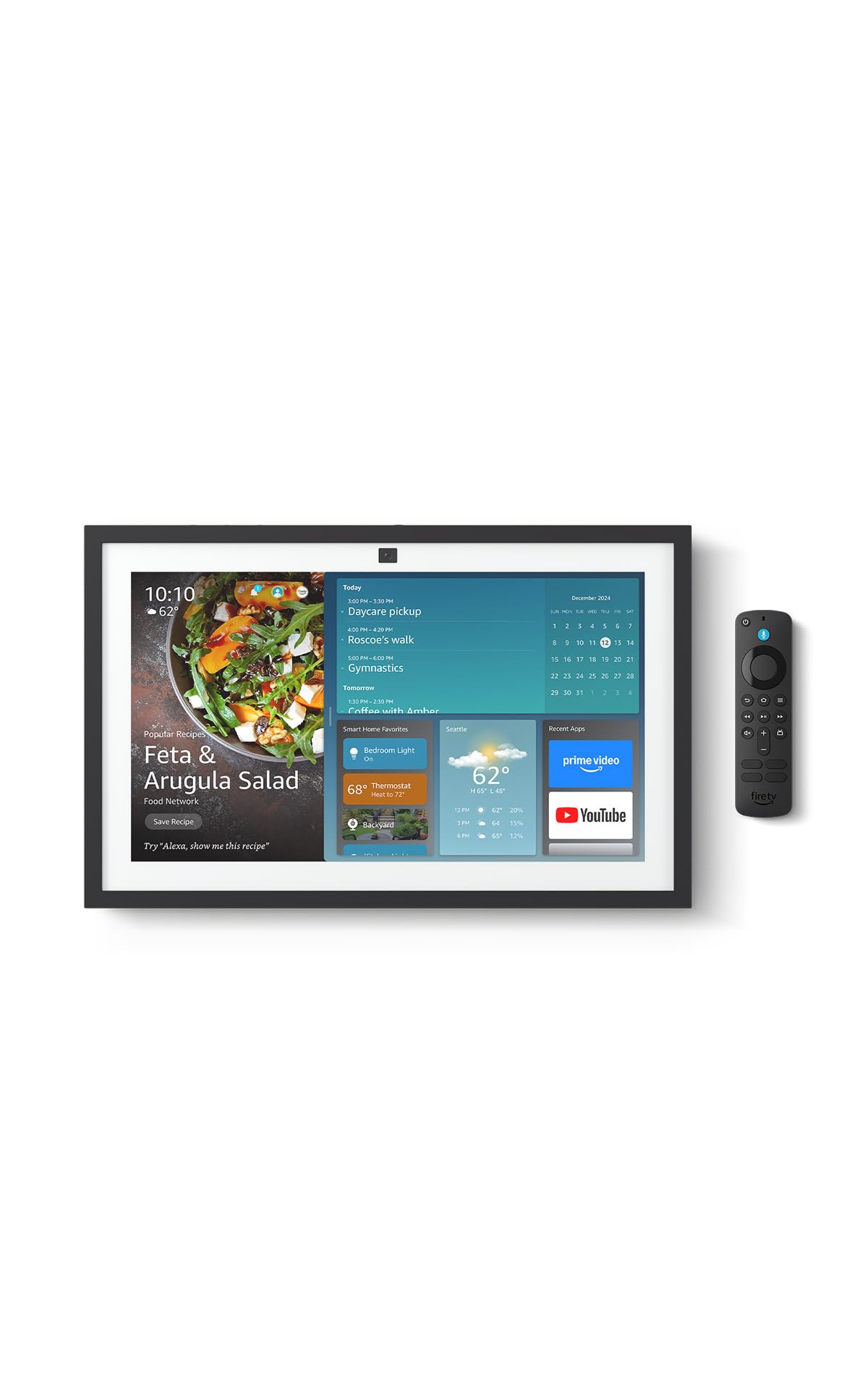
🏡 Elevate your home life with the Echo Show 15 — where smart meets stunning.
The Echo Show 15 (2nd Gen) is a 15.6-inch Full HD smart display designed as a central home hub. It features built-in Fire TV for seamless streaming, a powerful audio system, and a 13MP auto-framing camera for natural video calls. With WiFi 6E and a smart home hub supporting Zigbee, Matter, and Thread, it controls your connected devices effortlessly. Customizable widgets keep your family organized, while robust privacy features protect your data. Perfect for kitchens and shared spaces, it combines entertainment, organization, and smart home control in one sleek device.
| Size | 16.1"W x 10.1"H x 1.4” D |
| Weight | 4.96lb |
| Display | 15.6” with 1920 x 1080 resolution. Use in landscape or portrait orientation. |
| Camera | 13 MP + Shutter (Photo quality/size may vary) |
| Audio | Two 2” woofers + two 0.6” tweeters |
| Wifi Connectivity | Wifi 6E (802.1ax) is supported. Tri-band, dual-antenna wifi (MIMO). Supports 802.11a/b/g/n/ac wifi networks. Does not support connecting to ad-hoc (or IBSS) wifi networks. |
| Smart Home Hub | Zigbee + Matter + Thread Border Router |
| Amazon Sidewalk | Sidewalk uses Echo and Ring devices to securely keep other devices connected and help find lost items by reporting their approximate location to the owner. Sidewalk can enable supported devices to remain connected even when wifi is lost or the supported devices are outside the range of their home wifi. Sidewalk uses a small portion of your internet bandwidth and the approximate location of your devices to provide these benefits to you and your neighbors. Sidewalk is turned on for your device unless you have previously turned it off. You can turn off Sidewalk at any time. Learn more about Amazon Sidewalk. |
| Bluetooth connectivity | Advanced Audio Distribution Profile (A2DP) support for audio streaming from your mobile device to Echo Show 15 or from Echo Show 15 to your Bluetooth speaker. Audio/Video Remote Control Profile (AVRCP) for voice control of connected mobile devices. Hands-free voice control is not supported for Mac OS X devices. Bluetooth speakers requiring PIN codes are not supported. |
| System requirements | Echo Show 15 comes ready to connect to your wifi. The Alexa app is compatible with Fire OS, Android, and iOS devices and also accessible via your web browser. Learn more about supported operating systems. Certain skills and services may require subscription or other fees. |
| Set up requirements | Amazon wifi simple setup enables customers to connect smart devices to their wifi network in a few easy steps. Wifi simple setup is another way Alexa is always getting smarter. Learn more about frustration-free setup. |
| Processor | Octa-core SoC with Amazon AZ2 neural network engine |
| Sensor | ALS RGB + Accelerometer |
| Included in the Box | Echo Show 15 2nd Gen, Alexa Voice Remote (2024) with batteries, power adapter (30W) and 5 ft. cord (white), wall mount, anchors, screws, mounting template, and quick start guide. Setup requires wifi. Device can be wall mounted (electric drill required) or placed on a stand (sold separately). |
| Warranty and service | 1-year limited warranty and service included. Optional 1-year, 2-year, and 3-year extended warranty available for U.S. customers sold separately. Use of Echo Show 15 is subject to the terms found here. Use of Fire TV on Echo Show 15 is subject to all the terms found here. |
| Privacy features | Wake word technology, streaming indicators, microphone/camera off button, camera shutter, the ability to view and delete your voice recordings, and more. Visit the Alexa Privacy Hub to explore how Alexa and Echo devices are designed to protect your privacy. |
| Accessibility Features | To enable features that personalize Alexa to your abilities, go to Settings → Accessibility. • Tap to Alexa enables access to Alexa via touch, instead of speech, through on-screen tiles or a keyboard, including the ability to save your favorite actions. • Adaptive Listening provides customers more time to finish speaking before Alexa responds. • Preferred Speaking Rate enables customers to control how fast or slow Alexa speaks. • Alexa Captioning, Call Captioning, and Closed Captioning provide text captions in any mode for supported content. • Show and Tell helps customers who are blind or visually impaired identify products when you say “Alexa, what am I holding.” • VoiceView screen reader enables access for customers who are blind or visually impaired. • Screen Magnifier enables customers to zoom in/out, and pan around the screen. • Notify When Nearby will play notification sounds when you’re detected near your Echo device. • Kindle Read Aloud will have Alexa read your Kindle books aloud. • Real Time Text enables customers to type live text in a video call. • Alexa Accessibility features also include settings for Color Inversion, Color Correction, Request Sound and more. |
| Language | Alexa speaks English and Spanish |
| Alexa Skills & Features | Alexa makes your life easier, more meaningful, and more fun by letting you voice control your world. Alexa can help you get more out of the things you already love and discover new possibilities you've never imagined. Discover and learn what Alexa can do. |
| Software Security Updates | Learn more about these software security updates. If you already own an Amazon Echo, visit [Manage Your Content and Devices]https://www.amazon.com/hz/mycd/digital-console/contentlist/booksAll/dateDsc/) for information specific to your device. |
| Content Availability | Certain apps and services are subject to change or withdrawal at any time, may not be available in all areas and languages, and may require separate subscriptions. |
| Size | 1.5” x 5.6” x 0.7” (38.68 mm x 141.3 mm x 17.6 mm) |
| Weight | 0.1 lb (45g) (without batteries) |
| Batteries | 2 AAA (included) |
| Technology | Bluetooth |
| Compatibility | Echo Show 15, Echo Show 21, Fire TV Stick 4K (1st Gen and later), Fire TV Stick 4K Max (1st Gen and later), Fire TV Stick (3rd Gen) |
| Warranty and service | 90-Day Limited Warranty and service included. Use of Fire TV is subject to the terms found here. |
A**N
10 Stars! No issues, read for user tips
I've had so many Echos over the years, beginning with the 1st Gen, can't live without them anymore since so much of our home is Alexa connected. I originally got a refurbished 1st Gen Echo Show 15", not knowing the 2nd gen was coming out. So glad I returned it for the new 21" Echo Show, it's absolutely phenomenal! Streaming video: Easy to set up streaming (which I've done on our 5", 8", and 10" Echos). The best part of the Echo Show is that Fire TV is included. I easily logged into Hulu, Netflix, Amazon, Max, Peacock, Paramount, Disney+, and Apple TV (other Echo shows only allowed me Hulu, Netflix, and Amazon, I believe). The setup and remote is the same as FireTV. Streaming audio: Easy to connect with your Audible account, and Apple Music or Spotify. I can also stream NPR and podcasts. If you are having a problem with Echo playing the right song, try this: "Echo, play Blinding Lights by the Weeknd on Apple Music" instead just saying "Echo, play Blinding Lights." Same "Echo, play Christmas Jazz on Apple Music" instead of "Echo, play Christmas Music." The more specific you are, the better results. Calendar: I tried the Skylight and it is useless. The Echo Show will connect to your Apple Calendars. Our family does shared calendars, and everything shares over to our Echo Show, including announcing events and times to leave. Drop in: It's amazing! The camera will zoom and adjust automatically. Our Echo Show 10 does this, but it's on a swivel and always runs into things. This one is much smarter! You can drop in from another Alexa device, or simple the Alexa app on a smart phone. Photos: We have all of our Echo Shows displaying photos that I have uploaded to Amazon photos and then select which photos to show using the Alexa app. Screen is so clear and large, better than any smart frame I've ever seen. And friends/family can share photos to it. Announcements: Announcements will show on the screen and announce (I also have push notifications to my watch/phone). Echo hears them perfectly and announces them correctly (our Echo 8 has stopped properly listening and announcing). You can also announce from the Alexa app if you are not home, very convenient for parents :) Widgets: Widgets are easy to add and adjust, just be patient and go through the process. Ads: To remove (most) ads, go into settings on the screen and turn everything to off! I barely get any. If you are still getting those annoying "Wicked" ads, it's because you have on the "Theme" setting. Once I turned that off, no more "Wicked" (or other future sponsored theme movies), even though we do like the theme setting (Mario is my favorite!). Pricing: Look for a sale. I got the 21" for $350 on the Black Friday Sale. Would have cost me more than that for a TV, sound bar, and Apple TV for our kitchen (which was our old setup). I LOVE all of our Echo devices. Our Gen 1 is still working amazingly, and glad to add the Echo 21" to our home.
D**D
Much improved; delightful enhanced slideshows.
I have had several show devices over the years. This one replaced a 15 inch model. Although the 21 is huge, it can use the same stand and mount. In about a month of use, two improvements stand out. Your slideshows will be gorgeous with AI enhanced images on the giant screen. Second, the proved version of Alexa is clearly advanced. Keep in mind that the UI and the controls are work n progress, but knowing Amazon, these will be continuously improved. Highly recommend upgrading if you like your smaller Show, and space permits this big monitor.
D**B
It is so convenient.
I purchased this 21" Echo for the kitchen to view recipes and perhaps see some tv. So far it's great. I had 1 small glitch..the power button got stuck and I didn't realize it and couldn't figure out why I couldn't operate it. It is back to working 100%. Love it
S**T
Love it!, nice to have a large screen
We got this for our kitchen, we were thinking of getting the Starlight calendar but since we already have lots of Alexa devices we decided to give this a try. It replaces a smaller echo we had in the kitchen. We love it, but with all the functions would form with it mounted vertically. Still, it does the job and has a great picture. It is nice to have the built in fire stick so it doubles as a television for us. Despite being small, the speakers sound great when we stream music and it is nice to see the lyrics on the screen (If you use Amazon music and turn that option on) It looks great and fits into the room well. Over all, we love it. Since it only requires 30 watts, I am going to get a POE to power adapter and power it from one of my network POE++ switches so that it won't go down during a power outage. You come to depend on these things...
M**3
Great for folks looking for a tablet with lots of useful features!
We used to have a 21" tv in our bedroom for years, but never really used it. It sat on a dresser with a cable box, essentially gathering dust, so, we eventually got rid of it. So, years later, after getting into a lot of streaming tv,courtesy of our Fire Stick, we thought this looked interesting and decided to buy it, along with the Amazon stand (more on that later) they advertised with it. So, as all the other reviewers do, time for Pros and Cons! Maestro, cue the orchestra! Pros: 1. We've been fans of the Amazon universe, for the most part. The unit came safely packed in a large box. Attaching it to the stand and setting it up was a breeze. These Echo Shows essentially set themselves up, once they're plugged in. If you know your wi-fi and streaming passwords, you're pretty well set. And when you purchase it, if you check that you're setting it up under your account, it also makes it easier. 2. It's a sturdy and well-made unit, but of course, be careful when setting it up. It's not really that heavy, either. It came with a wall mount,but as stated, we opted for the stand. I personally wouldn't wall-mount a 21" monitor to watch tv, but if you're using it more as a calendar, music player, etc., it will do fine. The Amazon Fire TV stand we purchased assembled and connected with zero issues. 3. No issues with the video, sound or connectivity. Everything looks and sounds good, too. I felt the pictures advertising it made it look a lot bigger, but it's neither tiny nor a monstrosity. 4. It comes with a Fire stick remote, but that remote doesn't control everything on the Show. You'll be using Alexa (more about her later), or sometimes using your fingers. As far as the Fire TV itself is concerned, it's really no different for those who have used the Fire stick previously. 5. I do appreciate the fact that Amazon gives you very simplified instructions,even though you might not even need them. Not a pro or a con, but since we used it in our bedroom, I turned off the camera, so, I can't speak to its video-chatting prowess. If you read up on what you can do to keep your privacy with these devices, it will behoove you, if you worry about it. CONS: (Honestly, these aren't "dreadful" drawbacks,because everyone's tastes are different. I figured that I'd mention them,with the caveats.) 1. The screen image that you see in the picture above is if you are using Alexa; the Alexa+ creates a different home screen, with 2 apps that you can't delete or change the size. I don't mind Alexa+, but we haven't really used it for its premium features (getting dinner reservations, buying tickets, etc.). Again, this didn't lessen the experience, since ultimately, it's personal preference. 2. You can make use of the widgets in the Widget store, but they're a little light. That ,I'd presume, will likely change in future builds. But some of the apps I linked on our Echo Show 5, like Spotify and Sirius XM, did get recognized to play music on this. I'm presuming the Alexa app gets credit for that. 3. The price. I would offer this advice: If you can really make good use of a decent amount of what's on here (Streaming TV, Music and Podcast player, Alarm clock, Smart home control pad, Reminders and Calendar for organization, recipes and video chat) it's worth the investment. If you're buying it ,say, only for the FireTV, just buy a Fire stick, and look for an inexpensive flat screen. I feel that I'll be making good use of its many features, and will only hope for expanded capabilities. All in all, I'm satisfied with this purchase, and hope this is a start for next-level Amazon products
Trustpilot
Hace 5 días
Hace 1 semana