
Descargar la aplicación


Servicios al cliente
Sobre nosotros
Copyright © 2025 Desertcart Holdings Limited
Descargar la aplicación
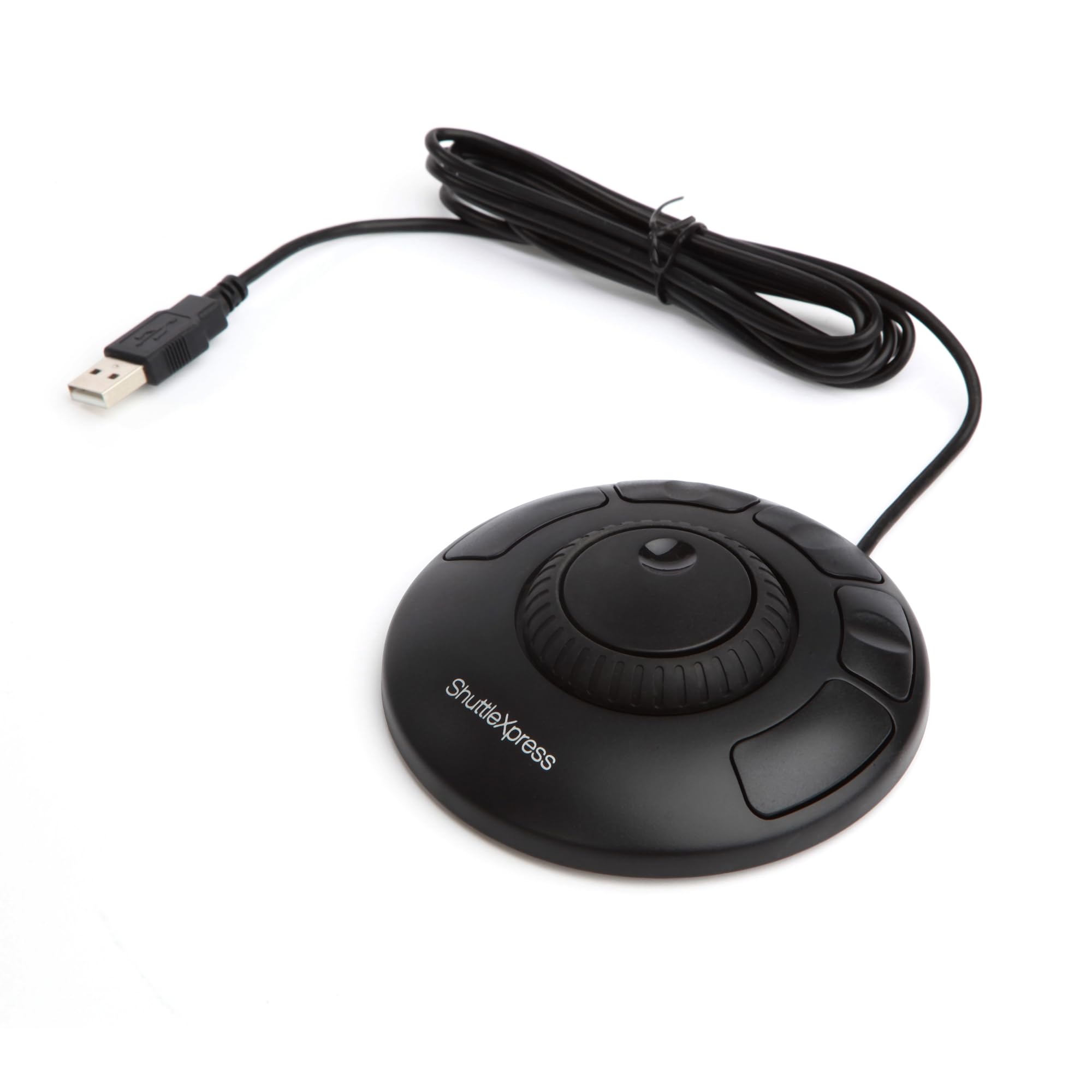
🎬 Edit smarter, not harder — command your creativity with every turn!
The Contour Shuttle Xpress is a compact, ergonomic multimedia controller designed for video, audio, and image editors. Featuring a 7-speed jog ring and 5 programmable buttons, it offers precise timeline navigation and customizable shortcuts compatible with over 100 software programs. Its USB connectivity supports both PC and Mac, making it a versatile tool to boost productivity and streamline creative workflows.


S**R
Works as advertised, is inexpensive, and has a good feel to it
I bought the ShuttleXpress to use in amateur/hobbyist video post-production. For its price this feels extremely well made. It's not as light as I expected it would be (though it's by no means heavy), and the case has almost no flex to it. The buttons have a reasonably quality feel, and the jog wheel/shuttle both respond well and have the tactile feel that you'd expect. The jog wheel clicks lightly as it rotates (for my use it correctly clicks at each frame), and the shuttle offers increasing resistance when rotated left or right. I didn't even bother with the included driver CD and instead downloaded the latest driver/control panel directly from the manufacturer's website. It installed and worked without issue on my Win7 x64 machine. (I installed the software before connecting the device. I'm not sure if that would make a difference, though.) Since this product and software are a bit old even the new driver package didn't include presets for Adobe CS6, however I was able to find a zip file containing all the necessary .pref files from the manufacturer's (ContourDesign's) forums. If you're in need of them, search Google for (I don't think Amazon will allow me to post the link): shuttlexpress cs6 settings download There are pretty good directions and a lot of other information on the forums, though the actual product page is pretty lacking. I can't speak to the included documentation because I didn't look at it. The Contour Shuttle Device Configuration application (they also call it the "control panel" -- not to be confused with the Windows Control Panel) is very simple, straightforward, and easy to use. There are presets for many different applications (under the heading "Application setting"), and more can be imported by clicking "Options" in that same section. You can also create your own settings and map the buttons/shuttle/jog to keystrokes, mouse actions, and more. It even includes a comment field so that you can remember the purpose of each mapping. Overall, I think this is a fantastic price for a great little input device. The fact that it's customizable beyond the manufacturer's included settings is a huge plus, as it'll be useful even if Contour goes out of business and applications change over time. I must admit that I only got the ShuttleXpress yesterday and played with it for about a half-hour, so I'm by no means an expert. If I experience any kind of hardware failure or software bugs I will update my review accordingly.
D**Z
Junk
MacOS Ventura 13.2; Adobe Premiere Pro 23.4.0 I had hesitations about this product going in given the wired hardware with USB-A but decided to give it a chance since the price was reasonable compared to more expensive controllers. The construction is what you'd expect--perfectly fine plastic, nothing special or horrible. The software that runs it is also perfectly mediocre but usable. The problem is that the controller itself is completely unreliable. I retained the default settings for the wheel to be able to scroll through my timeline, and assigned cut and undo shortcuts to two of the buttons. The buttons seem to work consistently, but it seems like the wheel breaks with every other action I take, e.g. adding a clip to the timeline. I thought at first that it might be an issue of focusing the right panel but try as I might, I can't figure out a way to get it to re-enable the wheel--it seems to start working again randomly before breaking again shortly thereafter. Needless to say I'm returning this. I'm glad that I had the foresight to order a macro keyboard in case this thing didn't work out, but if you're still weighing your decision I'd recommend skipping this product and going straight for something else.
A**R
Great art input tool and long life
I have used this since I bought it in 2014, and have had no issues with it preforming. I use this for drawing, the tactile jog wheel and buttons I prefer over the built in ones on my wacom tablet. Being tactile means I can keep my hand on it and focus on the screen without thinking about whats where or dealing with a less accurate touch only wheel. The outer wheel can be twisted and then springs back to the center. I use that for zooming in and out on my canvas. The inner wheel can spin around freely, I use that for rotating my canvas or changing animation frames. Both work very nice, the software has all the features I need, even the ability to switch input layers with a button to change what the wheels and buttons do without moving my hands off it. You can switch to the next or previous layer, doing more than 2 would be more of a hassle I think. My only complaints are minor, since it is a circle its easy to get it twisted around and lose track of which button is which from time to time, and I do wish there were a few more buttons on it, something like a middle ground between this and the larger one contour makes. But overall this is a great input device and very customization to whatever you want. I would recommend getting it if you think it would be helpful.
S**E
Works well once you get it setup
I'm digitizing some footage that requires just minimal editing in Sony Vegas 11, so I decided the ShuttleXpress would fit the bill for me (not needing more than the 5 hotkeys this unit provides). When setting up the buttons for Vegas 11, I noticed that only previous versions were predefined. No problem, I went through the steps to setup the buttons for Vegas 11, which requires you to navigate to the .exe file that you will be running for the program you're setting up. I followed the steps, but when I tried my hotkeys in Vegas, they did not work (or responded differently than what I had programmed). It took me awhile to figure out; it turns out that the software was reading Vegas 11 as Vegas 6.0 and was using those predefined key sets. If I right-clicked the contour software in the system tray, there were two key sets available: Vegas 6.0, and my custom set. I selected the custom set that I made, and everything worked perfectly. Until I tabbed out of the program and came back to it. The contour software defaulted back to the "Vegas 6.0" settings. I have been unable to figure out how to set the software to my custom set, so instead I edited the Vegas 6.0 set to my custom settings. Now that that's done, everything works fine and my workflow is much easier to manage and I'm flying through these simple edits. About the unit itself (instead of the software): the jog/shuttle wheel is responsive and easy to find the desired scrub speed. The three middle buttons do have recesses in them to help you to know where you're at without looking. Overall, this small footprint unit feels pretty solid for it's size.
B**Y
Pretty good device for audio editing
I'm a bit disappointed that this device doesn't come with Audacity 2 support out of the box. It's not like Audacity is an unknown app, or not widely used. The ShuttleXpress requires the user to create their own usage map, and that's time consuming. Without knowing the device as well as I will in, say, a month of use, I'm just taking stabs at what will and won't work with it. Having said that, it works nicely once it's set up, and it comes with dozens of other programs that are already part of the driver package, Adobe Photoshop being one. My use, however, was to combine this device with my recordings on Audacity that I do for Librivox DOT org. I wanted it to emulate a jog wheel that is part of a dedicated video or audio editor so that I can advance or back up to a specific point and then mark it. The Xpress is limited to the keyboard shortcuts that are available in Audacity, as it is with any other program. If something can't be done via the keyboard, then you won't be able to do it via the ShuttleXpress either. Therefore, if you're looking to provide the functionality of a dedicated editing system, the ShuttleXpress is not going to work. In addition, this is not meant to supplant a mouse or trackpad, it's designed to work in conjunction with it. That gets back to the statement that the ShuttleXpress will only work with existing keyboard shortcuts. Anything else you'll need to do manually. I do think that once I get accustomed to using it, and have it programmed, that it will be a big help in my recording and editing chores. Unfortunately, as stated above, the lack of Audacity 2 support out of the box is very disappointing. I simply can't be the only person using this device for this purpose. Unfortunately, both the Audacity and Contour forums aren't of much help in finding a driver map that can be imported or adopted, so if that's your software, be aware that you'll have to create it on your own. Ditto for any other software that isn't supported out of the box by Contour. Lastly, for Mac users, if you're upgrading to Mountain Lion, you'll need to download an updated driver from the Contour website. Save yourself some aggravation of having to uninstall the one that comes with the device (a suggested requirement by the manufacturer for the updated driver), and download it first, then proceed with your software installation. All in all, a pretty capable device that would, in my case, have had much more utility with an existing Audacity map.
M**S
Easy to Use for Davinci Resolve and more…
I got this today and have configured it. It works on all sorts of programmes, and it comes with pre-built settings for Davinci Resolve. I remapped some of the keys to suit my needs. It allows you to map the keys to any keyboard commands, and it supports compound commands through macros, but I haven't tried these yet. It takes up a small footprint on my desk – smaller than my trackball. I tested it in the app. The only downside I can comment on is that – although it appears to be solidly built – it is light. I have the USB cord running to the back of my desk, and the tension of this cord (not at all tight) disrupts the orientation of the device. Not a big deal, but a bit of a nuisance for me because I've got mobility challenges with my hands, which was a key driver to buying this item. There is a 'better' version by the same company, but I felt it wasn't worth twice the cost and it looked like it would be more challenging for my hands to deal with.
J**S
It Works, But Could be Way Better. You're Better Off Investing More
This works, but the level of control left quite a bit to be desired still. There is a pre-programmed configuration for a large amount of software which is nice. I bought this for exclusive use in DaVinci Resolve, who offers their own speed editor with a better "search dial" that also comes with the full version of the program ($295). Since the speed editor retails at $395, with the software, it is practically $100 which makes it far more worthwhile as it is just $40 more and you get a ton of function for it the money and a better wheel. If they improved upon the shuttle control and the jog wheel it would be worthwhile. My biggest suggestion would be combining the shuttle and jog into just one wheel that has far more rotary clicks per rotation for the jog function. Then give a new ergonomic button to hold for shuttling. The additional buttons where not in the greatest of positions and don't add much as you're probably using this in your left hand while your right is on your mouse (or vice-versa with the keyboard). Either way those five buttons don't really add to this which just makes the unit an overpriced wheel that should otherwise retail for $20-$30. Maybe there is some other software this would be useful for but I can not attest to them as I did not try the unit with them.
R**.
Awesome for Sports Film Review!
I purchased the Contour ShuttleXpress 3D in the hopes of being able to do "old school" jog shuttle type video playback for my son's pee wee football team. I record the games in high definition, then head to "Titans Tower" (our little football field house) and plug in my laptop to the big Sharp Aquos LCD TV. At first, I was a little disappointed because I had hoped it would "just work" out of the box with Windows Media Player. But this device isn't quite like that. What this thing does is "map" certain functions (button presses, shuttle wheel movements, etc) to keyboard buttons. Since Windows Media Player doesn't really have much in the way of flexible keyboard interaction, this wheel can't do much. Then I installed the Combined Community Codec Pack which came with Media Player Classic. Now THAT is a powerful application. I was able to configure the FFDSHOW video codec to remove interlacing at runtime making the picture silky smooth and sharp (in High Def). I was also to use the Contour Shuttle Device Management software to create myself a custom profile based on the extensive Media Player Classic key functions. This allowed me to progress frame by frame by spinning the shuttle forward. Super slow, fast, it didn't matter. The faster I moved my finger around in a circle on the Contour Shuttle, the faster the video would play. The coaches were floored. No more messing with DVD player buttons and going to far or not far enough. I could use one button to "play" in real time. Then when I start moving the shuttle wheel forward, it immediately transitions to frame by frame mode. If I move the wheel backwards, it skips backwards 5 seconds. Perfect for replaying football plays. This thing made our film nights at least an order of magnitude more productive. My son's coach is also the president of the 250+ player football club and he paid me a very nice compliment at the end of season banquet. He said, "We have the best film guy in the entire tri-county football league." That was very gracious of him to say. But for me, it was just important that my son could learn better from the film nights because we could show things like precise positioning, point of impact, and how certain holes develop during blocking schemes. Very powerful stuff. I'm convinced that our kids had an advantage by being able to learn much more effectively on film nights. Bottom line: This device does EXACTLY what it says it does, at least in my case. The key is that you need to take the time to properly research and configure a custom profile and for many applications, there is already a profile available for you. Buy this thing! You won't be disappointed!
Trustpilot
Hace 1 mes
Hace 1 mes