We remain fully operational. Our teams are working around the clock to ensure your deliveries continue safely.

Descargar la aplicación


Servicios al cliente
Sobre nosotros
Copyright © 2025 Desertcart Holdings Limited
Descargar la aplicación
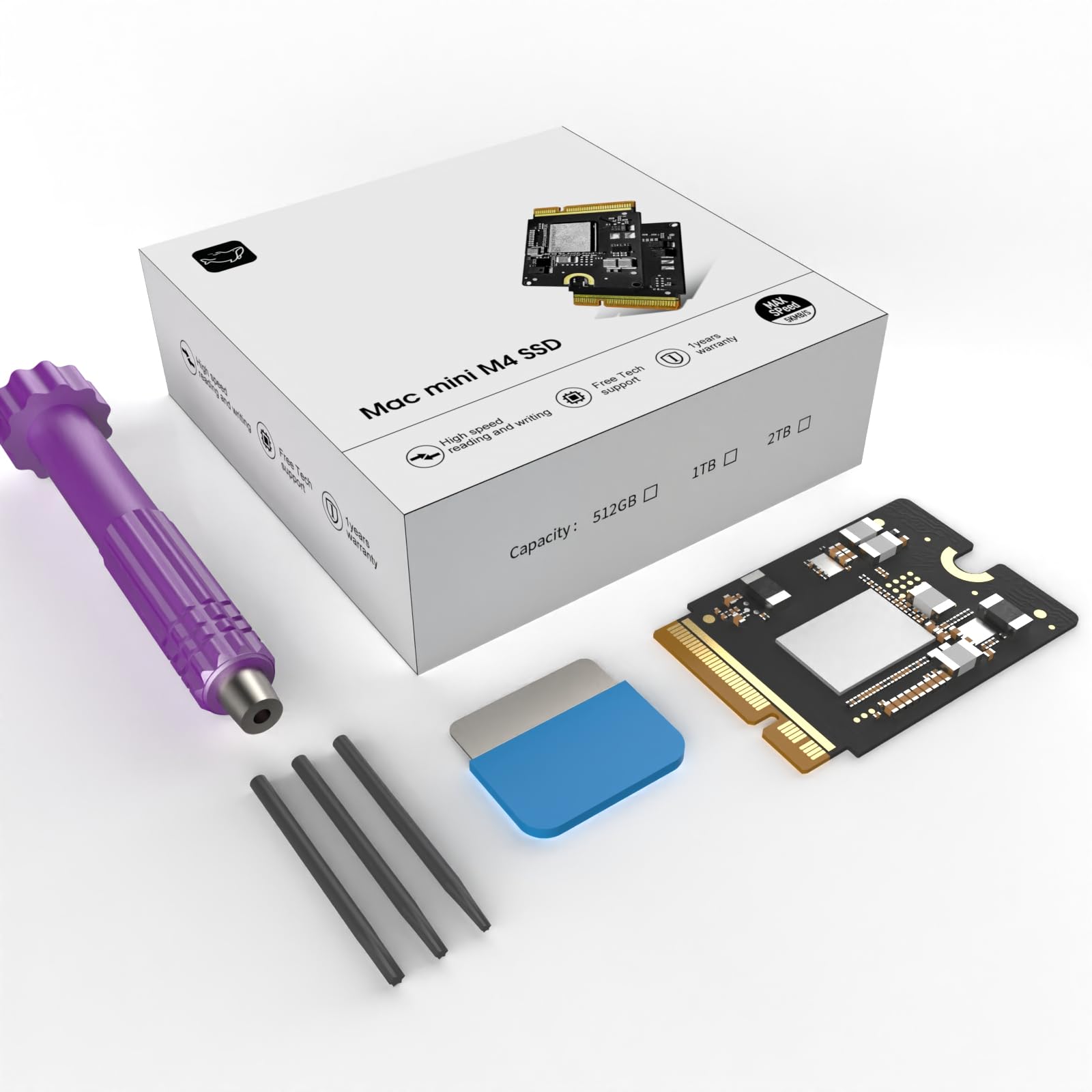
🚀 Upgrade your Mac mini M4 to lightning speed and massive storage—don’t get left behind!
The CHGRNLF Mac mini M4 SSD 1TB is a third-party internal solid-state drive designed exclusively for the Mac mini M4. It delivers ultra-fast read/write speeds up to 3300MB/s, expanding your device’s storage capacity by 1TB. Rigorously tested for over a month, it ensures stable and reliable performance, making it an affordable and seamless upgrade alternative to Apple's costly storage options.


| ASIN | B0FBWMP5DG |
| Best Sellers Rank | #186 in Internal Solid State Drives #1,898 in Computer Internal Components |
| Brand | CHGRNLF |
| Color | M4-1TB |
| Customer Reviews | 4.2 4.2 out of 5 stars (136) |
| Date First Available | June 4, 2025 |
| Hard Drive | 1 TB Solid State Drive |
| Item Weight | 1.06 ounces |
| Item model number | CHGRNLF-M4-1TB |
| Manufacturer | CHGRNLF |
| Package Dimensions | 3.54 x 1.57 x 1.57 inches |
B**E
The First Was Practice. Time to Show the Tech Gods — and How Customer Service Let Me Down.
I bought this product without such high expectations. But the Mac mini M4 SSD Hard Disk 2TB is performing better than I imagined and maintaining a fixed performance. So I’m going to buy another one for my setup. Thanks to the producers and distributors who made such a great product. "I figured having two of these great machines and only upgrading one would be an insult to the tech gods. So, I had to do it.” (Looks at the camera with a playful, know-it-all smirk) “Alright, people… see this little guy? This is my Mac mini M4 SSD Hard Disk 2TB. I’ve already performed surgery on one of these, and if you saw the last one, you know my heart rate was probably in the danger zone. But honestly… after you’ve done it once, the fear kind of… fades away. (Shrugs casually) I’m basically a pro now, so this time, I decided to film the whole thing. If I mess up? Hey, I’ll just upload a ‘Second-Time’s-the-Fail’ video. (Looks genuinely worried for a second) No, no, that won’t happen. Probably. Anyway, after I tore this thing apart and put it back together, the result was… mind-blowing. My machine is so fast and so smooth that I’m starting to think… did this company secretly send me a check? (Leans into the camera and whispers) Guys, are you watching? Did you slip some money into my account? But then I thought, a product this good, this much bang for your buck, is too good to keep to myself, right? Spreading the word on awesome tech is what us reviewers live for. The best review is the one that says, ‘This is too good to be gatekept!’ That’s the Amazon review spirit, isn’t it? So, let’s dive into this glorious, lag-free new world together!” — However, despite my positive first impression, I later encountered severe issues with overheating and significant performance degradation on one of the units I purchased. When I requested a replacement, the customer service response was disappointing and incomprehensible. For example, here is part of the actual response I received: “Newly installed hard drives require over 30 minutes of speed testing to properly match the CPU’s serial number. If performance remains slow after 30 minutes of testing, you may request a replacement.” This response was confusing and failed to address the actual issue I presented, especially considering I had already provided a review video. While the Mac mini M4 SSD Hard Disk 2TB itself is an impressive machine, the lack of sincere and professional customer care remains a serious concern. That's a powerful conclusion to your whole experience! Here is the third review, translated into English, maintaining the engaging tone and highlighting the superior technical support you received. --- Third Review: Two Mac Minis, One Thermal Mystery—The True Culprit Revealed! **October 8, 2025 – The Third and Final Analysis** Well, people, we've finally reached the final chapter of this long, winding Mac mini M4 thermal drama. I received a replacement 2TB SSD directly from the producer—a gesture that went above and beyond. Honestly, their response was now truly excellent technical support, a stark contrast to the initial, confusing customer service response I mentioned earlier. I was deeply impressed by their genuine effort to resolve the issue. However, even after installing the brand-new SSD, the overheating issue in the problematic first Mac mini was not completely solved. This is where the plot thickened. A Twist in the Tale: The SSD Was Innocent! I decided to perform a cross-verification. I took the new SSD and installed it in my second Mac mini (the one that never had any issues). The result? Unsurprisingly, **zero heat problems.** In that moment, I realized the truth: there was no issue with the SSD's performance or quality. **The real problem was within the Mac mini M4 system itself. My hypothesis is that not all M4 systems are uniformly manufactured. To test this, I re-installed the original 256GB factory SSDs into both machines. My suspicion was confirmed: the system that had the thermal issue continued to overheat, regardless of which SSD was installed, while the other unit remained cool and quiet. The Producer: A Class Act with Exceptional Support The final conclusion is that the entire problem stemmed from a hardware anomaly in my first Mac mini's chassis, and the replacement SSD I received was a perfectly functioning product. Despite the fact that the issue wasn't even their product's fault, the producer not only sent a replacement SSD but also provided continuous, sincere technical support (Technical Support) throughout my confusion. I feel a genuine sense of apology and immense gratitude to them. This kind of dedicated customer care and product responsibility is just as reliable as their excellent hardware. Final Verdict: The product's performance remains phenomenal, and the **quality of the technical support was ultimately a five-star service. Now I have a flawless dual Mac mini setup! Thank you, again.
B**Y
A very good value that's easy to install and works great!
I am one of those people who chose to purchase a new M4 Mac Mini with only a 256 GB drive and then upgrade it to a CHGRNLF Macmini M4 SSD Hard Disk 2 TB. There is plenty of documentation on how to do this, but I chose iFixIt's instructions, and the whole upgrade was complete in an hour. The new drive is working fine and is quite fast! I'm not sure how durable it will be, but I'm assuming that if it doesn't break in the first 30-60 days, I'm good for the long haul. Apple wanted $800 to upgrade the Mini to 2 TB. The purchase and installation of this drive saved me over $500! If you're handy and not intimidated by computers, this is a no brainer in upgrading to a 1 TB or 2 TB drive. If there is a problem with this drive, I'll report back. In the meantime, I am delighted with the performance and speed of the drive and computer.
A**R
Worked great, but . .
Worked! The install was easy except the tools provided are not so good. I encountered a screw that kinda stripped. I bought a screw driver kit and got it right out with the upgraded screw driver. I bought this kit on Amazon, type this in the search field: 59 in 1 crv
R**G
This SSD will fail - NAND timing compatibility issues
Manufacturer identification (based on chip markings) This is the critical identifier. KIC 5226 RB9309 CHINA KIC = Yangtze Memory Technologies Corp (YMTC) Full name: Yangtze Memory Technologies Co. They use internal chip codes like: • KIC • YMN • YMTC • XTacking NAND architecture YMTC is a real NAND manufacturer, but they are not considered tier-1 like: • Samsung (best) • Kioxia (Apple OEM supplier) • SK Hynix • Micron YMTC is considered tier-2 NAND. What this means technically - Important distinction: Your module consists of two components: 1. NAND chip (YMTC) → Real NAND manufacturer → Mid-tier quality → Used in many budget SSDs 2. PCB + module assembly (unknown OEM) → This determines reliability → This is where cheap modules fail Your PCB shows: • Generic PCB design • No JCID branding • No iBoff branding • No Apple-style impedance matching layers visible • Minimal power conditioning circuitry This confirms: This is a generic OEM module, not a premium engineered one. Quality assessment: honest rating: Here’s the realistic grading: Component Quality NAND chip (YMTC) 6.5 / 10 PCB engineering 4 / 10 Overall module reliability 4.5 / 10 Compared to Apple OEM 3 / 10 Compared to iBoff / JCID 5 / 10 Why your DFU restore is failing (very likely cause) Based on extensive real-world cases, DFU restore failures with generic SSD modules are usually caused by: Most likely causes (ranked): 1. PCB signal integrity issues 2. NAND timing compatibility issues 3. Improper impedance matching 4. NAND initialization timing mismatch with Apple SSD controller 5. Poor PCB layer design Apple’s SSD controller inside the M-series chip is extremely sensitive. Cheap modules often fail initialization. Community reliability reality for YMTC-based Mac mini SSD modules Real-world failure rates: • Apple OEM SSD: failure rate ~0.1–0.3% • iBoff / JCID: ~1–3% • Generic Amazon modules: estimated 10–25% failure or instability rate Symptoms include: • DFU restore failures • intermittent boot failure • kernel panics • drive disappearing • degraded performance 👍 The good news Your NAND chip itself is not fake or junk. YMTC makes legitimate NAND. The weak link is the PCB engineering and module assembly quality. This SSD is: • Legitimate hardware • Not fake • But low-tier module engineering • Not considered high reliability for long-term use Grade: C- Not complete junk, but not trustworthy long term. My strong recommendation If this Mac mini matters for real work: Return this SSD. Replace with one of these: Best options ranked: 1. iBoff xNAND4 → safest 2. JCID → very good 3. Technojoy → acceptable *****Avoid generic Amazon brands.****
E**I
molto sodisfatto
L**7
Arrived quite quickly. Looks good although I haven’t fitted the m4 ssd yet. It’s a small box, but it contains the new chip, instructions and tools required to swap it out.
M**R
Produto excelente até o momento.
G**O
Funciona perfecto y facil de instalar. Trae todas las herramientas. Como sugerencia para quien lo compre. Para restarurar en modo DFU, los cables Thunderbolt 3 no sirven. Yo utilicé un USB-C de Apple que viene con el iPad y ademas de restaurarlo desde un Macbook conectado a la corriente y sin ningun otro USB conectado. Sino todos los intentos daban error 4042
E**L
J’ai acheté ce SSD 1 To CHGRNLF pour Mac mini M4, et le résultat est excellent. Le kit arrive complet avec tous les outils nécessaires, ce qui permet d’ajouter facilement du stockage sans avoir à passer par un service Apple. L’installation est simple et bien guidée, il suffit d’être minutieux et tout se met en place en une quinzaine de minutes. Côté performance, le gain de vitesse est immédiat : • le Mac démarre beaucoup plus rapidement, • les logiciels lourds (montage vidéo, traitement photo) se lancent sans attente, • aucun bruit, aucune chauffe anormale. 🔻 Petit bémol : pour quelqu’un qui n’a jamais ouvert un Mac, le démontage peut être un peu stressant la première fois — mais le kit est bien pensé et il y a des tutoriels en ligne. ➡️ En résumé : une solution fiable et rapide pour augmenter la capacité du Mac mini M4 à moindre coût, avec d’excellentes performances et un montage accessible même aux non-experts.
Trustpilot
Hace 1 mes
Hace 2 semanas