We remain fully operational. Our teams are working around the clock to ensure your deliveries continue safely.

Descargar la aplicación


Servicios al cliente
Sobre nosotros
Copyright © 2025 Desertcart Holdings Limited
Descargar la aplicación
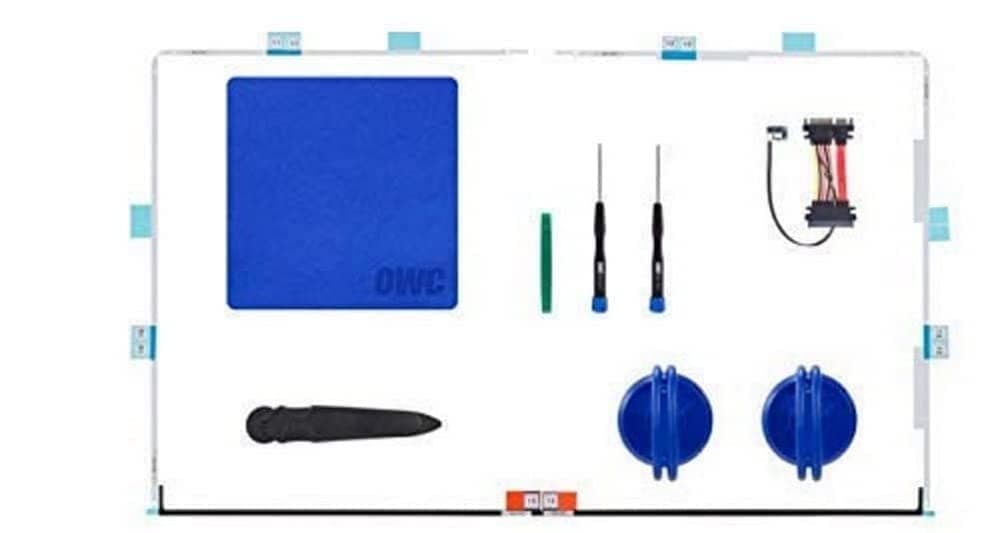
🚀 Upgrade your iMac’s heart with pro tools & smart sensor tech—because your Mac deserves the best!
The OWC In-Line Digital Thermal Sensor HDD Upgrade Cable and Install Tools kit provides everything needed to upgrade the hard drive in 27" iMac models from 2012 to 2019. It features a genuine Apple-compatible thermal sensor cable to maintain temperature control and system diagnostics, plus precision tools and adhesive strips for a flawless installation and reassembly. This kit enables a hassle-free SATA drive upgrade without software hacks, backed by free installation videos and a 1-year limited warranty.


| ASIN | B00J42HP9O |
| Best Sellers Rank | #150 in Internal Hard Drives #403 in Internal Solid State Drives #899 in Computer Hard Drive Accessories |
| Brand Name | OWC |
| Cable Type | SATA |
| Color | Black |
| Compatible Devices | Desktop |
| Compatible Phone Models | No Compatible Phone Models |
| Connectivity Technology | SATA |
| Connector Gender | Female-to-Female |
| Connector Type | Sata |
| Customer Reviews | 4.5 4.5 out of 5 stars (750) |
| Global Trade Identification Number | 00794504334753 |
| Included Components | Kit |
| Indoor Outdoor Usage | Indoor, Outdoor |
| Item Shape | Round |
| Item Type Name | In-Line Digital Thermal Sensor HDD Upgrade Cable and Install Tools for 27 inch iMac 2012 and later |
| Item Weight | 9.07 g |
| Manufacturer | Other World Computing |
| Model | OWCDIYIMACHDD12 |
| Model Name | FBA_OWCDIYIMACHDD12 |
| Number of Items | 1 |
| Number of Pins | 7 |
| Other Special Features of the Product | Temperature Control |
| Outer Material | Plastic |
| Recommended Uses For Product | Hard drive upgrade for Apple iMac 2012 and later models |
| UPC | 794504334753 |
| Unit Count | 1.0 Count |
| Warranty Description | No Warranty |
S**E
Worked Well for Me
I purchased this almost a year and a half ago because I was scared to do the install. I finally did it about a month ago, and I am happy with the results. I have a late 2013 27" iMac with i5 processor that ran like a dog because of a poor performing 1TB Seagate 5400 RPM HDD (I get it Apple, thin comes at a cost - heat). I used the OWC kit to replace that with a Seagate 2TB 3.5-Inch SATA 6GB/s Desktop SSHD (ST2000DX001) (Old Model) . While not as fast as a true SSD, it's a more cost effective solution (they are currently a hair over $100 on Amazon) and there is a noticeable increase in overall performance. My kit had everything that was shown in the online video, which can be seen on OWCs YouTube channel. They have a new version they just published on 02/03/2017. I followed OWCs instructions to the letter, and had the video playing on my PC while I was doing the teardown. As far as the replacement tape is concerned, I wish they had provided a lot more in the kit, as I had just enough after I made a couple of mistakes. The method I finally devised was to fold the backing along the tape strip and then use that as guide to line up against the edge of the iMac's case. I have confirmed the tape is the same brand and type as used by the Geniuses in the Apple Store when they disassemble your iMac. My only other recommendation is to be very careful with the screen. The glass is so large it can bow when reassembling the unit. Once I got the glass back on, it now looks like it was never taken apart. I then did a clean install of macOS Sierra and hooked my old drive up to an Anker USB 3.0 to SATA 3ft Converter Adapter Cable for 2.5 inch/3.5 inch Hard Drive Disk HDD and SSD, Power Adapter included and used the Migration Assistant to get my files and settings onto the new drive. A month in, everything is snappier and the computer actually comes back from a restart in under a minute. Some ephemera - When I was considering an SSD, I went on OWC's site and got on with live chat. I asked if I needed to use the heat sensor with an SSD, which doesn't get as hot as a comparable HDD. Chat said I have to use it, so I did a little more digging and I've confirmed that the circuitry locked up in the black connector is not only a temp sensor but also contains the EPROMS that tell the iMac the drive you're using is an Apple certified unit. Newer drives now contain the firmware to get around this issue, but my wife purchased the SHHD for me for Christmas 2014. I would have had to use the sensor anyway as the new drive is mechanical, but if you've purchased an SSD prior to 2015 that you wish to swap in, use the temp sensor. Also, this version of the 27" iMac (iMac14,2) doesn't have the eMMC slot on the logic board, so I couldn't get, say, a 64GB eMMC drive to do the Fusion Drive upgrade. On the plus side, Seagate now sells an SHHD that has the same SSD size, but uses a different schema for reading/writing data called shingled magnetic recording, or SMR. This allows for thinner platters and faster reads/writes over time. Yes, for you non-Seagate fans out there, Western Digital does make something they call a dual drive, which is a standard HDD and an SSD in the same sandwich, however, on Macs it is hard to install. They're also as expensive as a standard SSD for the same capacity. The Seagate solution just works and makes the Mac faster over time. In other words, your fifth boot will be faster than your first boot.
P**L
Great Tools For An Upgrade!
These tools all worked great as I opened my 2017 iMac 27 to add an SSD drive. I didn't need the temperature sensor as I decided to leave the original Fusion Drive in place which has its own sensor. The adhesive strips fit perfectly when resealing the screen. Great product!
A**K
Everything you need in a kit!
First off, I am an experienced PC technician. However, this was my first time opening a new generation iMac and was worried that Apple's everything-held-by-glue approach would be a pain in the rear. I ordered this kit to replace my aging hard drive for an SSD and I can say I am VERY pleased. The kit contained everything I needed. The pizza-cutter tool was particularly good at the task. My mac opened effortlessly following the video on their website. No surprises found at all, every single thing they pictured was exactly the way it was shown, at least on my unit. I did the operation over my bed and the only extra tool I used was actually the cardboard box the kit came on! When you open the screen you need to remove a pair of cables and I found that using the box was perfect as a placeholder for the screen in the right angle. Overall, the whole open and close process was done in half an hour, and that was just cause I was dead scared of breaking something. Great product!
T**W
Adhesive included
OWC overcomes Apples hopes that you just buy your upgrades through them. Ticks me off how apple grossly overcharges for upgrades and their 1TB fusion drives barely have enough fusion to actually wake the computer from a sleep. On iMac retinas, all l that holds your screen on is a rubberized adhesive. What's hard to tell in the photo is that the adhesive has to be replaced but is provided in this kit. One word of warning is that I had a very hard time lining up my screen to place it back on the frame. The adhesive is super sticky so once it grabbed it stayed. My screen now very slightly hangs over the edge. I also suggest having a towel nearby to place the screen face down on. The screen is super fragile so be very careful not to bend it. Somehow I got a small chip on the edge of the screen (not affecting viewing).
M**S
Fits 2017 iMac 27" 5K
Bought this kit because I needed to upgrade my 2017 27" 5K iMac's OEM Fusion Drive with a new NvME and PCMe SSD. The pizza cutter tool worked perfectly in breaking the monitor seal. It takes several passes to cut thru the adhesive, so just take your time. The suction cups were handy for lifting the display up. Make sure to take the extra time to remove ALL of the old adhesive and clean with rubbing alcohol. The replacement adhesive strips fit perfectly. I allowed the iMac to sit face down overnight as a precaution to allow everything to set and settle. The replacement adhesive strips are holding really well and I haven't had any issues with the adhesive failing.
D**D
Vital, but pricey
A Micron 2TB SSD and NewerTech AdaptaDrive bracket were used along with this kit to upgrade my 27" 5K Late 2015 iMac. I feel like $50 is a lot for the items I did use, since I didn't need the big cleaning cloth or the two suction cups. The other tools were all excellent though and the upgrade went pretty smoothly. The trickiest part for me was getting the new tape in place properly, and some of the backing tabs weren't cut through. Also I couldn't get the display aligned quite perfectly before the tape was sticking along the bottom, so it went back on just slightly off. It's not noticeable at all but I know it and it bugs me a bit... But overall I'm just happy with being able to successfully complete this upgrade myself, and there don't seem to be any issues. My fans work like they should.
A**I
Ich habe meinen iMac mit einer ssd Festplatte aufrüsten wollen und deshalb zu diesem set gegriffen, es beinhaltet eigentlich alles was man zum Umbau benötigt, von der Festplatte abgesehen. Das verklebte Display lies sich mit dem Rändelrad Gut lösen, so das die Saugnäpfe nicht nötig waren. Mehr als die zwei Torx Schraubendreher braucht es nicht. Das mitgelieferte Kabel passt perfekt. Das Display wird mit den im Lieferumfang enthaltenen Klebestreifen wieder fixiert, Beschreibung dafür ist perfekt. Ich kann den Artikel empfehlen.
D**S
Really good quality kit for everyone who want replace HDD with SSD. There is SATA cable with thermal sensor included. Everything works perfect!
K**N
Kit was good, gave me everything I needed. It was a pretty easy upgrade using a drive cloner and then re-installing MacOS with internet recovery got me back up and running. Everyone complaining about the weak adhesive is wrong, or they made this stuff SUPER STICKY! I aligned everything though it was good and dropped the panel, it moved a mm off and for the life of me I couldn't get it unstuck. Rather than deal with buying new adhesive I stuck everything down. it's not horrible but I really think the adhesive is good. PROVIDED you correctly cleaned off the old adhesive. I still give this 5 stars because I made a mistake doesn't make it a bad product. Its GREAT. Performance wise my 7 year old MAC can live another 4-5 years easily performance wise.
M**.
Pude actualizar ponerle un SSD a mi iMac de 27 pulgadas sin problema, es un proceso sencillo de hacer si es que te gusta la tecnología y en general hacer las cosas por ti mismo. La pantalla quedó perfectamente sellada, solo hay que poner atención y seguir las instrucciones al pie de la letra. ES MUY IMPORTANTE QUITAR EL ADHESIVO ANTERIOR SINO LA PANTALLA SE CAERA. De igual manera el sensor de temperatura funcionó perfectamente. Si pasará algo malo los actualizaré aquí mismo. Por el momento llevo dos días usando el iMac y todo perfecto.
J**O
Usado en el upgrade de un iMac de 27” late 2013. Adhesivos de calidad (nada que ver con usar cinta de doble cara), bien numeradnos para no equivocarse, y usando los vídeos del fabricante todo hecho en un rato y fácil. Incorpora el sensor de disco que si bien hay quien comenta que no es necesario en los SSD yo lo instalé.
Trustpilot
Hace 2 días
Hace 2 semanas