Desertcart purchases this item on your behalf and handles shipping, customs, and support to Bolivia.
🛰️ Navigate smarter, not harder — GPS precision that keeps you ahead of the pack!
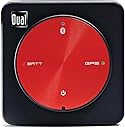
The Dual Electronics XGPS150A is a compact, portable Bluetooth GPS receiver featuring WAAS technology for highly accurate location tracking within ±2.5 meters. Compatible with iPhone, iPad, Android, Mac, and Windows devices, it offers 8.5 hours of battery life and includes a full accessory kit for secure mounting. Ideal for professionals and adventurers needing reliable GPS in remote or urban settings, it comes backed by an extended 2-year warranty for long-term confidence.


| ASIN | B006M49G80 |
| Additional Features | Bluetooth |
| Battery Average Life | 8.5 hours |
| Best Sellers Rank | #1,794 in GPS System Accessories |
| Brand | Dual Electronics |
| Built-In Media | XGPS150A |
| Compatible Devices | Smartphone |
| Compatible with Vehicle Type | Car |
| Connectivity Protocol | Bluetooth |
| Connectivity Technology | Bluetooth |
| Control Method | Touch |
| Customer Reviews | 4.2 out of 5 stars 1,871 Reviews |
| Display Type | Digital |
| Global Trade Identification Number | 00827204108635 |
| Human-Interface Input | Buttons |
| Item Dimensions L x W x H | 2.24"L x 2.24"W x 0.75"H |
| Item Type Name | Dual Electronics XGPS150A Multipurpose Portable Universal Bluetooth GPS Receiver | Wide Area Augmentation System |
| Item Weight | 1.76 ounces |
| Manufacturer | Dual Electronics |
| Map Types | Satellite |
| Memory Storage Capacity | 16 GB |
| Mfr Part Number | XGPS150A |
| Model Name | Dual Electronics XGPS150A Multipurpose Portable Universal Bluetooth GPS Receiver | Wide Area Augmentation System Model Name Dual Electronics XGPS150A Multipurpose Portable Universal Bluetooth GPS Receiver | Wide Area Augmentation System See more |
| Model Number | XGPS150A |
| Model Year | 2014 |
| Mounting Type | Dashboard Mount |
| Number of Items | 1 |
| Operating System | Android, Windows |
| Resolution | 480 x 272 |
| Screen Size | 0.75 centimeters |
| Special Feature | Bluetooth |
| Sport Type | Fishing, Running |
| Supported Satellite Navigation System | GPS |
| Touch Screen Type | No Touchscreen |
| UPC | 640649748644 827204108635 |
| Unit Count | 1 Count |
| Vehicle Service Type | Car |
| Warranty Description | Manufacturers Warranty |
D**N
Dual Electronics XGPS150A works very well, a great choice for use with non cell enabled iPads.
This XGPS150A works well, it allows my non cell enabled iPad Pro to work as a mapping device, such as with Google Maps. I still need to tether the iPad to my cell phone to get the maps. Apple does not allow its phone to send GPS information to a tethered iPad. If an iPad doesn't have the cellular hardware, it lacks the tiny inexpensive chip that would enable GPS reception. There used to be an app that would allow the phone to send GPS location data to an iPad but that app has been removed, rendering non cell enabled devices pretty much useless for GPS. Not only does the XGPS150A restore GPS function, it seems much more accurate than cell phone GPS. There is a disk displayed around the mapped location indicating the uncertainty of the mapped location. That disk is much smaller with this XGPS150A than it is with the iPhone location mapping. This 150A not only places me on the correct side of a divided highway, it follows as we move into an exit lane. I believe location accuracy is claimed within 10 feet and it seems well within that. We used it on a 6 hour trip so I can tell you battery life is longer than that. When I ordered it I had the idea it was much larger than it really is. The unit is small, it weighs 48g and measures 2.2" square and 3/4" thick. It has a molded in loop on the back for a strap and that adds a bit to the thickness, otherwise it would be thinner. It comes with a Velcro type strap and a handy rubbery molded pad so it stays put on top of the dash. Others have noted that the charging cord can't be used while it is in the rubbery pad. That isn't really right because you can put it into the molded pad tilted with one edge up. It is still held well enough that it stays put on the dash but can still be charged. My previous iPad mini was cell enabled and I didn't realize when I bought my current iPad Pro that the non cell enabled iPads were so GPS crippled. It makes little sense to me that a tethered iPhone can't send GPS location to an iPad. Anyway, this XGPS150A restores the GPS function and it seems to markedly improve on the iPhone's location accuracy in the process. The difference on this 150A model and the next higher one is this will connect to just one device at a time. There are just 4 status LEDs on GPS antenna. There is a downloadable app that gives information about which satellites are being used and an indication about position and accuracy, but that accuracy is indicated with a nonspecific word such as "good" but not in the much better way such as an estimate in feet or meters. It comes with a charging cord but no wall charger. It does have a cigarette lighter type plug for 12V charging. I'm happy with this GPS receiver and would purchase it again.
A**6
Outstanding item for the price.
After doing a lot of research I previously had used a Bad Elf GPS dongle for my flying needs. When I upgraded to an iPhone 5 and iPad Mini, my old 30 pin Bad Elf became an expensive and obsolete key chain. I tried using the 30pin-Lightning adapter, but found it awkward on the yoke and decided it was time for an upgrade. I don't fly enough to justify an expensive ADS-B receiver, and I didn't want to make the mistake of a plug-in unit again, so I set out to do some research. Having been happy with Bad Elf, I considered the Bad Elf Pro because one feature I thought I needed was tracking, something the Dual 150 doesn't have. What changed my mind was the price. Even though the 150 is an "older" model, I was able to pick it up for almost half the price of the Bad Elf Pro and it seems like it's made for flying. The rubber dash grip and small size are great on the glare shield of the plane. I was very impressed with how fast it got a cold signal and the accuracy was also great. The battery life is excellent for even long cross country flights or drives. I love how there's nothing to it, and the free iPad/iPhone application made it fun to see how well it was working. If you're not flying with Foreflight, you're missing out. I'm sure that Wing-X and Garmin Pilot are great too, but I've been using Foreflight for years and have nothing but praise for the application. There was no work to get this working with Foreflight. I use a wireless only iPad mini, so I otherwise didn't have airspeed, altitude etc. All of that shows up the instant you start up Foreflight with the GPS connected. No set up required. The GPS works great on sunny days and in clouds, It also doesn't seem to mind getting hot on the dash. The only big difference between this model and the newer one is the 150 can only connect with one device at a time. For me, this wasn't a deal breaker and it still isn't. For the simple VFR flier like me, I only use the GPS as a back up and wouldn't see a need for more than one device to be connected. Bottom line: If you want to get GPS function on your iPad for a low price, this is the unit for you. If I had the spare $700 laying around, I'd probably go buy a Stratus, but this will do just fine for me in the mean time.
P**P
Works well with various devices
The photos on Amazon and on the manufacturer's website really don't do a good job of conveying how small this device is. The "user interface" is exactly what you see on the photo - three LEDs and an on/off switch. There is an iPhone app to view the device status. Unfortunately, I have Android devices (phone, tablet) and there is no support for these. Perhaps when it sinks in that Android has over 50% of the smartphone market, Dual Electronics will get with it and produce at least a status app for Android. There is an app: "Bluetooth GPS" for Android which gives all the information that the Dual iPhone app does, with the exception of battery status (charge level, charging/discharging etc.). In use, it works very well. Locks almost instantaneously compared to other GPS devices I have used. I paired it with my Samsung phone (well known for having abysmal GPS performance) to try out Google turn by turn navigation, which with the internal GPS is practically unusable. The result was a complete transformation. The Google app came very close to being comparable to my dedicated car navigation system. Turns were announced as they arrived, stop at a junction and the icon was shown precisely on the junction etc. Even indoors, it sees 10 out of 12 satellites, with an estimated error of less than 2m. Works with my MacBook Pro -- the big problem there being the lack of mapping applications to make any use of it. There are two applications available, one turn by turn which uses TomTom maps which are so out of date that they are currently selling them for less than half price. The other uses scanned maps (not zoomable, no turn by turn), intended more for people wanting elevation data than anything else). These both cost $60, without maps. User reviews on both are not good. More competition is needed in this area. The only google application that makes use of GPS is Google Earth, and that is not terribly useful (unless you really did forget where on earth you are). The on/off switch takes a bit of effort to push, and you have to hold it a while, which really isn't stressed that well in the documentation. The USB connector is a mini-USB, not the micro-USB currently the standard on phones and other devices. Good because it is at least a bit more robust, bad because you need to carry chargers with the two USB connectors around. If there had been even a minimal effort at supporting Android, I would probably have given 5 stars. -------- UPDATE: This GPS receiver worked fine with my Macbook Pro, my Android phone and Android tablet, but did not work at all with an AK-N7000 bluetooth receiver for GPS on my Nikon D7000. Contacted the manufacturer of the AK-N7000, they were VERY helpful, they obtained a XGPS150 and tested themselves. They too had the same problems (no Bluetooth connection). They have been in contact with the Dual manufacturer to see if there might be a firmware fix. In the meantime, I had to purchase a different GPS receiver (BT-Q1000XT) to work with my camera.
K**6
CONFIRMED: Works great with Newest iPad ("3") & w/ Navigation Software on a WiFi-only iPad
Just wanted to let folks know that this product does indeed work with the newest iPad, the one that came out (in the USA) in March, 2012. I have a wifi-only iPad version, and the Dual Electronics works great with it. This device pairs easily and quickly with the iPad. It also has great battery life. The Dual Electronics device works with my iPad's navigation software. In specific, a Navigon North America navigation application. (Its great having a huge screen to view your map - the screen of the iPhone just can't compare and nor can dedicated GPS devices.) I downloaded the free app "Dual GPS Status Tool" onto my iPad and it gives all sorts of detailed information about the GPS device (e.g., battery life) as well as about the satellites to which its connected. To test the Dual Electronics device, I drove my 52 mile-roundtrip daily commute in the Washington, DC area. During these drives, the Dual Electronics device had no problems maintaining a connection to the satellites, to my iPad, and as a result the Navigon app on the iPad worked great. Its great not to have to worry about holding the iPad a certain way in order to get GPS - this external GPS always sits on your dash. I use, in addition to this Dual Electronics device, the Novatel Wireless MiFi 2200 3G Mobile WiFi Hotspot Modem, Refurbished (Verizon Wireless) so that I can connect the iPad to the internet and get the latest traffic reports while using the Navigon app. Note that in order to test whether this GPS device is truly working properly, I tested without the WiFi connected (because the iPad has a feature where it can determine approximate location if connected to WiFi, even without a GPS connection). So, in sum, I can report that this external GPS works, as does its software and the software of 3rd parties such as Navigon, with a WiFi-only device such as the iPad. P.S.: Not to get too technical here, but its adorable - a little cute guy with its own form-fitting dashboard mount.
P**E
Wonderful Product
This is the coolest thing for my iPad. I wish I had purchased the 3G iPad that comes with a GPS Receiver, but since I didn't, this device makes it possible for me to use many GPS enabled iPad apps. Some apps will not install on the iPad if it is not 3G even if you have this device so use caution when buying the apps. I do experience an issue when switching between apps while I am using this device. The iPad seems to lose the GPS even though the utility with this device shows that it is clearly working. I DO NOT believe that the issue is with this device, I believe it is a software issue, but it's something to be aware of if you use this. The remedy is to shut down both applications (if you can figure out how to do that on an iPad) or shut the iPad off and then back on which is what I do. It doesn't take very long, but if you are in the city and using this for navigation and your turn is coming up, watch out!! Again, I don't think it's the device's issue. I use this with the CoPilot navigation app and the What's Next app and a few others. 8/7/2012 - I took this device on a 2400 mile trip and it worked great with my iPad 2 and CoPilot and other apps. One thing I learned about my iPad is how to actually shut apps down without rebooting the thing. I'm a pretty tech savvy guy so when someone asked me about shutting the app down and restarting it I had to say I didn't know how and eat a bit of crow. Shoot, for all of you who have iPads and don't know, double-tap the center button and little window at the bottom opens/raises up and shows you all the apps that are running. Hold your finger down on one of the app icons until they start shaking and have a red minus sign on them. Touch the minus sign of the ones you want to shut down and viola, you are done. Click the button once to get them to stop shaking, click again to exit. I thought I was shutting down all my apps when I rebooted the darn thing, but no. When I double-tapped that button the first time, EVERY app on my iPad was running because at one time or another I had opened it and never closed them. I guess you learn something new all the time even when you thought you knew it ALL already.
M**P
Not happy. Buy the AXXERA XGPS150E or Bad Elf GPS PRO 2200 instead.
I'm a 747 Captain flying international cargo. I'd seen several of my colleagues using a Dual XGPS 150A with their iPads so, not knowing better, I bought one, too. I was VERY disappointed. It will basically show a solid signal lock with 10+ satellites and working fine near the ground, but then it loses all calculated tracking data at either high speed or altitude, not sure which is the cause. It's not the iPad or the apps I'm running, the problem even exists when running only their app and no others. Returned twice, waiting on third attempt which they say will be the E model. Okay, we'll see, but I'm not hopeful. I've now spent $30 on return shipping for a device that cost $100. I'm effectively paying for the privilege of being their beta tester. So I splurged and tried again with a different product, the Bad Elf 2200. It works very well. No glitches so far and performs as advertised. I like the backlit screen and that it can synch with up to five devices, pretty handy stuff. The only complaint that I could possibly think of is that it would be nice if it could be a little more of a stand-alone GPS, with lat/long waypoints, time-distance calculations, etc., but I don't think that's what it was intended to do. A sticky pad mount like Dual's would be a nice option in addition to their lanyard. That said, though, until I see how the E-model works I'd absolutely recommend the Bad Elf 2200 over the XGPS 150A. >UPDATE< I got the AXXERA XGPS150E from the manufacturer. I don't know but I'm guessing that DUAL was bought, usurped, seized, altered, expropriated, converted, overrun or some how replaced by AXXERA. In any case, I stand by my original review (A-model not recommended) but clarify that on it's maiden flight yesterday the AXXERA XGPS150E worked as advertised. It looks almost identical to the A-model, uses the same iOS app, same firmware, etc. The battery lasted for about 6 hours in cruise flight over the Pacific and recharged in about 2 hours. It's cheaper than the Bad Elf and the sticky mounting pad is well designed. The Bad Elf has a LONG lasting battery and it's own backlit screen with basic data. So my suggestion, based on how I use it, is don't buy DUAL'S A-model, but instead consider the E-model from AXXERA or the Bad Elf GPS Pro 2200.
S**.
NOT IOS6 Compatible on 4G/LTE iPads-Problem
Tried all of the following and will not pass GPS information to ANY APPS on 4G/LTE iPads with IOS6. It does however work fine on None-3/4G/LTE WiFi ONLY iPads. This is most likely an iOS 6 induced issue, which Apple tells us will be fixed, but have not yet been given a timeframe. This issue affects all apps using an external GPS, except the vendor apps (the DUAL or Bad Elf app). The vendor apps "talk" directly to the GPS, not through the Apple iOS. More about this and a workaround on our Blog here: [...] Also, please go to your main iPad Settings, tap General > Date & Time > Set Automatically, and make sure it's set to OFF. Then, confirm that Location Services for ForeFlight is turned ON (you can find this under iPad Settings > Privacy > Location Services). And confirm that Disable Ownship is set to OFF (you can find this in ForeFlight, under More > Settings, near the bottom of the right column. If the above does not get your GPS going, then try fully closing and then re-opening the ForeFlight Mobile app: 1. Exit ForeFlight and go to the main iPhone or iPad home screen 2. Press the button at the bottom of the iPhone/iPad twice in a row. A list of the last apps you've used should show slide up at the bottom of the screen, and the top part of the screen will go dark. If they don't slide up - please try again until they do. 3. Find the ForeFlight icon on that list at the bottom of the screen. Tap and hold the icon until it starts to wiggle, then tap the - sign in the top-left corner of the icon. This will stop ForeFlight Give that a try and let us know if any other questions arise -- we're happy to help! Adrian Tegler ForeFlight Pilot Support ForeFlight LLC UPDATED:OK HOLD THE PRESS! THIS WORKED - * Go to the main iPad Settings app. * Tap on "Privacy". * Tap on "Location Services". * Toggle the top row to "Off". This will turn off location services for all of your apps. * Reboot your iPad (press-and-hold the top button for 5 seconds, slide the red slider to power off, wait 5 seconds, then press the top button to turn your iPad back on). * Go back to Settings -> Privacy -> Location Services and turn location services to "On" for your iPad. Also make sure that location services are set to "On" for ForeFlight Mobile. * Leave your iPad connected the Internet for a few hours (the screen can be off). This might not be necessary, but we have encountered a few rare cases where this fixed the problem. NOTE: Current iPad 4G/LTE IOS6 configuration is: Airplane Mode= ON a) WiFi=OFF b) BlueTooth= Manually ON ( Connected to DUAL XGPS 150A) c) Cellular Data=OFF Location Services=ON Auto Set Date & Time= ON Ignore Warning message- " TURN OF AIRPLANE MODE or USE Wi-Fi to ACCESS DATA" click OK. ForeFlight - MORE- DEVICES- Showing DUAL XGPS Connected with green checked. Sub Note: All other Location APPS that do not require data connection and obtaining GPS location working ok.
M**.
Works with MotionX-GPS HD on WiFi iPad
Just received the XGPS150A about 21 hours after I ordered it. Can't beat Amazon Prime shipping! I was concerned, as others were that this unit would operate with my WiFi only iPad and MotionX-GPS HD. I emailed MotionX and received a positive answer in less than an hour. Using my new iPad (3) the following apps work fine, Maps, MotionX-GPS HD, Google Earth, ArcGis, iGIS and EasyTrails GPS. I did not try the Dual GPS with MotionX GPS Drive, because I have it on my iPhone 4s and don't use it much. Also, you can preload maps with GPS Drive, but you need WiFi if you need to recalculate your course. I downloaded satellite maps of my area into MotionX-GPS on the iPad, and took a short walk and created a track and three waypoints with the Dual/iPad and my iPhone 4s. One of the waypoints was much closer with the Dual unit and the other two were different, but equally off by about 15 feet. The track was much closer with the Dual than with the iPhone. With the Dual, both coming and going pretty much overlapped and were mostly within the path I was walking on. With the iPhone, the coming and going did not overlap at all and were on both sides of the path, sometimes by quite a lot. To be fair to the iPhone, it was in my pants pocket and the Dual GPS was on my arm with the handy but somewhat difficult to use arm strap. One of my planned uses for the Dual GPS and iPad combo is to map the locations of trees and plants in a GIS database. The ability to download satellite maps into the WiFi only iPad (don't need a WiFi or cell phone connection) and now have GPS is theoretically an improvement over using the iPhone because the iPad screen is much larger. One thing that I did not count on is that the iPad screen is almost impossible to see in sunlight. This diminishes the advantage of using the satellite maps in the background to make sure you have the exact location. The Dual XGPS150 Status App is pretty cool and gives more information on the satellites than you would get from the iPhone. I think this is a fantastic product and I am very glad to have it. I have not tried it with my laptop, but assume it will work well with it also.
V**2
Buono e funzionale
È Un ottimo prodotto, buona qualità prezzo! Lo utilizzo in aereo con ottimi risultati. Lo consiglio per la navigazione aerea.
L**.
Excelente
Trabaja perfectamente
M**N
Parfait pour l’instant.
Utilisé hier pour la premiere fois avec Foreflight sur Ipad dans un gyrocoptere, le tout a bien fonctionné. S’est déconnecté a 2 reprises De foreflight, mais probablement un probleme avec foreflight. Si vous voulez utilisé ceci en aviation, je vous recommanded’acjeter plutot le DUAL XGPS170D ADS-B / GPS BLUETOOTH TRAFFIC & WEATHER RECEIVER qui vous donnera Dans Foreflight les cartes météo ainsi que la position des avions équipés de transpondeur.
R**Z
Funciona bien con el iPad
Lo hemos estado probando en un viaje de 3 semanas por los EEUU, con Sigic como navegador y ha funcionado muy bien, la batería dura tanto como la del iPad y tiene una pulsera por si quieres llevarlo como "reloj" cuando vas por la calle. Muy recomendable para el iPad wifi
M**T
Excellent GPS for iPod
Delivery of the Dual XGPS150 was very prompt. I had read there are 2 versions, a 150A (America) and 150E (Europe) My conclusion is that they are the same device. Mine is a 150A and works fine in the UK. I've used this GPS twice and so far I'm very impressed. I'm using it for hiking in the UK with the latest iPod. Unfortunately the iPod doesn't come with GPS, so you either have to buy a plug in GPS like Bad Elf (more expensive) or one that works using bluetooth. The Dual XGPS150 is very small and light, so it fits easily into a jacket or rucksack pocket. There is a small switch on the side of the device which needs setting for Android or Apple devices. The default is set for Apple, so I didn't have to change it. Switching on the Dual at first was a little tricky, as you have to apply pressure to the top of the device for 3 seconds. I found it needed some pressure from my thumb to hold down, but this is probably not a bad idea as it avoids accidently switching on or off the device when it's in your pocket. After I had switched on the XGPS150 I switched on my iPod bluetooth connection. The two devices paired very quickly. I'm using Ordnance Survey maps of the UK National Parks at a scale of 1:25 000, downloaded using the 'Outdoors App'. These are offline maps so scrolling is instantaneous. I have found the XGPS150 to be very accurate and really helpful for navigation. After a full charge (2 and a half hours) the XGPS150 was showing 45% battery left after 5 hours of hiking. I also downloaded the Dual App, though you don't have to do this to use the device. However the App usefully shows you satellites, battery status, latitude, longitude and altitude. So far, so good. I'm very pleased. But a word of warning if you are thinking of buying this product elsewhere. Initially I ordered the XGPS150 from an internet company called 'Proviation'. Do not buy from this company as it appears to be a rogue internet company. I did not receive the device and I'm still trying to get my money back. In contrast Oasis Pilot and Amazon have been great. I'd like to add another warning. If you are using a wifi only iPad or iPod DO NOT upgrade your Apple operating software to OS8.3, released in April 2015. There is a bug which stops the Dual GPS device from working with map Apps when using Bluetooth. I'm hoping Apple are working on a fix as OS8.3 has rendered my Dual GPS as useless. I can now add that since Apple updated their software my Dual GPS works fine again, and I have now upgraded to OS9 and can confirm it works ok.
Trustpilot
1 week ago
1 month ago