


🏷️ Elevate your workspace with labels that mean business!
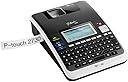
The Brother PT-2730VP is a versatile desktop label maker designed for professionals who demand precision and style. It offers USB connectivity to PC and Mac, a large backlit graphical display, and prints durable laminated labels up to 24mm wide. With over 50 pre-designed label templates and a protective carry case included, it’s the ultimate tool for organized, high-impact labeling at the office or on the move.
| Included Components | protective carry case, label tapes |
| Print media | Labels |
| Max Input Sheet Capacity | 1 |
| Compatible Devices | PC |
| Maximum Color Print Resolution | <300 dpi |
| Sheet Size | 24 millimeters |
| Maximum Black and White Print Resolution | 300 dpi |
| Warranty Type | Limited Warranty |
| Dual-sided printing | No |
| Max copy resolution color | 300 dpi |
| Duplex | Simplex |
| Hardware Interface | USB |
| Ink Color | CMYK |
| Additional Printer functions | Print Only |
| Control Method | Touch |
| Number of USB 2 Ports | 1 |
| Total USB Ports | 1 |
| Model Series | PT |
| Specific Uses For Product | personal |
| UPC | 777786384876 778889245729 080000232502 012502626596 778889545362 012502628163 |
| Printer Ink Type | No Ink |
| Global Trade Identification Number | 00012502626596 |
| Manufacturer | Brother Printer |
| Item Weight | 1.94 pounds |
| Product Dimensions | 9.4 x 7 x 2.8 inches |
| Item model number | PT2730VP |
| Is Discontinued By Manufacturer | No |
| Number of Items | 1 |
| Manufacturer Part Number | PT2730VP |
T**C
Versatile Label Printer, Excellent In Its Price Range
I purchased this printer for use both at work and at home. I work in the IT industry and use this for labeling computers, patch panels, switches, routers, etc. This PT-2730VP replaces an older Brother model PT-1800 that I've had for 8 years. The durability of my old PT-1800 made me want to consider a Brother again this time. Even after 8 years, the PT-1800 is still going strong, I just wanted more features. My short list of requirements for a new label printer were:- must run on batteries for "in the field" use- must also include an AC adapter so it can be left on for extended periods when needed- must have a QWERTY keyboard- must have a back-lit display for use in areas with minimal lighting- must be able to use as BOTH a stand-alone printer and as a computer-driven printer- prefer a unit that comes with a case - as my label printer gets fairly heavy use (make that ab-use)- should have 'reasonable' label making software included- should not waste large amounts of label tape (my only real complaint with the older PT-1800)- labels should look good - i.e. not smeared or ragged- should be reasonable in priceIn all these areas, I'd say that the Brother PT-2730VP either meets or exceeds my requirements. On whole, I gave it 5 stars. It's not perfect but I feel it is an excellent value - a great balance of features and price. I'm not aware of any other label printer in this price range that offers better quality than the PT-2730VP.I'd like to comment on the hard-shell plastic case that comes with this printer, especially since one reviewer was unhappy with it. I certainly understand where that person is coming from - I too have more tape cartridges than will fit in the case. I too would prefer more room for labels. And let's not stop there; while we're at it, I'd also like room for a spare set of batteries. Oh, and scissors. Can't forget the scissors. But all that said, I feel that the case is quite rugged, it protects the printer well, it looks good, and it provides enough space for the basics - i.e. the printer, all cables/adapter and 3-4 large tape cartridges. So it's not a bad case. Again, considering the price, it's a good deal.The labels are the standard TZ-Tape series used by many Brother models. You can find them lots of places - at least in the basic black on white style. If you want the more exotic types and colors, you'll probably need to order them on-line. Compare these labels to other brands in the same price range and I think you'll be happy with the quality. Cartridges run between $14-$23 depending on style and width.One advantage this PT-2730VP label printer has over my older PT-1800 is that it is compatible with the "1 inch" wide labels (actually 0.94"). My older printer stopped at the 3/4 inch tape. However, this printer does not print on the 1.5 inch TZ-tape available from Brother.Another improvement over my older unit is that PT-2730VP wastes far less label tape. All label printers are going to have some wasted tape - but the PT-2730VP does very good job of keeping this to a minimum. On average there is less than an inch of total excess per label. My PT-1800 regular required 3-4 times that amount. Less waste means more labels per cartridge.The software that comes with this unit is very nice for the price (P-Touch Editor 5.0). It has lots of useful features and is well designed. It installed and ran without a problem on all 3 computers I needed it on: my Windows 7 box at home, my Windows 7 laptop at work, and my XP desktop at work. No errors or crashes have occurred on any of the systems I'm using it on. With this software, you can create and store as many labels as you want. I use my laptop in the field. I've got all my label designs on all 3 machines. Others have provided good photos of the unit itself so I uploaded a capture of the P-Touch Editor screen and a photo of what the label looked like when I printed it use black on yellow. As you can see, graphics/logos are easy to include. The software is fairly intuitive if you've used drawing software before. There's a "Professional" mode for experienced users - and an "Express" mode that is simpler and has fewer choices.You can also "insert Symbol" - this lets you insert characters from fonts like Wingdings, Dingbats, etc. These can be scaled to any convenient size.It prints any of about 18-20 different types of bar codes, including the increasingly popular QR Code.Just about anything can be rotated, scaled, styled, etc.Tip: Since this is a monotone label printer, importing a graphic such as a logo works best if you start with a black and white version. Avoid images with lots of color and/or gradients/shading and or fine details - you'll be much happier with the results.
P**2
Brother hits another home run!
Wow, I like this labeler. I tend to be a big fan of Brother products, and this is no exception.I've been avoiding buying a labeler because (1) the handheld models didn't seem versatile enough, and (2) I thought, what can I do with this that I can't do with, say, a black marker and paper labels? Then, after the 50th time I couldn't figure out what something was because the marker had rubbed off, or the paper label had disintegrated, I thought, it's time to check out the labelers.Handhelds were out because they didn't seem to do enough. I wanted one that would connect to my Mac, and if possible, have Mac software. (I confess to running Windows on my Mac out of desperation - not all software that I need runs on the Mac; that's another story.) But I also wanted one where I didn't have to attach it to the computer; I might want to, say, label stuff in the garage, or someplace else where maybe I didn't want to haul a laptop. I wanted labels that would hold up to a bit of abuse; they had to take some abrasion and not tear too easily. If the labeler could run on batteries or AC, that was a plus, although AC only would be okay.I was amazed to find a labeler that met all of my requirements, and was still in my price range. I have lots of other Brother products (fax, sewing/embroidery machine, knitting machines, probably some other stuff I forgot about), and they're great, so I was willing to give this a whirl.It's terrific. The Mac software isn't available yet (I'm on OS X 10.9; if I were still on 10.8, the software is available), but it's coming. I've loaded the PC software, running under Windows on the Mac, and it's running just fine. There's a learning curve, but it's not huge (took me about 10 minutes to figure out how to use it). I like that I get a print preview, so I'm not surprised at the label that comes out. I like, too, that there's no wasted tape when printing labels from the software.Standalone, without the computer, the labels are still great, but there's a fair amount of tape waste. That's okay, in a way, because the labels I wanted were pretty small, and sometimes it's helpful to have enough label to be able to see where the label is. (I'm not sure I explained that well, but if you've ever looked all over something for a teeny weeny label, you might appreciate this.)The print is clear and sharp. The labels print quickly, and cut automatically. I might be the only one around who still remembers the old labelers that embossed plastic tape that didn't stick well - this labeler seems space-age compared to that. I like this labeler a lot.If I have one quibble, it's that it could be easier to get the paper off the back of the label. Not a big deal, though, considering that the labels do stick to just about anything I can think to label (and I am now labeling everything I can think of).Good product, good price. I don't see how you can beat this for most home and office applications.
Trustpilot
3 weeks ago
5 days ago