Buy anything from 5,000+ international stores. One checkout price. No surprise fees. Join 2M+ shoppers on Desertcart.
Desertcart purchases this item on your behalf and handles shipping, customs, and support to Bolivia.
⚡ Label like a pro, speed like a boss.
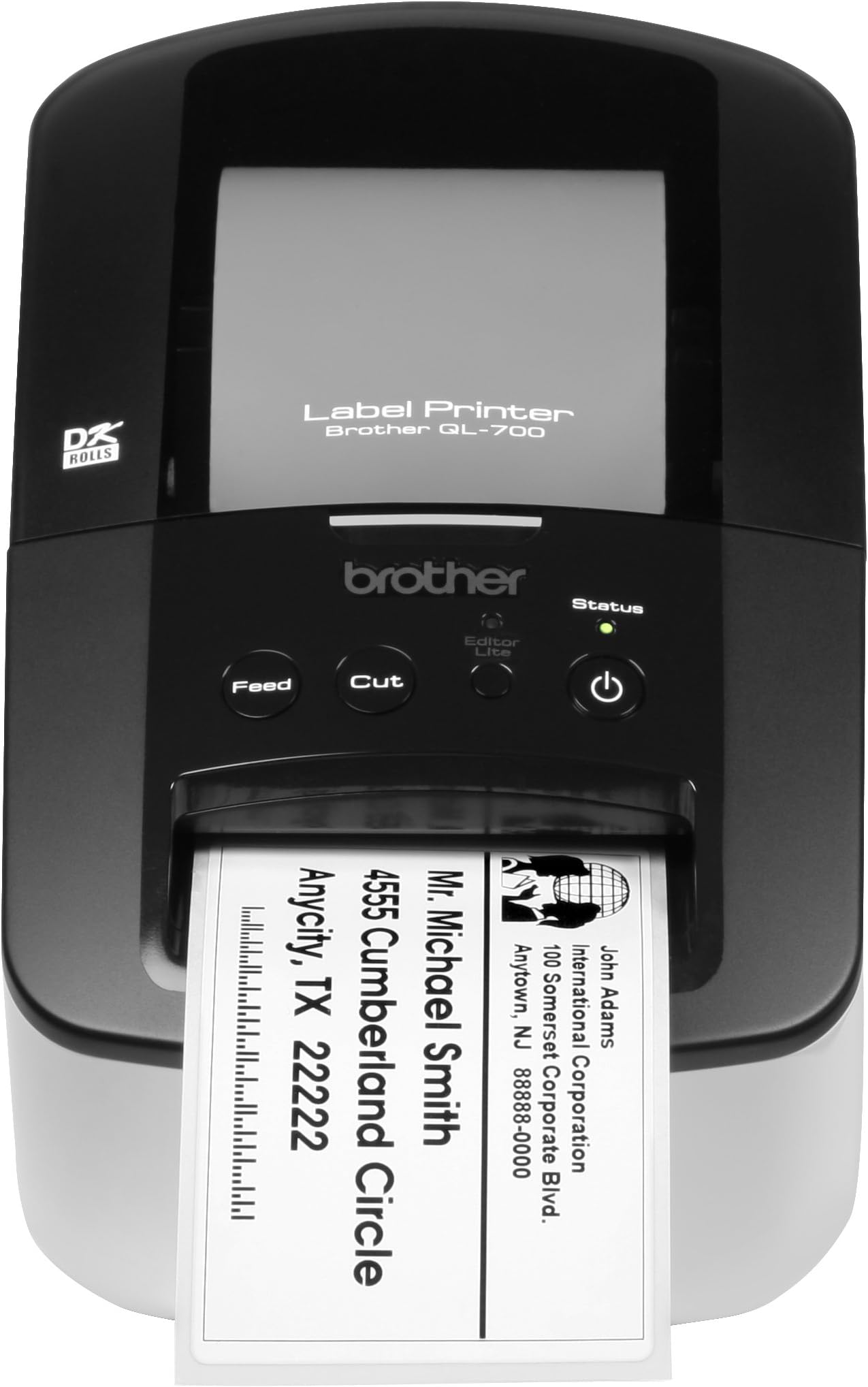
The Brother QL-700 is a high-speed monochrome thermal label printer designed for professionals who demand efficiency and quality. Capable of printing up to 93 labels per minute with a built-in auto cutter, it supports a wide range of label sizes including continuous rolls for banners and postage. Its plug-and-play setup requires no ink or toner, making it a cost-effective and hassle-free solution for office and home labeling needs.
| ASIN | B005TJMC0S |
| Additional Printer Functions | Print Only |
| B&W Pages per Minute | 1 ppm |
| Best Sellers Rank | #173,007 in Office Products ( See Top 100 in Office Products ) #393 in Desktop Label Printers |
| Brand | Brother |
| Built-In Media | Printer Accessory |
| Color | Black |
| Color Pages per Minute | 1 ppm |
| Compatible Devices | Laptops, PC |
| Connectivity Technology | USB |
| Control Method | Touch |
| Controller Type | Push Button |
| Customer Reviews | 4.4 out of 5 stars 1,394 Reviews |
| Display Type | LCD |
| Dual-sided printing | No |
| Duplex | auto |
| Global Trade Identification Number | 00012502630456, 00012502631712, 04977766707237 |
| Hardware Interface | USB |
| Ink Color | Black |
| Item Dimensions D x W x H | 7.2"D x 10.3"W x 9.4"H |
| Item Type Name | Brother QL-700 Label Printer |
| Item Weight | 2.5 Pounds |
| Manufacturer | Brother Printer |
| Maximum Copy Resolution Black and White | 300 dpi |
| Maximum Copy Speed Black and White | 93 ppm |
| Maximum Media Size | Paper Roll |
| Maximum Print Resolution Black and White | 300 DPI |
| Maximum Sheet Capacity | 93 |
| Model Name | QL800 |
| Model Number | QL700 |
| Model Series | QL |
| Number of Trays | 1 |
| Other Special Features of the Product | Auto Document Feeder |
| Output sheet capacity | 93 |
| Paper Size | 1 |
| Print media | Labels |
| Printer Connectivity Type | USB |
| Printer Output Type | Monochrome |
| Printer Type | Thermal |
| Printing Technology | Thermal |
| Processor Count | 1 |
| Resolution | 300 x 300, 300 x 600 DPI |
| Scanner Type | document |
| Series Number | 700 |
| Special Feature | Auto Document Feeder |
| Specific Uses For Product | Home, Office |
| Total USB 2.0 Ports | 1 |
| Total Usb Ports | 1 |
| UPC | 809190616448 168141597367 809385665848 031112278575 012502630456 012302523958 125026304564 172302783940 799916403189 823887433217 012306111960 804066561310 806298125582 887609415776 745666849524 787543743327 823019511318 806293534716 805095165227 806293907183 172302783834 012502629009 809385673720 012502630920 791836612528 801593097442 800187786113 758399156951 799198600054 619730791715 8091862788… |
| Unit Count | 1.0 Count |
| Warranty Description | 1 Year Manufacturer's Labor + Parts Warranty |
| Warranty Type | limited warranty |
R**.
Brother QL-700
I've been a seller on eBay and recently Amazon and I decided to get this label printer not expecting that I would write a review. Here is my experience in chronological order: 1. Ordered printer and it arrive here in Okinawa, Japan in 8 days. As usual, Amazon sellers are on their game when it comes to shipping. Great job! 2. Box and contents arrived with no damage. Thanks USPS. 3. I had the printer for about two weeks before I decided to open it up and get it going. It was well packed and no damage. 4. Unlike most of the time, I read the quick setup directions which took about 5 minutes. Easy to read and understand. 5. Followed directions and hooked up the label printer to my computer, loaded the tape (it came with two different size label rolls), feed through the slot and aligned it per directions. Very easy to do, you can't screw it up. 6. I happened to have 7 orders I had to work on so used the software that came on the machine (lite version), cut and pasted my first address (my business) and saved it and printed 10 labels. Worked like a charm. Fast and labels were perfect. You can adjust the size and font (Windows theme selection) and hit the print button. 7. Cut and pasted customer addresses and printed their labels and again; PERFECT! 8. You can print postage but I haven't gotten to that stage yet. 9. This label printer is GREAT!!! It's a snap to setup even for non-computer geeks, doesn't take up a lot of space, and works as advertised. This printer is worth it's weight in gold. Will save you time and make your packages look professional. 10. I don't do reviews often, but just had to on this particular purchase. Semper Fidelis, Richard
G**M
Great printer out of the box, takes a bit of time to setup but no complaints at all !!!!
Ok so after this box has been sitting on my home office floor for about 3 months (just never enough time to sit down and setup). I finally cracked it open to install. I use Windows 7 and the installation was flawless. No issues with drivers or updates. Once the printer was installed I made sure (as you should as well) you download the latest software version. The initial install has will place a button on your desktop just for this, a great little feature. I updated the software first and then the lite version which it stores on the printer memory itself. I then went to work. I tried the lite version first and in under 2 min I had my first label come out. Sweett!!!. Cutter blade is fast. I then went for the next big step. Creating a local spreadsheet as a database and then connecting that database to my first label design. This took longer of course since I have not used the software before. I did not use the express scree but the professional screen. A very easy toggle between the two at the bottom of the screen. Once I got my ADDRESS label to look how I wanted, I then added one more thing. A postnet bar code at the bottom of the label to seal the deal. A postnet barcode is what expedites your mail through the post office sorting system. This took a few minutes to figure out. Added the bard code first then linked it to the zip code field in the database. BAM !!! Done. I used a MS Word to validate the bar code that I already use for some window based envelopes I have, and the codes looked identical. I suggest you start with a test database first, like excel, just a few fields like name, address 1, address 2, City State and zip and just a few rows of data to get the hang of it. Once your done with how your labels look then simply blow up the database with the real data you will be using. From cracking open the box to this review 3 hours and I work in technology so this stuff comes a bit easier to me. Take your time this thing works but you can be overwhelmed with the design screen. BTW once you have the label layout file looking the way you want make sure you save it. I did this with the excel database and next time I went in to open it up. It linked up straight away to the database and brought up the label just as I have designed it. I will be sending a poor mans copyright letter (that's a letter mailed back to yourself) to make sure this thing makes it through the postal system just fine before I do anything in bulk. While at the post office I will inquire what I can do to cut down on the postage since I may be sending out a couple of hundred of letters with these labels on them. Stay tuned
A**S
SOLVED - printer communications error -- If you cannot print with windows 7, 8, 10, 11, read on...
I bought this in 2016. When I plugged it in, it acted like a flash drive and had a ready-to-use program called PKLITE10.exe. I ran it and it would not print "communication error". This was on a windows 7 machine. I moved the printer to each of several computers/laptops in my house, and none worked until I got to the last one, my server, which was running Server 2012. It printed fine. So I left it connected to that machine and used it weekly, sometimes several times a week. The software is so simple to use, and in my opinion as a software developer with over 30 years experience, very intuitive and simple.... So I upgraded my server to 2019 because it was time :-) --- and now it doesn't print. It just says "printer communication error". Just like when run on windows 7, etc... Here is how I solved the problem, and it now works with every computer in the house. The program PKLITE10.exe, on the built-in disk of the printer was dated approximately 2011. This version only works up until windows XP and does not seem to work with 7, 8, 10, or 11. I had to "update the printer" with a later version of the built-in software. I downloaded it from Brother, ran the "transfer" program, and it updated the printer. Sooo, if you want to update yours, here it how I did it. Go to brother and find the QL700 downloads page and scroll to the bottom and download "P-touch Editor Lite Update Tool". run the program. If you get an error, hold down the little button on the printer next to the power button until the LED goes OFF. then re-run the program. Click the "transfer" button to transfer the new software to the printer. Mine took about 45 seconds. Then it said "Successful". I unplugged the USB cable an held the printer power button to turn it off. Then turned it back on and plugged in the cable. If the little LED to the left of the "status" LED is NOT lit, hold down the little button under it until it lights. This enables the "lite mode" which means the printer acts like a flash drive as well as a printer, and the window pops up that has the printers' built-in software. Note that the date of the PKLITE10.EXE file is now a lot more recent. Mine is dated 1/28/2015 it used to be dated 2011 or thereabouts. Anyway, the printer now works with any computer in the house, and does not require any software installation. Good luck and I hope this is useful to someone, took me hours and hours to figure out.
A**D
Great Value but Buggy Software + 115V only
Before I begin this review let me lay it down for all potential international buyers (like myself). - this is a 115V ONLY machine. If your country operates on 115V then all is good but if you are on a 220-230V supply like me you'll need a step-down converter - though the machine's power label states this machine as 115V/1.7A I have been able to operate this on a 60W wall-plug transformer - despite all minor annoyances you are still looking at a substantial amount of savings as it retails for US$148 where I'm from ---Build Quality--- - it is larger than the photos suggest but with a comparable footprint to earlier models - it is heavy but this ensures it stays on your desk with little chance of it getting accidentally knocked off - glossy plastic used is a fingerprint magnet - if you are using aftermarket labels without the caddy you will have problems feeding a roll into an empty caddy from the rear (hinge space) as the space is really tight in there ---The Machine Itself--- - standard buttons such as feed, cut, power and "Editor-Lite" (more on this later) - pilot lights are not obnoxiously bright - on the economy mode print quality is acceptable on tiny font size < size 8 - nice, grippy rubber feet so it stays on the desk ---Machine Driver/ Running as Networked Printer--- - driver installation was smooth but do follow the instructions to the "T" - you need to disable "Editor-Lite" by long pressing the button before you connect the USB cable to your PC during driver install. If you don't do so driver will not install properly - I connected this to a W7 64-bit desktop and the supplied driver works right off the bat - I then tried connecting this to my home server (WHS2011) and the W7 64-bit driver works for this install too. This turned my label printer into a networked printer with WHS2011 as the print server - the driver deployment wizard (Brother BRAdmin Professional) works and installed the driver and utilities onto all my networked machines (clients). - no indication of how much memory is in this printer (if any) but if you run more than one instance of print job it slows down a bit Machine Software and Utilities - if you are running MS Office on your machines Brother will install an add-on for you to import data into the P-Touch editor software - database linking is buggy... seriously, you guys have been at this for years and STILL haven't fixed this issue - if you deal with XLS files then it sometimes works better if you convert the file to CSV before importing it into P-Touch Editor - lots of templates to download for free - if you print just the odd label here and there then all these won't matter - firmware and software updating tool works well and is very intuitive. I suggest updating it the very first time you run the software - Editor-Lite Software allows you to quickly print a label by skipping P-Touch editor. The software is built into the printer but can be disabled. When enabled you will see a new drive appears in your My Computer page, it appears as a removable drive. I disable it by default. ---Bottomline--- It works and for the low price they are selling this for it is just too good to pass on. If you have an older version I'd stick to the older machine as there is little in terms of upgrade. If you do not have a label printer then just get this. It's a lot cheaper than what they are charging for their older machines and if you run an e-commerce business like I do it helps to have 2 printer loaded with 2 different sized labels so you do not need to change rolls all the time. P.S. English is not my native language so please excuse my grammar. Update - I've put 5 rolls of labels through this machine and it is still working fine. So far none of my print jobs have had issues but it doesn't do well for fine graphics (expected). If you are printing maps for example the print quality isn't acceptable unless it is a custom drawn map with thick lines. It does vector graphics okay; icons, banner images etc.
A**E
A good postage label printer, saves time and money
I recommend this product to anyone who ships regularly. Printing your own postage labels saves trips to the post office, your mailman will pick up your packages from your mailbox. Good quality printer, works well. I use it to print labels, with postage paid, for sales where payment is made through Paypal. Using Paypal Multi-order Shipping I can import names and addresses with the click of a button. Can also print one-off postage labels by typing in name/address. Paypal Multi-order Shipping uses Pitney-Bowes software which requires minimal setup. It is a bit "clunky" but works well. A good investment, saves lots of time, as we were printing postage labels on 8.5 x 11, trimming it down then taping to package. Save money by not buying Brother label rolls. Get your labels on Ebay, lots of sellers. Also just buy the label rolls, without the plastic carrier, it's cheaper, then buy a re-useable plastic paper poll carrier (a few dollars) again on Ebay (deltadiscount7) . I recommend this product to anyone who ships regularly. Probably also good for general labeling, but have not tried it
C**G
Love this machine!
I am an amateur videographer and this labelmaker has been an absolute godsend for me. I have an absurd plethora of wires, cables, batteries and SD and CF cards which can be challenging to keep organized and identified - for example, I find it absolutely essential to label (number) all of my batteries so I know at an instant which batteries are fresh and which are not. Same thing with the SD and compact flash cards used by my camera and audio recorders. Before purchasing this unit, I had experience with a number of Brother pTouch labelmakers - the kind that use the shiny plastic tape. While those labels were pretty, and perhaps a bit more professional in appearance, they are also quite thick and more than a little prone to falling off. That meant I simply could not use them on anything going inside a camera or recording device. But the label tape used by this unit is quite thin and doesn't obstruct anything. I have no qualms about using them on any of my devices. Other things I like? I love that this device wastes very little tape and is so easy to use, whether with the EZ-Lite software or as a printer connected to my laptop. It prints fast and it prints dark, and that's all I need it to do. I don't use this for address labels or to print fancy graphics, so cannot comment on that aspect of the labelmaker.
C**N
Great little printer!
I really like the brother label printers. We use these in a manufacturing setting to print labels for packaging and shipping of product and it is quite easy to setup and get working. They are inexpensive (for both the hardware and labels) and just work. When they don't work any more (which has never happened to me in 6+ years) they are so inexpensive that I would consider them disposable. I've purchased quite a few QL-700 and QL-560. Their SDK is pretty easy to use if you want to write your own windows applications (or other platforms too) and get your programs to print out labels for you. Using their P-Touch editor software, it is easy to make templates that include graphics, barcodes (of many varieties including 1D, and 2D), different fonts, lines, etc... These are quite easy and friendly to use. I've used Zebra printers, Datamatrix printers, and others but I keep coming back to these guys. They are quite inexpensive and just seem to work well.
L**E
QL-700 with Mac-OS X
Overall: the Hardware is solid - the Software is well done & very capable, with a few minor start-up glitches ----- Bit of an adventure to install w Mac-OS X. The 'Printer-Driver' would not install from the software-CD in the box. Eventually downloaded from their website. Good compatibility with various Versions of Mac-OS X - we've run it with 10.12.6 thru 10.4.11 - same great flawless performance. After installation we have not seen any bugs. Printer connected via USB ----- At this time the 'Editor Lite' software is not Mac compatible. Mac-Users have to use the full 'P-Touch Editor' software - may be overkill for simple address labels, but gives you complete freedom with label appearance. Almost any address will fit on regular small labels. Even long complicated five-line addresses - just use smaller font-size & line-spacing. Can also save your labels for next time ----- Prints a nice address label. Automatically cuts each new label from the roll. They stick to an envelope with no problem. We are using the DK-1209 Small Address Labels - roll of 800 for ~$15 ----- QL-700 Dimensions - __ Height: 6" __ Width : 5" __ Depth : 8.5" __ Weight: 3.5 pounds UPDATE Dec 2016 - -- Still working fine - no problems
あ**し
私の期待通りの性能です
今迄シートに印刷してカットし作業していましたが、この商品が手ごろな価格だったので今回購入し使ってみると、印刷も早く綺麗で、自動でカットしてくれ、ロスも無く助かっています。 あとは、耐久性の問題ですが、長くもつ事を期待します。
A**R
Very happy to see the printing quality
Today I received the product. Very happy to see the printing quality. It is very fast and clean print.But the software CD what I received with the product, couldn't install software with that. Finally I downloaded software online and installed. Now my labels finished. Purchased labels without spool. It was quite hard to open the spool and install new labels in it. I spent alomost one hour to remove one end. But plastic quality is really good ,after putting much pressure also it didn't break. Have to be careful when putting more pressure on spool.
A**E
der drucker funktioniert
die Bedienugsanleitung gib es nur auf Spanisch,Portugiesisch oder Englisch,ich kann keines dieser Sprachen!
B**A
Great little printer
I love having all my stuff organized, so I finally went for this winter after researching different brands, wireless, etc. While ideally I would have preferred fully wireless, to me it wasn't worth three times the cost and I much prefer the greater editing capability that this one offers. Similar to other reviews, I am on a Mac, so was a bit worried that it wouldn't quite work as stated. Sure enough, when I first opened it, it said drivers need to be downloaded. However, the prompts that popped up on my MacBook (from 2016) took me directly to the Brother page and less than thirty seconds later I had it downloaded. So, setup is very easy and took me less than 5 minutes until I printed the first label. I did not read any of the instructions, so it's very intuitive. Started by labeling some jars in the kitchen.
C**N
Excelente impresora
Excelente impresora la recomiendo ampliamente, rápida con un software sencillo y muy económica. Lo mejor que puedes imprimir en diferentes tamaños de etiquetas
Trustpilot
2 days ago
1 month ago