Buy anything from 5,000+ international stores. One checkout price. No surprise fees. Join 2M+ shoppers on Desertcart.
Desertcart purchases this item on your behalf and handles shipping, customs, and support to Bolivia.
๐ค Take command of the roomโand your cursorโwith expert precision!
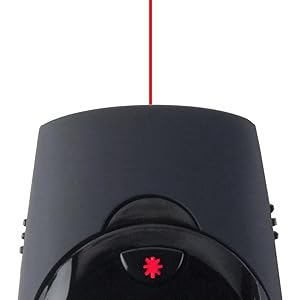
The Kensington Expert Wireless Presenter (K72425AM) is a professional-grade presentation tool featuring a 50-meter wireless range, a bright Class II red laser pointer, and instant toggle between presentation and cursor control modes. Compatible with Windows and Mac OS, it offers plug-and-play ease, ergonomic comfort, and reliable interference-free connectivity, making it the go-to choice for confident, seamless presentations.


| ASIN | B009K1PYGU |
| Additional Features | Ergonomic |
| Battery Type | AAA |
| Best Sellers Rank | #124,816 in Office Products ( See Top 100 in Office Products ) #64 in Office Presentation Remotes |
| Brand | Kensington |
| Button Quantity | 5 |
| Color | black |
| Compatible Devices | Laptop |
| Connectivity Technology | Radio Frequency |
| Controller Type | Button Control |
| Customer Reviews | 4.1 out of 5 stars 250 Reviews |
| Global Trade Identification Number | 00085896724254 |
| Item Weight | 180 Grams |
| Manufacturer | Kensington |
| Max Number of Supported Devices | 1 |
| Maximum Number of Supported Devices | 1 |
| Maximum Range | 50 Meters |
| Mfr Part Number | K72425AM |
| Model Name | Expert |
| Model Number | K72425AM |
| Number of Batteries | 2 AAA batteries required. (included) |
| Smart Home Compatibility | Not Smart Home Compatible |
| Special Feature | Ergonomic |
| UPC | 163121147570 085896724254 |
| Unit Count | 1.0 Count |
| Warranty Description | 3 year warranty |
S**D
Long reach
Always works grwat
A**R
Kensington has made this a quality tool for the presenter.
I love this presentation tool because it is so very easy to use with my MacBook Air. Setup? Well, there really is no setup; it's a plug and play item. If you can insert a couple of AAA batteries, you can operate its simple and intuitive controls with no problems. Yet, it is versatile enough to do just about anything you want to do remotely. One excellent facet of its operation is that it stays in touch with the computer at great distances. I have worked in large rooms, and never have had a problem using it. A quality presentation tool that fits the hand nicely.
A**R
ALMOST A FIVE STAR
I had good expectations for this Kensington unit, especially since it has a dual mouse and presenter function. Does it work? Yes, BUT, the way this unit is set up, the mouse cursor is just too slow, it kind of has two speeds based on how long you apply pressure to the stick, but the high speed is almost painfully slow. Trying to get across the screen take forever. It really needs multi speeds,, which would make this a stellar control. I tried this on three computers just to make sure, was the same on all of them. It is usable for sure, just annoying. For doing standard presentations it will work fine. Good quality. LOTS of documentation that is useless, and you will need a magnifying glass to read.
M**E
Great little gizmo!!!!
I LOVE this. It makes training so much easier when I can move about the room and interact. Ergonomic design perfect fit for my hand. The downside is the color and size of the laser pointer. It is red and small, very difficult to see with color presentations. The case fits perfect in roll bag or purse. It is not a hard case but protects very well. Our presentations are given from connected laptops and with the alternate use as a mouse it is very convenient. Recommend; as it is awesome for the money.
J**N
nice remote
This is a great way to keep yourself unfeathered from your computer during presentations. I like the fact that inserting the dongle into the remote turns it off. Using this as a remote mouse is cumbersome and slow. I thought I would use this feature, but it's useless to me.
Q**S
A Good Presentation Remote for Heavy Use Teachers
I purchased this to use in a high school classroom on a daily basis. I have used and subsequently lost or broke about a dozen wireless presentation remotes over the past 12 years. I have used this product now on a daily basis for about two weeks. I can't comment on battery life other than to say it uses standard sized AAA batteries and not a proprietary or hard-to-find battery. The dongle fits inside the back of the remote and holds there securely. I have never felt it would fall out. The remote itself is thicker towards the rounded end and tapers down towards the narrower end. It is comfortable to hold in the hand. There are two slider switches on either side of the remove. On the left side is the on-off switch. When on, the buttons on top of the remote to control its functions light red. They are bright enough to see but not distracting. On the right side of the remote is the slide switch that toggles between presenter and mouse function. Although hard to see in the picture, there is a center joystick that acts as a mouse. The mouse function does work but it moves the mouse cursor slowly so I wouldn't count on it for frequent use. The laser is red and shows up clearly in a brightly lit room. The classroom in which I teach has overpowering fluorescent lighting and the red dot is clear. When plugged in, the dongle sticks out about an inch. I have never had a connection drop. In general, I like the product and feel it is one of the better ones I've used over the years.
J**D
Awful
I purchased this remote for the ability to control the mouse, and the mouse control is awful. It's not even as good as the nipple control on a 20 year old IBM laptop. Beyond the sluggishness of the mouse control, there's a button underneath the finger-joystick which is so easy to press that you end up pressing it when trying to move the mouse. So you end up clicking and moving everything when you try and move the mouse - just plain awful. For presentations, the last thing you want is a piece of technology that is designed to mess you up.
E**Z
Great cursor function and case can be added to lanyard!
Game changer for teachers. I would always purchase the cheap $10 clickers on this app and finally went with this. It has a cursor feature which allows me to walk around my room and if I need to click on a link or change a setting, I donโt have to be at my smartboard. Laser pointer is also a good feature. I love love the case. I turned it into a keychain and keep it on my lanyard so I donโt lose it and itโs always ready to go!
C**N
Pointeur laser et contrรดle sur les diapos
Se tient trรจs bien en main et se range facilement.
V**R
Handy and easy operational tool. Laser light also works well.
Very easy to handle just handy one. You can go for it. Good enough for all kind of presentations. Laser light is interesting feature along with mouse and presentation modes.
P**H
... comparison to Logitech R800 and price also this is best. If u want to purchase presenter with wireless ...
By Prakash V Marvaniya,Bhuj,Gujarat In comparison to Logitech R800 and price also this is best. If u want to purchase presenter with wireless connectivity and also having mouse operation both then this is the best item. But in my case Black screen button is not working. Rest of the operations are very fine. As I do not need more this facility I have not complained or return the item. But amazon should see that any item sent by vendors should work properly as per specification given on site. If u are lucky to get tested presenter then this is best having low price.
S**R
Adequate
Device generally works fine h/ever the laser dot is far too small. When presenting the dot is barely visible from 20 ft, which for my purposes is inadequate. Would not buy again
B**J
Value for money
Good quality
Trustpilot
3 weeks ago
1 month ago