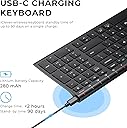
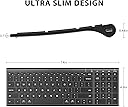
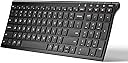
⌨️ Elevate your desk game with the BK10 — where sleek meets smart productivity!
The iClever BK10 is a universal Bluetooth 5.1 wireless keyboard designed for professionals who demand seamless multi-device connectivity, ergonomic comfort, and long-lasting battery life. Featuring a quiet scissor-switch mechanism, a full numeric keypad, and durable stainless steel construction, it supports Windows, macOS, iOS, Android, and ChromeOS. With up to 45 days of use per charge and a 10° ergonomic tilt, it’s engineered to boost productivity while complementing any modern workspace.


| ASIN | B07PV6NDB2 |
| Additional Features | Quiet typing < 50 dB; USB-C 280 mAh rechargeable (≈ 45 days @ 8 h/day); low-battery LED; 30 min auto-sleep; multi-device |
| Antenna Location | Office, home office, study sessions, classroom note-taking, coding, data entry, laptop-stand setups, remote/Zoom meeting |
| Best Sellers Rank | #163 in Computer Keyboards |
| Brand | iClever |
| Built-In Media | Silicone Keyboard Cover |
| Button Quantity | 104 |
| Color | Black |
| Compatible Devices | Windows 10/11; macOS 10.15+; iPadOS 13.4+; Android 9+; ChromeOS (BT 4.0+) |
| Connectivity Technology | Bluetooth (33 ft), 3-device quick-switch |
| Customer Reviews | 4.2 out of 5 stars 6,629 Reviews |
| Enclosure Material | Powder-coated steel base + ABS top frame |
| External Testing Certification | Não aplicável |
| Hand Orientation | Ambidextrous |
| Item Dimensions L x W x H | 14.41"L x 4.92"W x 0.66"H |
| Item Weight | 370 Grams |
| Keyboard Description | Compact Bluetooth keyboard, Quiet scissor-switch keys (< 50 dB) , 3-device pairing, 99-key US QWERTY layout Keyboard Description Compact Bluetooth keyboard, Quiet scissor-switch keys (< 50 dB) , 3-device pairing, 99-key US QWERTY layout See more |
| Keyboard Layout | QWERTY |
| Language | English |
| Manufacturer | iClever |
| Mechanical Keyboard Switch Model | scissor key mechanism |
| Model Name | iClever BK10 Bluetooth Keyboard |
| Model Number | BK10 |
| Number of Keys | 3 |
| Number of Sections | 4 |
| Power Source | Rechargeable Battery |
| Recommended Uses For Product | Office, home office, study sessions, classroom note-taking, coding, data entry, laptop-stand setups, remote/Zoom meeting Recommended Uses For Product Office, home office, study sessions, classroom note-taking, coding, data entry, laptop-stand setups, remote/Zoom meeting See more |
| Series Number | 10 |
| Special Feature | Quiet typing < 50 dB; USB-C 280 mAh rechargeable (≈ 45 days @ 8 h/day); low-battery LED; 30 min auto-sleep; multi-device Special Feature Quiet typing < 50 dB; USB-C 280 mAh rechargeable (≈ 45 days @ 8 h/day); low-battery LED; 30 min auto-sleep; multi-device See more |
| Style Name | Contemporary |
| Switch Type | scissor key mechanism |
| Theme | computer accessories |
| Unit Count | 1 Count |
| Warranty Description | 1-year limited hardware warranty |
C**D
Bluetooth Setup Was Glitchy, Keyboard Action Lacking. iClever Support is Awesome
Update: Nov. 17th, 2020 I've had this keyboard for more than 30 days and struggled with it quite a bit. The lack of tactile feedback was difficult to get used to. To "correct" that I installed a keyboard clicking app for my Ubuntu Linux 20.04 workstation that this keyboard is connected to. Hearing the "clicking" feedback from my speakers helped more than I thought it would and I actually began enjoying using this keyboard. My fingers "stopped tripping over themselves" and all in all, I'd say it's been a pleasant experience with this keyboard. And then ... the battery stopped charging. No matter what I did, the battery refused to charge. I'd plug it in for a few hours, the battery meter would read 100% and then drop to 10% when I unplugged the keyboard. I was three days past the return date of the keyboard when it happened, so I contacted iClever support. They responded in less than 12 hours and successfully remediated the issue to make me happy. I have to say, their response and support in my case was world-class. I'm disappointed that the keyboard failed as I was finally beginning to enjoy using it and with that said --- I'm going to give it another try and purchase another. I very much appreciate their Customer Service and am happy to give their product another chance as a result. I like to support companies with excellent customer service and iClever's support is awesome. Nice job!! Original Review: I bought this keyboard to replace an Apple Magic Keyboard (Aluminum, bluetooth model) because a few keys broke on it due to wear and tear and finding replacement keys was very problematic. Placed multiple orders with multiple vendors only to be told after the fact parts were backordered because of the tarrif's and such with China. So I opted to buy this keyboard instead and hey why not, it was actually cheaper than replacing the keys on my Apple Bluetooth keyboard. Aesthetically, this is a very pleasing keyboard. It matches my blacked out workstation and I like the fact it's laid out like a 101k keyboard with the number pad off to the right. It's a sturdy keyboard, there is no "flex" when I type on it and it appears to be very well thought through and constructed. 10/10 for that. Getting it to connect to my Bluetooth 4.x on my Ubuntu Linux workstation presented a few issues to overcome. First was that it wasn't visible to my bluetooth. It seemed to take a very long time to be discoverable. Minutes and minutes long. Once found, I connected they keyboard via the first channel. Nothing happened until after another lengthy delay it started repeating the "d" character despite my not touching the keyboard. I had to turn the keyboard off to make it stop repeating "d" and then removed the keyboard from the list of bluetooth devices in Ubuntu. I repeated the setup instructions documented and the same thing happened. Examining the keyboard the "d" key appeared fine and didn't appear stuck, so I tried pairing the keyboard with my Ubuntu workstation again, this time on the second channel. It worked. No repeating "d" character, the keyboard functioned as normal. For giggles I removed the keyboard from my bluetooth devices and again followed the instructions to connect on the first channel, only to see the "d" key repeating itself again. Dropped the bluetooth connection to the keyboard, re-setup on channel 2 and it's working like a champ. Not sure what's wrong with the first channel, it's definitely kaput. That doesn't matter to me, I'm only connecting this keyboard to one device so that's a non-issue for me and not something I'd return the keyboard for. My last comments are specific to the action in the keys and the feedback they provide while typing. I typically clock anywhere from 95 - 110 wpm on every keyboard I own, whether it's an old IBM CLICKY keyboard (my favorite) an old Logitech K570 and my beloved Apple Wireless bluetooth keyboard. I'm used to the response action on all these keyboards and can switch pretty seamlessly. On this keyboard the action is lacking. The response from the time I press a key to it reverting back to it's resting state seems lacking to me. I expected the action to be similar to that of my Apple wireless bluetooth keyboard. It's not. If that's what you're expecting with this keyboard, do not buy it. The last thing I want to say is that the lack of keyboard "action" for me inhibits how quickly I can type on it. I've found my fingers "tripping over themselves" trying to type on it. That means more mistakes and backing up to correct. As I typed this review, I switched back and forth between my Apple bluetooth keyboard and this one. The difference in the keyboard action and my ability to type so much faster on my Apple keyboard vs. this one is absolutely noticeable. I'm going to give myself a little more time to get used to this keyboard and if that doesn't do the trick then I'll be sending it back. The "dealbreaker" for me isn't the bad bluetooth channel it has, it's the keyboard action and not being able to go as fast as I can on my Apple bluetooth keyboard which has a similar layout and key spacing (I measured the gaps between the keys on both keyboards, they're identical.) About me: I've been in the Information Technology field for 35 years. Yep, I'm an old fart. I write reviews for products I buy because I like to share what I find, both good and bad. I also read others reviews before I purchase a product and rely on the truthfulness of those reviews. If you found my review helpful, please indicate such. Thanks for reading.
J**R
Bluetooth keyboard that does it all pretty well - with NO Bluetooth Dongle!
I purchased this so I could put my laptop on a stand at eye level and then push if back a bit away from me. The main keyboard (excliding the number keys) is the same size as my 14" Dell laptop keyboard, so my figers don't notice the difference much. This comes with no extra dongle to plug in to a USB port. So if you have regular USB or USB-C, it won't matter. This connects - more like you would connect a headset. You start the B.T. scan, find the keyboard, and add it. I've had it for a couple of months now, and have yet to have to replace any batteries. Lastly - it does lay a little too flat for me. So I bought a little stick on that allows me to adjust the keyboard angle at 3 different levels. That caused the keyboard to 'rattle' on my glass desk top - but great news! They send a little keyboard over-lay (like a spill-proof cover) that you can use, or not. I cover my keyboard with it while I'm away, but use it as a cushion - when I'm typing - to get rid of the keyboard on glass vibrations. So - no problem! It's a great keyboard and very cool to have the number keys. I trade the stock market - and number key's are important for data entry. And the cool thing is in addition to my computer - I can pair the keyboard to 2 OTHER devices, walk across the house and talk to other things - all from the same keyboard, by picking Bluetooth #2 or #3. They pretty much though of everything. Looking forward to using this keyboard for years to come!
C**Y
Pretty nice, durable, GOOD COMPANY. A couple design flaws.
tldr: It's pretty great, with a couple of design quirks. Above all, the company stands behind their product, quickly fixing the problems and making things right by the customers. If you have a faulty board, tell them, they'll make it right! I had purchased a 2019 version. As older reviews reflect, it was terribly unreliable. The 2020 version solved the reliability issues and even improves a couple things. I'm now updating my one star to 4. If 4.5 was available, I'd choose that. Pros: -Great support! As soon as they learned of my problems, they sent an upgraded replacement. It's good hardware, so I'm happy that the company has updated the flaws and ensures customers are satisfied. -Good hardware. The keyboard is well designed and built. For a slim sheet of metal and plastic, it's pretty sturdy, I have no worries throwing it in the backpack. The numpad is appreciated! The keys are full width, so touch-typists won't have to adjust. The board is about as wide as a tenkeyless, very portable and good for space savers. The switches are slightly more tactile than my laptop keyboard. iClever updated some imperfections: The font is now larger, centered, more pleasant and more mac-friendly. The legends are still decals, but their quality has significantly improved; much flatter, they almost look like part of the plastic. The board's curve might look slight, but combined with the seated angle, it significantly improves the typing experience. I'm not saying its like scupted keys, but it's surprisingly better than purely flat boards in laptops. -iClever now includes a translucent silicone keycover that perfectly fits over the keys and stays put while typing. I'm using it now, and it's pretty great! The tactility is interesting, and I don't feel bad about snacking while typing. When I use my expensive mechanical keyboard, I can't bring myself to have food or drink anywhere near it. The keycover sits on the keyboard with gravity but stays in place, just like the silicone keycovers I put on my old Macbook. It would be awsome if there was a way to affix it for travel. Still, it was unexpected and is very appreciated. -Good battery life. Cons: -Weird Bluetooth key chioce. This drives me crazy: The four keys above the numpad aren't what you'd expect. Instead, they're device connection buttons and a calculator button. The Home, End, PgUp, PgDn keys are only available as shift keys on the numpad. When you look at the competition for these thin boards, several have moved to this design, which I think is a mistake. I'd definitely give 5 stars to a version with those four keys assigned to typing. Bluetooth and calculator should always be function keys. -No numlock light. Although there is a numlock key, there is only a caps lock light. Out of five led lights, there's only one lock light! One is for battery, and the other three indicate which of your three devices are connected. I can forgive the missing scroll lock, but no numlock light?? Still, it's a pretty nice choice for the money, especially considering the exceptionaly good support. I'm typing on it right now with silicone cover, and it's pretty enjoyable. If you want a full-size keyboard function for your iPad, this is excellent. It fits nicely alonside a 12.9" iPad pro in a backpack, so I can leave my laptop at home more often. As long as you're comfortable with four keys wasted, I highly recommend this.
A**R
Great full keyboard that you can take with you for traveling.
I rely on a number pad, and this has one. Weird to see the range of keyboards and the prices they command. Buy from MS or dell, pay through the nose. And I only have about 30 or so bluetooth keyboards, this one does something a lot of them don't do. Put a decent space between the number pad and the keyboard. Nothing more frustrating when you overshoot the backspace and hit numlock. The right and left edge keys are nice and big, they didn't meld the enter and the backslash together, none of the keys are in a weird position* (we'll come back to that one) and they're nice and springy. Only complaint, but I'm a weird one, no dedicated home and end key which I use a lot when writing. Also, I can't see a way to lock the F1-F12 keys since I prefer them as the primary functions and the media/shortcuts as the secondary functions. The only thing that could make this better, backlighting. Put a $50-$60 version out with backlighting, totally would buy it. Now back to that "asterix" when I mentioned the keys are in the right position. Technically true, but somewhere along the line they put the down arrow icon on the up arrow key and vice versa. Yet when you press what should be the up arrow, it acts as such, just mislabeled. I just checked their promotional shots on this product's page, it's also on their keyboard. Kind of funny. Doesn't hinder function, but you can't swap them out either to correct the mistake. I do love that there is a dedicated calculator shortcut button, since I use my calculator a lot, also why I prefer keyboards with a number pad. I'm currently using this keyboard literally on top of my Surface Book 2's keyboard. One other thing, best pairing method ever, hold down the 1/2/3 bluetooth button to enter pairing mode, how it should be. Now I can't speak to if it's really BT 5.1, but I can say it's compatible with my Tab S 8.4 which is now like a 5 year old tablet (I use it as an e-reader) and I know the surface book is either BT 4.1 or 5.0 so should be compatible with most devices without any issue.
E**N
Worth the purchase
I have thoroughly enjoyed this keyboard. Very easy to type quickly on, pleasant sound while you type... It looks professional and works great. It connects easily to my tablet whenever I need to use it. The only thing I wish I could find was those cute keyboard replacement keys that would work with this model.
T**T
2 orders, 0 results.
I was sooo excited to have a new keyboard. Let me say: as a teacher, having the keyboard and extra monitor lets me accomplish a lot more than my little laptop. My fiancée purchased this because I’d been hesitant to get a new one since my last keyboard kicked it. When the first arrived, it didn’t have the USB insert. I researched if the device was Bluetooth; maybe I was confused! Nope. Giving the benefit of the doubt, plus someone else picked it, I decided to exchange for the proper one. I tried to let the seller know what the issue was. The second keyboard arrives. Same issue. No USB! Rendering it useless. Don’t get me wrong, it FELT nice when I messed around with the keys, but it didn’t feel worth the hassle. I needed the keyboard weeks ago. I finally just returned both. Currently waiting for an approval for return, which has never happened. Idk, I’m not out a whole lot of money. Just inconvenienced and annoyed. The world has bigger problems!
G**O
Great keyboard. Exactly what I needed.
I bought this keyboard for 3 main reasons. It's wireless, it can connect to up to 3 devices and it has a number pad. So far this keyboard is exactly what I wanted. I also love the look. It's very thin and sleek looking. Another huge plus is that it's rechargeable so I don't need to worry about replacing batteries. This has made my job much easier. I'm constantly switching from my Windows laptop to my Mac laptop to my Android phone and this keyboard makes it a smooth transition. I will point out a few things that I wish were a bit better. First when switching devices, it takes like 2 seconds to switch. That's not really a big deal since I'm never really in a rush to start typing on a different device. I can wait 2 seconds and usually I don't even notice, because I first need to click on some thing anyway so I do that while the keyboard is switching devices. Another thing I'm not too fond of is that there are 2 different shortcuts to switch languages for my phone. One of them is fine which is Ctrl+Space but I don't like the other one which is Shift+Space. This one is an issue when I'm typing fast, because when I hit the Shift key to type in a single capital letter (like 'I' for example) I'm usually still holding the Shift key by the time my thumb hits the Space bar. So it thinks I'm switching languages. I have English and Spanish setup on my phone and I type in both so I can't just disable the Spanish option. I wish I could just disable the Shift+Space shortcut. In my phone's iClever Keyboard language settings I did set both languages to use English(US) keyboard setting which helps it to not use a different keyboard layout, but I still have spell check issues every time I inadvertently switch languages with Shift+Space. Again, not a big deal. So far I love this keyboard. One thing I have to get used to is remembering to actually push the keys to switch devices. Sometimes I just look over at another device and expect the keyboard to know what I'm thinking, haha. Maybe one day. Overall this keyboard is awesome and I definitely recommend.
J**S
Seemed good, but after three I give up
I originally bought two of these keyboards - one for my home office and one to carry with my laptop when I travel. The keyboard had no problem hooking up with Bluetooth and seemed to perform just fine. One of the two keyboards began malfunctioning awhile back. I would be typing and suddenly it would start unconrtollably putting ====================================================== until I turned it off. I thought it was something I did to it. It was past the return period, so I bought another one to replace it. Now, the new keyboard again is going to ===================================== and will not stop. It's frustrating knowing I have to buy new keyboards after purchasing three within just over a year. **EDIT** I changed this from 1 star to 3 stars because the seller reached out and refunded me. That is great customer service when they did not need to do so.
Trustpilot
1 week ago
3 days ago