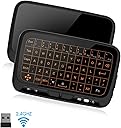
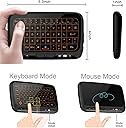
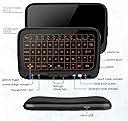
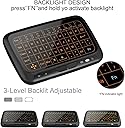
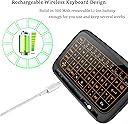
First things first, this seems to be an instance where an Amazon seller has updated an old product with a new one. This version (the one shown in the pics/descriptions) is the H20 whereas the other pictures in reviews seem to be the previous model, H18+. I can't say the differences between the models, but the images/description right now (March 2024) are accurate to the product shipped.Use caseThis product primarily seems to be bought to be paired with a tv, but I have bought and am using it for a Windows PC that is in a movable rack (and so there wasn't space for a traditional keyboard/mouse. It also doesn't need constant access.) That's the use case I am reviewing from.DesignFirst off, this is a pretty cool product. Yes it's all plastic, but I would say that the plastic feels of reasonable quality and it's quite rigid. It's pleasant to hold, not too heavy and generally seems designed well.I would also say the gyro implementation is excellent, it hasn't once missed being flipped from keyboard to mouse (you literally just flip it in your hand) and it gets the mouse direction bang on 95% of the time. (If I was using it on a desk or a flat surface and flipped it gently, sometimes the trackpad direction was reversed, but I don't see that being a common use for this product and just picking it up in the correct orientation quickly fixed it.) I have also not had it trigger accidentally, where it thought I had flipped but I hadn't. Overall, it's a cool idea executed pretty well.KeyboardThe keyboard is generally pretty nice, obviously the keys are small but they are stabilised really well, are nice to the touch (at least at first, how well it holds up remains to be seen!) They are also very tactile and just feel pleasant to use. Obviously this isn't comparable to a real keyboard but is definitely faster than a tv onboard screen. I tested:Normal keyboard: 368cpmMini keyboard: 158cpmPhone keyboard: 218cpm (I did allow the autofill, as it's a positive and negative of using a mobile keyboard.)I definitely feel like I could get faster over time and get closer to the phone keyboard - but this just to illustrate the difference! I was also slightly more accurate on this - 100% vs 95% on the phone.The backlight also gets pretty bright, and has great granular control and so I think you'll be able to find a level of it that will work well for you. Something not made 100% clear on the marketing, the keyboard backlight is the white/blue colour in the photo, there are no different colours. The reference to 7 colours is the ring around the trackpad.Full size arrow keys are nice, and their placement is fairly good, but there is a jumble of other keys next to them.Now on to the negatives, and I would say there are two main ones:Layout - at first glance, I didn't think it was bad but there's a few things I have been irritated by as I am using it. The letters and numbers are pretty well arranged (even the F keys, despite being half sized are fairly well positioned and easily accessible) But I feel like there probably was enough room for them to be full sized if they'd made the top status bar thinner - there's no real reason I can tell for it to be the thickness it is (it just shows some status lights, like connected and caps lock) and if it was thinner, there might be more room for a better layout.I also kept hitting F1 instead of escape, escape being below F1 at the start of the numbers, whereas on a normal keyboard it's always top left.The symbols are kind of scattered randomly around the rest of the board, some with dedicated keys, some only accessible by holding function. Some of the OS function keys. ctrl, alt (and even altgr) are fairly well placed, but for some reason the windows key is over on the right side of the board and ; is where I would have put it (I hit it a few times by accident, and I have always had to look for the windows key when I need it.) ; and ' are also randomly at the bottom between ctrl and alt - I literally just found them as I was typing this review (I spent ages yesterday trying to type an email, but was missing the @ key which is ' on the UK layout.) There's also no dedicated delete key, and fn-backspace doesn't seem to activate it. Windows does not treat delete and backspace the same, so deleting files from the keyboard, just doesn't seem possible here.Off button - linked to the layout, but much more minor, at the end of the number row is the power button, which is power for the device it's attached to (not the keyboard, which has a switch on the edge.) I can see this being important if you're using this as a tv remote, but on a PC it's always an annoying key to have and especially annoying if it's easily hit accidentally. It's bigger and right above backspace, I definitely hit it a few times accidentally when trying to go back.Overall, the keyboard is really nice, the layout isn't the end of the world as no one is using this as their main computer keyboard (you shouldn't be anyway!) But I can see it being a big benefit for typing on a tv or on a PC that's hidden away.TrackpadThe trackpad is a bit of a different story. Positives first, as before:It's a trackpad, the tracking itself is pretty good, better than a chunk of £200-300 laptops but it's not the best trackpad you will ever use. The gestures are good and do seem to work well and consistently for the most part. The RGB is cool if you like that kind of thing and is also used to show some status (for example, it flashes red if it gets disconnected.) It is worth noting, the marketing advertises it as 'breathing' - it doesn't, it's just solid when in use and then dims when not in use (there is no breathing to this either, it's one step up or down.)Now on to the negatives:- It uses the same 'grippy' texture as the rest of the product, rather than the smoother feel of a lot of laptops. It's just not as nice to use as something smoother in my opinion. (Whereas the grippy is nicer on the rest of the product, as it doesn't feel like you're going to drop it.)- Clicking and dragging is absolutely horrendous. Per the instructions, left click twice and then move and the trackpad will go into drag mode. This worked for me maybe about a third of the time, but if you're trying to select a bunch of files for example then chances are, it will just double click on the file and open it. I don't know if this comes up much in tvs, but it does feel like a big oversight for PC use. Adding a physical L/R button to the back could have overcome this, or even allowing a keyboard key (something big like space bar) to act as a left click for these kind of scenarios would make a huge difference.- A nice clean trackpad tracks well, but once it gets sweaty or oily from your skin, the tracking gets way more imprecise and jumpy. I was using it earlier today and I just had to grab a mouse in the end.ConclusionFor the purpose and price, this is a pretty awesome product. The keyboard (I feel like this is why most people are buying this, particularly if being used with a tv) is pretty good all around and it feels nice (I would say the actual key feel is better than a £10 'normal' keyboard.) The trackpad is 'fine' for occasional use, but the click to drag and drop in performance when it gets 'dirty' are deal breakers for me.There are also a whole load of uses and features I haven't dived into - the IR control seems cool, but I haven't tried it. The battery life, I haven't charged it and have been using it for two days to test and play around with - I believe them when they say it could last a few weeks.