


Desertcart purchases this item on your behalf and handles shipping, customs, and support to Bolivia.
๐ Triple your screens, not your clutter โ the ultimate 12-in-1 USB-C hub for pros on the move!
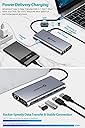
The UtechSmart USB C Hub is a compact 12-in-1 docking station featuring triple 4K HDMI outputs, 100W USB-C Power Delivery charging, gigabit Ethernet, and multiple USB ports. Designed for MacBook Pro/Air, Windows, and other USB-C devices, it enables seamless multi-monitor setups and fast data transfer in a portable form factor, perfect for hybrid work and travel.


| ASIN | B07TXTF2WR |
| Additional Features | Portable |
| Best Sellers Rank | #28,100 in Computers & Accessories ( See Top 100 in Computers & Accessories ) #1,165 in Laptop Docking Stations |
| Brand | UtechSmart |
| Built-In Media | Triple Display 12 in 1 Hub, User Manual |
| Color | Grey |
| Compatible Devices | Windows 10/11 & MacOS , ChromeOS, supports full-featured USB-C 3.1/3.2 Gen1/Gen2, Thunderbolt 3/4 ports, For MacBook Pro/Air, Dell XPS, Latitude, Inspiron series, Microsoft Surface series, HP ProBook/ EliteBook series, Lenovo ThinkPad/ IdeaPad/ Yoga series or other laptops which are compliant with full-featured USB-C port. Compatible Devices Windows 10/11 & MacOS , ChromeOS, supports full-featured USB-C 3.1/3.2 Gen1/Gen2, Thunderbolt 3/4 ports, For MacBook Pro/Air, Dell XPS, Latitude, Inspiron series, Microsoft Surface series, HP ProBook/ EliteBook series, Lenovo ThinkPad/ IdeaPad/ Yoga series or other laptops which are compliant with full-featured USB-C port. See more |
| Customer Reviews | 4.1 out of 5 stars 1,731 Reviews |
| Data Transfer Rate | 480 megabits_per_second |
| Enclosure Material | Plastic |
| Hardware Interface | USB Type C |
| Item Dimensions L x W x H | 2"L x 1"W x 5"H |
| Item Weight | 113 g |
| Manufacturer | UtechSmart |
| Mfr Part Number | UCN3278 |
| Model Number | UCN3278 |
| Number of Items | 1 |
| Number of Ports | 12 |
| Operating System | ['Windows 10', 'Windows 8.1', 8', 7', 'macOS 10.15 Catalina', 10.14 Mojave', 10.13 High Sierra', 10.12 10.11 El Capitan', 10.10 Yosemite', 10.9 Mavericks', 10.8 Mountain Lion', 10.7 10.6 Snow Leopard'] |
| Special Feature | Portable |
| Total USB Ports | 4 |
| Total Usb Ports | 4 |
| UPC | 850004875278 |
| Warranty Description | 12-month warranty |
V**M
Gets pretty hot and it wasn't clear what the USB-C input was about, but saved me $200
The one year edit: This device has continued to perform flawlessly, to the point where I recommended this to another team member in Ireland. She loves it to the point where she's telling her team about it. Accidental out-of-box failures aside, if you need a reasonably priced docking station, absolutely get this - just know that you can only have a maximum of 3 screens. Like many of those who were fortunate enough to work remotely during the pandemic, I worked from home for over a year. While working remotely, my laptop was upgraded and I was given an amazing docking station (charged the laptop, just had to plug in the USB-C port, plenty of monitor port options, a good number of USB ports). We're now entering a hybrid phase, which means I'm working Tuesdays and Thursdays in the office. Management announced that no new equipment purchases would be approved. I'm not complaining at all! My amazing job let me work from home forever, I saved on gas and insurance, I got to KEEP MY JOB. But dragging that docking station back and forth, well, that was kind of extra. A coworker gave me this listing and I decided to give it a shot. This was around Prime day, the device cost me $70. An actual second docking station would have cost me $250-$300 (I looked). Yeah, I kept my job and all, but I don't have like TESLA money or anything to be buying a docking station like that. I'll go with the bad first, detracts nothing from the rating, but I hope that telling you this will help you be prepared: It gets hot. Not like setting things on fire hot, but after a 10 hour day, I began to get worried. My home didn't burn down though, and I have a monitor base to rest it on the corner of for a little extra airflow, so yay for not dying of immolation in my sleep. The USB-C port that you can plug a charger into, as far as I can see, is worthless. There isn't a lot of documentation or information in the Q&A section, but from what I can tell, plugging the USB-C in to a power port does 2 things: Gives a little 'oomph' to charging anything except your laptop, and makes the device even hotter. I abandoned this connection after 2 hours and just plugged my laptop's mobile charger in. Not a huge issue for me personally, as I don't use this device to charge devices, and it's still just one plug for the laptop charger. HDMI only. If you have a monitor with DisplayPort, you'll either need an HDMI cable, or a DP > HDMI adapter. You've been warned. It has 3 HDMI ports, but max monitor support is 3. So you can't have 3 HDMI monitors plus your laptop screen. You can have 2 monitors and the laptop screen, or 3 monitors and no laptop screen. I've grown so accustomed to 3 screens (2 monitors and a laptop) that I've been mulling over a 4th screen. Not happening with this device. All minor gripes. Now for the good part: SO TINY!!!! My OEM docking station is a 6x6x4 cuboid with its own power cable and a big rectangular whatever-it-is that lets you then plug into an outlet. This thing is smaller than a lot of TV remotes (not including smart TV remotes) I've had. TINY!!! Ports for days! I think this device has more ports than the OEM dock (maybe like 1 more USB port, but more is more). I like knowing the ports are there even though I only use 1 for the wireless dongle for my mouse and keyboard. Because some might say less is more, but in this case, more is more, am I right?? HDMI Ports: You have 2 right next to each other and one on the small end. Depending on your end connector, you won't have to try to wedge 2 of them in right next to each other. All in all, between the money I saved and the functionality I preserved, there are 0 regrets with this purchase. There were some birth pangs when I first got it, and yeah, I have to plug in 2 things to the laptop rather than just 1, but if anything, that adds another star to this device and detracts a half star from my employer.
A**R
Great features, great instructions, great company
I'm an architect gearing up for Work From Home. I looked at a hundred similar products before purchasing this one. There was always something missing, a feature or display limitation. I was looking for a USB-C hub that wouldn't have a huge footprint on my desk. Wanted at least 2 monitors plus the laptop screen, with all 3 unique desktops. Having 4K for versatility and future proofing was nice too. Didn't need any legacy plugs, I've got adapters for all my old monitors. This product fit the bill. So many others had limits on using three separate monitors. Check! Needed six USB ports for keyboard (with 4 blue USB-3), mouse, and things like web cam, external drives, and random USB devices. Check! I wasn't worried about charging my laptop through the hub. It is lightweight, and that's a plus. This is small and light, can take it with me on trips just as a USB hub if nothing else. I wanted to be certain of was that it was true Plug and Play, no drivers needed. I don't have admin rights on the company laptop so installing drivers can be an ordeal. This one needs no drivers. Check! Housing of this device is metal. Attractive but simple design. Comes with a simple cloth travel case. The happy surprise inside the box is this plastic card that says "Watch the video". It took me a minute to figure out it was a USB card, the tab flips out and it opens the product video on YouTube. From that video I got a sense of the personality of this company. They told me how it would work, what to do if anything went wrong, and assured me they provide full refunds and more. It is rare to feel like you are doing business with actual people, but I am an instant fan of UtechSmart. When I ordered the product, I missed that it does not have a speaker/headset jack. I am glad I didn't cancel the order because I love this product and I just don't need more than the one jack already on the laptop. It is hard to find the right headphone jack on these hub/dock products, whether you want split jacks or a unified headset jack. In the end, UtechSmart decided to leave this off and keep the product a little more compact. I think that was a great decision. Too soon to speak to durability of the connectors and plugs, so I didn't rate that. But they boast a lifetime warranty if you register the product in 7 days. If these are the features you want, this is a great product.
E**E
Great Product...but my luck sucks.
Like a lot of people during the pandemic I found myself scrambling to set up a home office to work remotely for the first time ever. New laptop, desk, USB mouse & keyboard, and of course, two computer screens. A friend of mine is a IT nerd for a living and he did some research for me and recommended this product based on the features and price. I did my own research and I agreed with him, it was a great balance of ports and cost. The product feels like it is made of quality materials and it connects all my devices. However, my luck continues. My luck unfortunately consists of something being wrong with the product is likely not to happen to someone else. For example, my new desk came with a chip on the surface. The two identical monitors I bought? One of them wobbles like one of those hula girl toys that people use to put on their dashboards of their cars (not me though) because the base is loose. For this docking station? Good question. everything works great except the designated port for the USB connection of my wireless keyboard. All of a sudden, after a days of it working, it tends to stop working and then only works intermittently. At first I thought it was the keyboard USB connection failing, but when I plugged in the USB connection directly into my laptop's USB port it works without fail. So it looks like I have a faulty port. I have no idea if this is a common issue but with my luck I am not surprised if I am the only one who has this issue. Still recommend. Hope everyone else has better luck.
J**Z
Perfect Triple HDMI Docking Station
I've been using one of these docking stations for several years to connect my work laptop to a KVM I share with my personal laptop. It's not easy to find a docking station that provides 3 HDMI ports. I have recently switched my personal laptop to one of these as well. They seem to perform better than most of the higher priced powered docking stations. I have 3 24" monitors going through a KVM, from there to two docking stations for the two laptops. I didn't want anything with power distribution back to the laptops because neither support it. I also did not want a bunch of extraneous DisplayPorts that I wasn't going to use. Many of the other docking stations I tried would not allow me to use the 3 external screens at the same time as the laptop screen. At least one of the screens duplicated another. However, this docking station allows me to have the three external screens and the internal laptop screen in use at the same time (though I rarely have the laptop open) with no problems/duplication. Games are running smoothly with no drop-outs or frame rate loss. When I'm compiling videos, the heavy internal GPU utilization doesn't affect the external screens at all. Overall, this is the best triple HDMI monitor docking station I've ever used. Probably going to buy a couple to keep as emergency backups.
B**.
glitchy
The description of this product really looked like it met my needs, but it really really doesnt. My goal was to take basically any laptop that had a Usb-C port, and give it 3 4K monitors, and plug the various other peripherals into the dock so that users could simply dock in and use their laptop at a workstation. I assumed (and would have been ok) with the screens having low refresh rates, and things like that, because its a work scenario, not some kind of gaming pit. Anyway, my experience failed on so many levels, it was sad. and, even the most basic things like keyboards and mice had intermittent issues. In the end, I threw it in a box of things we wont be buying more of. The problem with the monitors is that it doesn't have its own internal graphics card with its own VRAM, it simply creates more ports tied to the computer's graphics card, which, for many laptops is simply not enough to run more than 1 4K monitor, and certainly not 3. To add insult to injury, even when I do supply the device with additional power (which I had to get an additional power cord since it didn't come with one), it still has poor communication with the host PC, causing the mouse to regularly "pause", and the keyboard to have key sticking issues, the webcam to cut in and out during conference calls, speakers to have crackling sounds. it was theoretically capable of all of that, since it plugs in, and "works" but it is one continual bad experience, with no remedy in sight. its too bad really, it had all the ports I'd hoped for, and it looked to be exactly what we needed.
B**E
Convenient, but...
The hub is great. I just bought two lenovo monitors on sale to maximize my screen since I'm working from home for the next two semesters (Thanks COVID). Grading students' papers on my laptop screen was a bit much, and the old second monitor was old, so I had to use the VGA cable only it didn't connect right and the slightest movement caused problems. Anyway, I love the hub. It has all the ports noted by the description. I haven't used them all as of yet because I just connected it two days ago. However, I really only wanted it to connect my two external monitors, so I wouldn't have to use the laptop screen at all. The only issue I have already is that it runs hot and there isn't a lot running through it: the laptop charger cord and the two HDMIs. I thought that was worth dropping two stars because if it claims to be a 12-port hub, there's a very big problem if it's running hot with only three things connected. And to be clear, it isn't running hot after hours of it being used. It's running hot within a few hours with everything shifting into hibernate / sleep mode and being turned back on. I went from 12-14:00 for a Zoom conference. At 14:30, I walked away to put my son down for a nap. I came back at16:00. It's now 17:06 and has been running hot for the last twenty minutes. I don't know the solution. I have to finish this semester out, but I think I'll look for another hub. I can't afford for this thing to overheat and wreak havoc on my home office and other electronics.
D**X
Small dock, just the right features
This dock supports three monitors, has an ethernet port and USB, just what I needed. I had difficulty understanding what is the difference between USB C 3.0 and USB C 3.1, so one of my laptops only supports two monitors. Tech support was accurate with their answers and responded very well to my inquiries. Their English language was pretty good. I mostly use my setup for work, better than the setup I have at work. I use AutoCAD, Fusion360, Office, Acrobat, browsers and some fairly obscure programming packages for industrial controls. This dock is excellent for all these. I sometimes stretch the CAD tools across three monitors, where I no longer need to zoom or pan so much, just work. The only thing better would be an 8K display that is 36" across. But then I wouldn't have the benefit of separate monitors, where I can have email, Word and Acrobat all visible on their own displays. So this is the setup I enjoy and this dock makes that possible. I also play a little video game called slither.io, where I spread the browser across three screens. While the video is synchronized across them, gameplay is possible, but a bit sluggish as compared to the screen on the laptop. Buyer beware: make sure your laptop is USBC3.1 and you have enough video graphics memory to support four monitors (4gb I think). My Yoga900 did not but my two ThinkPads do have enough memory. I am pleased with this dock because it is small, does not need a power supply, has gigabit ethernet and works perfectly with Windows 10 home and Pro.
N**K
Perfect for remote work!
Due to recent events, I've been working from home instead of our headquarters office, where we had docking stations with dual monitors for our HP ZBook 15u G5 laptops. As such, I wanted to keep that setup while working remotely and this docking station works perfectly. I only use two of the three HDMI ports, so I have room for another monitor if I ever want. In addition, with a USB-C PD power supply plugged into one of the USB-C ports on the dock, I just need to plug in the single attached USB-C cable into my laptop to charge it and connect the displays, keyboard, mouse, and other peripherals. I was pleasantly surprised that our HP laptops could also be charged over USB-C (keep in mind, though, that the power supply must support Power Delivery; a standard phone charger will not work). I have a 2020 MacBook Pro 13" for my personal laptop, whose power supply I leave connected to the dock to charge either laptop. With the MacBook, however, the dock can only act as a single monitor, effectively splitting the output to all attached monitors. This is clearly described in the description, but I figured I'd note that here in case anyone needed clarification. On Windows, however, I can have up to four different displays total (the laptop's screen itself, and one for each of the three HDMI ports). Even with this slight down side, I'm still very glad that I purchased this dock as it has a nice build quality. I have also used the MicroSD card slot on my MacBook Pro and it worked perfectly.
K**D
Excellent unit. Works well. Lots of ports
Using it very effectively to connect two HDMI external monitors, USB printer, keyboard, etc. Very versatile.
T**D
Its ok
worked ok but haven't fully go it it working as my computer isnt up to speed
Trustpilot
2 months ago
4 days ago