Buy anything from 5,000+ international stores. One checkout price. No surprise fees. Join 2M+ shoppers on Desertcart.
Desertcart purchases this item on your behalf and handles shipping, customs, and support to Bolivia.
โก Upgrade your workflow with Intelโs speed demon SSD!
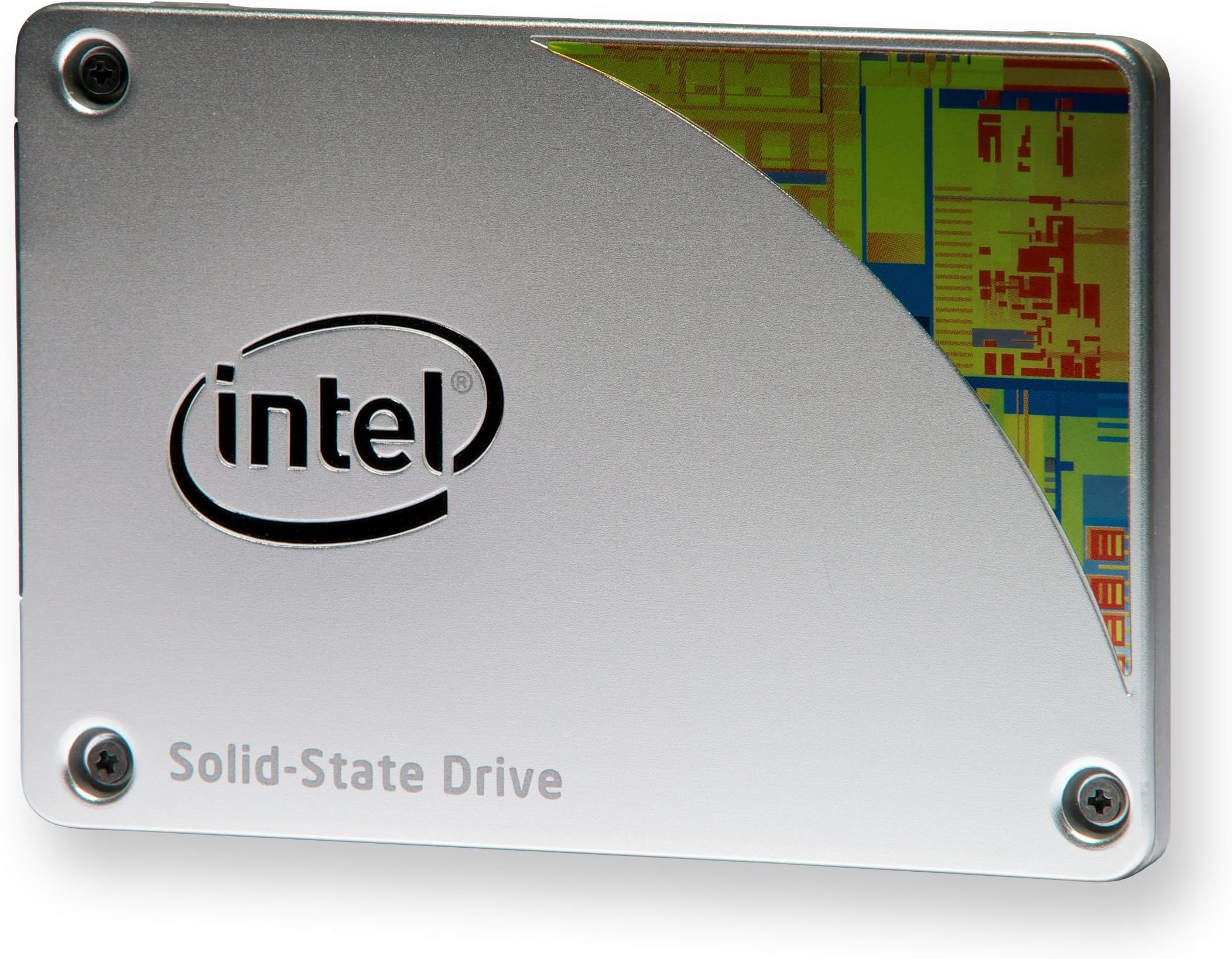
The Intel 530 Series 2.5-Inch SSD delivers a lightning-fast 540 MB/s read speed and 480 GB of reliable storage, perfect for professionals seeking rapid boot times and seamless multitasking. With a 5-year warranty and easy plug-and-play installation, itโs engineered to boost your PCโs responsiveness while ensuring long-term durability and energy efficiency.
| ASIN | B00GV7V6EA |
| Additional Features | Portable |
| Best Sellers Rank | #1,976 in Internal Solid State Drives |
| Brand | Intel |
| Cache Memory Installed Size | 1 |
| Compatible Devices | Desktop |
| Connectivity Technology | SATA |
| Customer Reviews | 4.0 out of 5 stars 707 Reviews |
| Digital Storage Capacity | 480 GB |
| Form Factor | 2.5-inch |
| Global Trade Identification Number | 00735858261159 |
| Hard Disk Description | Solid State Drive |
| Hard Disk Form Factor | 2.5 Inches |
| Hard Disk Interface | Solid State |
| Hard-Drive Size | 480 GB |
| Hardware Connectivity | SATA 3.0 Gb/s |
| Installation Type | Internal Hard Drive |
| Item Weight | 9.07 g |
| Manufacturer | Intel |
| Model Name | SSDSC2BW480A4K5 |
| Model Number | SSDSC2BW480A4K5 |
| Number of Items | 1 |
| Read Speed | 540 Megabytes Per Second |
| Special Feature | Portable |
| Specific Uses For Product | Personal |
| UPC | 809392576168 088022187077 735858261159 012304089704 |
A**R
An Honest Review
!update 3/3/2016 On the very bottom is the update (pretty important)! Looking for vital information, below my experience review you'll probably find what you want. So I bought this since I was tired of having my OS on a Terrabyte hard drive and I wanted my OS to be isolated from everything else so it won't be affected. i went to install my OS windows 8.1, on a normaly on a HDD it takes around 1hr and 30 min to 2hrs. With this SSD it took less than 30 minutes to install heck not even 20. Orginally with my HDD it took 30 sec to 1 min for my PC to boot up. now it's less than 10 SECONDS!!! Take note I have a Intel core i3 3.5GHz along with 32GB. Considering I'm a college student and in the field of Computer Software Engineering/cyber security I want to make sure I've got enough ram and a decent processor to handle everything. Along with the solid state came a sticker with the words SPEED DEMON, and I have to say, it looks beautiful on my pc. Now to get to the important stuff. -If you want to make sure you can put it into your Tower PC you'll need the reseller kit as it comes with an extention for fit a 3.5 HDD slot/tray (screws included) or a black plastic add on for your Laptop (I'd recommend getting a larger SSD for a laptop so you have something to work with instead of constant worry over storage space.) It also comes with a SATA cable and a power supply cable. -Now some places it says that you need to do a few things in order to use a SSD. This is not the case, I simply hooked it up and installed my OS without any issues at all. (no there is no Driver and the disk that comes with the kit is only a bunch of manuals and warranty which you don't need to register it) -This Intel 530 SSD 120GB is most certainly large enough for an Operating System like Windows 7,8,8.1 and so on. I even have all my drivers (motherboard and graphics card) installed along with McAfee, Microsoft Office 2013, Google Chrome, Printer Driver and with it all up to date (with a lot more programs that come with windows 8.1) I still have 62.1 Gb left on it. *Size was my ultimate worry when it came to purchasing this product, which is why I am having this up for those with worry about storage space. you have enough space for essentials but I can't say you have enough for games.* -Note that you can make a SSD faster with TRIM but not having TRIM turned on will NOT affect an SSD, it'll just allow it perform better when uninstalling and reinstalling. I can't say this is something to worry about when it comes to something of this size since 120GB is not really enough space for gamers. Are there any cons with TRIM active, I wouldn't know since I'm not planning on using it since I have an OS on mine. I don't want to chance it. If you're asking, "Is buying this really worth the money I mean, it's seriously expensive?" Yes it's expensive but for the fact that it uses less electricity, runs faster, can take many more hits (falling on the ground or hammerd hits) than an HDD but the best part of all of these features, with Intel you get a 5 YEAR WARRANTY!!! 5 YEARS, just having that is worth the money. In short I am pleased with this product. It works very nicely. If you come up with issues then you had bad luck. Take note I'm reviewing this as a BRAND NEW product straight from Intel through amazon. Hope this review helps. !update! So it's been a little over a year now and my pc is still running at blazing fast speeds. after a year of having it I still have 38.1 GB (why below) left on it. I will probably be upgrading it soon though, you don't want to have too much on a SSD or any storage device other wise it'll have some issues and potentially crash. Other than that I'm still running just fine, to think I have 4 years of warranty left on this thing. I would like to point out the 16.5 of the data is due to my OneDrive automatically downloading and writing to it. I would advice disabling this feature on an SSD because it can shorten the life of it. I don't know if you can change the drive to download and write too but this should be something you should be aware of.
J**S
Fast and reliable
Pros - the price point was very competitive - around $0.60 per GB, add the 5 year warranty - it is really a great deal. Highly responsive customer support - the Intel cust support were really nice, and was with me for more than ONE FULL HOUR and also recognised my skill levels - though they couldn't solve the issue! I have now upgraded my laptop to this drive and using it for the last two weeks - it is really fast! Cons - 1. The retail kit is for desktop upgrade - so you will need a separate USB/SATA adapter for laptops. However this is a known fact and I was OK with this, and would still give 5 stars. 2. I upgrade the SONY VAIO SVE model Win8.1 laptop and I had used USB/SATA enclosure - which I had used for upgrades on my Lenovo Win 7 laptops without any issues. However, the Intel branded Acronis s/w downloaded from Intel's site failed to transfer the data on Sony laptop. This is where I reached out Intel Support - though they spent so much time with me, they concluded that it is a the USB/SATA enclosure that is not compatible and causing the failure. I proved to them that I was able to do the same upgrade with the same SSD and USB enclosure on another Lenovo laptop-but they still maintained the stand. This is the reason I reduced one star. The upgrade process was not smooth at all. 3. As the Acronis didn't work, and I didn't want to use my good old Norton Ghost, I ended up buying a SATA Wire 3.0 and used the EZ Gig s/w to clone the disk. This was not successful, because when I replaced the SSD, the system didn't boot - with a message that the disk is corrupted. I had to put the recovery disk and reset to the factory settings - meaning lost all s/w that I had installed and wasted the money on the SATA Wire. I don't blame the SSD for this as it is more of a Sony laptop protection mechanism - but Intel should recognise the same and educate their support teams that upgrade of the HDD on all laptops are not the same and easy. So overall excellent drive with fast performance and reliability - but with not so nice upgrade experience (on the Sony laptop)
M**R
Awsome drive
This was my first SSD, so wasn't quite sure what to expect. I went with Intel as I've always had good luck with their other components. So, I cloned my old spinning platter drive to this one, and all worked fine on the first try. This is the most performance gain for the money of any changes I've ever made to my computer. Of course it won't change a Pentium 4 into an i7, but you will see a noticeable difference. Now for some details that may help others... I highly recommend buying the retail kit for the few extra dollars. The Intel SSD Toolbox software that comes with it is really nice as it keeps track of the usage and gives an estimated life remaining. It also tweaks your system for best performance. A couple of notes though, it appears to have changed my display monitor's sleep setting to 20 minutes. I thought the system had died the first time it happened as I originally had the monitor set to never sleep since I use the system nearly all the time. I simply changed it back to never sleep and all is well. The kit also has a mounting bracket (for Desktops) and a nice plastic shim (for Laptops) and some cables in case you need them. Included in their software is an Optimizer that's recommended to run each week. I'm not sure what it does, but figure Intel knows what's best, so I'll do what they say. Another item worth mentioning, when running the Optimizer it will sit at 85% for quite a while and then finish. You might think the system is locked-up, but it will eventually finish after a minute or two. So, about performance... I am very happy with the speed increase. My Windows Experience Index went from 5.9 to 7.7. Applications such as Nero, MS Word and Streets and Trips open in less than half the time now. My e-mail compacting is lightning fast as well. My boot time is much less and smoother. This drive also solved a known Windows 7 annoyance of the tray icons not always appearing due to Win 7 not giving enough time for the apps to finish loading one icon before moving onto the next one. Another user said that an SSD solved this for him, so kudos to him for pointing this out, it fixed mine as well. So in summary, performance is a no-brainer. I just hope the life expectancy is at least a couple of years and that the Intel SSD Toolkit will let me know when it's getting close to time for a replacement. Would I recommend this to others, well of course. In fact I just bought a 2nd one.
C**B
Would not work at all on my Lenovo Thinkpad E420s
Got this for my Lenovo "E420s". It did not work at all when installed in the HDD bay. When computer booted, it would not find the drive at all. I had gone through creating a clone of my HDD onto this SSD via a USB enclosure which ran fine. But zero when actually replacing the drive. I even tried putting in a Windows 7 CD to boot from acting like I wanted to install it fresh. It also did not find the drive at all. I tried all sorts of BIOS settings like the AHCI and Compatible mode, etc.. nothing. I started with the original BIOS version of 1.08, and then I upgraded to the latest of 1.38. No change in behavior; verified the new BIOS was in place after upgrading. I was excited to try this drive per all the durability testing and the low power usage of this one compared to say the 520. I also have used Intel drives over the years per durability. But something just ain't right with this round (of course possibly having partially to do with the Lenovo.) So I'm going to have to return this. Apparently there are plenty of things going wrong with this drive and as of Dec 2014 Intel responses have indicated they are still working on it. Some other articles referring other types of issues with the Intel 530 and the Lenovo e420s: http://hardware.techhelpbox.com/lenovo-e420s-intel-530-ssd-cold-start-issues-when-unplugged-from-ac-power-adapter-79034.htm https://communities.intel.com/thread/52675?start=0&tstart=0 Some other articles about NAND write issues with this drive: https://communities.intel.com/thread/46941?start=45&tstart=0 UPDATE: I also tried this on another newer Lenovo, and an old Dell Inspiron. This drive would not work at all on any of those. The low power usage stuff apparently is very tricky for laptops. But the drive did work fine in my desktop. None-the-less, returning it. Intel recommended I try their S3500 series which does not have the special power management complexities. REGARDING SUPPORT. Lenovo didn't want to provide any information at all because I was out of warranty. Intel support, however, went way beyond the call of duty to help determine the problem and provide alternative SSD's to work with.
W**N
This one has the speed and value in it!
This is my first SSD and I installed it onto my PC. It contains a pad that is of the size of the SSD (for laptop; I don't why it needs that), a SATA cable (not sure if it is SATA 3 but it is black), power cable that links from your PSU (if it is compatible with your PSU socket), 3.5-inch HDD bracket and several screws. The kit will help you to install on any general CPU with the given parts. The bracket will free your worry for not having a 2.5-inch SDD bracket in your CPU. In my case, I did not used any of theirs because my CPU case has all that I need. After wiring up the SSD to my computer, I reinstalled my Windows 7 onto my new SSD. Installation from CD was quite OK since the transfer rate is restricted by my DVD drive. After that, the loading is fast and my Windows 7 is loaded up! With the SSD as my main drive, I am so relieved that I have a (almost) noiseless PC sitting beside me. I've now using the SSD for more than 1 week and used like almost 50% of the total space. I installed Steam games, Diablo 3, Guild Wars 2, Adobe applications, VMwares and etc. All of them launched really fast. My startup after the black screen and shutting down are also fast, almost at an instant. Overall, I am really happy with the SSD performance. It may not be the best SSD of all. But it is also not the worst. I have read several reviews about this SSD and compared with other SSDs. I trusted Intel for their reliability and the review performance statistics show that it is more like an above-average SSD. For the price of $149.99, I have been tempted and thus I bought it. I wouldn't buy another one and install it on my laptop.
G**N
Hardware is fine, but Intel data migration software has problems
The hardware itself works as expected. Haven't used it long enough to comment on the reliability though. Speed, what speed? When you buy a SSD, the least you should be concerned of is the speed. It is unfortunate that so many people are obsessed on reading specs which simply do not matter in real life. When it comes to SSD, all that matters is the reliability, because even the slowest SSD are fast enough, to a point that anything faster would be virtually unnoticeable in daily routine use. Reliability is an entirely different matter. In contrast to the speed, there are many unreliable SSDs out there. When they have problems, they tend to be very costly problems. Therefore, approach SSDs with a practical mind. It is not a gadget you can game with. Buy the most reliable, and forget about the specs. I chose to stick with Intel, both because of their track record, and because of my personal experience. I bought this SSD to replace a three-year-old Intel 320 SSD, which has had absolutely no problems on a system that is almost never shut down 24/7 in the last three years. I decided to replace it because I've run out of space on it. SOFTWARE PROBLEM: But I would like to alert users that the Intel data migration software is not a reliable tool. It is very easy to use, and works mostly, but fails to do a complete clone migration. I run into a problem, which is seemingly minor but time-consuming to fix. The QuickBooks Pro 2012 failed to recognize the license and therefore could not be run on the new drive after migration. I believe this problem with QuickBooks is not isolated. These programs probably are designed to defeat users transferring the program from one system to another. To prevent this, only an exact clone of the disk would work. I ended up erasing everything, and using the Windows 7 Restore to do the migration again. This method was far more difficult, and would need some fairly high level computer knowledge, but it did fix the problem of the QuickBooks Pro license problem. Here is how you do a restore on your Windows 7 (you need a backup hard drive in order to do this): (1) While you are still using your current system and current hard drive, go to Control Panel, and click on "Backup and Restore". (2) On the left side panel, click "create a system image", and follow the instructions to create a system image on your backup drive. (3) On the left side panel, click "create a system repair disc", and follow the instructions to create a system repair disc, if you don't already have one. (4) Make sure that your computer is set to boot from a CD drive.. (5) Turn off your computer and connect your new SSD hard drive to your system. You may need to replace the old hard drive, but on some desktop computers, if you have enough power connectors and SATA connectors and cables, you may not need to take off the old hard drive. So it depends, but regardless, you will need your new SSD hard drive to be installed at this point. (6) Place the system repair disc in a CD drive, and reboot your computer from the system repair disc. (7) Choose in the system repair menu "repair using an existing image" (or something like that, I don't quite remember the exact phrase). (8) Select the backup drive on which you saved the system image as the source drive. (9) Select the new SSD hard drive as the target hard drive on which the system is going to be "restored to". (10) Follow the instructions to complete the process of restore. It may take up to 30 min. depending on the size of your drive. I know this is quite complicated, but this is a far more reliable method to ensure that you really are getting an exact clone of your hard drive. If you have some programs like QuickBooks on your system, this is how you get it work. The Intel data migration software failed on this important details although it does seem to work mostly. However, strangely enough, even with the windows system restore based on an image, Microsoft office document cache is messed up on the new drive after the restore. The regular functions of the Office work just fine, but office document cache does not. I had to manually fix it. It is not a very serious problem, though. You can probably ignore it and continue to use the Office because it will gradually build a new cache and leave the old one behind. But it was annoying enough that I felt it had to be fixed. Had it not been these problems, upgrading to this SSD would take less than an hour total, and it would be fun to do. But it was no fun to go about these nasty problems. To the end, all worked fine, but given the time that I had to spend on this to fix those problems, I wish I didn't have to make this upgrade.
Z**R
like most things Intel
Had to replace it with a new one at full cost cause I broke the plastic connection socket. My fault but the piece that broke is an incredibly thin piece of unsupported plastic whereas the rest of the drive is very solid metal. "The forces involved to break it were minimal and caused by tension on the cable. That shouldn't happen. How hard could it be to make the socket sheath out of either thicker plastic or metal? Otherwise, like most things Intel, it works great, very fast.
G**N
Possibly the best one out there for the money!
This review updated on 14 Dec. 2013: This is a classy and is made with excellence as a unit. I was positively impressed from the moment received: nearly all the reviews have been VERY positive for notebook users. 1: Well boxed and clearly, cleanly marked. 2: Packaged well to assure that it is received in perfect condition. 3: The "kit" had everything one would need for nearly universal use. 4: The software, directions, were all simple enough for this cave man. Now to the Mitty-Gritty part........ Though all the above is true and I was so hopeful to use this SSD with real satisfaction, it simply did NOT work for me at all, and I finally had to return it to Amazon as simply not usable. I spent many hours of time trying all the little suggestions from Intel Customer Support too over the past month...... nothing would make it work right. :-( Do be aware that you DO need to use their cloning software (free), for many of the programs out there to do cloning will not work with the new SSDs. Also, if you are an XP sp3 user like myself, you will have a problem: The unit and "Migration Cloning" software has trouble timing and placing the memory correctly, so it causes the drive to "mis-step" often and that stops the computer, freezes all movement and action and makes loading anything very slow..... the very opposite of what you are buying this to fix. The 2nd (free)Intel/Acronis program to fix this "align" error will not work either, so you are left being unable to use it, pretty much as I am now. This has been an on-going Customer Trouble Report Issue with Intel........ all in all.... it has been a very disappointing experience for me. These things did nothing like they promised to do. Though Intel does reply to Customer Service Requests better than many, it does take LOTS of time to try to resolve any issue at all: so DO be very patient with the process (they must get thousands of requests daily). Answers are not well thought out nor answered in any depth either, as with most. I finally had to give up in the end.... no real solutions. If you do use this fine looking SSD, this process will take you possibly couple of hours to put into full operation if all goes well. This drive is silent so don't let the "quiet" get to you ..... (humor). I loaded it from my WD 1TB Blue Drive with the Clone Software, onto my 4 GHZ ROG Asus VZ Mobo, Octal Prosessor 8350 @ 4.0GHZ, 8GB memory, Dual SLI set up, it recognized the SSD drive instantly. The MS Disk Manager worked fine with it in XP/3. (Any problems, go to "Control, then Administrative Tools, then Computer Management, then Disk Manager" to assign a Drive #, set it active, (if it doesn't do it automatically for you that is.). It had some "troubles" with function from the first that never were resolved. Any WD HD will work perfectly, but not this SSD. It is Intel...... that alone says a LOT for the value and quality. One thing that I have always believed to be true: The manufacturer "knows" the quality and real life of their product; if it is a good or great product, they will demonstrate that fact in the length of warrantee on their product - how long will they stand behind what they have made? Intel has the longest warrantee of ALL the drives I looked at.... it is the best by 2 years additional length (5 years). I am still very impressed with all Intel Products I have seen and used..... but in this experience..... not so good. I do not exactly blame Intel either since so many DO get fantastic performance apparently with these fine SSDs, and figure that it must be a rather finite issue relating to details with XP, as well as possibly the Azalia USB 3 drivers that the Intel hardware and unit firmware just do NOT really like each other nor get along with each other well. I wish you all the best.
Trustpilot
1 month ago
3 weeks ago