Desertcart purchases this item on your behalf and handles shipping, customs, and support to Bolivia.
🚀 Boost Your WiFi, Boost Your Life!
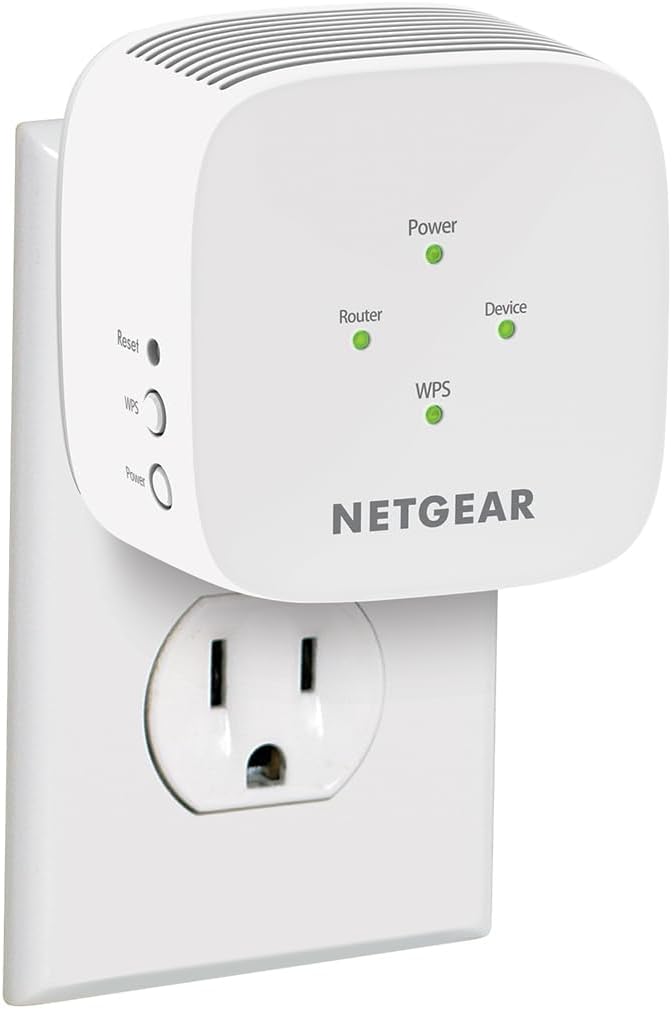
The NETGEAR EX5000 WiFi Mesh Range Extender delivers dual-band AC1200 speeds up to 1200 Mbps, expanding your wireless coverage by up to 1000 sq.ft. It supports up to 15 devices simultaneously and is compatible with any standard router or modem. Its compact wall plug design and easy WPS setup make it an ideal solution for eliminating WiFi dead zones in homes or small offices.


| ASIN | B083R46CV8 |
| Best Sellers Rank | #7 in Repeaters |
| Brand | NETGEAR |
| Built-In Media | Quick start guide, WiFi Mesh Extender (EX5000) |
| Color | White,Grey |
| Compatible Devices | Router |
| Connector Type | RJ45 |
| Customer Reviews | 4.0 out of 5 stars 16,494 Reviews |
| Data Transfer Rate | 1200 Megabits Per Second |
| Frequency Band Class | Dual-Band |
| Frequency Bands Supported | 2.4 GHz, 5 GHz |
| Global Trade Identification Number | 00606449146677 |
| Item Dimensions D x W x H | 2.55"D x 2.85"W x 2.85"H |
| Item Weight | 0.34 Pounds |
| Manufacturer | NETGEAR |
| Mfr Part Number | EX5000-1AZNAS |
| Model Number | EX5000-1AZNAS |
| Range | 1000.0 square_feet |
| Smart Home Compatibility | Not Smart Home Compatible |
| Special Feature | High speed |
| Special Features | High speed |
| UPC | 606449146677 |
| Unit Count | 1.0 Count |
| Warranty Description | 1 year warranty |
| Wireless Communication Standard | 802.11ac |
| Wireless Compability | 802.11ac |
F**I
Cheap, effective range extender as long as you got A/C power.
Easy to use and set up. Remember to connect directly (192.168.1.### usually) and without a VPN or have your service exclude the browser you're using to access this device. Okay range but so cheap you can add a few more and not worry. Fairly stable, but connects poorly unless you're in an unobstructed space. Still good to have though.
A**R
Amazing!
Incredibly easy to setup - literally pressed 2 buttons and the extender was working. Cannot beat it for the price and simplicity!
A**R
Works for a small house
For the price, it works okay. It improved the wifi reception enough for a small house. No complaints, it did what I needed.
R**L
Setup is ridiculously frustrating
The biggest lie this company sells is that a customer can set up their range extender in five minutes. This is my second extender from Netgear, and honestly, I don’t know why I purchased a second one. My first extender, purchased in 2017, was a total pain to set up. I couldn’t get the website to work 98% of the time. The problem is, in order to access the set up website, you have to be connected to the extender’s Wi-Fi, but that’s almost impossible to get connected to in the first place. When my 2017 extender stopped working, I figured it was just old and needed replacing. I tried updating the firmware, but wasn’t able to do so because the extender wouldn’t even connect to the wifi to get the update. Well, surprise, surprise! The “new and improved” model uses the same, outdated, confusing, annoying website. I finally got the extender to work after about 2 hours. Come to find out, though, that only the 5G wifi worked, but not the 2G, even though the website says both were connected and working properly. That essentially made this extender useless since I was using it with my smart plugs and lights, which only work on a 2G network. I feel like I’ve tried everything and at this point, I’m just really annoyed. The only way I was able to set up the extender was not through the website, but through the default extender IP address, which I luckily found buried within Netgear’s “help” articles. Now, I can’t even get that to work. All in all, I’m super frustrated and will not be purchasing from this company again. It looks like it’s time to find another brand!
D**A
Did exactly what was advertised
Geez - reading some of these reviews you would think by getting one of these you're making a deal with the devil. This did exactly what I needed it to do and honestly I had been looking at getting one for the better part of a year now but the reviews scared me off. Just get it if you have dead zones. Make sure you understand what this is and isn't - this did actually increase my wifi speeds but that was only because of the router being physically far from me and speeds suffered as a fact. For people in the similar use case where you don't have physical access to the router, set up is actually pretty easy. Just access the router admin page (which it has the address in the instructions) and pick the band(s) to extend and the new network's name/password. The first thing to anyone having issues - make sure you are extending the correct band. I was originally extending the 2.4GHz band and the wifi was even worse than no extender. I am now using the 5GHz band and getting much more palatable speeds. The other major thing that scared me was the handful of reviews where someone's unit had melted and almost started a fire. The fact it's so small makes me concerned how they managed to fit everything in the unit and have it able to sustain performance for what many people might be 24/7. If you feel the unit when it is in use it does dissipate a solid amount of heat. I have been making it a point to turn the unit off when I go to sleep and I would recommend others do the same. Overall, very happy with the purchase so far.
P**N
Compact but takes a hit on performance(Setup is a breeze using WPS)
I purchased this NETGEAR EX5000 to eliminate a weak WiFi area near my outdoor cameras. There seem to be two setup methods. One uses the app or browser setup pages(marked in Yellow color with numbers 1, 2 and 3), while the other uses the WPS buttons. After reading several reviews mentioning setup headaches, I skipped the web route entirely and used WPS instead(images marked in Blue color from 1 to 4). For me, setup was surprisingly straightforward. I placed the extender in the same room as my router, waited for the status light to turn green, pressed the WPS button on the extender, then pressed the WPS button on my router(TP-Link) a few seconds later. After a short wait, the extender created the extended network automatically(existing network will be extended to your_existing_network_name_2/5GEXT). I connected using the same WiFi password as my router and later logged into the local webpage to rename the network. Compared to some other networking devices I have dealt with in the past this felt fairly painless. The compact size is another thing I liked. It does not block the second outlet making a placement easier in a crowded wall socket area. However, I was disappointed in performance. I tested this extender and compared against my wired access point(I know not a fair comparison) using a local speed test server. My WiFi 6 access point was able to deliver around 1.8 Gbps in the same location but this extender averaged around 42 Mbps. I understand this is a WiFi 5 extender and not intended for multi gig networking, but I was anticipating 200-400Mbps.
P**S
Solid product
For something that doesn’t cost very much this works great. I put it in my detached garage (which is about 35 feet from my gateway/modem) so that I could stream on my tv that’s in there. No problems whatsoever. Setup took less than 2 minutes. I’m not sure what the speed is but the 4 WiFi bars on my phone and tv are always at the max when I’m out there.
H**K
Easy install for WPS routers
This was a breeze to install. I followed these easy steps: (1) I plugged the extender into a wall socket near the router and waited a minute or so for the power light to turn from red to green; (2) pressed the WPS button on the extender causing the WPS light on the extender to blink green; (3) pressed the WPS button on my router; (4) after a minute or so the WPS light on the extender turned solid green and the router light turned on (also solid green) indicating that the extender and the router were communicating; (5) unplugged the extender from the wall socket and replugged it into a wall socket about half way between the router and the computer that I wanted to connect to the network; (6) waited for the power, router and WPS lights on the extender to turn green again; (7) then turned on the computer and connected to the new extended wifi network. Works great! Easy install and it fixed my connectivity issues. If your router does not have a WPS button, then you will need to set up the extender using a NETGEAR installation application on the internet. I can't comment on that process since I didn't need to use it. By the way, the extender can extend one 2.4GHz and one 5 GHz network. If your router has both 2.4 GHz and 5 GHz networks, and you want to extend both, then after step (4) above, turn off the extender using the power button, then restart it and follow steps (1) through (4) above. When you go to connect your device to the extended network, you will see two new networks that have the same name as the existing 2.4 and 5 GHz networks, but with the following extension _2GEXT and _5GEXT. Very simple installation and great results with my new extended networks. Also, the extender itself is small and has no protruding antennas, which makes it tidy and nearly invisible.
A**S
Excelente producto
Funciona muy bien. Batallé para configurar un poco al inicio pero creo que fue mi error.
S**L
Buen repetidor
Funciona excelente, buen alcance en señal.
F**A
La distancia del alcance que cubre la señal es muy poca.
Es fácil de conectar y la coneccion es rápida pero el alcanze es muy poco.
M**A
Muy buen producto
Fácil de instalar y ayuda a ampliar el alcance de la red
A**A
Muy bueno
No ha fallado hasta ahora
Trustpilot
1 month ago
1 month ago