Desertcart purchases this item on your behalf and handles shipping, customs, and support to Bolivia.
๐ Elevate your home internet game with the ultimate all-in-one speed and security hub!
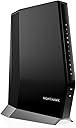
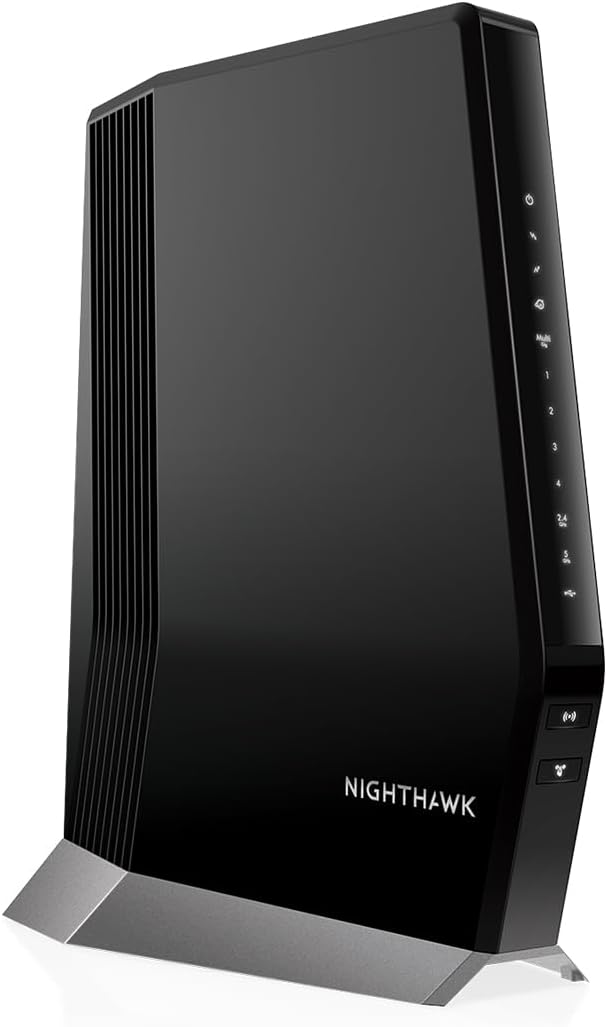
The NETGEAR Nighthawk CAX80 is a premium cable modem and WiFi 6 router combo designed for professional households demanding gigabit+ speeds and reliable whole-home coverage. Featuring DOCSIS 3.1 technology, dual-band AX6000 WiFi 6, and a 2.5 Gbps Multi-Gig Ethernet port, it supports up to 30+ devices across 2,500 sq ft. Compatible with major US cable providers like Xfinity, Spectrum, and Cox, it offers advanced network management via the Nighthawk app and robust security with WPA3 and NETGEAR Armor. Perfect for seamless streaming, gaming, and smart home connectivity.


| ASIN | B082XW53G3 |
| Antenna Location | Indoor |
| Antenna Type | Fixed |
| Best Sellers Rank | #826 in Computers & Accessories ( See Top 100 in Computers & Accessories ) #5 in Modem Router Combos |
| Brand | NETGEAR |
| Built-In Media | Nighthawk AX8/8 Stream WiFi 6 Cable Modem Router; Ethernet cable; Quick start guide; Power adapter |
| Color | Black |
| Compatible Devices | Computer, Laptop, Smartphone, Tablet, Printer, Gaming Console |
| Connectivity Protocol | ethernet, wi-fi |
| Connectivity Range | 2500 square_feet |
| Connectivity Technology | Ethernet, Wi-Fi |
| Control Method | App |
| Controller Type | ios |
| Coverage | 2,500 square feet |
| Customer Reviews | 3.9 out of 5 stars 3,717 Reviews |
| Data Transfer Rate | 6 gigabits_per_second |
| Frequency | 6 |
| Frequency Band Class | Dual-Band |
| Global Trade Identification Number | 00606449143485 |
| Item Dimensions L x W x H | 8.5"L x 4.3"W x 10.4"H |
| Item Weight | 4.5 pounds |
| LAN Port Bandwidth | 2500 Mbps |
| Manufacturer | Netgear |
| Maximum Upstream Data Transfer Rate | 3000 megabits_per_second |
| Mfr Part Number | CAX80-100NAS |
| Model Name | CAX80-100NAS |
| Model Number | CAX80-100NAS |
| Number of Antennas | 3 |
| Number of Items | 1 |
| Number of Packs | 1 |
| Number of Ports | 4 |
| Operating System | NETGEAR OS |
| Other Special Features of the Product | Internet Security, Remote Access |
| Router Firewall Security Level | High |
| Router Network Type | Home WiFi Router |
| Security Protocol | WPA-PSK, WPA2-PSK |
| Special Feature | Internet Security, Remote Access |
| UPC | 606449143485 |
| Unit Count | 1 Count |
| Warranty Description | 1-year warranty |
| Wi-Fi Generation | Wi-Fi 6 |
| Wireless Communication Standard | 802.11ax |
| Wireless Compability | 802.11ax |
S**S
CAX80 works great with EAX15 extender (Wired TV boxes may not be compatible)
I originally had the Xfinity gateway with three of the Xfinity 'mesh' extender pods and yet I was getting inadequate WiFi coverage (not even close to my available 1.2Gbps connection). As a complete home networking rookie, I finally managed to do something about it after some basic self education. I was specifically looking for gateways (modem+router in one) due to limited physical space in my living room for two separate devices. The CAX80 was expensive compared to Xfinity-compatible Arris or Motorola gateways. However, the theoretical specs seemed superior and it is likely 'future proof' (provided it will last 3+ years). Setting up the CAX80 router was easy enough with the Nighthawk app on my phone. Right off the bat, I noticed an increase in throughput with a wireless connection to my gaming laptop located about 30 feet away from the router (from 300-500Mbps to 600-900 Mbps averaged through the day). I live in a two-level 2700 sq ft condo with thickly insulated walls. Previously (with Xfinity gateway), I got zero signal at the furthest end of the house from the router. After adding three 'daisy chained' Xfinity X-Fi mesh pods, I was getting 20-60 Mbps throughput with frequent loss of signal through the day. After switching to just the CAX80 router, I was getting a weak but consistent signal at the far end of the house with 3-10 Mbps throughput. I then connected a Netgear EX15 extender halfway between these points (again, setup was easy with the phone app). I decided to extend only the 2.4GHz frequency (saving 5GHz for working and gaming laptops in proximity to the router). I am now getting 110-130 Mbps throughput at the far end of the house consistently which is adequate for what I needed here (TV box, 3-4 phones/tablets, doorbell, smart lock, thermostat etc). Overall, I am happy (and proud of my first such set up) with nearly $600 worth (yikes) of hardware upgrade (CAX80 and EAX15) for what I needed my home network to do. Of note, saving $15 in monthly rental fees for the Xfinity modem should make up for this upgrade in about 3.5 years lol Couple of issues to be mindful of if you have Xfinity internet and TV: These may be related to my own naivete or my home's wiring rather than misleading specifications from the manufacturer. I had a main TV box (connected by a split coaxial cable) and an additional wireless (WiFi) TV box. After changing from the Xfinity gateway to the CAX80, the wired TV box stopped working while the wireless one worked after a reboot. Comcast auto-assistant was unable to rectify and sent a technician over who diagnosed the following issue: CAX80 is not MoCA compatible and the simplest fix would be to get a wireless main TV box. I ordered such a box via Comcast (local store is easier and quicker than online). Now, both TV boxes (Xi-6 via ethernet cable and Xi-5 via WiFi) are functional albeit with a delay in displaying my channels after powering on (anywhere from 5 to 30 seconds). May be this delay is from something I overlooked during the connections or whatever but it is a minor gripe at this stage (after nearly 96 hours of toiling to get all of the above done) and I will figure out a fix someday soon. Hope this helps the next amateur in a similar situation as I was. Happy networking!
K**R
Excellent choice!
Overall, itโs been a solid upgrade from the equipment I rented from my internet provider. Setup: The setup was relatively smooth using the Nighthawk app. Performance: Speeds have been fast, and the WiFi 6 helps with multiple devices. Streaming, video calls, and general browsing are all snappy. I havenโt noticed any major slowdowns, even during peak hours. That said, it doesn't magically fix weak signals in very distant corners of the houseโyou may still need a mesh system if youโve got a large home. Design & Features: The design is clean. Just 4 Ethernet ports and USB connectivity are great for those who still like hardwired options. The built-in DOCSIS 3.1 modem has been reliable so far. Overall: This is a good all-in-one solution for people looking to stop renting a modem and step into newer WiFi tech. While it may not be the cheapest option, it offers strong performance and a noticeable upgrade in speed and reliability.
T**.
I paid extra for worst experience.
The first one I ordered, appeared brand new, but would not activate. I bought this one after moving to a new apartment and didn't have any internet so I kept trying to activate it with comcast. And when all else failed, they finally told me that its been pre-activated to another account. And it actually cannot be released. So I ordered replacement. This one activated right away. Sadly, we live in a one bedroom apartment, not much concrete in these walls, but when you go from the living room - where the router is located - to the bedroom, the service drops to very low speeds. I was fine with it because it was working and I just accepted that netgear doesn't make great products. Then a few days after the 3 months mark, the WiFi SSID was nowhere to be found. I couldnt connect to the router, and even when I tried to go wired, it wouldn't give me an IP. The router was stuck with 2 LEDs constantly on, and no other LEDs would work. I tried rebooting it and nothing. I tried resetting it and nothing. I tried several times and it was the same outcome. At this point, I decided to call the tech support. That's where the real fun started. After tracking down their number and connecting, I couldnt hear the service person. And this wasn't just because of the very thick accent. Apparently Netgear support sounds like they're in the heart of India. I would hear 1/2 a second and then nothing, and then 1/2 a second and then nothing. And then half a second and nothing. Starting to get very frustrated I hung up and called again -- this happened 3 times, with the same outcome. I was trying to tell the tech that there is something wrong with their phones, but apparently they said that "ev------wa----- f----e" ... So i'm to believe that it's on my side. So I called from a completely different line, and got connected with someone completely different. THANKFULLY I could hear this person... Aaaaaaand EVERYONE Around them. It was very very very diffucult to make out a word they're saying because they were surrounded by other techs less than a few feet away. And each one is yelling into their headset in their native accent. And everyone is using the same diagnostics script that they're reading. "Have you tried resetting the router" one said. "please disconnect the power and wait 30 seconds". "This is Netgear support how can I help you". And more than 10 other voices echoing in the background. The tech then instructed me to try to reset the router and wait. Not only have I tried that, and explained it to her, I've spent a better part of my morning doing that. But I decided to entrust the professionals. Moments pass, router is reset, and nothing worked. No surprise here. She paused and then told me that we'll have to reset it to factory settings and reconfigure it. Moments pass. Pin stuck in router for 30 seconds. Power comes on. And she would guide me through it "and the light should now be turning Amber"... no lights were turning amber. She pauses puzzled. "Okay we'll try again... Reset holding the pin for 1 whole minute".... A whole minute? What the heck difference is that between that and 30 seconds. I know how to count. But Okay, one minute of pressing a tiny little pin against my finger and into the stupid hole.... Moments pass.. Router being reset.. 20 seconds... 40 seconds... 60 seconds. Relieved to be done. I let it power up naturally, and she explains "and the light should now be turning Amber". . . . . . . . . . . . . . . ."how about now?" . . . . . . . NOTHING turned amber. 2 lights. Turning white. Same as before. Same as this morning. Very puzzled. We run though the cabling to make sure that its still good. And then she comes back with the brilliant idea... "Okay Mr Tamer. We will try one more reset. This time you'll hold the pin for TWO minutes." TWO WHOLE MINUTES! At which point i opted to put the phone down on speaker so I can two-hand this operation. 2 minutes passed and nothing. Same result. I.. wanted.. to... die.. Thank you NetGear. It's been great. She asked about the date of purchase, and being that it was slightly over the 3 months mark (within a few days) they could not accept a return. However they will send me a replacement. She took down my information and we parted. I wanted to write a review then and there, but I decided to wait until I cool off and see how things progress. An hour later I get a call back from them, they are informing me that the warehouse has no available routers in that model, and they will send me one as soon as they have any in stock..... Whaaaaaaat?? So not only do I have a broken one that they wont take as a return, but they cant even send me a replacement. It's been 3 months and half on this $450 piece of crap. Two days later, I get another call. It's NetGear support for the replacement router. The warehouses are STILL out of stock and they can't send me another. So I ask her, can you send me a cheaper model or something else in return? I dont even need the same model. She actually YELLS BACK, "No. They will Send me one. Once they have more in stock". I could not be more in shock, so you called me up, out of no where to Yell at me for not having stock? And I bought the expensive model, and because of that, they cant give me a replacement? It's now been over a month since they've called. And I STILL never got a replacement for this. So after my first call with them, I figured I'll go straight to Costco for a spare comcast wifi router. And maybe I'll return it once I get my replacement. Unfortunately the only one they have was Netgear Nighthawk, the lesser model. After spending yet another few hundred bucks and a few more hours to get it to activate - with comcast as well. It's been working with very very bad signal, even 15 feet away from the router. Yet another nighthawk disappointment. And now it's passed the return date, so even if I get a replacement I'm screwed. It's been by far the worst experience ever. Do not get anything nighthawk
B**K
Fiber optic/cable Netgear has always delivered
Easy to set up even with a long password. Works as expected just great. Product met my expectations for a cable modem. Xfinity had no problem and it works smooth once I became familiar with its operation. Looking forward to using it through all my 4K TV watching. Got next to the highest plan for speed. Options for Internet connection are available but limited in performance. I came from California where I had a brand new fiber optic cable system For less money. I hope Xfinity can deliver by todayโs expectations.
R**N
Netgear Nighthawk motor router. New and refurbished.
Title: Disabled, senior citizen. Description: Beans I had to go and spend money on a brand new Nighthawk modem router combination c a x 80 because refurbished one went out on me like 4 months after I had it. Well it didn't make me happy at all because I just lost $290 something like that. And I couldn't get one bit of help from Nighthawk next year with a refund or even a partial refund would have been nice like $200. Very very disappointed in that. Then I have to turn around and borrow bag to get help to raise money to buy the brand new Nighthawk CX80. Very disappointing now I have to pay that back. There was no reason Nighthawk next year couldn't help me out and taking care of my refurbished one I'm on a fixed budget disabled senior and it was just like it took advantage of me and scam me or prodded me. That's how it feels. And I still have it it's all boxed up I don't know what to do with it now. It's no good to me with it not working. And I'm out around $290.
P**)
Internet plan at or over 1k mbps?
- Wifi 6 router, built in. Not the "standard" or most commonly found router in homes (2023) & still semi-expensive to purchase separately. - Ease in setup with a call to my provider. - 2 month no issues, not one. User friendly. - Netgear app is simple & stable to use. From experience it is much better than Aris. Easily block or add access from devices connected. - Has a guest WiFi feature, which some may enjoy. - Cannot prioritize connected devices in app. Which sort of bites but not a game breaker. - Speeds have been great in a 3,000 sq/ft home. Range is very good. I've had my "wired" connection hit somewhere consistently around 1.1-1.4k download speeds and in the high twenties for uploading. Wifi speeds on average are in the neighborhood of 300-700 depending on distance & room. - Design & shape is pretty typical of a home modem. It is easy to read and identify what is going on. - One ethernet port has 2.5gbps. The other ports only support 1gbps. Which is fine for what I do. I like having multiple ports as an option. I'll never do only "2" ports in a modem again. - Value. It's a higher end 3.1 modem, supports 1gbs+ internet speeds. Then factor in the built in WiFi to the price with generation 6 Wifi. Then assume theyre not cheaping out and has good enough range to cover your home. If your internet plan is at 1k mbps and or above this is a great device. If you're under those plan numbers then I'd shop for something else.
L**S
Awesome router- great range
My internet was not able to keep up with the demand of multiple gaming devices, streaming and working from home, so we upgraded our internet to 2 GB and as a result had to upgrade our router. My office is above the garage, so we chose this for its range and to future proof our internet for when we inevitably have even more devices online. This router is so powerful we were able to stop using all 5 of our wifi extenders and the security features are also great. I like that I can see all devices connected to my internet and can block devices accordingly. Its quite futuristic looking, and very easy set up. Its a bit pricey, but worth it in my mind to have a router that will be able to handle 4 GB if/when we need to upgrade our internet yet again and to be able to use the internet around our entire home and garage without any extenders. Very happy with this purchase!
J**K
A potentially great product that has nothing but problems.
I had a lot of hopes for this device. I paid top dollar for it seemed great at first, but I've now given up and bought a different router. The best thing I can say about the router is it has great performance. The download speeds are fantastic for both wired and wireless, and the wireless range is fantastic. If it ended there, I'd be a happy customer, but there are also a bunch of negatives. The firmware is absolutely terrible. It's buggy and has broken implementations of the functionality you find standard in other routers. If you are a basic user that turns on the modem and never needs to configure anything, then this might work for you. Making config changes is painful because saving a simple option causes a full reboot, which takes about 5 minutes since this also needs to reestablish the cable modem connection. I need static DHCP reservation and port mapping, and somehow they completely bungled this. I was able to find a clumsy workaround after several hours, but I'm still very unsatisfied with the end result. The firmware also forces you to trial their Netgear Armor security service, which I found was blocking legitimate connections and causing me problems. Fortunately, you can disable it. After about 2 months of operation, the modem began to experience a bunch of problems. I log in to the firmware and try to make a few changes, and find out the changes will no longer save. I try several times to factory reset the device, which only clears half of the changes. The flash memory on the device has likely failed, and the device can no longer function properly. I try to open a ticket on Netgear's support website. The website starts giving me a bunch of errors about not being able to create a ticket. I later find out this is because their website can't handle a description that has multiple lines, so you have to submit it as one big line with no paragraph breaks. Sometimes the messages in the ticket are displayed out of chronological order. Completely ridiculous. ๐คฆโโ๏ธ Their support staff responds 3 days later with the standard troubleshooting questions. I respond immediately. It takes them another 2 weeks to respond with more questions even though the device is obviously broken. A week goes by with no answer. I try to follow up. No answer. It's now been a month and this broken piece of junk is still just sitting there because their support staff is probably completely overwhelmed with other people stuck in the same situation. I gave up and bought a modem from a different brand.
Trustpilot
3 days ago
2 months ago