


⌨️ Elevate your workspace with the Keychron K8 — where productivity meets style.
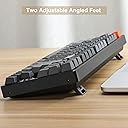
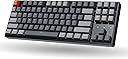
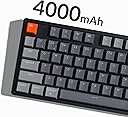
The Keychron K8 is a premium 87-key wireless mechanical keyboard featuring a compact tenkeyless layout, RGB backlighting, and tactile Gateron Brown switches. Built with a CNC aluminum frame, it offers multi-device Bluetooth 5.1 connectivity and USB-C wired mode. Designed for Mac and Windows compatibility, it boasts a 4000mAh battery delivering up to 200 hours of wireless use, making it the ultimate blend of style, comfort, and performance for professionals and gamers alike.






| ASIN | B0869J8XD9 |
| Additional Features | Bluetooth, Lighting, Wireless |
| Antenna Location | Gaming, Office |
| Best Sellers Rank | #31,157 in Video Games ( See Top 100 in Video Games ) #166 in Mac Gaming Keyboards #4,966 in PC Accessories |
| Brand | Keychron |
| Built-In Media | Extra keycaps for Windows and Mac operating systems |
| Button Quantity | 87 |
| Color | Gateron Brown Switch |
| Compatible Amazon Tablet Models | Amazon Fire HD 10 11th Generation, Amazon Fire HD 10 Kids Pro 11th Generation, Amazon Fire HD 8 11th Generation, Amazon Fire HD 8 Kids Pro 12th Generation |
| Compatible Devices | Gaming Console |
| Compatible Operating System Family | MacOS, Windows |
| Connectivity Technology | Bluetooth, USB |
| Customer Reviews | 4.5 out of 5 stars 347 Reviews |
| Enclosure Material | Aluminum |
| Hand Orientation | Ambidextrous |
| Item Dimensions L x W x H | 14.13"L x 5"W x 1.65"H |
| Item Weight | 1.32 Kilograms |
| Keyboard Backlighting Color Support | RGB |
| Keyboard Description | Mechanical |
| Keyboard Layout | QWERTY |
| Manufacturer | Keychron |
| Mfr Part Number | k8c3 |
| Model Name | K8 |
| Model Number | k8c3 |
| Number of Batteries Required | 1 |
| Number of Keys | 87 |
| Power Source | Battery Powered |
| Recommended Uses For Product | Gaming, Office |
| Special Feature | Bluetooth, Lighting, Wireless |
| Style Name | Contemporary |
| Switch Type | Gateron G Pro Mechanical |
| Theme | Computing |
| UPC | 753610396260 |
| Unit Count | 1.0 Count |
| Warranty Description | 1 |
| Water Resistance Level | Not Water Resistant |
A**X
Wow
This keyboard is spectacular. I replaced my Razer Huntsman Mini with this as the Huntsman typing expereince was not what I was looking for. This on the other hand is exactly what I was looking for. I think the only real complaint I could level at it right now is that the backspace key is a little funky, but that is apparently an easy fix. The Gateron brown switches are fantastic, and I am excited about the opportunities afforded by the hot swappable nature of this keyboard. The TKL nature of the keyboard is also awesome, and saves some space on my desk (part of the reason I opted for the Huntsman mini in the first place). I appreciate the fact that this still has the function keys as well as arrow keys. I sorely missed that on the Huntsman. The RGB was a nice surprise too, since I didn't realize this model came with it! I just have mine set to blue to match my PC build. Overall, 10/10. Initial impressions are very positive. Now to maintain and lube it, since that seems to be a very common suggestion among keeb enthusiasts. The only reason I didn't give it full marks for quality of material is because of the issues I mentioned with the backspace key and the fact that the spacebar is doing the same. Other than that... This is perfect for me and the aforementioned issues may just be me adapting to a new board.
D**S
Spectacular Keyboard | Better than K2
I got the K2 first and I was unable to comfortably hit the Enter and Shift buttons on the right without hitting the Pg Up, PgDn buttons. I decided that I needed something else and I got the K8 (this one) and this one is absolutely perfect. This is my first (technically second after K2) mechanical keyboard. I made the switch from the old Magic Keyboard from Apple which had batteries to be inserted. I love to type, I type a lot. This keyboard has made it a breeze to type. The tactile touch and feel are excellent. I am not a mechnanical keyboard purist and I don't know too much about them, but my experience with the Keychron K8 has been splendid till now. I'm happy I made the investment in this product and elevated my typing experience. My model is the RGB and aluminum frame one. I got it in some Prime day deal for 80 bucks or so. I am not a big color guy, however, it helps spice up some boring evenings.
P**U
Awesome keyboard.
I write a lot for work so had been curious about upgrading from my laptop keyboard to a tactile keyboard. I did a bunch of research and the Keychron K8 seemed like the perfect combo of what I was looking for at a totally reasonable price. It took a little bit of getting used to coming from a Macbook keyboard, but I am now officially hooked. Typing on this thing is such a uniquely satisfying experience. I also love the different color options even if I stick mostly to the single lit key. I've also found Bluetooth connectivity to be perfect without any issues or delays whatsoever. Highly recommend this keyboard.
S**Z
Update: Worst Keyboard Ever
Besides them obviously sending me an open box / return, the keyboard is of mediocre build quality… all four corners don’t quite line up; it isn’t very noticeable from far away, but you can feel it. I bought the brown switch version at a discount for around $40, so I’ll probably keep it but not sure I’ll ever buy Keychron again… Edit: I just reread the description and had no idea I was buying a used keyboard. That sucks Update: I decided to keep the keyboard and I regret every second of it. It lags, it loses lighting setting, it disconnects all of the time, the switches are garbage, NO AUTO OFF FEATURE SO JUST TONS OF BATTERY WASTE if you dont remember to turn it off. All around it's literally the worst keyboard I've ever purchased, and I'll never buy another Keychron again!
P**L
Best entry level mechanical keyboard for windows and macos
I work on both windows and macOS. For the price and features, I believe this is the best entry level mechanical keyboard. The keyboard is very sturdy and switches feel amazing. They also provide with additional keycaps for macOS. The design choices made for the toggle switches is great. It supports connecting to 4 devices, 3 through Bluetooth and 1 wired which I feel is a great flexibility to have.
S**O
Pretty good, but switches are not swappable
LAYOUT I tried several Keychron keyboards, and I think this has the best layout and probably the second-best witches (Gatheron brown). The layout is excellent because it is still relatively compact, but I can find everything I need quickly without looking. I also tried the K4, and while having the numeric pad is sometimes useful, I always messed up with the arrow keys. If you need the numeric pad, go for the K10, it is massive but has a great layout. If you want a ten-key less, I think this is the best possible layout. BUILD The build quality is excellent: very solid and quite heavy. Not the most portable, but when I am not at my dest I'll use my laptop keyboard (which feels like crap now that I got used to a proper keyboard..) SWITCHES (BROWN) The brown switches are pretty good. I also tried the blue ones, but they are incredibly clicky. I mean, if you are working alone, I guess you get used to it after a while, but if you share your office with someone else, I think they will hate you and secretly (or not so secretly) wish you lose all your fingers in a woodworking accident. Back to the brown switches, they are relatively quiet if you learn not to bottom out. You can feel in your fingers when they actuate (instead of hearing a click like with the blue ones). I just wish they offered a bit more resistance. I really have to concentrate if I want not to bottom out while typing. That is why I wanted to try to swap them for Gatheron black switches, which offer a bit more resistance, and this is when I found out that this particular model's switches are not hot-swappable. If you buy directly from Keychron, this same model will be 6$ less than on Amazon (89, instead of 95), and the one with hot-swappable switches is just 4$ more (99, instead of 95). I wish I had bought it directly from Keykhron! Anyway, now I am stuck with these switches, so I'll try to make the best of them and see if I can learn not to bottom them out without thinking too much about it. BATTERY The battery life is pretty good. I usually keep the light at the minimum setting (but not zero), and I have to charge probably once every two/three weeks. This while I am at the computer 8-9 hours a day. Between emails and my current translation project, I'll spend at least 3 of those hours just typing. The rest of the time, I'll be on tasks where I use the keyboard only for shortcuts, like editing videos or things like that. CONNECTION The Bluetooth connection works very well; I never had any issue pairing with my Mac. My only complaint is that when I wake up my computer, it does not register the first stroke, so I'll have to remember to type the first letter of my password two times. When I was using the Magic Keyboard from Apple, I did not have this issue. Anyway, not enough to want to switch back to those crappily shallow and mushy keys! RGB LIGHT I guess I could have saved a few bucks and gone without or just gotten the white one. At the end of the day, it's just for show. There are a ton of different possible effects. Most of them are just distracting, some are kind of cool, but I don't look at my keyboard while typing unless I'm fishing for some seldomly used symbol, so really, what's the point? It would have been cool if there was a way to configure the lights, this could have helped remember some shortcuts. Anyway, in the grand scheme of things, I don't think saving those few bucks would have made any difference in my life, and sometimes, when I am working or playing videogames at night, the changing lights on my keyboard can be a delight, so going back I would still get the RGB version. GET (OR MAKE) A GOOD PALM REST! And please don't use the feet. I mean, unless you don't type that much or wish to feel pain in your wrists... Mechanical keyboards are great for your fingers, but they are much taller and will make your bend your wrists too much if you rest your palms on the desk or cause much fatigue in your wrists and shoulders if you keep the wrists at the correct angle by keeping your palms off of the desk. Keychron makes decent wood palm rests with the correct measures for each of their keyboards, but you can also do your own on the cheap by cutting a piece of wood to the correct size and sanding its edges (BTW, you want a 13x3x1 inches piece of wood for this keyboard).
J**H
Mac Compatible with Brown Switches!
I picked up this Keychron to replace a Logitech mechanical keyboard with Romer-G switches when I replaced my windows laptop with a Mac. I'm glad to say all my searching paid off. This keyboard is really fantastic to type on. The feel of the keys, the switch feedback, and the multiple options for connectivity make this a really great match for my work setup. I've been able to type for long periods without any discomfort, and it's quiet enough to not bother my coworkers if I have a nasty email to send out. The backlight it a little dim, which isn't a huge deal since the office is well lit. I leave the lights on, but it's hard to tell. I do wish the backlight was more controllable outside of the predefined patterns. This is absolutely a small complaint, and does not outweigh the benefits of this keyboard. Just buy it if you want a compact keyboard for Mac. You won't be disappointed.
P**.
Great Keyboard
This keyboard is very comfortable. It also has both windows and mac book support. You can also hot switch keys for mac book and windows.
A**R
Amazing
Switched from razer to this and never looked back 10/10
M**C
Costa tanto ma la qualità è eccelsa
Comprata come regalo, il mio amico non ha avuto problemi e come qualità dei materiali non c'è paragone con le marche più commerciali. Ottima tastiera e retroilluminazione fantastica.
P**S
Really nice keyboard for the price - highly recommended if you want to enter the mechanical world
I own several keyboards like many people I assume. When it comes to mechanical I have been a long time user of Topre keyboardf (Realforce). In the past 3-4 years I made a switch to keyboards (non mechanical) that offer bluetooth connectivity and the ability to connect to multiple machines at the same time. So from my Topre Reaforce keyboard - i jumped to a Logitech MX keys just because it offered a nice switch - to connect on 3 machines at the same time. It was not a bad keyboard but I missed the mechanical feel on the keys. At the same time I did not want to spend 300-400 pounds (this is how much a good mechanical keyboard will cost). It seems Keychron offer a very good deal. Good quality, mechanical switches (with reasonable noise) and very very reasonable price. The keys are not super silent my topre keyboard is but they can be ok - depending on your sensitivity. For example if you work at home and you have your own room - then it can be ok - they dont sound like cherrymx keys. Overall the bluetooth switch works very well with both Windows/ Mac and Linux machines. Very happy!
L**A
ottima tastiera
ottima niente da dire
B**B
Love this Keyboard
Very good wireless keyboard, with some flaws ( I did not like) What could have been better: 1) What I missed though was the num pad. 2) Also, and the latency in typing was quite visibly slow, I am not sure if that was this piece or K8 itself was like that. 3) Pinging sound was quite loud and irritating but, that could have been corrected, and I did not want to spend time doing that 4) Height of the keyboard is too high and requires to float or use a wrist pad 5) Above all to top it, they shipped me a wrong order so, had to return but, I would love to have it if it was not for the fixed switch's, num pad. What was Better: 1) Excellent RGB brightness 2) Size for travel and build quality (Superb) 3) Packaging 4) Bluetooth & MAC compatibility 6) Value for Money choice 7) Easy to clean between the keys even without removing key caps 8) Very easy to MOD 9) No other Keyboard with such good MAC compatibility 10) Key spacing
Trustpilot
5 days ago
3 weeks ago