Desertcart purchases this item on your behalf and handles shipping, customs, and support to Bolivia.
๐ป Own the airwaves with the WS1040 โ where pro-level scanning meets next-gen ease!
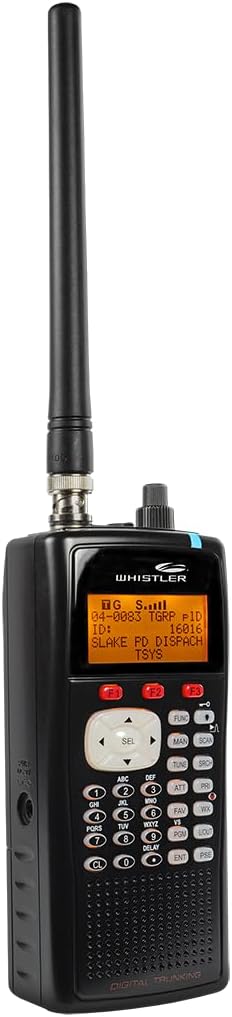
The Whistler WS1040 is a handheld digital trunking scanner featuring Motorola P25 Phase I support, dynamic free-form memory for over 38,000 frequencies, and a user-friendly menu-driven programming system with context-sensitive help. It offers instant Skywarn storm alerts, customizable LED indicators for multiple agencies, and a PC interface for easy programming and cloning. Designed for serious scanning enthusiasts and professionals alike, it delivers powerful, flexible monitoring with modern convenience.


| ASIN | B00IID3OAY |
| Best Sellers Rank | #20 in Radio Scanners |
| Brand | Whistler |
| Built-In Media | product, manual |
| Connection Type | USB |
| Connectivity Technology | USB |
| Customer Reviews | 4.1 out of 5 stars 1,517 Reviews |
| Global Trade Identification Number | 00052303406997 |
| Item Type Name | radio scanner |
| Item Weight | 8.48 ounces |
| Light Source Type | LED |
| Manufacturer | Whistler |
| Media Type | USB |
| Minimum System Requirements | Windows 7 |
| Model Name | Whistler |
| Resolution | 10000 |
| Scanner Type | Radio Scanner |
| Standard Sheet Capacity | 300 |
| UPC | 052303406997 |
| Warranty Description | 1 year |
J**D
AFRAID OF PROGRAMMING? FEAR NOT! READ ON.
If programming a scanner scares you, maybe I can help and save you a few bucks. Iโve been there. Iโll explain later. First off, the WS-1040 is a fantastic scanner. When programmed correctly, it has more bells and whistles than a circus train and leaves nothing to be desired in the way of a scanner. The specs are on the money and correct to a T. The most difficult part is the programming. If you wish to do it yourself, WIN500 from Radio Reference or Starrsoft is highly recommended but it is a PC based program. It will not work on Mac. Butel, ARC500 software is what I use. It is also PC based. Here's a WARNING based on my 4 years of experience starting as a dummy knowing nothing. In 2012, I didn't know anyone who could program a scanner for me. Numerous negative reviews stating โdifficult to programโ scared me away from trying it myself. So, I ordered a GRE PSR500 from an online SCANNER retailer that offered pre-programming for 1 county for $70.00. I thought it would be great to have my scanner working right out of the box. This was a huge mistake. I felt like Iโd just had a bad night at Vegas and didnโt even get a kiss. The scanner did not work out of the box. An expensive amplifier was a waste. I emailed the seller twice and explained my problem. They told me to call them. Having worked on an I.T. help desk for a major corporation for years, I fully understand the obstacles involved in communication between the trained and untrained even when both parties speak the same language fluently. That's seldom the case anymore. I've written trouble-shooting flow charts and know they exist on any help desk, however, they are not about to email them to a customer. Programming a digital scanner is a complicated process. Attempting to do so over the telephone was more than I was willing to endure. Finally, through an Internet search, I located a local HAM radio club. Almost immediately, a half dozen members responded who were willing to help me out. I was totally impressed and pleasantly surprised. Amateur (ham) radio operators are a great group of guys. As Yogi Bear might say, โThey are smarter than the average bear.โ I live in a small county with only eight frequencies. The SCANNER seller had not programmed any of them. The amateur (ham) operator deleted all incorrect data and cloned my GRE PSR500 to his. The results were amazing. Whistler bought GRE. GRE made Radio Shack scanners. Therefore, the Pro106, Pro107 and GRE PSR500 are internally the same as the WS-1040. They can all be cloned from each other by pressing 3 keys. The SIMPLE instructions are on page 19 of the WS-1040 ownerโs manual. All thatโs needed is a cable with a 1/8-inch(3.5 mm) male stereo phone plug on each end, NOT INCLUDED. I use Amazon Basics. The WS1040 is compatible with the following scannermodels: PRO-106, PRO-197, PRO-651, PRO-652, GREPSR-500, PSR-600, WS1040, and WS1065.To clone a scanner: 1. Connect the two scanners at their PC/IF ports. 2. Turn on both scanners. 3. On the source scanner, press PGM. 4. Press the GLOB softkey. 5. Use the 4-direction keypad to locate the CloneSend option. 6. Press SEL to transfer data. Since my GRE PSR500 settings were saved on ARC500 software in my PC. I plugged in my WS-1040 with the supplied data cable and uploaded. I was scanning in one minute. The WS-1040 has 7 color coded lights that can be set by the programmer to flash or stay steady indicating which agency is transmitting. I love this feature. I listen to two police departments, county sheriffโs office, EMS and Fire. I can tell by the color and flashing sequence of the lights which agency is transmitting from across the room. This is really helpful anytime you're not holding the scanner in your hand. The LED and keypad can also be programmed to illuminate as the user desires. This is a great amenity in low light conditions. Pre-programming services do NOT program such luxury features. There is NO refund on pre-programming service whether it works or not. A pre-programming service is not for the benefit of the buyer, it merely helps the online retailer make more sales to nervous first-time buyers like myself. And making sales is what business is all about. Had the SCANNER online help desk been able to get me up and running over the phone, I would have never realized what I was missing and would have probably been willing to accept the very minimum this scanner has to offer. If a new, pre-programmed scanner DOES work out of the box, it will be the very minimum at best and most users will probably be willing to accept it. As a result, they will never know what they're missing. Hereโs the SUGAR FROSTING: Someone in your area owns one of the above mentioned radios and probably has it programmed exactly as you would like. Start by searching the Internet for local HAM Radio clubs and send them an email. They are willing to help beginners get started and will clone it for you in a heartbeat at NO charge. If they have a frequency that you do not want like the FAA tower, delete it. Do it right from the beginning and you will be a HAPPY SCANNER. I didnโt do it right from the beginning and it cost me big. In 2012, the GRE PSR500 was $500.00. IN 2016, the WS-1040 is about $265.00. SCANNING IS GETTING CHEAPER AND THAT MAKES ME A HAPPY SCANNER. UPDATE 9/9/21. I cloned 2 WS1040 scanners. Here are easier-to-follow instructions on cloning. CLONING WHISTLER WS1040 SCANNER All thatโs needed is a cable with a 1/8-inch(3.5 mm) male stereo phone plug on each end. Connect the two scanners at their PC/IF ports. Turn on both scanners. On the source scanner, press PGM. Press the GLOB softkey F3. Will be lit. GLOB will appear on screen above. Use the 4-direction keypad to locate the CloneSend option. Press SEL to transfer data. Disconnect cable. Press SCAN key and youโre in business.
F**R
Great Scanner, programming was a breeze
Iโve read so much about how difficult this scanner is to program, I almost didnโt buy it. Iโm glad I didnโt listen, this scanner is incredible, easily the best Iโve ever owned. If you want to get the fullest enjoyment out of this scanner, do the following. 1. Get a Radio Reference account. Every frequency available in the U.S. is there. 2. Download the Butel ARC500 trial software. I bought mine, but you can get up and running using the trial version. You can use all the features for 30 days. This more than enough time to get your ws1040 programmed and personalized. 3. Get some good rechargeable batteries. Iโm using Duracell recharables, they seem to be ok. 4. And this is the most important, go to YouTube and search for ScannerMaster Radio Shack Scanner Programming Videos 1, 2, and 3. He will walk you through using the software, yes it is for a different scanner, but the set up is for the software and it will apply to any scanner which uses ARC 500 software. After watching the video, the software and programming started to really make sense. Honestly, programming this scanner seemed very difficult until I watched these videos, it is really so much easier than you may think. Prior to this scanner, I had never used a scanner that required software to program, all the scanners Iโve had in the past were programmed manually on the scanner. I would just buy the latest version of Police Call at Radio Shack, and punch in the frequencies I wanted to listen to. Now with programmable scanners, Radio Reference, and available software, putting in frequencies is easier and faster than ever. It took me 15 minutes to put in over 800 frequencies, and that included installing the software on my PC. Now about the scanner, it is awesome! I like the scan lists over the old banks that my previous scanners had. I set up lists based on the my community, surrounding communities, my County, local airports, National Parks, CalFire, railroads, and a scan list with emergency frequencies, ie Red Cross, Weather, FEMA, and others. I assigned each agency an LED color and set the LED to flash and the back light to come on when a priority Frequency is active. There are so many ways to customize this scanner to suit your personal tastes, you should never get bored. If I can get this scanner programmed and set up the way I wanted it, anyone can. Donโt let other negative programming reviews stop you from getting this scanner. If you do you will be missing out on an incredible scanner.
S**S
Great Scanner with Some Minor Drawbacks
๐๐๐๐ (4/5 stars) The Whistler WS1040 Handheld Digital Scanner Radio is a versatile device that has certainly impressed me in many ways. However, it's not without a couple of drawbacks that are worth mentioning. Pros: Versatile Scanning: The WS1040 offers an impressive range of scanning options. It's been fantastic for monitoring various frequencies, from local emergency services to weather updates and more. The ability to customize scan lists is a definite plus. Build Quality: The scanner feels sturdy and well-constructed. It's held up well over time, and the buttons and controls have a solid tactile feel. Ease of Use: Setting up and programming this scanner was relatively straightforward. The menu system is intuitive, and the included manual is helpful for newcomers to digital scanning. Cons: Sound Quality: One noticeable downside is the sound quality. The audio can be on the low side, especially in noisy environments. Using headphones or an external speaker can help improve this, but it would be better if the built-in speaker were louder. Battery Life: As mentioned, the battery life leaves something to be desired. It's disappointing that it lasts only about 3 hours, which can be limiting if you're on the go without access to a power source. In summary, the Whistler WS1040 is a solid digital scanner that offers a wide range of features and customization options. While it does have some drawbacks, such as lower sound quality and limited battery life, these can be mitigated with the use of headphones or external speakers and by keeping a charger handy. Overall, it's a valuable addition for radio scanning enthusiasts, but there's room for improvement in certain aspects.
B**N
Check radio reference before purchase
I am in one of the areas where police are still on phase 1 non encrypted p25. A radio reference subscription (even for a month) and use of paid software (free for a month, so use it and get it where you want it before the month is up) is a must. Super easy when you use butel or proscan. Do your research and be sure your area is compatible with this. Most need phase 2 or are totally encrypted. It is still fun to search with it without the digital, but that can be done with less expensive analog only scanners.
J**Y
Terrible signal and quit allowing to be reprogrammed
I have purchased two of these devices. The first one quit allowing to be reprogrammed after just a few weeks so now it is stuck on a base programming. Performing a factory default reset does nothing for it. The second one does not pick up any signal at all. It can be sitting side by side with the other, one will sound off while the other does nothing. Very disappointed in these devices. Will not be purchasing any more of this brand.
S**R
Great ScannerโEasy to Program with the Right Tools
Iโm glad I read the reviews before purchasing this scanner because the best tip I found was to spend a little extra on a subscription to RadioReference.com and download the Butel ARC500 software. With those two things, programming this scanner was surprisingly simple - even for someone like me who only has a basic understanding of radios and scanners. If you can remember navigating menus on old-school flip phones, youโll feel right at home. Even Mac users shouldnโt shy away. I run a Windows 11 virtual machine on my Mac (using Parallels for other Windows needs), and it worked almost flawlessly. The only hiccup was figuring out which USB driver to use, but it wasnโt a dealbreaker. Free virtual machine options like VirtualBox should work fine too. Without reading much documentation, I had the scanner fully configured in under an hour. Performance has been excellent so far. Indoors with the stock antenna, I easily pick up local emergency response channels. Outdoors, I was able to pick up aviation and weather frequencies as well. Iโll probably invest in an external antenna to extend the range, but for the price and the ease of setup, this scanner has exceeded my expectations. Itโs lightweight, easy to move around. Bought a $20 package of Amazon rechargeable batteries with a charger to reduce waste. Highly recommended for beginners and casual hobbyists alike.
L**๏ฟฝ
COMPLEX TO PROGRAM. SOME TIPS + NOT EASY FOR AMATEURS !
Do NOT expect to open box and scan. Forget trying to Manual program unless maybe one or 2 frequencies. To program on PC you MUST BUY RadioReference software ! $15 gets a 6 month subscription. THEN YOU MUST ALSO GET A THIRD PARTY SOFTWARE PROGRAM TO USE RADIOREFERENCE ! Iโm using PSREDIT500 with a 30 day free trial for that. That will fairly easily IMPORT frequencies from the RadioReference site. MAJOR TIME CONSUMING PROCESS. Once you figure out How to do all this you can add tons of frequencies into the scanner with the pc cable that comes with it using the pc USB port. With the above software you can assign different colors to flash , beeps, etc for various frequencies if you want to but remember lights and sounds use batteries up faster. The software works ok once you figure out How to use it. Assigning frequencies into different โscan lists โ ( we old timers called โbanks ) can be done but time consuming / confusing. EXCEPT TO INVEST A FEW BUCKS AND A LOT OF TIME TO GET EVERYTHING SET UP PROPERLY ! Very Annoying is when I go back online to add a few new frequencies I have to RE-ENTER ALL THE OLD ONES AGAIN, then it Erases Everything and loads all the old and new items which is a major pain. The Priority channel feature is USELESS because it interrupts anything your listening to every couple seconds to check the Priority channel. VERY ANNOYING ! You get long gaps in any transmissions and miss things ! So I donโt use Priority but instead enter my favorite Priority channel as a duplicate in every scan list as a substitute way to make it check more often without interrupting whatever Iโm listening too. BAD USE OF A POPULAR FEATURE. Amateurs beware of Very Difficult programming and overly complicated. Unless using AC power cord you Will need rechargeable batteries and a battery charger ! This applies to ALL scanners. They generally use up regular alkaline Non rechargeables in about 8 hours. So expect MORE EXPENSE for rechargeable batteries and a charger. WAY TOO DIFFICULT TO PROGRAM and cost money for software. Otherwise Iโd give 5 stars. Tons of features.... More than you actually need. Setting up a chirp and flashing red light is cool on my favorite local police dispatch. Using the pc software you can enter battery type , text label different scan lists ( banks ) , set lights , beeps etc, choose all the frequencies, settings, scan list locations etc and then Easily upload / enter Everything with one mouse click once youโve chosen all your interested in. BUT AGAIN... IF you want to add even one more frequency Later , you have to RE-ENTER EVERYTHING AGAIN from scratch ! There maybe a way around that but after hours of playing around with the software Iโm running out of patience ! Maybe Someday manafactures will realize people just want an easy to use scanner without having to spend MORE MONEY and TONS OF OUR TIME to MAKE THEIR PRODUCT USABLE. Sales would skyrocket IF they ever realize what CONSUMERS WANT. All said, GREAT SCANNER. Tons of features. Picking up state and local police etc and great reception and listening pleasure once set up after THREE DAYS of learning HOW to program. New to scanners ? DO NOT EXPECT TO HEAR ANYTHING UNTIL YOU DO ALL THE WORK ! And SPEND MORE MONEY. BE ADVISED ! Instructions are REALLY COMPLICATED AND CONFUSING. Iโve been scanning since the old crystal chip days and still a challenge setting this up. BUT now enjoying a great scanning experience..... Finally. Off to go add a couple more frequencies now.... a couple more hours of MY TIME to MAKE THEIR PRODUCT USABLE ! Whistler should at least offer a free RadioReference subscription with the product. It costs You $7.50 for 90 days IF you subscribe by Mail and willing to wait a couple weeks. OR instant subscription for $15 / 180 days using PayPal or $30 / one year. And THEN, still need third party software like psredit500 which has a 30 day free trial. Great IF you have tons of time to do but donโt expect to open the box and hear anything until YOU make it work. Once set up by You , it does work really well ! Remember to choose battery Type when programming. I think it wonโt change unless you do. Factory preset is non chargeable alkaline. It wouldnโt charge fast enough anyhow so get a good quick charge battery charger so you can take this with you anywhere you go. Iโve even heard my local police running my license plates while driving ! A common sneaky thing most police do these days hoping to find unregistered cars etc. What a pleasant surprise ( NOT ! ) hearing YOUR NAME on the scanner !!! Also great for knowing about traffic accidents etc before you get tied up on a closed road etc. Scanners are fun And a very useful tool also. GOOD LUCK. Hope this helps... especially for people new to scanning.
R**L
Low Price Great Scanner
After reading some of the reviews I was a little scared to order this scanner. I decided to go ahead and give it a try because the other scanners were so much more expensive. I have to say that after getting it I am glad that I ordered it. It is well worth the price. It is a little hard to figure out the programming at first but after a little time of playing around I was able to figure it out and the programming was pretty simple. All you have to do is use the software that they recommend and it's pretty easy. They suggest using Radio Reference and I did which made the initial programming really simple but you can also program it yourself manually with the software. Manually is a little more time consuming but you don't have to pay any extra for the download from Radio Reference. The only issue I have had so far is that the battery life is not very good. Other than that I am completely satisfied.
A**ใผ
ๅจๆณขๆฐในใใใใ
ๆตทๅคไปๆงใชใฎใงๅจๆณขๆฐในใใใใใใใชใๅใๆฟใๆฉ่ฝใใใใฐใใใฎใ ใใฉใฉใใ็กใใใใงใ่ชฌๆๆธใๅ จใใผใธ ่ฑ่ชใชใฎใง็ฟป่จณใใชใใๆชๆฆ่ฆ้ใใฆใพใๅไฟกๆๅบฆใฏใใใใไฝฟใฃใฆใฟใฆใฟใชใใจใใใใพใใใใใฏใฉใคใใฏๆใใใปใใงใ้ปๆบใฏใขใซใซใช้ปๆฑ ใใซใ้ปๆฑ ใไฝฟใใพใใใใใๅฐ็จใฎ้ปๆฑ ใใซใใผใไปๅฑใใฆใพใใ
B**B
Have to read and follow instructions or it wonโt work.
Very good scanner-Works well on P25 phase 1 - Easy to program from Radio Reference .com - Have to download software from third party to work. - Instructions come with scanner - Read and follow instructions and no problem. Update to this Radio reference.com now supplies the needed software to make scanner work. No need for third party software.
J**A
Buen equipo, bien por amazon
Estupendo equipo, llego como prometido por amazon, en buenas condiciones. Facil de programar en modo convencional, dificil en digital, completo con cargador antena dos portapilas
A**X
works well
good price
F**Z
Will not pick DMR or anything digital for that matter...
This scanner although is of good quality, is an American scanner, it is programmed with the American band plan. It is NOT DMR and the only digital part of it being trunked 700mhz again will not pick anything up as the UK does not use 700mhz trunked. With software it is easy enough to program analogue frequencies in and it works well picking up. but if you are looking for a DMR scanner this is NOT it. It is just a very expensive analogue scanner with misleading headlines that only apply if you live in the USA!!
Trustpilot
1 week ago
2 weeks ago