


🚀 Elevate your home network — speed, range, and control in one sleek router!
The Linksys N300 Wi-Fi Wireless Router (E900) delivers reliable 300 Mbps wireless speeds with MIMO antenna technology, covering up to 260m². Equipped with 4 fast Ethernet ports, it supports multiple wired devices simultaneously. Designed for easy mobile app setup and secure WPA-PSK encryption, this router is ideal for millennial professionals seeking seamless streaming, remote work, and smart home connectivity.



| ASIN | B007IL764W |
| Antenna Location | Indoor/Outdoor |
| Antenna Type | Internal |
| Best Sellers Rank | #171,176 in Computers ( See Top 100 in Computers ) #1,886 in Routers |
| Brand | Linksys |
| Built-In Media | Single-band N Router |
| Color | One Color |
| Compatible Devices | Laptop, Personal Computer, Smart Television, Tablet |
| Compatible devices | Laptop, Personal Computer, Smart Television, Tablet |
| Connectivity Protocol | Wi-Fi |
| Connectivity Technology | Ethernet, Wi-Fi |
| Control Method | Touch |
| Coverage | Sufficient for different house sizes |
| Customer Reviews | 4.0 out of 5 stars 980 Reviews |
| Data Transfer Rate | 300 Megabits Per Second |
| Frequency | 2.4 GHz |
| Frequency Band Class | Single-Band |
| Frequency band class | Single-Band |
| Has Internet Connectivity | Yes |
| Is Modem Compatible | Yes |
| Item Part Number | E900EU |
| Item Weight | 202 Grams |
| LAN Port Bandwidth | 300 Mbps |
| Manufacturer | Linksys |
| Maximum Upstream Data Transfer Rate | 300 Megabits Per Second |
| Mfr Part Number | E900-EU |
| Model Name | E900 |
| Model Number | E900-EU |
| Model name | E900 |
| Number of Items | 1 |
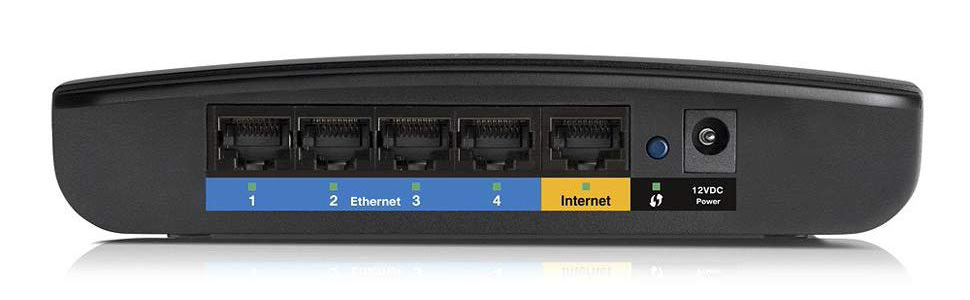
| Number of Ports | 5 |
| Operating System | Windows |
| Other Special Features of the Product | Access Point Mode |
| Router Network Type | hybrid |
| Security Protocol | WPA-PSK |
| Special features | Access Point Mode |
| UPC | 745883596751 |
| Voltage | 12 Volts (DC) |
| Wi-Fi Generation | Wi-Fi 4 |
| Wireless Compability | 802.11n |
| Wireless communication standard | 802.11n |
G**E
Verdadera cobertura completa (en áreas de 260m²)
Si lo que necesitas es verdaderamente obtener una cobertura completa en tu hogar, este aparato es tal vez una de las mejores opciones. Es cierto que es una inversión considerable--pero en mi experiencia, en este tipo de cosas sueles obtener lo que inviertes. Puede que este aparato sea una exageración para uso doméstico. A menos que trabajes desde casa y con archivos pesados que hay que subir a la web; o que sean muchas personas en casa usando servicios de streaming a la vez, por ejemplo. O que tu casa sea considerablemente grande, es decir, de 2 o 3 dormitorios, 260m², más o menos. Por otro lado, es el primero que pruebo que se adapta perfectamente a las necesidades de una oficina. Como menciono arriba, si lo que buscas es una cobertura veloz y fiable para streaming, esta te permite 4K y 8K sin problema alguno. Incluye tecnología WiFi 6 que proporciona velocidades cuatro veces más rápidas de hasta 6 Gbps que te ofrece suficiente ancho de banda para más de 40 dispositivos. A través del WiFi 6 minimiza las congestiones en la WiFi eliminando las interferencias causadas por redes cercanas. Aísla tu red para eliminar las interferencias. Obviamente, puede expandirse el rango de este router agregando cualquier producto compatible con Linksys Mesh ya que incluye la tecnología Intelligent Mesh. Te ofrece una seguridad más inteligente con actualizaciones automáticas, controles parentales y red para invitados. Y te permite configurar y controlar tu red desde cualquier sitio con la aplicación de Linksys. La configuración es fácil usando la app Linksys en tu móvil PERO cabe mencionar que solo se puede configurar a través del uso del app--cosa que podría molestar a ciertos usuarios, ya que no te permite acceso pro ordenador, por ejemplo. El plus es que con la aplicación puedes monitorear y administrar el WiFi de tu hogar de forma remota en tu móvil, como ya mencioné, con lo que tendrás un control más "al detalle" de lo que pasa con tu red. Esto último sin duda les servirá a los padres que quieren mantener cierto control sobre lo que hacen sus hijos online. Este router obviamente tiene soporte para controles parentales. Además de eso, te permite dar prioridad a ciertos dispositivos y no a otros; y crear una red separada para acceso a invitados. ESPECIFICACIONES TÉCNICAS: Tecnología Wi-Fi: - Mesh AX6000 de doble banda Gigabit 1147 + 4804 Mbps Funciones destacadas: - Doble banda (2,4 GHz + 5 GHz), 4x4 WiFi 6 - Red WiFi mesh de expansión fácil - WiFi sin interrupciones - Actualizaciones automáticas del firmware - Dos puertos USB 3.0 - 4 antenas ajustables - Aplicación de controles sencillos - Doble banda simultánea. - MU-MIMO 4x4 - Procesador con núcleo Quad a 1,8 GHz - Tecnología OFDMA Estándares de red: - WiFi 6 (802.11ax) - WiFi 5 (802.11ac) - WiFi 4 (802.11n) - 802.11g - 802.11b - 802.11a Velocidad Wi-Fi: - AX6000 (1147 + 4804) Bandas Wi-Fi: - 2,4 y 5 GHz (doble banda simultánea) Alcance Wi-Fi: - Hasta 278 m2 Número de puertos Ethernet: - 1 Gigabit WAN - 4 Gigabit LAN Otros puertos: - 2 puertos USB 3.0 - Corriente Antenas: - 4 antenas externas ajustables Procesador: - Procesador con núcleo Quad a 1,8 GHz Indicadores LED: - Corriente/Estado/Conexión, WPS, Ethernet y USB Modos de funcionamiento: - Router inalámbrico - Puente inalámbrico Compatibilidad con sistema de archivos de almacenamiento: - FAT - FAT32 - NTFS - APFS (Solo lectura) Instalación fácil: - Instalación sencilla y segura por aplicación - Requerimientos de la instalación: (1) Conexión a internet con un módem. (2) Dispositivo móvil con Android 4.4 o iOS 9 y posterior, preferiblemente con Bluetooth. Dimensiones (L x A x A): - 280 mm x 170 mm x 60 mm (con las antenas recogidas) Peso: - 940 gramos Funciones de seguridad: - WPA2/WPA3 Mixed Personal - WPA2 Personal - WPA3 Personal Fuente de alimentación: - Entrada: 100-240 V CA, 50/-60 Hz, Salida: 12 V, 4 A
C**X
Performans > Fiyat
Yedek/ikinci/ana router olarak da rahatlıkla kullanılabilir, ancak kablolu mesafe arttırıcısı olarak kullanmak icin ideal. Kablosuz üç duvar üzerinden bağlanıldığında %10-30 civarında, düşük fakat tüm ihtiyaçlara yeterli bağlantı gücü sağlıyor, yüksek miktarlı data kullanımı dahil (HD, FHD film) ihtiyaca cevap verebiliyor. Kabloyla evin merkezine çekip kablosuz bağlantıyı üzerinden yaptığınızdaysa zaten %80-100'lük yüksek güçle bağlanılıyor. Ödenen paranın karşılığını fazlasıyla veren bir ürün. Artıları: - Uygun fiyatı. - Kablolu (LAN) bağlantıda yüksek, güvenilir performans (kopma, kesilme, yeniden başlatma gerektirmemesi). - Sadece uzun menzilli kablosuz N300 router olarak piyasada giderek azalan bir model olması. - Cisco'nun (Belkin) ev kullanıcılarını hedefleyen Linksys serisinin kaliteli, güvenilir bir ürünü olması. - Güvenli (HTTPS) bağlantı üzerinden kolay kurulum ve yönetim. - Özellikle kablosuz mesafe arttırıcı olarak kullanmak için uygun bir ürün. - 7/24 açık kalan bir cihaz olduğundan, çok düşük elektrik harcaması (Normal/Idle 4.70 watts,Bekleme/Standby 2.40 watts) Eksileri: - Kablosuz bağlantı gücü (mesafe/performans oranı) düşük. Ancak HD (720p) film dahil bir sorun yaşamadım. - Komut satırından yönetim konsoluna erişim yok. - Linksys'in Türkiye'de Teknik Servisi yok (Ancak Amazon'un kendi sattığı ürünlerden biri olduğundan arkasında Amazon garantisi de var. Sunduğu daha avantajli fiyatlar da hesaba katildiginda, doğrudan Amazon'dan almak daha avantajlı. Not: Tomato Shibby firmware ile telnet üzerinden yönetim.
J**N
Article usagé
Croyant acheter un article neuf, quelle désolation en ouvrant la boite de constater que cet appareil avait deja été utilisé
L**H
Routeur haut gamme avec des performances wifi milieu de gamme
Routeur WIfi soit disant Haute gamme mais performance du signal WIFI à peine meilleur qu'une livebox4 !!! mesure à 3 mètre: livebox4 : -35 db MR9600 : -30 db à 7 mètre : L4 : -65db MR : - 60 db
F**A
Works wonderfully, if you make certain adjustments
We recently switched to a different internet provider who was able to hook us up with a way faster connection speed than what we had been using. But we had to buy a router in order to have wireless access since the new company doesn't provide their own. When the computer was hooked up directly with an ethernet cable our speed was clocking at least 30 Mbps and usually closer to 50 or 60. After reading up on the various brands of wireless router available, we went down to a brick and mortar store planning to buy this precise Linksys model. But they didn't currently have it in stock. Impatient to get wireless, we instead bought a seemingly comparable Netgear router from the store and hooked it up the next day. It seemed to work well enough at first and although it did reduce our speed significantly we had sort of expected this so no big deal. BUT within a day or two of use the Netgear device was dropping the internet connection about once every other day. Not a huge problem, we just reset the router and once it booted up again it worked fine for another day or two. But we had just been through this kind of dropped-connection drama with our previous internet provider and were not really as tolerant of it as we might have been. Besides which, the Netgear reduced our speed so far that actual downloading was only around 300 Kbps. So we researched again, saw this router with the tip in the comments about how to adjust the settings to boost the speed and performance and ultimately we decided that this really was the one we wanted and had from the beginning. So we went ahead and ordered it on Amazon and while waiting for it to arrive continued to use the Netgear, which continued to perform pretty much the same. Once the Linksys came we set it up and crossed our fingers. Sure enough, the Linksys was only giving us around 600 Kbps. But we went ahead and followed the directions given by another reviewer here and changed the settings. The directions were as follows: "Go to [...] and login to your router. If you've never done this, look for instructions that came with your router or do a google search to find the default username and password. Find a page that has QoS settings. For the E1200, you need to click on "Applications & Gaming" and select the "QoS" sub-menu. (It is the same for the E900 as well) Disable WMM Support. Click save." Once we did this the speed immediately went up to the 25 to 35 Mbps range and has stayed there since. No dropped connections, faster speed than we even expected, and the extra reassurance of knowing that if we do have a problem customer service will be available indefinitely, rather than having to pay for it after the first 90 days (as was the case with the Netgear router). We couldn't be happier with this router, it has made the internet a pleasure to use again and I just wish we had bought it in the first place!
Trustpilot
3 days ago
3 weeks ago