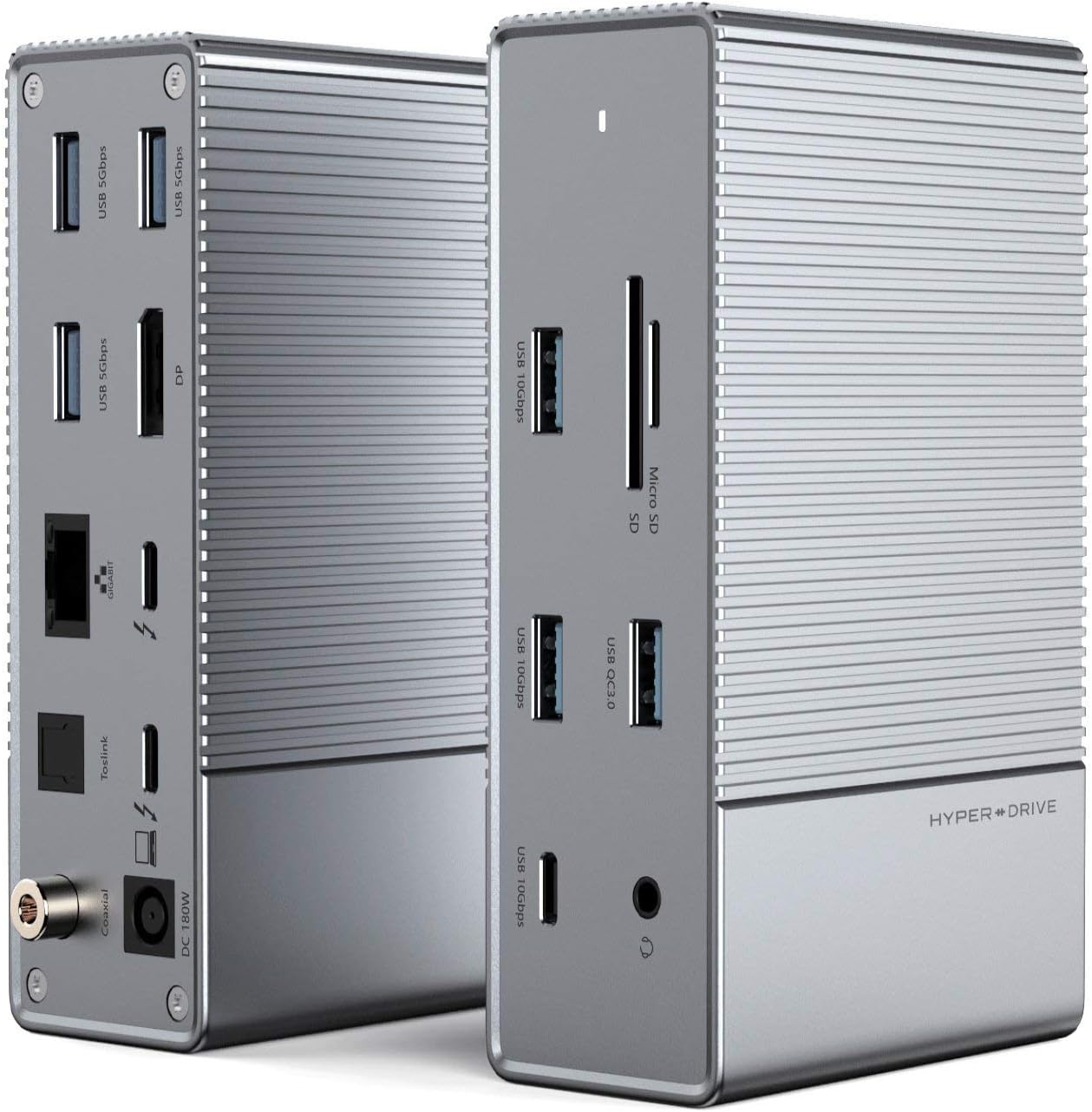


Product description HYPER - Latest Generation Titan Ridge Docking Station. Supports 8K video. Backward compatible with USB-C host. Specifications Dimensions & Weight 132.1 x 88.9 x 43.9mm 3.5” x 2” x 0.59” 589.7 g / 20.8 oz / 1.3 lbs Compatible with USB-C Host Backward compatible with USB-C (non-TB3) host/computer. The difference between TB3 vs USB-C connection would be upstream bandwidth (40Gbps vs 10Gbs), downstream port (TB3 vs USB-C 2.0), and video resolution (see below). All other port features remain the same. HyperDrive GEN2 16-Port Thunderbolt 3 Dock Thunderbolt 3 Titan Ridge Latest version of Thunderbolt 3 utilizing Intel Titan Ridge chipset which supports backward compatibility with USB-C non-TB3 devices. Supports 8K, Dual & Triple 4K Video Output Supports dual (8K+4K) video (Mac/PC) or triple 4K video (PC/Chrome only with MST hub). See supported max video resolutions below. DisplayPort 1.4 Supports DisplayPort 1.2 and 1.4 protocols. Connect to a single DP display (Mac/PC/Chrome) or MST hub to expand up to 3 extended displays (PC/Chrome only) Daisy Chain up to 6 x TB3 Devices Daisy chain up to 6 x Thunderbolt 3 docks or devices. 6 x USB High-Speed Data Ports USB-C 10Gbps 5V/1.5A USB-A 10Gbps 5V/900mA x 2 USB-A 5Gbps 5V/900mA x 3 USB-A QC 3.0 18W Charging Port: Charging only. Supports Quick Charge 2.0/3.0 5V/9V/12V. Max 18W. Gigabit Ethernet: Supports 10Mbps/100Mbps/1Gbps. Half/full-duplex. MicroSD/SD 4.0 UHS-II 312MB/s: Supports maximum read/write speed of 312MB/s. Supports SDHC/SDXC memory cards up to 2TB. MicroSD and SD slots can read and write at the same time. Digital Coaxial Audio: SPDIF interface: Max 96KHz/24bit output, 0.4V~0.6V Vpp@50Ω load. Optical Toslink Audio: Optical fiber SPDIF interface: Max 96KHz/24bit output, -21dBm~-15dBm light intensity output. 3.5mm Audio Jack: Sample rate up to 96KHz/24bit. Supports auto-detection and auto-switch between OMTP and CTIA. DC 180W: Connect to included 180W (21V, 8.57A) power supply for dock to function. - Upstream TB3 40Gbps 85W PD: When connected to TB3 host/computer, Upstream TB3 port supports 40Gbps data bandwidth and 85W Power Delivery to TB3 host. Upstream USB-C 10Gbps 85W PD: When connected to USB-C (non-TB3) host/computer. Upstream TB3 port supports 10Gbps data bandwidth and 85W Power Delivery to USB-C host. Downstrem TB3 40Gbps DP1.4, 15W: When connected to TB3 host, Downstream TB3 port supports 40Gbps data transfer, DisplayPort 1.4 video, 15W power, and ability to daisy chain up to 6 x TB3 devices. Downstream USB-C USB 2.0 15W: When connected to USB-C (non-TB3) host/computer. Downstream TB3 port supports USB 2.0 data transfer and 15W power. About HYPER Celebrating our 16th year anniversary in 2021, HYPER by Sanho Corporation is a dynamic team based in Silicon Valley, California. We specialize in delivering award winning, cutting edge IT & mobile accessories with a focus on Apple, portable power, data storage & connectivity products. Digital Coaxial Audio; Optical Toslink Audio; Gigabit Ethernet; USB-A 5Gbps 5V/900mA x 3 Upstream TB3 40Gbps, 85W PD (for TB3 host), Upstream USB-C 10Gbps, 85W PD (for USB-C host) Downstream TB3 40Gbps, DP1.4, 15W (for TB3 host), Downstream USB-C, USB 2.0, 15W (for USB-C host) DC 180W MicroSD/SD 4.0 UHS-II 312MB/s USB-A QC 3.0 18W 3.5mm Audio Jack USB-A 10Gbps 5V/900mA x 2 USB-C 10Gbps 5V/1.5A Video Resolutions for TB3 host Max Extended Video Resolution DisplayPort 1.2 1 Display (Mac/PC): 1 x 4K60Hz (TB3 or DP port) 2 Displays (Mac/PC): 2 x 4K60Hz (TB3+DP or TB3 with dual video adapter) 2 Displays (PC only): 2 x 4K30Hz (DP with MST hub) 3 Displays (PC only): 1 x 4K60Hz (TB3) + 2 x 4K30Hz (DP with MST hub) or 3 x 1080p60Hz (DP with MST hub) 1 Display (Mac/PC): 1 x 8K30Hz/5K60Hz (TB3 or DP port) 2 Displays (Mac/PC): 1 x 8K30Hz/5K60Hz (TB3/DP) +1 x 4K30Hz (TB3/DP) 2 Displays (PC only): 2 x 4K60Hz (DP with MST hub) 3 Displays (PC only): 1 x 4K60Hz (TB3) + 2 x 4K30Hz (DP with MST hub) or 3 x 4K30Hz (DP with MST hub) Video Resolutions for USB-C host 1 Display (Mac, PC, Chrome): 1 x 4K30Hz (DP1.2) or 1 x 4K60Hz (DP1.4) 2 Displays (Require MST hub. PC/Chrome only): 2 x 1080p60Hz (DP1.2) or 2 x 4K30Hz (DP1.4) 3 Displays (Require MST hub, PC/Chrome only): 3 x 720p60Hz (DP1.2) or 3 x 1080p60Hz (DP1.4) Review: Great dock with versatility, but sometimes crashes MBP - Works well, but does crash once a day with my Macbook Pro. Other than that, the simplicity of have everything connected and 4K work fits my bill nicely. I have a Alienware 38" connected. Review: An excellent edition. - One of the best purchases I have made for my mini. PC to give it additional slots and capabilities.


| ASIN | B08P5BMJ9D |
| Best Sellers Rank | #267,971 in Electronics ( See Top 100 in Electronics ) #2,150 in Laptop Docking Stations |
| Brand | Hyper |
| Color | Silver |
| Compatible Devices | Chromebook |
| Customer Reviews | 3.5 out of 5 stars 44 Reviews |
| Hardware Interface | Thunderbolt 3 |
| Item Weight | 1.53 Kilograms |
| Manufacturer | Sanho |
| Mfr Part Number | DE042-LYJ-2-2-136 |
| Model Number | HyperDrive GEN2 |
| Number of Ports | 4 |
| Total USB Ports | 4 |
| Total Usb Ports | 4 |
| UPC | 817110014533 |
| Wattage | 85 watts |
B**R
Great dock with versatility, but sometimes crashes MBP
Works well, but does crash once a day with my Macbook Pro. Other than that, the simplicity of have everything connected and 4K work fits my bill nicely. I have a Alienware 38" connected.
W**R
An excellent edition.
One of the best purchases I have made for my mini. PC to give it additional slots and capabilities.
N**L
Very Poor customer service
I bought another one that the TECH STAFF of Hyperdrive suggested and in would not even drive 2 monitors. Still waiting on a return label from HYPERDRIVE after buying hundreds of dollars of their products. Buy your hyperdrives directly from Amazon to ensure a faster return policy and zero circle jerks.
B**R
Stopped working and vendor did not honor warranty
I purchased this and used it with my 2019 Macbook pro for almost a year with no issues. At the time it was the only dock which could support the Samsung G9 monitor at full resolution and 120hz refresh. The dock would get really hot but it still worked. One day it stopped working within the 1 year warranty period. I opened a ticket with the vendor and after providing them the details and proof that the dock was not working they completely stopped responding. Way too much money to spend on a product that doesn't even last a year, dissapointed.
L**U
Great docking station with few mounting options.
There are a host of reviews that delve into the features of this great little dock, but I want to touch a little on the amazing construction of this dock, as well as poke the entire docking station manufacturer base a little bit with a stick. First, the build of this is pretty amazing, from an engineering standpoint. There are folks out there for whom the design specifics of a thing might go right by them. Not everyone appreciates a bit of engineering, perhaps that's only for the engineers. Well, I'm a bit of an engineer. I was trained in electronics, jet engines, and other engineering fields when I was in the Navy. So when I look at build quality and marvel at it, it's something to note generally. The all-aluminum enclosure this is built out of has the literal appearance of being machined out of a chunk of solid billet aluminum. Everybody talks about, oh, Thunderbolt this, and Mac that. But has anyone actually just...LOOKED at it? I study the port alignment, and it's aerospace quality. You know how sometimes the ports on the circuit board won't exactly match the holes in whatever case they're mounted in? These look like the entire thing was hand fabricated by a German machinist. With .0001 accuracy. The only screws are on the one endcap, and the seams on the opposite cap are so precise you have to search for them up close to find them. The heft of it, is perfect, it feels like a quality component. And I love that it literally has the smallest footprint of any of my docks, even laid on its side it's extremely compact but stood on edge, the space it occupies is miniscule. Which, for a non-mountable dock, is literally best-case scenario. So I'm pretty much enamored with the design and execution of this dock. If I had just got done Ferrari shopping for my new Enzo and I went next door to purchase a docking station to match my car, this is the one I'd purchase. I might paint it red, of course. But you get the point. But the overall design can't alone win this 5 stars, and this takes me to the downside of nearly every dock I've owned, used, or reviewed. Despite the fact this occupies a wonderfully small footprint, and for that I give it proper credit, some of us just don't want these things ON our desks. There are those of us who fight daily to reduce desk clutter, because once you give in to desk clutter, it CONSUMES YOU. Yeah, a little melodrama there, but the point remains valid. There is only ONE docking station that I own that included ANY kind of wall mount ability, and that's a StarTech. Wonderful little dock that I love BECAUSE I can wall mount it. And they didn't even include any mounting hardware, specs, templates, NOTHING. I had to FABRICATE a wall-mount for it. And I was GLAD to do so. Why? Because now it sits on my wall, not on my desk. Thanks, StarTech. Hyper, in fact ALL manufacturers, please, pay attention. Not all of us want docking stations on our desktops, not all of us want GIGANTIC power bricks on the floor, or especially on our desks. No, really, the power supply that comes with this is enormous. Just, wow, just stick a mATX power supply in here or something. But, why do you go to all these great lengths to build these wonderful looking, working, docks, and then just leave the cord management and mounting up to us? Please, please, please, give us a way to mount these things, the docks AND the power supplies. I don't care if it's a wall mount bracket, an under-desk clip / bracket, something that velcros to my monitor, or to the side of my case, give me SOMETHING to mount this. You could include a plastic cage for the brick for pennies, a decent mount for the hub might take a buck or 2. But man, it sure would make it easier. I'll probably make some kind of bracket for it, because I like the hub I just don't want it on my desk. Feature wise, just to touch on it, I love the plethora of USB ports, could use another display port or even an HDMI though. I don't use my hub to run multi-mon, at least not on this, (I do on my StarTech), my video card and onboard video can do all that. This is more about usb connectivity for me, and for that this this is the bomb. I just wish I didn't have to fab a way to mount it somewhere. Happy computing!
J**0
Turns a laptop into a desktop, Has Coax audio output
I will start off by saying that this is one of the most if not the most "complete" hub I have ever seen. This hub literally has all the ports to set this up as a desktop including Coaxial audio output. I set this up on my secondary desk where I Have another dock for my laptops and this just blew it away. I plugged everything from my secondary workstation into this device to test it and it handled it like a boss. Because of the 180W charging I was even able to test it with this Alienware laptop I recently got. It is able to power the Alienware (without the GPU chugging though) and turn it into a multi-screen workstation. Unfortunately it only has a single DP output and the other is through Thunderbolt only so a TB->DP cable is required and most devices will not support it.... I mainly was attracted to this because of the coaxial audio output so that I could run this dock to my DAC. The coax port actually works fine on my external DAC which is pretty cool to be able to do this with a laptop. It didn't quite work right with my pixelbook (only appeared once, typically shows the monitor as the output and not the other audio device) but it worked fine on my windows laptops and even on another linux laptop. For a thunderbolt laptop like a macbook or a high end windows laptop this dock provides a ton of expandability to thunderbolt devices.... however I don't really have those. I just used a keyboard, mouse, external SSD, external HDD, Ethernet, DAC and a flash drive. No issues with all of it and powering the laptop at the same time. I drove a single display with 1080p and recently 1440p. Overall this is quite a unique dock, it is a shame that it seems that the company discontinued it now (not available at the time of review). Maybe it is just out of stock like half the other things on the market....
O**E
Was wishing for the best but... Read the entire review to understand
I love doing tech reviews especially on hubs, and docking stations. I am working from home now and needed a docking station to connect several devices and saw this HyperDrive Thunderbolt 3 USB-C Dock, GEN2, and really wanted to try it out. If you want more in-depth reviews on all types of tech gadgets, head over to my YouTube channel "OndaWire" where I put products to the test. I test products for at least a couple of weeks and give all the pros and cons that I experience so you can make a better decision before spending your hard-earned money. Let's jump in and talk about this HyperDrive Thunderbolt 3 USB-C Dock, GEN2. Pros: 1. You can tell immediately after taking this out of the box that this is quality at its finest. This docking station is super solid, heavy and so stylish. It's a great piece of hardware. This has that professional look that makes people look at it twice. 2. I tested the Ethernet and this thing delivers. I consistently stayed in the 1GB data speeds. 3. If you want a device that has power delivery (PD), then look no further because this delivers that power to keep you fully charged and working non stop. 4. The placements of the ports are great. All of the cables that you don't want to see are in the back and since I do a lot of videos editing the SD and Micro SD card are perfectly placed in the front, along with the 3.5mm headphone jack, 10GB USB-C port for fast delivery of data and 2 USB-A 10 GB ports! Absolutely love the placement of these ports. 5. This docking station by Hyper is running the latest version of Thunderbolt 3 utilizing Intel Titan Ridge chipset and the speeds reflect it. This thing is fast and probably one of the best docking stations out minus the few cons that I will get to in a minute 6. The coaxial and Toslink for audio is super nice. I've never seen a docking station with this on it, and it's game-changing. 7. This docking station will allow you to daisy chain up to 6 docks. This would be good if you have a bunch of terminals to hood up. 8. When I transfer data, data transfers at the blink of an eye! Cons: 1. The box says Triple 4K video display BUT THAT IS NOT ACCURATE! This does NOT allow you to add a Triple screen, but rather 2 extra screens ONLY, and again, ONLY if your computer is Thunderbolt 3. If it's just USB-C, then you only get 1 extra monitor added. 2. Why make the second port for dual display USB-C Thunderbolt 3 ONLY but make the DP port USB-C / Thunderbolt 3. So confused on this one. 3. For $300 Con #1 and #2 should not exist. I would expect this out of a way lower priced docking station but again, for $300, this should work seamlessly and with USB-C and Thunderbolt 3 not 50/50 USB-C and Thunderbolt 3, especially when the Title, box and the description CLEARLY say, "works with BOTH Thunderbolt3 and USB-C devices. Still can't make sense of that. Overall, I am giving this a 3.5 *** star rating. As much as I personally wanted to love this HyperDrive Thunderbolt 3 USB-C Dock, GEN2 the cons are too much, especially for the price tag of $300. NOW, with that said, if you ONLY have a Thunderbolt3 computer/device, then you will absolutley love this HyperDrive Thunderbolt 3 USB-C Dock, GEN2, I can gaurantee that!
K**R
Impressive specs
When I received the package that contained this docking station my first thought was that I’d made a terrible mistake. I’ve tested at least half a dozen docks over the past year, but this box was as large and heavy as any two of them combined. I was almost afraid to open the box as I assumed I was going to hate something so heavy, but when I finally cracked it open I was pleasantly surprised to find that the dock itself is rather small, and light enough to hold in the palm of my hand (though I should point out that the dimensions in inches listed in the product description are way off. The mm measurements are accurate, but I suspect someone screwed up the conversion to inches and didn’t notice). What accounts for the weight and size of the box is the truly enormous power supply. It’s a 180W beast, significantly larger and heavier than any power supply I’ve used for a dock, though of course this dock is more capable than most, and requires a larger power draw to feed it. The range and quality of the connections available on the HyperDrive are impressive. It can handle 8K displays, which is a pretty rare feature right now. 6 USB-A and 3 USB-C ports mean that you won’t find yourself wanting, though the lack of HDMI and only one DP port makes this a dock that’s tailored for a very specific user rather than for general use (though of course you can add an MST hub to expand your display options). For me this dock is massive overkill. It’s been fun to play around with but it’s not really designed for someone with my modest needs. If the range of ports suits you then I’d happily recommend it. It’s well built and very sturdy, though the enormous power supply means that this thing is absolutely not portable. It’s designed to live permanently on your desk beneath your array of 4K monitors, and not to be tossed in a bag to take with you to work every day.
Trustpilot
1 week ago
3 weeks ago