Buy anything from 5,000+ international stores. One checkout price. No surprise fees. Join 2M+ shoppers on Desertcart.
Desertcart purchases this item on your behalf and handles shipping, customs, and support to Bolivia.
🎮 Elevate your game with wireless precision and style — never miss a move again!
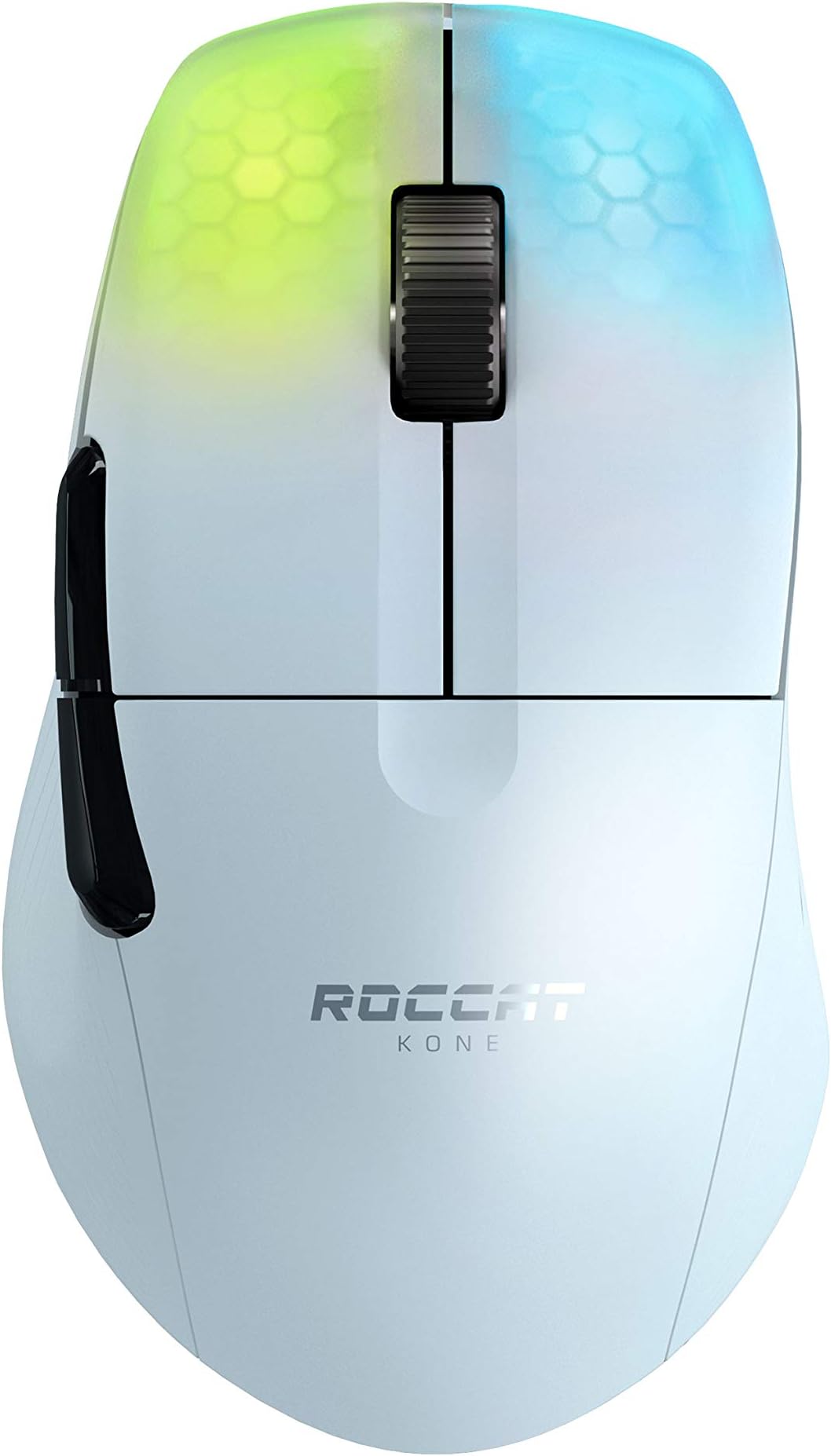
The ROCCAT Kone Pro Air is a premium wireless gaming mouse engineered for professionals and enthusiasts alike. Featuring a 19K DPI Owl-Eye optical sensor, Titan Switch Optical buttons rated for 100 million clicks, and a featherlight 66g ergonomic design, it offers unparalleled precision and comfort. Dual wireless modes (2.4GHz and Bluetooth) provide over 100 hours of battery life with rapid charging. Its translucent honeycomb shell showcases vibrant AIMO RGB lighting, while heat-treated PTFE glides ensure smooth, effortless control. Backed by a 2-year warranty, this mouse is the ultimate blend of performance, durability, and style.


| ASIN | B091BHSZ52 |
| Additional Features | Wireless |
| Antenna Location | Gaming |
| Are Batteries Included | Yes |
| Are Batteries Required | Yes |
| Battery Average Life | 100 Hours |
| Best Sellers Rank | #1,294 in Computer Mice |
| Brand | ROCCAT |
| Built-In Media | 'USB-C PhantomFlex charging cable, heat-treated pure PTFE glides' |
| Button Quantity | 5 |
| Color | White |
| Compatible Devices | Windows 7, 8, 10 & 11 (software support) |
| Connectivity Technology | Bluetooth |
| Customer Reviews | 4.1 out of 5 stars 401 Reviews |
| Embellishment Feature | LED |
| Enclosure Material | Aluminum,Ptfe |
| Global Trade Identification Number | 00731855504152 |
| Hand Orientation | Right |
| Hardware Platform | PC |
| Item Dimensions L x W | 7.24"L x 5.2"W |
| Item Weight | 2.56 ounces |
| Manufacturer | ROCCAT |
| Mfr Part Number | ROC-11-415-01 |
| Minimum Required Operating System Version | Windows 7 |
| Model Name | Kone Pro Air |
| Model Number | ROC-11-415-01 |
| Mouse Maximum Sensitivity | 19000 Dots per Inch |
| Movement Detection | Optical |
| Movement Detection Technology | Optical |
| Number of Batteries | 1 Lithium Polymer batteries required. (included) |
| Number of Buttons | 5 |
| Operating System | Windows 10, Windows 11, Windows 7, Windows 8 |
| Power Source | Battery Powered |
| Range | 10.0 meters |
| Special Feature | Wireless |
| Style Name | KONE Pro Air |
| UPC | 731855504152 |
| Unit Count | 1.0 Count |
| Warranty Description | 2 year manufacturer |
Z**L
Great Mouse
The Kone Pro Air is a great mouse. I upgraded from the wired Kone Pure Ultra. The Pro Air retains a very similar ergo shape with the thumb groove on the side, the large side buttons, and the superb mouse wheel. Since the shape was so similar, adapting was pretty easy, and the best part is that I'm no longer fighting the wire. In a lot of mouse or peripheral reviews in general, the writer will say something like "Will this thing make you a better player? No!" However, in the case of the Kone Pro Air, I do think it has made me better. I just got out of a Modern Warfare 3 2-hour session of Shipment/Rust and I can perceptibly feel that my tracking and flicking has gotten faster, smoother, and more accurate. You really don't understand how much a mouse wire can bog you down until you go without one for a few weeks. And I had been using a mouse bungee too. I held out on buying a wireless mouse because I was always skeptical of latency, but this mouse is IMMEDIATE over a 2.4ghz WiFi network. Lighting is a little understated as it only shows up under the two main mouse buttons instead of around the whole mouse (like many Roccat mice), but it looks good. Only couple caveats I'll mention here are that Swarm is pretty buggy and the initial pairing process was a little cumbersome. Swarm will show the mouse charged to 100% and display "4 hours remaining." There is also no way to stop the mouse from turning the RGB off after a minute of it being idle (I made sure to turn power saving mode off). And when I got the mouse I had to do a little 20 minute song and dance or plugging the mouse in, hitting the pair button on the dongle, unplugging it, etc. Eventually I got there and I've zero problems since (and I use a KVM switch), but I thought that was worth mentioning. The Owl Eye sensor is spot on and the PTFE feet glide super smoothly over my Skypad 3.0 (glass mousepad). Roccat also includes a spare set of feet, which I thought was a nice touch. Overall, I am very pleased. If you have tried other Kone mice and want to make the jump to wireless, you should be very happy with the Kone Pro Air.
N**A
The best lightweight mouse for me.
I've used this mouse for about a month now. Here are my thoughts on this wonderful mouse. Pros: -extremely low latency wireless -top tier stock feet that don't need replacing. ( Aftermarket feet will probably perfor 5-10% better if you really want that edge ) -large side buttons -great coating -ergonomic shape that fits well for MY grip style -unique RGB implementation -easy storage for the dongle under the mouse -dual mode pairing with bluetooth connectivity (bluetooth mode offers dramatically more battery life. about 3x more usage time available Cons: -optical switch clicks just cannot match the sound and feel of mechanical switch clicks. the crispiness is missed -the ergonomic shape, while comfortable for ME, is not for everyone, as it can alienate the gripstyle's of others due to forcing a specific grip -no adapter for the included cable to plug the receiver into ( if you've had other wireless gaming mice I think you'd know what I'm talking about. ) -no infinite scroll wheel ( coming from a g503 lightspeed, this is a feature that I miss ) -the rgb implementation, while unique, may not be for everyone Wireless mice these days are pretty much all great. With wireless tech being as good as wired, sensor tech coming as far as it has and with companies all pretty much using their own implementation of the same sensor from one company, performance of these mice are pretty much all the same. What it comes down to is shape. And while this is a 5 star mouse for me due to the shape, it is definitely not a "one size fits all," but more a "perfect shape for some." If this shape looks like it will fit your grip style, I say give this a try. It's definitely unique in the market for it's shape, so if the shape is right for you, it's pretty much the only one out there like it.
S**E
Not quite a Kone Pure, but it's pretty great.
It tracks perfectly, and all buttons and the scroll wheel feel precise and high quality. It's quite light, and the BT works perfectly. The LED RGB lighting is superfluous, but it's a nice touch. The shape is not as great as the old Kone Pure, but it's not far off. I would prefer it to be a bit smaller and deeper contoured on the sides, but this mouse shape is almost perfect. The built in battery lasts for several days of use, and recharges easily. I have no regrets with this purchase.
K**R
One of the most comfortable ergo shapes I've tried
TLDR: Try this mouse if you're looking for an alternative to the GPX shape. Pros: - Very unique shape that fits your hand like a glove - Lightweight wireless (self explanatory) - Very smooth operating mouse wheel with defined steps, and easy to click - Very good quality stock feet (PSA: REMOVE THE BLUE FILM) - USB Type C port on the front - Solid battery life (especially with RGB off) - Fantastic coating that maximizes grip and doesn't leave residue (speaking for the white version) - Software that gives very good control over the mouse, and useful information including a system tray battery status. - Bluetooth functionality - Very nice and flexible charging cable - Sensor based off the Pixart 3370 Cons: - No included USB-C to A dongle adapter for the cable (though to get around this, I am using the one included with the Glorious Model-O Wireless mouse and it works perfectly) - The charging port is recessed a little too far making it kind of a pain to remove the cable (although if you need to use it wired, it's one of the most solidly seated detachable cables) - Buttons 1 and 2 feel sort of creaky, but not quite as mushy as most opticals Thoughts: If you've been waiting for a good light weight, wireless, ergo mouse, then you need to give this one a try. Roccat hasn't ever really been on my radar for peripherals, but this one had me intrigued. The shape looked a little odd, but attractive like I've seen it before on a mouse that I liked in the past. I would describe the shape as a hybrid between a refined Rival 300 for the ring, pinky, and mouse 1 and 2 (but shorter), a little bit of a G502 around the thumb, and the back kind of like a EC-2 with the hump farther forward. It all comes together to make for one of the better mouse shapes I've placed my hand on. The shape makes you grip it the same way every time without forcing any fingers into uncomfortable or awkward positions. It just feels right. The mouse wheel feels really good and is easy to click. The side buttons are nice and big, and are easy to hit. The main mouse buttons are okay, but they feel like they have a little creakiness to them that's kind of off putting. So far, the best optical switches (or really good for any switch for that matter) goes to the Steelseries Prime. Those buttons are very snappy, and the internal design seems like they should keep their consistency pretty much forever. I really hope those get copied and implemented by other brands. The stock feet are very good also. They're very close to the quality of hyperglide, tiger: ice, or at the very least corepadz. You really shouldn't need to get aftermarket ones right away. I made that PSA in the pros and cons section because I have seen multiple people praise or criticize the glide with the protective blue film on. So if you get one, please make sure to peel those off. My only complaints about the mouse right now are its lack of an included adapter for the wireless dongle to connect to the charging cable (which is a very nice little doodad included with most other wireless mice). And the charging port on the mouse being recessed too far. When the cable is in, it feels very solidly in place like a wired mouse, but it makes it a bit of a pain to remove. I'm afraid I'm going to put too much pressure on buttons 1&2 and damage them over time or something. Aside from those 2 issues, I have no other complaints right now. If anything changes, I will update the review with important stuff noted at the top. Conclusion: This is a really nice mouse. I would recommend trying it if a GPW's shape is a bit too eggy for your liking.
C**S
Cheap product
Overall, this mouse feels very cheaply made compared to similarly priced, and even cheaper options from other brands. The scroll wheel is obviously a major issue on these. I didn't even have it 4 months and the scroll wheel was utterly useless. It would regularly disconnect in wireless mode, so often that I just gave up and used it plugged in, defeating the entire purpose of getting the mouse. I would not bother with this mouse when I can get a Logitech G502 for $35, which is 10x better
P**S
Lightweight and very responsive!
I've been a Razer user for quite a while. I decided I needed a change and seen the Roccat bundle with the Kone Pro Air, Vulcan 122 AIMO, and ELO 7.1 Air and went for it. First off, Amazon ships each part of the bundle separately. The mouse arrived within a couple days, the keyboard a few days later, and the headset was almost a week before it arrived. Second, this mouse is just plain awesome! I'm used to heavy metallic mice. The Kone Pro Air is super lightweight and very responsive. Wireless and Bluetooth connection works flawlessly. My favorite part of this mouse is the mousewheel. It's fully metal with a slight texture on it. It's also flat which is a really nice change and a bit wider. It doesn't have left to right tilt, but I never used that. The USB-C cord is a nice soft braided cord, plenty of length, and a nice quality. Overall, this thing has earned its 5 stars easily. I'm super impressed with Roccat and will be a return customer for sure!
K**H
Finally the mouse of my choice after 10+ mice
First of all, I have a fingertip/claw grip. My hands are medium F9~F10. I owned Basilisk Ultimate, Viper Ultimate, Pulsar X2 Lite Mini, Deathadder V2 Mini, Orochi V2, Logitech G-pro Superlight, Coolermaster (two mices, forgot the names), Logitech G303? Shroud version, and the list goes on. I ended up using the Basilisk Ultimate because of it's comfy ergonomic fit. However, it was too heavy so I kept on changing my main mouse. I can say that Roccat Kone Pro Air is my main now. Weight is not the lightest in the world, but it is very light still considering a ergo mouse. The X2 Lite Mini worked well too, but it hurted my pinky finger if I played for a while. (Strong tight grip when focused FPS gaming sessions) The only thing that isn't the greatest is the software and the USB C port not being easily plugged in, but that isn't a deal breaker for me. Besides, all other softwares were also crappy anyways. I was surprised by the charging speed. 50% to 90% in just 15~20 min. So far so good and super happy with my purchase.
M**W
Loved everything about this mouse until I didn't
I got this mouse for not gaming but office use, I wanted a very light mouse with click that isn't too obnoxious and this mouse fitted all of my needs. When I got the mouse, I downloaded the driver software from their website and paired the mouse with no issues, all the customization feature work as they should. I used this mouse until the middle scroll suddenly started to glitch, it would randomly scroll up when I'm scrolling down and vice versa, this seemed like very minor issue at first, however after I remind myself what a proper scrolling felt like with my other mouse, I could not stand it anymore, I had to return this mouse, even though everything else worked perfectly. I honestly wanted to use this mouse for longer if possible, I love the shape, click sound, middle click(I use a lot for my work) and everything. Maybe it just wasn't built strong enough for my type of use, so I will be looking for different mouse.
F**A
Excellent
Excellent product
ゆ**う
普通に良い
つかいやすい
M**.
Despues de un año, comenzo a fallar
Lo compre el 15 de julio del 2021, el mouse es muy ligero, la batería es increíble, es fácil de usar sin embargo comenzó a fallar el scroll, pienso que fue un defecto de fabrica, ya que el scroll es algo que se usa mucho menos que ambos clicks, me comunique con Roccat y Amazon y afortunadamente me dieron una solución, estoy dudando si comprar otro mouse de la misma marca por el miedo que me vuelva a fallar.
T**A
Great
My son said it is fantastic
あ**あ
つかみ持ちにおすすめ
四ヶ月くらい使っています。 耐久性はあんまりわからないです KPUというマウスを使っていてケーブルにストレスを感じていたのですが、形が似てて無線のこのマウスが値下げしていたので購入しました 無線で快適 充電持ちがかなり良い。 ライティングもキレイですね 重さはまあすごい軽いとはいえないけど丁度いい重さだと思う クリック感は重めです。個人的にはクリック感は軽い方が嫌なのであまり気になりません サイドのえぐれのおかげで指先で操作する感覚が得られる+ケツの形状もG403のようなコブ型でつかみ持ち特化型だと思う。
Trustpilot
5 days ago
1 month ago