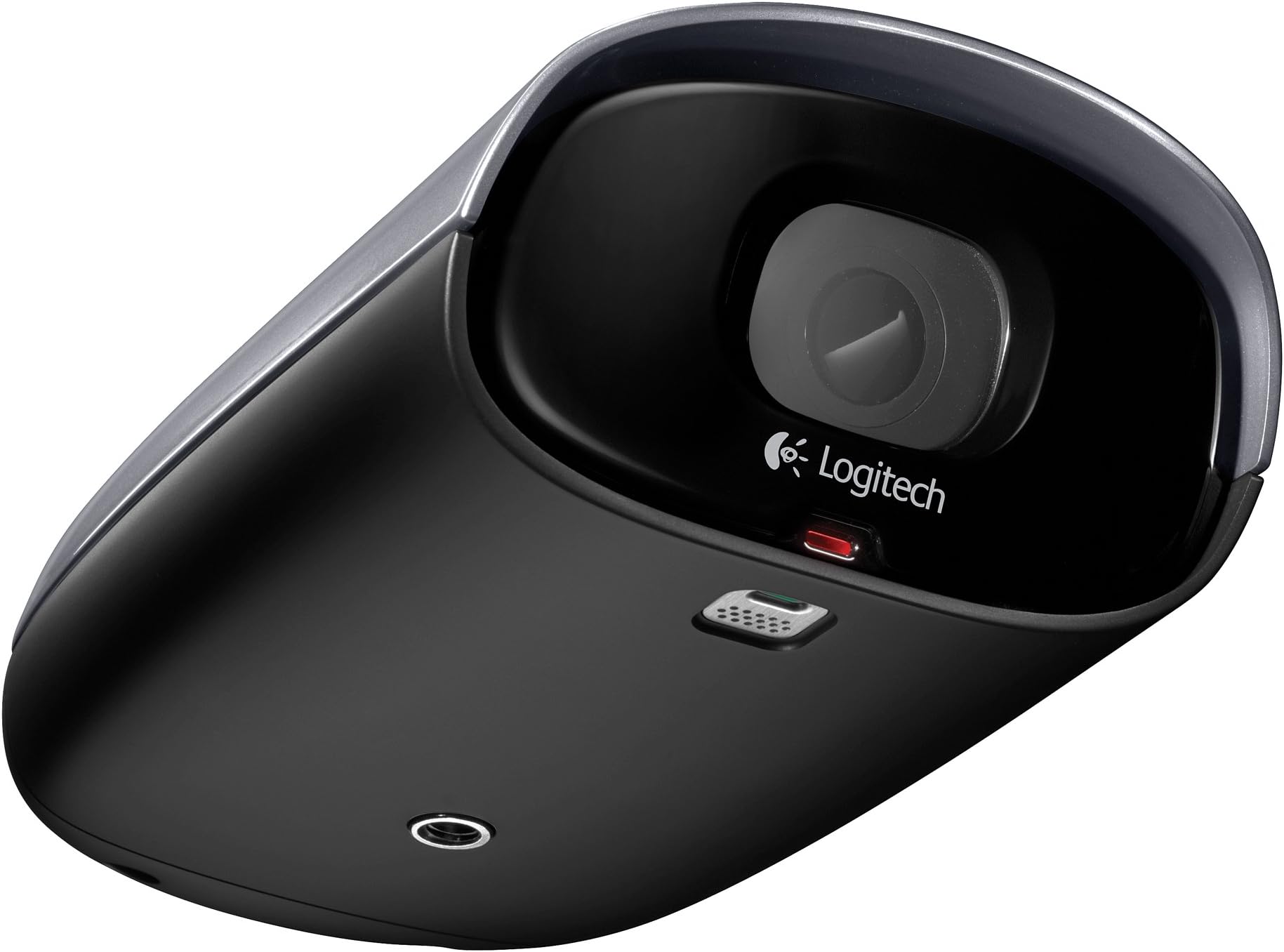


Logitech Alert 750e Outdoor Master - Night Vision Security System
Product ID: 435901
🌙Night vision up to 100 ft
🎥HD 720p video clarity
📱Remote live viewing on mobile
🔒 Stay ahead of the unexpected with 24/7 HD night vision security!
The Logitech Alert 750e Outdoor Master is a weatherproof, HD 720p security camera system featuring powerful night vision and a 130-degree wide-angle lens. It offers easy plug-and-play installation using HomePlug technology, eliminating new wiring needs. With free remote viewing apps for smartphones and tablets, motion-triggered alerts, and built-in DVR storage, it empowers professionals to monitor and protect their property anytime, anywhere. Expandable up to six cameras, it’s designed for flexible, scalable surveillance with Windows and Mac compatibility.
| Best Sellers Rank | #183,422 in Baby ( See Top 100 in Baby ) #875 in Surveillance Video Recorders #4,968 in Home Security Systems #12,876 in Surveillance & Security Cameras |
| Customer Reviews | 3.2 out of 5 stars 615 Reviews |
L**E
They swung me from disliking the system to loving it
I started out back in the end of April trying to find some security camera to monitor problems I had with some neighbors. My first one was the Logitech indoor one, figuring I'd just hang it in the window on that side of the house and that would be sufficient. But my initial attempts met with failure, and disappointment on a number of levels. I wrote a 2 star review of the indoor master system because of the things that just didn't work. I tried three other systems after that, all ending even worse. About the time I was trying the fourth system, I received an email from the guy in charge of their quality division saying he had seen my review and wanted to know if I was willing to try again, since they wanted to use the problems I had to help them tweak things and deliver a better product. The fact that he contacted me simply because of the review I wrote intrigued me, and since I was not at all satisfied with any of the other systems I tried, I gratefully accepted the offer of help. So I picked up another system, this one their External master system. I went through the setup the same way I did the first time, and hit almost all of the same problems. Errors about updates and unable to get to the internet from the software, problems with the iPhone and iPad apps not connecting right, and the fact that I use my media center computer as the "master" that gets all the recordings, but still wanted to view it from another PC that ended up mucking up some things. But they helped walk me through the issues one by one, and got the system up the way I wanted it. The update problem turned out to be something they heard about from a few other people, and said that just renaming the folder for now that had the update program in it would alleviate the errors, and that they were working on a resolution for it for the next software version. They then walked me through some changes to the INI file on my second PC so that I could use it to view things without having it interfere with anything, since the cameras get their settings, download the video files, and everything based on the PC that touches them. I tried to minimize the problem by basically duplicating everything exactly with my second computer but that actually caused as many issues as it prevented. By basically nulling out everything I could in the INI file now, I can connect to the system without it causing the problems it was. They didn't do anything specific for the iPhone issues I had, but over the course of a few days, eventually it started working more often than not, and the troubles I had were enough for them to graciously put me into their beta testing for the next version, which I am running now and is night and day compared to the old version, both in options as well as in reliability. One trick I ended up learning - when adding a second PC, don't set up as a site, even a site with the same name. You can cancel that part and just view then. If you don't, like I didn't the first time, you'll end up with a second "site" on the logitech alert website when you view your cameras. I was seeing two sites, both named the same, but only one with cameras. It took a bit of beating up but finally I was able to remove that second null site. I had a problem with the base module that plugs into the switch actually causing a broadcast storm or something since after it was running for 18 hours or so, everything on my home network would no longer work, although my VOIP phone system did. That was the only thing going straight into the router though, not into the switch everything else collapses into. As soon as I unplugged the network cable from the switch, everything started working again and a quick power cycle of the network piece of the Logitech setup would let it work again for another 18 or so hours. They promptly sent me a replacement and had me ship mine back to them for testing, and it has not happened again. The cameras run a bit more toasty than I would've been comfortable with normally, but even the three I have outside now, in the 100 degree weather we've had recently, have had no problems. I'm even thinking it might help me in the winters, if the heat is enough to dissipate any snow that ends up on them... :) The night vision is quite impressive, although the detail isn't as good as it is during the day. But it's easy to see and recognize people even from 30 feet away as they walk down the sidewalk here, although that recognition is mostly from size, shape, and movement recognition, not face. But close up the faces are easily visible and recognizable. The problem with night vision for me is bugs. Seems a lot of insects love the little red emitting spots on the front of the cameras, so they play havoc with the motion detection. If you leave it set to record during the night, you'll see a lot of bug activity. But i've also got some great shots now of lightning strikes nearby that I pulled from the recordings the cameras have made during storms at night, so it's not all negative. :) Motion detection overall is really the biggest weakness it has I think. The majority of my recordings are things like bees flying past, or birds. There is an option for sensitivity, but it's never made any difference for my setup. The one thing I'm hoping for in a future upgraded software version is a way to specify the size of something to trigger the recording, so that the birds hopping slowly across my front lawn doesn't get the recording going every time, but the person does. Also, rain storms, headlights flashing across the lawn, or lightning all will trigger the recording. Even the reflection of a car on the wet sidewalk as it drives past will be recorded if it's in a motion zone. Another nice bonus I hadn't known when I started was that the system will backfill a bit when recording is triggered, so when something crosses the motion detection zone, it'l actually also add to the recording about 5 seconds or so of the cache prior to the trigger activity. That way you can see what "lead up" to whatever happened within the motion zones, and it also does the same for after, giving a few more seconds after the motion zones have been left. Since I have it running on my media center PC, one feature I like is that when it's open on the desktop, if you're using a camera with sound enabled, you hear the sound, but if you minimize it, it stops playback of the sound through your system - which is nice for someone like me that is using the system on the same thing they use to control their TV. Little touches like that really help show how much effort they've put into polishing this system. And the fact that I could email them saying "this is happening," and get a reply saying they've found whatever it is to be an issue, and are already addressing it for the next release... In fact, the system has impressed me so much that I now have a total of four cameras on my system, three external and one internal. And it is amazing how much of a deterrent they are for the stupid actions of my neighbors. After getting the first two cameras installed, my life here has become much more enjoyable just for that factor alone. In the back and forth email correspondences I've had with two of the people involved with the product now, the things that aren't present or not quite what I would have preferred I've found are at least on the table for changes, if not already actively being changed. One of their big requests is an easy way to stop recordings. It's simple to stop the alerts and emails, but recordings you have to go and set the sensitivity all the way to Zero individually on each camera to disable them from recording motion. I was originally doing that every night just so I didn't have to watch the bugs when I went through the videos, but I'm hoping that since it's such a popular request that one of the feature enhancements in the future will be an easy way to set a schedule, so that, say, from 12 to 3 on Saturdays when I cut the grass it knows not to be throwing hundreds of files on my hard drive of me doing so. Another thing I would love to see is a way for another computer to view directly the feed without causing some of the issues I've hit because of the commander software trying to update settings in the firmware of the cameras. Although even better than that, would be a way for an iPhone or iPad to directly access it to view realtime, since with either the software or just a web browser, you're seeing a delayed feed due to the fact that the traffic has to pass from your site to the logitech servers, then to your device you are viewing with. So there's anywhere form a 5 to 10 second delay to as long as 35 seconds I hit one weekend. They've told me that the direct view from an iPad or iPhone is something they're considering. I hope that one becomes a reality since I think that would be a great feature. Another possibility they're talking about is a Mac version of the software, which I would like as well since I run the system on a Mac Mini that is running Windows 7 boot camp for my Media center, but I also have a new 15" Macbook Pro that I'd like to use more than just the web version on. I spent about 2 1/2 months using the system and the default free web service, but I got on the $79 program a week or so ago, and have to say that I wish I had done so sooner. It made it so much better to be able to control everything from anywhere else. One of the nice things with the iPhone and iPad is that the software doesn't change, so you don't have to download another version. it simply offers the extra features if you subscribed to it, no new app needed. And even from a web page, you have pretty much all the control and settings options that you have from the commander software. It's very well done and certainly something I'll keep subscribing to as long as I have my system, especially if the newer versions have some of the fixes and additions I hope to see. I love being able to see all around my house, in every direction, from the couch. And not just to see what is happening with the people and kids around here, but even for weather. We've had a lot of storms lately, and I can easily see when the bad stuff is heading this way from any compass point now through the cameras. It even helps at night when I'm laying in bed reading on my iPad and wonder if I closed the garage door or not. I just open the software on the iPad and take a look at the camera showing my driveway, since the field of view includes enough of the garage that I can see the bottom of the door if it's closed, or the seam in the garage if it's not. And when I have it on my TV, it's easy to jump full screen for a nice shot of all four cameras at once, or just double click any of the camera views to bring that one full screen by itself. Double click again to go back to the four screen view, and pick another. Changing cameras positions in the grid display is as easy as simply clicking it and dragging it to another square. Field of vision is very impressive, and the ability to zoom, pan, all digitally, so that people you may be monitoring aren't even aware of it, since there's no motor moving a camera around, no lens spinning as it zooms, like so many other systems out there had. I'm amazed at how much I can see to the sides, although there is the fisheye bending effect at the very edges of it. If you have a camera that ends up out of time sync for some reason, the trick is to get onto the windows machine, go to the time settings, and if it wasn't already, set it to sync with an external internet time source. Close the Logitech Commander software, then do the "sync now" option. When it shows that it successfully synced the time, reopen the Logitech Commander software, and the camera should now be in sync again. I have to say that the people at Logitech that I've dealt with have been top notch and helpful way above and beyond the call of duty. It was their initiative that got me to try the system again, and helped me work through my issues and concerns enough to now have four cameras going. I've got several clients (I build networks and support servers and such) that have seen me checking out things remotely and are interested as well now in using these, since the ease of using the electrical system in place of running coax cables is blatantly obvious to them. I'm ultimately very glad that I had bad experiences with the other systems I tried, so that I did end up coming back to these logitech units. None of the software or features on the other units had the power and flexibility I have now. And if Logitech ups the ante by doing some of the things I'd like to see added, then it's going to put them so far out of reach of the competition that there will no longer even be a way to compare them to the others. Edit - My comment about the idiots next door having stopped their depredations because of the cameras doesn't seem to hold as true anymore, evidently they read the review and today decided to be even more idiotic. I finally got tired, called the police, and their "but we didn't do anything but ride around" defense fell flat when I could show the police exactly what they were doing and saying for the last few hours. So while it may not have stopped the stupid behavior, at least it helped show it when needed for law enforcement. Edit 6/10/2012 - I'm now up to six cameras, three externals, three internals with night vision as well. Really looks great on my 55" LED TV when I have the view maxed, like a nice high tech security center. Edit December 2012 - Now there is a "Mac Commander" program so you can use these with a Mac system. There are some really nice improvements with the Mac version - you can "pop out" each camera and size it differently and float them at different points on the desktop - the Windows version is a fixed format, can't resize, only pick what shows and how they're laid out. More control immediately from the main window as well in the Mac version - what I absolutely HATE about it though is it does *NOT* connect locally to the cameras. For some unknown lame reason, Logitech has decided to force it to go out your internet to pull the video from *THEIR* servers - so your cameras are using bandwidth sending the video signal to Logitech, then you double that by pulling it back into your system. I don't know how much bandwidth they're using outbound, but inbound it sucks about 350Kb of bandwidth for me to watch the feed - and there's a 5 to 6 second delay as well. So without an internet connection working, you may be out of luck. They claim that it will fall back to a "local" connection if your internet is down, I haven't tested that out yet but will and report back here. But the whole "send the video to Logitech then send it back to the user" is just a total waste of bandwidth. I'd rather direct connect to the cameras with the Mac the way the Windows version does. Their plan is to move the Windows version to be like the Mac version so at some point, if you stay current, even the Windows version is going to waste bandwidth and force you to watch everything time shifted as well... I'll be sure I don't upgrade my Windows side that controls everything when they make that boneheaded move... Meanwhile the system is still working great and I absolutely love it.
B**N
Logitech Lacking
We have always been Logitech users and strong supporters so choosing their outdoor security camera seemed to be a no-brainer. Unfortunately this was not the case. We don't know whether it is just this product group or a corporate change in direction but- This product is poorly thought out, the support is all but non-existent and overall experience is regrettable. Others have mentioned the sad state of the bracket. I did not imagine it could be so bad. It is worse. It is weak and flimsy and, if the extension arm is put on, destined to fail. The product description says: "Complete outdoor digital video security system, easy to install, no new wiring or networking needed". While possibly true in some cases, it certainly was not in ours. Few of us have a free wall outlet within a few feet of our computer yet you must plug a giant power supply/HomePlug bridge into a wall outlet by your computer. It cannot plug into a surge strip or UPS and, if you place it in the upper outlet (as illustrated) it will block the lower. If you try to hang it off the lower outlet it is unsecured and is constantly trying to fall out. So much for dependability- no backup and limited stay-in. And you are out one entire outlet. The power supply/HomePlug bridge then is supposed to plug into your router with a short, flimsy flat CAT-5 cable. If you are wireless you are out of luck. It is "wireless" meaning it uses HomePlug powerline carrier but not 802.11 Wi-Fi. If you have anything else plugged into your router you may also be in trouble. I have a network printer, streaming DVD , satellite dish and a DSL modem which all got along fine before. When I plug in the Home-Plug device the whole network goes down. Tech Support might help me trick it into functioning but they do not call back or answer emails. The outdoor installation is interesting, too. The HomePlug bridge/power supply plugs into a right angle adapter that cannot fit in an outdoor box with anything else. It also wants to rock out of the outlet and must be secured. You are out one entire outlet. The two circuits for the two HomePlug adapters have to be free of other devices that might interfere. If it doesn't work the instructions say to "just" plug it in to another closer outlet. So you have the "freedom" to mount it anywhere you have a dedicated outlet that has nothing else on the circuit. You cannot, necessarily, place the camera where you wanted to place it. I had an electronic outdoor lighting timer that could not coexist with the HomePlug. You are now out one entire circuit. The outdoor supply/bridge is on a 2 foot cord and can be placed anywhere. Anywhere, that is, within about a foot of the box in a single acceptable orientation at the same height as the box and with a drip loop below. It cannot mouth sideways right or left, above, or upside down. And then for the best part- it cannot be mounted in the sun! You just bought an "outdoor" system that cannot be mounted in the sun! The camera once mounted on the aforementioned flimsy bracket is then wired with an equally flimsy flat CAT-5 cable. The camera and the power supply have to be opened up to receive it. Oh, by the way, the camera cannot be mounted in the sun either! Their outdoors must be different than my outdoors. After it doesn't work you call Tech Support and hold for half an hour if you are lucky. The guy then tells you that he thinks you have a bad camera but that he has to escalate to Second Tier Support who work sometime Monday through Friday. They do not call or answer your email. My wife and I are both technical people in the electronics industry. We are not intimidated by technical issues and know quality when we see it. We haven't seen it in this product.
S**T
Good plug 'n play security camera system
This is a good consumer grade security camera system that anybody can install and get above average video/images with great iphone/ipad and software integration. The video quality isn't quite real HD, and you don't have a real optical zoom to help make out any details. However it is a much higher resolution that competing cameras in this price range and not having any moving parts or motors means one less thing to break over time, especially in bad weather. The only major complaint I have with these units is the poor motion detection, and that the video quality still needs to higher to better make out individuals at a distance. Also while you can pay ($80/yr) for the online "Alert" internet service, your cameras do NOT automatically upload to the internet, when you check videos, only then does your camera or remote PC and web browser request the video which is then loaded from your cameras memory card and transmitted to your device. Still, unless something better comes along or you're lucky enough to have several thousand dollars to spend on commercial grade HD security cameras this is likely your best bet today. Update: I've had the 700e operating outdoors in heavy snow and rain last winter and it has run perfect without any issues common to outdoor security cameras such as condensation/fogging. The night vision has done fairly well too, a single Par light off to the side of the house or any other ambient lighting nearby provides plenty of light for the unit to illuminate my driveway fully.
C**E
Great camera, solid features
I originally purchased 2 dropcams for use in a home security/monitoring system. They were difficult to set up and connect to my network, and the video quality was just ok (when it worked). The Logitech Alert system by comparison, is great - easy set up, connected to my network quickly, the video quality is great, and I love the mobile options (you can view video from the web, any computer, iphone, ipad, android phone, etc). It isn't a perfect system but for the price it is very good. I have 4 cameras (2 indoor and 2 outdoor) and they all work great. Pros - easy set up (keep in mind it uses power lines as a network connection, so you need to install the camera near an outlet - this theoretically presents a security risk as somebody could just unplug the camera) - great video quality (including automatic night vision mode which works well albeit not as clear as daytime video) - fantastic mobile options (you can view video from any phone, tablet or laptop including mac, PC, android, IOS, etc - but it's worth it to pay for the annual subscription so you also have access to recorded video) - automatically archives the video from the SD cards in the cameras onto your PC (when the computer is on), but the cameras also auto record over old videos on the SD cards so they will never run out of space - email alerts are pretty customizable and notify you anytime the cameras detect motion (you can specify what hours to notify you and adjust the sensitivity) Concerns - They are pricier than some other networked cameras (including more than the dropcam) - The mobile viewing options aren't that useful without the annual subscription (which costs $80 and allows you to watch recorded video, not just live streams as in the free version) - the email alerts are customizable but fine tuning can be tough, so you may end up with dozens of useless emails, or if you turn the sensitivity down too much you might miss something useful - the infra-red LEDs that are used for night vision seem to attract bugs (even though it's not visible to human eyes), which can cause lots of emails where the camera detects motion from the bugs Some reviewers complained about the lac of a MAC application, and you DO need access to a PC for setup. However, you can do most (not all) of the same things from the mobile application (if you pay for the annual subscription). So I am a mac user and haven't had any issues. I only use my PC for setup and to archive video a couple of times a week. Overall this is a great camera and works well alone or as a system. UPDATE NOVEMBER 2012 Logitech just released a Mac version of their commander software, which is much appreciated! As far as I can tell, it works similar to the PC version. Good job Logitech! This was my one major gripe before - that Mac users were left out in the cold when it came to setup and administration of their Alert cameras. The web-based software (with premium $99/year service) has many but not ALL of the features of the computer-based software. Mac users, enjoy!
N**X
What Is Missing in this Great Product
The Logitech Alert 750e is a good security camera. There's no doubt about that. And it is priced right. So, despite what I have written below, it has to be one of the best solutions for a home security camera or system of cameras in a price range that is not prohibitive for most people. But it has many short comings. It relies heavily on Logitech's website for a couple of really important functions - viewing the camera across the internet and forwarding alert emails. Alternative products, such as some Panasonic cams, have the handy capacity of actually operating as their own web server for internet viewing and will allow you to configure them to use your existing email service for sending alerts. Currently, basic use of Logitech's web site is free, though there is a premium service that is a little fuzzy on pricing. You have to put that premium service in your shopping cart to find out it is priced around $80. But even then, it isn't clear if that is the registration fee or the subscription fee mentioned on the Logitech web site, or if it is both. And there is nothing indicating how long the subscription is -- at least nothing I found on the site. The control software for the cam also leaves much to be desired. It works great and it is simple to use, but it is very limited in its features. Want to adjust storage space for captured images? You can. But only to certain preset amounts. I wanted to set mine to 2 gigs, the size of my free Dropbox.com account so I would have a couple days of the most recent motion-capture videos stored off site. But in that general range, the cam's software forced me to choose between a 1/10th of a gig (woefully inadequate, especially with more than 1 camera) or 10 gigs with no options in between. Want email alerts with snapshots of the motion detected by the cam? You can get those - sort of. You may have a single frame but not multiples, as is the case with some other products. Finally, you cannot install the cam's control software on multiple computers on your network; e.g., a desktop and a laptop. It just won't work properly. Some of these shortcomings make me wonder whether Logitech's free version of its web based services will remain free for the reasonable life of the cameras. And what will customers do when Logitech stops providing the service, whether free or for a premium? Regardless, even the premium services are something the camera itself or the control software could and should do for free, as Panasonic has demonstrated. Too bad the high quality images and ease of use with the Logitech 750e cannot be combined with the functionality of some alternative products.
Q**G
The bad things, mostly - Logitech Alert 7xx Security Camera
NB: LOGITECH DOES NOT SUPPORT THIS PRODUCT RUNNING ON AN APPLE COMPUTER. HOWEVER I'M RUNNING IT INSIDE OF A VIRTUAL MACHINE, VMware, ON AN iMAC. MOST OF THE ISSUES, EXCEPT FOR ONE ON WHICH I REPORT, HAVE NOTHING TO DO WITH THIS WAY OF RUNNING LOGITECH'S PROGRAM. ONE PROBLEM DID RESULT FROM MY COMPUTING ENVIRONMENT (the software update) AND LOGITECH'S SUPPORT PERSONNEL RESOLVED THAT FOR ME AND IT'S NO LONGER AN ISSUE (see emails below). I'm going to mention mostly the negative things about this model; please look at the four and five star reviews on Amazon.com to find out what people say they like about the Logitech Alert 750e. I've had another brand of camera running for over a year now, the Aztak Mole, a WiFi camera, motion-sensing. I've tried several others in 2010 which I've returned because of poor ease of use, setup difficulty and other irritating features: Foscam FI8908W Wireless IP Camera Axis 207W Wireless Network Camera PHYSICAL - This cam is hefty and if that's an indication that it's well made I probably believe it. It's pretty, too, and it has colored indicator lights that tell you what it's doing. That comes in handy if, for example it's mounted under the eves and you can see that from your window. The Hardware is very well thought out and plugging everything together took longer than in Logitech's promo video, only because I examined everything carefully and marveled at the attention to detail that is embodied in this product. However... The screw-mounting hole on the case is not attached near the cam's center of gravity. So, if you want to use it, say, on a window sill using a small camera tripod (it fits), then the camera will tip over. MANUAL - There is no paper manual. There is a quick start guide, which is well designed and was enough for me to plug things together. As for sitting down with a book and reading about the features and limitations before or during the use of the camera, forget it. There is a HELP feature - see below. INSTALLATION - There was a glitch in an otherwise clean install. At one point the the software complained that it couldn't detect the camera. After wasting about half an hour, I saw an on-screen note that, for PoE cams, this message can be ignored. I didn't know what PoE cams are (I found out later), so I continued and everything went swimmingly. TIME STAMP - There is no time stamp on the images! -- this is one of the most important features a security cam should have, for legal reasons, amongst others; That's what I think. And it's almost impossible to tell what time a video was taken from the file names which the camera produces. VIDEO ACCESS / QUALITY - The picture quality (720x960) is good and there is some spherical distortion, as can be seen on the online adverts for this product. This is normal and can be expected for wide angle security cams. ZOOM - The zoom is only 'digital', however -- it's not a real optical zoom. This means it only makes a subset of the image bigger, but the detail, the resolution, is as it was before the cropping and enlargement: enlargement are 'grainy' (as they often call that these days -- a term borrowed from film photography which actually had grains of silver halide on the surface of its film). This kind of zooming business ain't nothin' to write home about but this wasn't made more or less clear to me in the advertisement for the camera. The current view is NOT shown when the cam is in replay mode, so you can't see what's going on, say, if a burglary is in progress, while playing the video -- until later. There's no option for that, although space is available if not all cameras are used. You'd have to pull up a web browser window to do that. Resizing the picture area to be monitored (Zooming) carries along the active motion sites which have been outlined by the user, if any. It's desirable to select the motion-sensing area to omit triggering the camera due to the motion of leaves, for example, and this does the job at any magnification. MOBILE DEVICE ACCESS - It prevents access to your other security cams when trying to access them from a mobile device like an iPhone: I use Aztak Mole cameras in addition to this Logitech model. After I key in its URL, [...], sign in to see the camera's live view), I either get a screen from Logitech [sic] advertising 'Commander' software for sale or download, or I get a message saying that I can't connect to my Internet wirelessly! This happens with all the browsers I've tried - Safari, Opera and Terra. I hate this feature. Logitech should not block this Internet access from my iPad. Logitech provides, for free download, its app for mobile devices and it works. It gives the save view and options (none) as when accessing the am cir a web page. In both instances however the pop-up message "Press to continue" appears, ad nauseam, so you can't sit back and enjoy the view as if you were watching some other thing on your computing device. The iPod app downloaded (free) from Apple is made for a display the size the iPhone. When expanded on the iPad to full screen size the picture is of course quite low-res. If the this is an example of the software that Logitech sells as adjunct to the camera, then I don't want it. I've been afraid to buy it to try. On the subject of browser access - I'm used to accessing the old (2010) Mole cam from my office via Internet Explorer or Opera or Mozilla, to view what happened - did the mailwoman leave a parcel on the stoop? Are the horses in the barn or are they out? That web based screen gives me the option of seeing previously taken pics stored on it's on-board SD card. You can't do that with this Logitech camera. BAD HELP - HELP tab in Logitech Alert Commander opens the familiar (Windows) help feature but using its SEARCH feature causes Logitech's system to stop responding: The message "Logitech Alert Commander Help (Not Responding)" obtains in the title bar at the top of its window. Next, the Help window itself grays out and then the perpetual revolving circle cursor appears whenever the mouse is hovers over this window or over the Logitech Alert Commander window. Windows 7 offers an option to search for a solution to THIS problem, but when selecting that option Logitech Alert Commander commits Rapture -- it closes and one has to re-start it afresh. SUPPORT The support web page at Logitech.com asks for a username and password, but it won't accept the one I've set up in the software and in product registration. After another laborious account setup procedure and after having to make up and remember yet another new password, all I got was a email: "Thanks for submitting your question. Use this reference number for follow up: #110615-003872". And that was four days ago. A MAJOR Failing - No Time Stamp appears on videos, as is featured in all security cams I've seen. From looking at a frame, one has no idea of when that picture was taken, not even approximately. The user-given name of the cam is identified, however, a small perk, since it's usually / often obvious from the scenery around one's house. When saving a frame from the playback, no time or location annotation appears in the resulting jpeg picture. You lose provenance, so to speak. Try showing THAT to the police, or to an insurance company to prove how your property looked before the mishap happened. I still have no idea when my video snippets were taken. SOFTWARE UPDATES - please G o o g l e nowscape+suck+logitech to find my web page about that. Program pop-ups keeps pestering for 'firmware updates' but updates don't work -- the old version remains and the new version is not updated. To obtain this null result a long time is needed. I have version 3.0.176. I ma running under VMware on iMac. I called Logitech Support(888.469.4543) early afternoon and Darren answered right away, no waiting, and he is a friendly fellow. He sent me an email which delineated some steps (10 steps) to try to get the update to take, but to no avail; it did not work, but later Logitech did send me an email which took care of the problem (please g o o g l e nowscape+suck+logitech to find my web page about that). I asked if the new versioned software would have a timestamp and Darrin said no. Darren probably thought that I'm a space alien from the planet Kolob, judging from his reaction. He said some people use this camera to watch heir goldfish -- a time stamp really isn't needed for that and I think that's probably so. But it's needed for the things for which one actually buys a security camera, as evidence in court, after apprehension of a thief! I had this need a few years ago, but I didn't have a security camera; that's why I have cameras now and I want this timestamp feature, especially for a camera in this upper price range; it's not asking for much. Re-FORMATTING Formatting the supplied SD micro card takes approximately 45 times as long as it takes my regular camera to do a deep format. Running the diagnostics produces a file which shows what problems, if any, were found. However it does not detect, apparently, that there is something amiss with the format. I can hear the camera click when it makes an image, but that image does not appear in Logitech's directory on on the C drive. However formatting the SD card seems to fix that. MOTION SENSING - When the motion sensitivity is set to its factory default position, walking 15" in front front of the camera at a normal pace ACROSS its field of view it does not trigger picture taking. This obtains, especially after it has just captured a video and its red light has ceased blinking and returned to a steady illumination, indicating that it's ready for more action. The Logitech Alert Commander software is pretty and has some good utility. However the "Display" feature of this Alert Commander is awkward gad confusing and sometimes wrong. Sometimes it won't show files (its function is so select files for viewing) unless one restarts the program. Maybe this has something to do with the reformatting problem mentioned above, I don't know. THE GREEN TIMELINE BAR of the Alert Commander Software - The "Display" feature of the Alert Commander has a timeline view where "<" and ">" symbols bracket a green timeline bar, which when clicked advance the the time display forward and backwards. The green bar shows where, along the displayed time line, videos were taken. However during playback of the files, clicking this not only moves the time window left or right but it causes the displayed file to jump from place to place. Deleting a video can be accomplished by right-clicking (but not by using the delete key). More than one file segment cannot be selected for deletion, say by dragging the mouse along the line which represents those segments -- something that is common in audio and video editing software. It's not intuitive. When deleting by right-mouse clicking, it's not obvious what's to be deleted. On the green timeline, a red cursor follows the current time-position of the frame being displayed. This green bar can be stretched or compressed, a nice feature -- but because of that it's never clear the extent to which a deletion will take effect, because that extent always show as green, like the rest of the bar's extent that is associated with video clips. The extent does NOT change color when right clicking, so that one might have a preview / clue of the range of the imminent deletion. When using the "<" and ">" of the timeline bar to slide the green time line bar left or right, its associated red cursor becomes disassociated -- it does not move with it. Instead, it stays positioned relative to the screen, not not in relation to the time at which it had been stationed. Thus you lose the spot which you were reviewing, only because you wanted to move the timeline. The same happens when you want to increase / decrease the resolution of the displayed timeline, a feature which is provided so that you can spread the extent of the time display from hours to seconds. During display playback, the red cursor which shows what time is playing on the timeline and displaying on the screen, can sometimes march off into the future, ad infinitum, on its own -- a time where there couldn't possibly be a video -- because that time hasn't happened yet! How could this have escaped Logitech's 'quality control'? And when you manually stop the cursor there is no button to cause it to go 'home'. Sometimes, when playing material, it does not play for an extended period of time, instead showing a blank screen, even though no files have been deleted and the timeline that shows playable files are present. Repositioning the red cursor, manually, at a point in time before this malfunction allows the material to be displayed. Another problem with Alert Commander's green timeline bar is that sometimes, when one clicks a spot (file) on it to select one video segment, it turns white, indicating that there isn't a video recording after all! Who would what such a feature? I'm guessing that this happens because the user has deleted videos in the default folder to which the cam has saved its output. The cam does not check to see if the files are sill there -- it assumes that they are -- and it keeps the green colored segments in the display. I suppose that's because the programmers didn't think to check from time to time if those files still exist -- something which they could easily do since they do it once already. That's my opinion. At least this should be done shortly after booting up the Alert Commander software. It seems that the green bar can confine video material from the onboard SD card as well as from the default video directory, but I'm not sure. In any case, one can't be sure of what the source of the video on the green bar is. At least I can't tell. So, If I delete something, say, a pic of me embracing my girlfriend, can my wife later find it anyway? STILL PICS - I don't see an option to take only pictures -- snapshots; only videos seem to be produced. Still photos would conserve a lot more storage space and are suitable and more convenient for many situations. It's not too difficult, at least conceptually, to provide, even AFTER the fact, pictures of the scene BEFORE during and after motion has been detected. DELETING - When one deletes the videos in the directory in which the software has saved them, Alert Commander software doesn't notice that and continues to show a green bar-timeline which represents stork data, which, of course when attempting to play it, happily displays a blank screen. It doesn't skip that green colored area with no data. Seemingly Alert Commander doesn't refresh itself before it begins playing. Alert Commander acts as if it's playing a movie snippet even when it has nothing to play! There is no way to turn the camera off remotely. It's always on. DIGITAL ENVIRONMENT - In the two years that I've been using my present computer, I've never had Windows-compatible purchased software behave so badly, except for this Logitech Alert Commander thing. Perhaps many of the problems I see are addressed in the new updates which won't update to my machine. I have version 3.0.176. At time of this writing (June 2011), version 3.0.196 is available, presumably 20 releases newer as mine, but as mentioned above, this won't update on my computer. I run Windows 7 via VMWare emulation on a 27in iMac. Everything works, except this software. I don't think my configuration is the problem; if so, Logitech should have mentioned this in its systems requirements, but I'm willing to be educated about that, if anyone knows for sure. I've contacted Logitech about this problem several days ago and have received no reply. I've also asked them if I could do this update outside if theta commander software -- no reply. -- I am disillusioned and very very tired of having to spend so much time fiddling with poorly thought out and sloppily implemented software that doesn't work out of the box and I feel obligated to warn others about what may happen if they buy these things. I hope that manufactures read user reviews / complaints and take away from them what they can do to make it better. Please feel free to contact me, thanks. * To find this review as well as email correspondence online, please g o o g l e nowscape+suck+logitech ****** Update ****** UNINSTALL - After futzing around with this, trying it for about two weeks, I found this thing too difficult and inconvenient to use for the reasons above. I returned it to Amazon and uninstalled the software. Then I scanned my C drive for "logitech" and about 30 Logitech files still remain. I don't want that stuff to waste space on my hard drive. What Am I supposed to do now?
B**L
Great camera, unless it rains or snows
This is potentially a fine system - good image quality, solidly-made, and straightforward to set-up. But I wouldn't buy it again - not in its present stage of development. The problem is in its motion sensing, for triggering email alerts. It mistakes rain and snow falling across its field of view as motion that merits an email alert. This problem is particularly acute at night, when the infrared illuminators are activated, and snow flakes and raindrops passing in front of the camera are brightly illuminated and appear as meteor-like streaks in the field of view. Some nights I have a hundred or more false alarms. (The problem occurs also in daytime, but only by the dozens.) Several users on the tech support forum (forums<dot>logitech<dot>com - Security Cameras - Alert; search 'snow') have complained about this issue. Logitech has responded repeatedly, saying that they're aware of the issue and are working on a downloadable software update that will address the situation. Before Christmas they forecast delivery of the update by the end of December. But it hasn't yet been released, and now they aren't forecasting a release date. (They report it will be a major upgrade, with lots of other features, but they no longer are committing to when it will be delivered - probably a wise move in view of their difficulty in getting something worthy of release.) If and when the upgrade is released, and if it works, the product will be a gem. (And my indoor cameras have worked flawlessly.) But if you live anywhere but in a desert, and if email alerts are of interest to you, and if you're considering the outdoor camera (e.g., the Logitech Alert 750e or 750i), I think you'll be disappointed. Below follows some technical info and musings - which may not be of interest to most folks, but I offer them for what they're worth. The system sends an email alert when motion is detected. The existing product already includes several parameters that you can tune to help reduce false alerts. (But, as indicated by my experiences, and those of other users, they don't cope adequately with rain/snow.) One feature is that the product allows you to draw numerous rectangular sub-regions in the field of view, within which the sensed motion must occur in order to be considered for an alert. Thus, if the field of view includes your driveway and a public street, you can draw a rectangle on the driveway part of your screen, which doesn't extend into the street. The system only monitors the user-defined sub-regions. (Or, the user can specify that the whole image frame should be monitored.) Another is that the product has a control that allows you to adjust how long motion must be detected before an alert is sent, e.g., 1 second, 2 seconds, etc. The higher the number, the less frequently a qualifying motion is sensed. (But the higher the number, the more frequently a "false negative" event occurs, i.e., a motion that *should* merit an email alert - such as a person walking across the field of view - but doesn't. A further parameter is a "sensitivity" control - a slider bar that lets you set a value between 1 and 100. The lower the number, the less frequently a qualifying motion is sensed. (But, the lower the number, the more frequently "false negatives" again occur.) A final parameter is a time interval within which the system won't send a further alert. This is typically set to 3 or 5 minutes, and ensures that false alarms don't recur at a rate of thousands per hour. Once one alert has been sent, that camera won't send another alert until after the specified interval has elapsed. Now I delve into suppositions - not fact. I think the product encodes imagery using a DCT-based image compression - like that used in JPEG. I suspect the image is segmented into square tiles, e.g., 8x8 or 16x16 pixels, transformed into the spatial frequency domain, and the resulting coefficients then represented by Huffman-encoded tokens or the like. In such systems, motion can be detected by monitoring the stream of resulting image data for changes in bandwidth (i.e., if there is no motion, each image frame is like the predecessor, and data is spit out at a uniform rate). Only those tiles corresponding to the user-defined sub-regions of the frame would be monitored for changes in bandwidth. In such a system, the "sensitivity" control can simply set a threshold value against which sudden changes in data stream bandwidth are judged. If the threshold is exceeded, the system can conclude that sufficient change in imagery has occurred to send an alert. Such an arrangement does not attempt to analyze the image contents, e.g., whether the change in imagery that causes the data stream bandwidth to hiccup is due to harmless trails of snow blowing across the IR-illuminated field of view, or a real threat. There are better ways to do this. Rain and snow trails appear as elongated traces - relatively long regions with two closely spaced edges. (The traces are not always straight, as the wind can blow them into wild arcs...) Each frame of imagery can be analyzed for long edges using known techniques. Pixel regions bounded by closely-spaced long edges can be flagged as potential rain/snow streaks, and can be replaced with corresponding imagery from the same location in an immediately preceding frame. This would effectively remove such streaks so that they wouldn't trigger a change in bandwidth, thereby avoiding an alarm. There are many other such image discrimination techniques that might be applied. Logitech's business, however, historically has been in mice and computer peripherals. Thus, its technical staff probably doesn't have much background in image processing from which it can draw. The product is potentially a good one. I hope they are hiring some suitably-expert image processing/object recognition consultants (or employees) so that this product can soon reach its potential. Until then, I'm afraid it's the "boy who cried wolf" run amok.
D**N
Absolutely Excellent Home Security Camera
I purchased the Logitec Alert 750n after learning that Logitech had added Mac support for their Alert monitoring system. For years I'd been looking for some kind of web based security camera system I could set up myself. I know a lot of home security and alarm companies offer the same kind of service, but I wanted something I could set up myself both for expediency and cost's sake, and the 750n was perfect. Setup was incredibly simple. You plug the camera into wall power, and plug a wall-powered receiver into your router,and the camera communicates with the receiver through the power lines in your house. I didn't realize how simple this was going to be when I ordered it, and I was expecting to either have to run several dozen feet of cable, or to buy a new router to go with this camera. This was absolutely not the case. I unboxed it, and within 10 minutes I was watching the live stream on my laptop. The picture quality is absolutely amazing, both in daylight and night-vision. The camera records when it detects motion, and will send you an alert when it detects a certain amount of motion in a defined area. The camera is also wide angle, with a software crop and zoom, meaning the camera may be recording more than what you seen on your screen. The Alert software is good. I added an Alert 700e outdoor camera to my setup, and I'm able to watch the live feed from both on my computer, phone, and on the web. I paid an extra $79 a year to watch the recorded videos on the web and mobile. This brings me to my first of two small gripes: The cameras store video on a micro-SD card inside the camera. The alert software gives you the option of backing up recorded video to your computer, but the software will only back up if your computer is on your home network. If you were to take your computer to work, or try to back up your videos to a computer not in your house, you'd be unable. This seems like a minor problem, but if your house is broken into or catches fire it's not inconceivable that both the camera and the computer backing up the videos might be lost. When that happens your videos, including the event, are gone. The cameras will let you view your videos on the web or your phone, but they're not stored remotely. My second gripe: I set my camera up looking through a window at my front door. When night vision turns on, the IR illuminator reflects off the window, giving me a great video of the reflected camera and absolutely no view of whats going on outside. If there were a way to turn on night vision, without the IR illuminator, this would be fine, but there is currently no way to do this. This is a bit of an edge case, but it's not unthinkable that the camera would be used like this; it comes with a front suction cup mount for exactly this purpose. The only recourse in this case is to turn off night vision, which renders the camera practically useless for 10 to 12 hours a day. All in all, though, these are minor complaints against an otherwise great camera. I would absolutely recommend this to anyone looking to build their own home security setup.
Trustpilot
2 weeks ago
3 weeks ago