Desertcart purchases this item on your behalf and handles shipping, customs, and support to Bolivia.
🚀 Boost Your Signal, Boost Your Life!
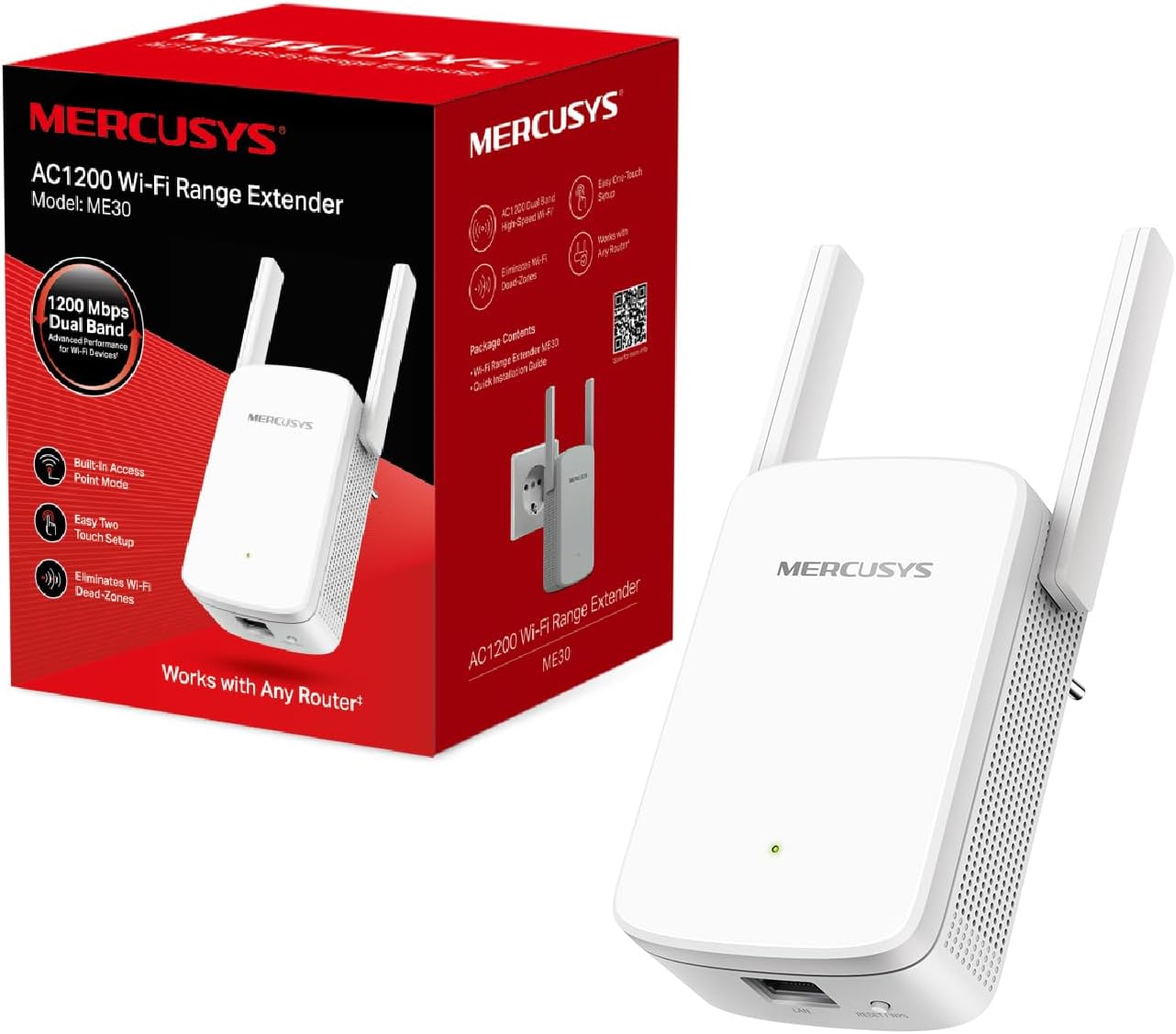
The Mercusys ME30 AC1200 Wi-Fi Range Extender delivers dual-band wireless speeds up to 1.2 Gbps, expanding your Wi-Fi coverage to eliminate dead zones. Featuring easy WPS setup, LED signal indicators for optimal placement, and a 10/100 Mbps Ethernet port for wired connections, it’s compatible with any router or access point. Lightweight and compact, it’s the smart, affordable upgrade for seamless connectivity in any space.
| ASIN | B0971K7H8L |
| Best Sellers Rank | 1,125 in Computers & Accessories ( See Top 100 in Computers & Accessories ) 15 in Network Repeaters |
| Box Contents | Camera Body |
| Brand | MERCUSYS |
| Brand Name | MERCUSYS |
| Colour | Verde Smeraldo |
| Compatible Devices | Laptop, Personal Computer, Smartphone, Tablet |
| Connector Type | RJ45 |
| Country of Origin | China |
| Customer Reviews | 4.0 out of 5 stars 8,640 Reviews |
| Data Transfer Rate | 1200 Megabits Per Second |
| Data transfer rate | 1200 Megabits Per Second |
| Frequency | 5 GHz |
| Frequency Band Class | Dual-Band |
| Frequency Bands Supported | 2.4 GHz, 5 GHz |
| Frequency band class | Dual-Band |
| Global Trade Identification Number | 06957939000516 |
| Item Dimensions D x W x H | 8.5D x 11.2W x 7.6H centimetres |
| Item Highlight | Compatible with any Modem Router and AP, 2 External Antennas for Stable WiFi Signal and Extended Coverage |
| Item Weight | 140 Grams |
| Manufacturer | MERCUSYS |
| Manufacturer Part Number | ME30 |
| Model Number | ME30 |
| Number of Items | 1 |
| Range | 5 |
| Special Features | Access Point Mode, Dual band, LED Indicator |
| Special feature | Access Point Mode, Dual band , LED Indicator |
| Unit Count | 1.0 count |
| Wireless Compability | 802.11a/b/g/n/ac |
| Wireless communication standard | 802.11a/b/g/n/ac |
J**E
Works great!
Wasn’t sure if this would work or not. Got a Sky Max hub which seems to output 5 ghz by default and doesn’t like connecting to anything on 2.4ghz. However, this found the2.4 ghz also apparently being output by the hub and connected straight up to it. It then sent out a 2.4ghz extension to connect to my far away camera. Fairly straightforward instructions and clever automatic renaming of the extension signal on the same password as the original hub. All this for a sensible price. Would definitely recommend.
R**C
Don't be scared by the name or the price, it works great!
This works really well! I've tried older-style, cheaper repeaters in the past which never worked but this is my first EasyMesh one. Because I have huge trust issues, I thought maybe I wouldn't buy one of the big expensive TP-Link ones and went for this instead... and it's been brilliant, i won't be upgrading after all. There's a specific section in my TP-Link router control panel for adding EasyMesh devices and it worked like charm, no app needed! As others have mentioned this is a TP-Link brand so you're going to be able to assume a certain level of quality and that's exactly what you get. It feels nice and sturdy and looks decent enough too. Getting really nice speeds now in an area of the house where I was previously getting drip-fed data.
W**G
For this price, sign me up
This is better than it should be at 21.99. What a bargain. I have a TPLink pro WiFi 7 mesh system with three nodes. The house is long so the WiFi signal doesn't penetrate the back wall, into the garden. I took a chance on this as I couldn't justify another WiFi 7 node, to use for a few weeks every year. It was very easy to pair up, with a web interface. It automatically appended an EXT to the end of my 2.4 GHz and 5 GHz network names. I went to the back of the garden and got 300 Mbps! My main WiFi speed is 930 all over the house but to me 300, at the back of the garden, for 21.99 is amazing. I like TPLink products and Mercusys are a sub brand of TPLink. Excellent value and it just works.
C**N
Doesn't do what it is supposed to
Worked when first set up. Three days later all I got was either "connected without internet" or I got connected but it took ages for anything to load. Tried their help line to give them a chance but could only contact Monday to Friday. Had to use the form but after completing it and ticking the accept, the submit button wouldn't work so gave up and decided to return it.
M**N
Brilliant
Bought these to upgrade from tp-link 300mbps boosters and it's like night and day. Takes a few minutes to set up, which is straightforward and simple to do. Pick a spot away from the router where the signal is still good enough to connect, which you can check in the app, and it works a treat. When carrying out a speed test prior to using this extender I was getting speeds of around 30mbps max upstairs connected to the old booster, after installing and connecting to this one speeds were around 300-400mbps.
R**S
Average dont expect much
Not exactly as expected.. barely got any speed increase setting up was easy but thats all about it..
M**R
Works great but app lets it down
For the price this works great. Main niggles were actually getting it set up with the app but did get there in the end.
M**R
Great value extender, very reliable with excellent coverage.
This is an excellent extender, very reliable with very good coverage. Works better than my previous TP-link which died on me.
R**T
Titolo: Ottimo rapporto prestazioni-prezzo, installazione rapida e segnale stabile
Scrivo questa recensione basandomi esclusivamente sulla mia esperienza di utilizzo, che nel mio lavoro come sistemista mi porta a confrontarmi spesso con problematiche di copertura wireless. Ho installato il Mercusys ME30 per estendere la rete in una zona della casa dove il segnale del router principale arrivava decisamente degradato, e il risultato è assolutamente soddisfacente. L'installazione è stata estremamente lineare, un vero "plug & play" facilitato dall'interfaccia intuitiva. La banda dual-band 1200 Mbps è gestita bene: ho notato una stabilità del segnale ottima, senza le continue disconnessioni che caratterizzano i ripetitori di fascia economica inferiore. Lo streaming e il traffico dati risultano fluidi e senza lag evidenti. È comodo poterlo utilizzare sia come semplice range extender che come Access Point, una flessibilità che torna utile se si vuole cablare il ripetitore per avere prestazioni massime in una stanza dedicata. Non ha fatto alcuna resistenza nell'agganciarsi al modem esistente, un fattore che spesso è fonte di frustrazione con dispositivi di altre marche. È compatto, non ingombra inutilmente la presa elettrica lasciando spazio per altri spinotti. Se cercate una soluzione semplice, economica ma soprattutto affidabile per eliminare le "zone morte" della casa senza impazzire con configurazioni complesse, questo ME30 fa il suo dovere in maniera impeccabile. Promosso a pieni voti.
P**E
perfect product !
perfect product, compatible with starlink (via app) & easy to set up 0 compliants, thank you !
K**I
Det löste mitt problem
Det löste mitt internetproblem. Jag rekommenderar det definitivt!
V**A
Rendimiento impecable, incluso contra los muros de una casa de pueblo
​Estéticamente me ha sorprendido de manera muy positiva. Da sensación de ser un dispositivo robusto, con un diseño elegante y sobrio que incluye las luces justas y necesarias, sin estridencias. ​En cuanto a la puesta en marcha, resulta muy intuitiva. Si prefieres lo rápido, con pulsar el botón WPS del router y del propio repetidor se enlaza al instante; si no, conectándote a su red Wi-Fi se abre automáticamente una interfaz web de configuración muy limpia que te guÃa paso a paso sin complicaciones. ​Lo que más destaca de este panel de gestión es la cantidad de opciones avanzadas que ofrece para afinar la red al máximo, entre las que se incluyen: ​Control de Acceso (Listas blancas/negras): Permite bloquear o permitir dispositivos especÃficos mediante dirección IP o MAC. ​Modo Alta Velocidad (High-Speed Mode): Para priorizar y optimizar el uso de las bandas de 2.4 GHz o 5 GHz según te convenga. ​Control de Cobertura Wi-Fi: Permite ajustar la potencia de emisión de las antenas. ​Programación de Encendido y Apagado (Power Schedule): Útil para apagar el dispositivo o sus luces LED de manera automática en horarios nocturnos (Night Mode). ​Gestión de Red de Invitados y Servidor DHCP. ​Ya en el uso diario, lo tengo conectado por cable a una toma de red para que actúe directamente como punto de acceso. El comportamiento es impecable, especialmente en una casa de pueblo con muros de piedra antiguos y anchos donde la señal suele sufrir mucho. Como es lógico en el estándar doble banda, la frecuencia de 2.4 GHz atraviesa mejor los obstáculos y llega más lejos, mientras que los 5 GHz ofrecen mucha más velocidad si estás más cerca y sin interferencias de por medio. ​Si buscas un amplificador solvente, con opciones de configuración avanzadas y que cumpla con lo que promete en cuanto a velocidad, este Mercusys es una compra redonda.
T**T
Mercusys M30 AC1200 Repeater
Einfacher und sehr günstiger 2.4 + 5 GHz Band Signal Verstärker um rund 18-20 Euro. Da meine Wohnung sehr langgezogen hatte ich im Wohnzimmer schlechtes WLAN und in der Küche bzw. am Balkon gar kein WLAN mehr, nun habe ich diesen Repeater genau in der Mitte wie beschrieben angesteckt nun ist überall genug Empfang, Wohnzimmer noch 5GHz möglich Rest dann nur mehr 2.4 GHz, aber besser als kein WLAN. Einrichtung via WPS-Taster in wenigen Sekunden erledigt, dann diverse Einstellungen via WEB-Interface geändert = z.B. Fixe IP 192.168.0.2 vergeben und DHCP-Server am M30 deaktiviert, da am Internet-WLAN Router meistens bereits ein aktiver DHCP-Server vorhanden ist, dann gibt es keinen IP-Konflikt. Mit dieser fixen IP kann dann im gesamten WLAN der Mercurys M30 Verstärker auch jederzeit via Webbrowser konfiguriert werden (der mwlogin.net Login funktioniert nämlich nur wenn man mit dem M30 Verstärker direkt im WLAN verbunden ist), alternative gibt es auch eine APP dazu. Man kann (soll) auch die Zusatzerweiterung der SSID _EXT weglöschen, sodass auch am Verstärker (im ganzen Netzwerk) der gleiche WLAN-Name vorhanden ist mit einem Passwort, dadurch klappt die Übergabe vom Magenta-Router zum M30 Verstärker/Repeater ohne Unterbrechung (auch ohne die MESH-Funktion), sogar beim VoWiFi telefonieren keine Unterbrechung am Handy, es wird auch zwischen 5GHz und 2.4 GHz fliesend gewechselt je nach Empfang, wichtig diese 2x neuen Verstärker SSIDs NICHT verstecken, sonst klappt die Verbindung nicht immer gleich, Handy zeigt sowieso nur 1x WLAN Netz an obwohl nun eigentlich 4x WLAN Netze mit gleichen Namen gesendet werden. Folgende Funktionen sind auch noch vorhanden (siehe auch vorab Login Simulator für M30 auf der Herstellerseite): .) WPA3 .) IP-Netzwerk manuell Konfigurieren .) AP-Modus möglich, am RJ45 Netz-Stecker aber nur max. 100 Mbit. .) Firmware Updates manuell + übers Internet möglich .) High-Speed-Modus = man kann am Verstärker nur 5GHz oder 2.4GHz übertragen lassen .) Betriebszeiten Festlegen = Zeiten eintragen, wo er Internet ausschalten soll .) Zugriffsbeschränkungen via Gerätenamen und MAC .) LED in der Nacht aus möglich .) Sendeleistung in 3 Stufen einstellbar .) Easy MASH ein / ausschaltbar .) Zeiteinstellung manuell oder via Zeitserver .) Sicherung der Config + Wiederherstellen .) Neustart manuell oder mit Zeitsteuerung, um den Cache von Zeit zu Zeit zu leeren .) Systemprotokoll auch auf Wunsch exportierbar Positiv: Neben oben genannten Dingen, für diesen Preis ein sehr großer Softwareumfang und sehr geringer Stromverbrauch von nur ca. 1.8 - 3.9 Watt an der Steckdose direkt gemessen. (Verbrauch steigt mit der Datentransferrate, z.B. geht der Verbrauch bei einem Speedtest im 5GHz Netz sofort von 1.8 Watt auf 3.2 Watt rauf), lt. Herstellerangaben sind sogar bis zu 9 Watt möglich, vermutlich wenn mehrere Geräte im Netz. Negativ aufgefallen ist nur der RJ45 Anschluss für z.B. einen PC oder Spielkonsole kann nur max. 10/100 Mbit erhalten und die WLAN Funk Datenübertragung ist immer ca. 50% geringer als am Haupt WLAN Router selbst, also 280 MBit direkt am Router im 5GHz WLAN Netz gemessen, sind dann am Handy im M30 Verstärker-Netz nur max. 140 Mbit, technisch natürlich logisch, da er gleichzeitig in beide Richtungen 140 + 140 Mbit zwischen Router und Handy hin und her sendet, das Signal wird ja nur „verlängert“, das gleiche gilt natürlich auch für das langsamere 2.4 GHz Netz. Tipp: Antennen leicht von der Wand wegdrehen ca. 45 Grad statt senkrecht, dann ist die Leistung ca. 10 dBm besser. PS: Diese relativ unbekannte Marke dürfte von TP-LINK produziert werden, im Impressum der Mercusys Homepage steht nämlich TP-LINK Deutschland.
Trustpilot
3 weeks ago
1 week ago